
Two screens can clear visual clutter fast, but the stand behind them matters just as much as the monitors themselves. A solid dual mount can open desk space, improve viewing angles, and keep daily work from feeling cramped, whether you’re gaming, editing, coding, or juggling email beside a spreadsheet.
This roundup focuses on mounts with different arm styles, weight limits, and fit ranges, so you can match the hardware to your desk and displays instead of forcing a mismatch. The result is a cleaner setup that feels steadier, easier to adjust, and less awkward to live with.
Quick Look at the Shortlist

Amazon Basics Adjustable Dual Monitor Desk Mount
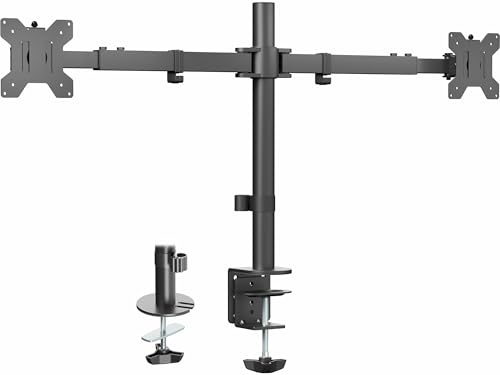
VIVO Premium Dual Ultra Wide Monitor Desk Mount STAND-TS38C

ULTRARM Heavy Duty Monitor Arm MA20P-S

ErGear Fully Adjustable Dual Monitor Mount White

Pholiten Dual Monitor Mount for 2 Screens

monTEK Vertical Stackable Dual Monitor Arm with USB

HUANUO FlowLift Dual Monitor Stand

HUANUO Dual Monitor Stand White
More Details On Our Top Picks
This is the straightforward two-screen mount for a desk that needs order more than drama. Each arm supports monitors up to 32 inches and 22 pounds, so it fits many home-office setups without asking you to think too hard about the hardware.
The separate tension adjustment matters because each display may sit at a different weight or distance from the post, especially in a side-by-side setup with one screen pulled farther out. That makes it a sensible match for daily work stations, though the trade-off is that heavier or offset screens need careful tuning to avoid drift.
What We Like
- 32-inch support gives you room for larger standard monitors.
- 22-pound arm capacity keeps many everyday office screens in range.
- Independent tension control helps each arm sit where you place it.
- VESA 75×75 and 100×100 support covers common mounting layouts.
- Black finish keeps the look simple and easy to blend in.
Things To Consider
- Each arm needs its own tuning, so setup takes a little patience.
- Very long arm extension can make balance more sensitive.
- It suits standard desk use better than oversized specialty panels.
Feature Snapshot
Who It Suits Best
You’ll like this most for a normal work desk with two standard monitors and a clean, no-nonsense setup.
A Better Fit Elsewhere
VIVO Premium Dual Ultra Wide LCD LED 27 to 38 inch Monitor Desk Mount STAND-TS38C suits you better if your desk carries wider displays and you want a mount built around that size class.
Wide-screen setups ask more from a mount, and this VIVO model is shaped around that reality. It handles two displays up to 38 inches and 22 pounds each, which makes it a more focused choice than the Amazon Basics mount when your screens sit in ultrawide territory.
The telescoping arms are the important part here, because they extend to match the monitor span instead of leaving excess arm visible across the desk. That helps the setup look neater, though the flush wall-style layout can feel less forgiving on deep or unusually shaped desks.
Upsides
- Built for two larger ultrawide monitors.
- Telescoping arms let the mount fit different screen widths more cleanly.
- C-clamp and grommet options give you two installation paths.
- 75×75 and 100×100 VESA support covers common mounting patterns.
- Flush positioning helps free up desk depth.
Small Caveats
- The size focus makes it less necessary for standard 24-inch monitors.
- Desk thickness matters, so measurement before installation is worth the time.
- The larger frame takes up more visual presence than a lighter dual arm.
Details At A Glance
Made For
You’ll get the most from this on a desk with two wider screens and enough depth to appreciate the flush, stretched-out arm design.
Where A Sibling Pick Shines
ErGear Fully Adjustable Dual Monitor Mount White is the cleaner match for smaller displays and lighter loads, especially in a simpler office layout.
This one breaks away from the dual-monitor theme and leans hard into a single large screen. That makes sense for ultrawide owners, because a 57-inch supported span and 44-pound capacity put it in a very different class from the lighter dual-arm options above.
The pneumatic height adjustment is the feature that gives it a smoother feel in day-to-day use, since gas spring systems help the arm move more naturally under load. It also brings quick-release VESA mounting and modular extension arms, so the install experience should be more flexible than a basic fixed post, though the trade-off is that it’s still a single-screen solution.
Bright Spots
- Supports very large ultrawide screens with confidence.
- 44-pound limit suits heavier panels and substantial setups.
- Pneumatic lift gives you easier height changes.
- Quick-release VESA plate helps simplify monitor attachment.
- Cable management keeps the desk area tidier.
Worth Noting
- It’s a single-arm setup, so it won’t replace a dual mount.
- Its scale makes it better for spacious desks than compact nooks.
- Large-screen mounts usually deserve careful installation planning.
Core Details
Who Should Grab It
You’re the right match for this if your desk centers on one large ultrawide monitor and you want sturdier support than a standard dual arm can offer.
Swap It Out When
monTEK Vertical Stackable Dual Monitor Arm with USB fits you better when you need two screens stacked above each other instead of one large display.
ErGear keeps the formula simple, and that’s part of the appeal. Each arm handles up to 17.6 pounds and screens from 13 to 32 inches, which suits a lighter dual-monitor workspace without the bulk of the larger VIVO and monTEK setups.
The white finish gives it a softer look than the black mounts in this list, so it blends nicely with light desks or brighter room designs. One thing worth considering is that the weight ceiling is lower than the Amazon Basics and Pholiten options, which makes monitor matching more important before you build around it.
Standout Traits
- White finish works well with lighter desk designs.
- 13 to 32 inch support covers many common monitors.
- Two-screen layout keeps the footprint efficient.
- Lower-profile weight range can suit lighter office gear.
Room For Improvement
- The 17.6-pound limit is narrower than several other picks.
- It suits standard monitors more than heavier work displays.
- Checking your screen weight before setup matters here.
Technical Sheet
Best Suited To
You’ll appreciate this most on a lighter-duty desk with two standard monitors and a preference for a white finish.
Look Elsewhere When
Amazon Basics Adjustable Dual Monitor Desk Mount fits better if your monitors are heavier and you want more load headroom per arm.
Pholiten leans into the kind of adjustability that helps in a shared desk setup. With tilt, swivel, and rotation built in, you can shift the screens for writing, browsing, or video calls without moving the whole base.
Its 22-pound-per-arm support puts it alongside the Amazon Basics mount in capacity, but the stronger emphasis here is on motion control and tidy cable routing. The honest read is that it suits flexible day-to-day use better than ultra-specific ergonomic setups, though that’s often enough for a home office.
Positives
- Tilt, swivel, and rotation add practical viewing flexibility.
- 22-pound arm limit fits many mid-range monitors.
- Cable clips help keep cords from spreading across the desk.
- Metal build should feel steady in normal desktop use.
Points To Note
- It’s aimed at common monitor sizes rather than oversized panels.
- Motion-heavy setups still depend on careful balance.
- Like most desk mounts, it rewards a measured installation.
Quick Facts
Whose Shelf It Belongs On
You’re the right fit for this if you want two adjustable screens on a normal desk and prefer a mount that keeps movement easy to live with.
Another Choice May Suit
HUANUO FlowLift Dual Monitor Stand works better for gaming-focused setups that need a slightly different motion feel and a narrower weight window.
Vertical stacking changes the whole feel of a desk, because it frees horizontal space in a way side-by-side mounts simply can’t. That makes this monTEK arm a smart fit for tall work zones, especially with ultrawide screens where the 17 to 57 inch range and 59.4-pound limit per arm give you substantial headroom.
The USB 3.0A/C note adds a convenience layer that many basic mounts skip, and the gas spring arm should make height changes feel smoother. The trade-off is plain enough, though, stacked screens are not for every workflow, and the layout asks more of your neck angle than a flat horizontal pair can.
Best Bits
- Vertical stacking saves a lot of desk width.
- Very high weight support suits heavy ultrawide displays.
- USB ports add a useful desk-side convenience.
- Gas spring movement supports easier positioning.
- VESA 75×75 and 100×100 compatibility keeps it broadly usable.
Areas To Watch
- Stacked monitors take some getting used to.
- The tall layout works best on desks with enough vertical space.
- It’s more specialized than a standard dual side-by-side mount.
Feature Rundown
The Right Fit
You’ll get the most from this if you want stacked monitors, serious load capacity, and a desk layout that needs space reclaimed vertically.
Where Another Pick Suits Better
VIVO Premium Dual Ultra Wide LCD LED 27 to 38 inch Monitor Desk Mount STAND-TS38C makes more sense if you prefer a wider side-by-side layout instead of stacked screens.
HUANUO’s FlowLift line is aimed at desks that need easy motion without getting bulky about it. With support for 13 to 32 inch screens and 4.4 to 19.8 pounds per arm, it sits in a useful middle ground for smaller gaming or work monitors.
The C-clamp and grommet base give you two common mounting paths, which helps depending on the desk you already own. The motion range is the main draw here, but the narrower weight window means you’ll want to match your monitors carefully, especially compared with the heavier Pholiten and Amazon Basics picks.
Highlights
- Full-motion movement suits gaming and multitask work.
- Two mounting styles make desk fit easier.
- Compact size range works well for smaller displays.
- White finish option is useful for brighter rooms.
Minor Gripes
- The weight span is narrower than several other dual arms.
- Best results depend on matching monitor size closely.
- The mount makes more sense for medium-light screens than heavy ones.
At A Glance
Who Will Love This
You’re a good match for this if your desk holds two smaller monitors and you want full motion without moving into a bulkier arm system.
Skip It When
Pholiten Dual Monitor Mount for 2 Screens is the better call if your screens are heavier and you want a little more load headroom per arm.
White desk setups often look calmer with a matching mount, and this HUANUO option keeps that visual line clean. It supports 13 to 32 inch screens and the same 4.4 to 19.8 pound weight range as the FlowLift model, so the two sit close together on fit, with the difference mostly showing up in finish and style.
The C-clamp and grommet base give you flexible installation, which matters on tighter desks where every inch counts. The trade-off is that it’s still tuned for modest monitor sizes, so it won’t replace a heavier-duty arm like the ULTRARM or monTEK choices for oversized displays.
Reasons To Buy
- White finish blends neatly with light furniture.
- Two mounting methods help with desk compatibility.
- Motion support makes everyday screen positioning simple.
- Compact size range suits most standard office monitors.
Softer Spots
- It’s not the right match for heavy ultrawide panels.
- The load range is narrower than stronger dual-arm picks.
- Screen matching still matters for a stable setup.
Core Details
Built With In Mind
You’re the right match for this if you want a white dual mount for smaller monitors and a tidy look on a compact desk.
Reach For A Different Pick When
ULTRARM Heavy Duty Monitor Arm MA20P-S suits you better if your setup centers on one very large ultrawide display instead of two compact screens.
How To Choose The Right Dual Monitor Mounts For Desk
Match The Arm To The Screen Weight
Weight limit comes before almost everything else in this category. A 32-inch monitor may still be too heavy for a lighter arm, while a smaller display can sit safely within range, so the number on the monitor matters as much as the size label. That’s why the 22-pound arms in the Amazon Basics and Pholiten picks feel more forgiving than the 17.6-pound ErGear option.
VESA pattern matters too, and it simply means the hole spacing on the back of the monitor. Most of these mounts use 75×75 mm or 100×100 mm, which covers a lot of common screens, but an odd backplate shape can stop an otherwise good fit. Check the monitor back before you chase arm style or finish.
Think About Desk Space And Arm Layout
Side-by-side arms make sense for spreadsheets, editing, and broad multitasking, while stacked layouts work better when desk width is tight. The monTEK arm shows how vertical stacking can reclaim horizontal space, but it also changes how you look at the screens day to day. For small desks, that trade-off can be very welcome.
Clamp style matters as well. A C-clamp is the common route for many desks, while a grommet base uses a cable hole or drilled opening, so the right choice depends on what your desk already offers. If your desk lip is thick or awkward, that detail can matter more than brand name.
Balance Flexibility With Everyday Use
Tilt, swivel, and rotation sound simple, yet they shape comfort in real life. A mount that moves easily helps during long workdays, shared desks, and gaming sessions, but too much looseness can become a nuisance if the arm won’t hold position. That’s why tension adjustment deserves respect, not a quick guess.
Gas spring and pneumatic arms usually feel smoother in height changes than fixed posts, especially on larger displays. They often cost more because the moving parts, stronger materials, and better finish work add up. For most home offices, that extra spend makes sense only when you adjust screens often.
Things Worth Knowing First
Hidden Buying Traps
Many setup problems start with screen size being treated like the only number that matters. Weight, VESA spacing, desk thickness, and arm reach all shape the final fit, so a pretty mount can still be the wrong mount. A quick measurement session usually prevents the kind of mismatch that turns installation into a chore.
Another common miss is assuming all dual mounts behave the same once installed. A heavy ultrawide like the one suited to the VIVO or ULTRARM models needs a different arm style than a lighter office pair, and a basic design may drift once the screens sit farther from the post. The safer path is to match the mount to the exact display pair, not a broad category.
The Upgrade Payoff
Higher-tier models usually cost more because they handle larger loads, wider spans, or more complex motion systems. Telescoping arms, stronger spring mechanisms, and cleaner cable routing all add material and engineering overhead. You’re paying for a setup that feels easier to place and more dependable under heavier use.
That upgrade makes the most sense for ultrawide owners, frequent desk adjusters, and anyone who wants a cleaner visual result from the start. If your screens are modest and stay put most of the day, a simpler dual arm often does the same job without extra bulk. The sweet spot is a mount that matches how you actually work, not how dramatic the product page looks.
Final Thoughts
The best dual monitor mount for your desk depends less on style and more on fit, weight, and how much movement you need each day. Amazon Basics and Pholiten suit many standard office setups, VIVO and ULTRARM make more sense for larger displays, and the HUANUO and ErGear picks stay useful for smaller desks or lighter screens. Match the mount to your monitors first, then choose the finish and layout that suits your space. That order saves you from most of the usual headaches.
