
Long desk days are easier to manage when your keyboard and mouse fit the way your hands actually move. That matters whether you spend the morning in spreadsheets, jump between a laptop and desktop, or split time between home and office. The eight picks below focus on hand posture, wireless convenience, and real-world layout choices like split frames, wave keys, vertical mice, and compact boards.
The Shortlist At A Glance
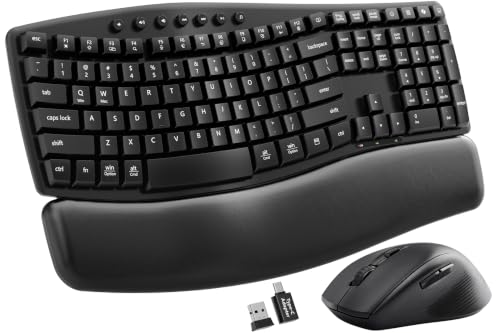
SABLUTE MA41 Quiet Ergonomic Wave Keyboard Set with Soft Leather Palm Rest

ProtoArc EKM01 Plus Wireless Ergonomic Keyboard Mouse Combo – Gray Black

Kensington Pro Fit Ergonomic Wireless Keyboard and Mouse – Black (K75406US)

SABLUTE Ergonomic Wireless Keyboard and Mouse Combo with 4000mAh Backlit Keyboard
Ergonomic Wireless Keyboard and Mouse Set with Wrist Rest, Compact 85-Key Keyboard
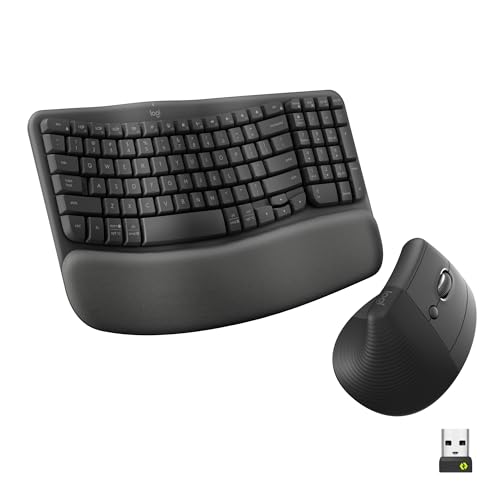
Logitech Wave Keys & Lift Vertical Mouse Ergonomic Wireless Combo, Graphite

Logitech Wave Keys & Lift Vertical Mouse Ergonomic Wireless Combo – Rose

Logitech Wave Keys & Lift Vertical Mouse Ergonomic Wireless Combo – White
More Details On Our Top Picks
The MA41 leans into desk comfort without getting flashy about it. The wave-shaped keys and soft leather palm rest make sense for long email sessions, order entry, or any workday where your wrists stay parked in one spot.
The dual-system switch matters more than it sounds, since moving between Windows and Mac machines can feel clunky on simpler combos. The 2.4GHz wireless setup also keeps the desk tidy, though you still have to be comfortable living with a receiver-based connection instead of Bluetooth.
Strong Points
- Wave key layout gives your hands a more relaxed angle than a flat board.
- Soft palm support helps during long typing stretches at a home office desk.
- Dual-system switching suits people who move between Windows and Mac setups.
- 2.4GHz wireless keeps the workspace clear of a cable trail.
- The included USB-C and USB-A adapter support practical mixed-device use.
Things To Consider
- Receiver-based wireless fits best on a steady desk, not a constantly shuffled bag setup.
- The soft-touch wrist area will need regular wiping in a busy office.
Feature Snapshot
Who It Suits Best
Desk-based professionals who want a quieter, more relaxed typing position will get the most from this set.
A Better Fit Elsewhere
ProtoArc EKM01 Plus Wireless Ergonomic Keyboard Mouse Combo – Gray Black suits you better when multi-device switching and a split keyboard matter more than the softer, single-board feel here.
The split keyboard gives this combo a different posture story from the SABLUTE MA41. Instead of one curved deck, you get a two-piece layout with a cushioned wrist rest, which often appeals to people who type all day and like a wider hand stance.
Bluetooth plus 2.4G support for three devices is the practical advantage here, especially for a desk with a laptop, tablet, and work machine in rotation. USB-C recharging keeps the setup cleaner, though the split format takes a little space and feels less compact than the simpler picks above.
What We Like
- Split-key layout creates a wider typing position that many desks can accommodate.
- Three-device support suits people bouncing between work and personal machines.
- Bluetooth and 2.4G flexibility makes pairing feel less rigid.
- USB-C charging reduces battery swapping hassles.
- The cushioned wrist rest gives long sessions a softer landing.
- Gray-black styling keeps it understated on a shared desk.
Room For Improvement
- The split frame takes more horizontal room than compact boards like the lgnitionkeys set.
- Bluetooth-rich setups can take a little more pairing attention than a plain receiver combo.
Details At A Glance
Built With In Mind
Multi-device professionals and split-key enthusiasts will appreciate the roomier layout and connection flexibility.
Swap It Out When
Logitech Wave Keys & Lift Vertical Mouse Ergonomic Wireless Combo, Graphite is the better fit for a more guided ergonomic feel and a smaller learning curve.
The Kensington pair takes a more traditional route than the split ProtoArc combo, and that can be a relief for anyone who wants ergonomic shaping without a big adjustment period. The contoured design keeps the look and feel straightforward, which suits a shared office or a home desk that needs one dependable set.
You may find this the easiest switch for people coming from a regular keyboard and mouse. The honest read is that it gives you ergonomic cues without forcing a dramatic hand position, so it’s a calmer step than the more specialized Wave Keys and Lift bundles.
Highlights
- Contoured shaping adds comfort without looking overly specialized.
- Wireless connection keeps the desk free of one more cable.
- Matching keyboard and mouse create a tidy, unified setup.
- The familiar layout helps new ergonomic users adjust more gradually.
Points To Note
- The more conventional layout offers less posture change than split or vertical designs.
- Shared-office use often means keeping the surfaces clean and fingerprint-free.
Core Details
Right Fit For
People who want a gentle ergonomic step, especially in standard office spaces, are the best match here.
Where A Sibling Pick Shines
Logitech Wave Keys & Lift Vertical Mouse Ergonomic Wireless Combo, Graphite suits you better when you want stronger posture guidance from the mouse shape and keyboard curve.
This SABLUTE set makes a strong case for workspaces that don’t stay bright all day. The backlit keyboard is the obvious draw, but the wave keys and faux lambskin palm rest keep the comfort story grounded, so it’s not just a glow-up for the desk.
The 4000mAh battery is the kind of detail that matters for people who hate charging routines. Compared with the MA41 above, this one leans harder into visibility and rechargeable convenience, though the extra features also make it a bit busier than the plainest choices in the list.
Upsides
- Backlighting helps in dim rooms or late-evening work sessions.
- 4000mAh power storage supports fewer charging interruptions.
- Wave key shaping encourages a more natural hand position.
- Soft faux lambskin palm support adds a cushioned resting point.
- Windows, Mac, and Chrome OS support broadens the fit.
Areas To Watch
- Backlit finishes usually call for a little more visual upkeep to stay clean.
- The feature set may feel busy for minimal desk setups.
At A Glance
Who Will Love This
Night-shift desk workers and anyone in dim home offices will get the most from the lighting and rechargeable design.
Reach For A Different Pick When
Kensington Pro Fit Ergonomic Wireless Keyboard and Mouse – Black (K75406US) is the calmer choice for anyone who wants a simpler, less feature-heavy setup.
Desk space is the big story here. The 85-key layout skips an independent numpad, so you get a smaller footprint that works well on narrow desks, in dorm rooms, or on a setup where your mouse pad deserves more room.
The black and red gradient gives it more visual personality than the plain Kensington pair, though the real value is still the size. You do give up number-pad comfort, so spreadsheet-heavy work may feel tighter than it does on a full-size board.
Reasons To Buy
- Compact 85-key layout saves desk space right away.
- No separate numpad makes the keyboard easier to place in small setups.
- Wrist rest adds a little more comfort for routine typing.
- Wireless design keeps a minimal desk looking uncluttered.
- The color treatment gives the set a more distinctive look.
Softer Spots
- Spreadsheet users may miss the speed of a dedicated number pad.
- Smaller boards can feel cramped during heavy data entry.
Key Specs
Who Should Grab It
Space-conscious shoppers who care more about desk layout than spreadsheet speed will appreciate this compact set.
Look Elsewhere When
ProtoArc EKM01 Plus Wireless Ergonomic Keyboard Mouse Combo – Gray Black is the better fit for people who need a full-size split layout and more device switching.
This combo stands out because the keyboard and mouse work together, not just side by side. The wave-shaped board and cushioned palm rest guide your hands into a calmer position, while the vertical mouse changes the grip angle in a way many long-hour desk users prefer.
The support for up to three devices makes it especially handy for mixed workstations, and the graphite finish keeps things understated. Compared with the lgnitionkeys set, you give up compactness, but you gain a more deliberate ergonomic layout that feels better suited to all-day office work.
Bright Spots
- Wave keyboard shape supports a more natural hand line.
- Vertical mouse changes wrist position in a purposeful way.
- Cushioned palm support helps during longer typing stretches.
- Three-device support suits laptop-plus-desktop routines.
- Graphite color keeps the setup clean and office-friendly.
Minor Gripes
- The ergonomic shape takes more desk room than compact boards.
- Vertical mice feel different at first and may need a short adjustment period.
Feature Rundown
The Right Fit
All-day office users who want a clearer ergonomic stance from both keyboard and mouse will appreciate this combo most.
Another Choice May Suit
ProtoArc EKM01 Plus Wireless Ergonomic Keyboard Mouse Combo – Gray Black makes more sense when you want a split keyboard and rechargeable USB-C setup.
The Rose version keeps the same ergonomic shape as the graphite model, so the practical case is identical: wave keyboard, cushioned palm rest, vertical mouse, and support for up to three devices. The difference is mostly visual, which matters more than people admit when a desk sits in view all day.
That softer finish works nicely in lighter interiors or setups that lean warm rather than technical. It’s the same comfort story as the graphite version, just with a finish that feels a little more personal and a little less corporate.
Best Bits
- Same wave-and-vertical ergonomics as the graphite version.
- Rose finish adds a warmer look to the desk.
- Supports up to three devices for flexible switching.
- Cushioned palm rest helps keep long sessions more comfortable.
Small Caveats
- The color choice changes style more than function.
- Like the other Wave Keys and Lift options, it needs more room than compact sets.
Core Details
Whose Shelf It Belongs On
Style-conscious office setups and home desks with softer decor are the best match for this version.
Skip It When
Logitech Wave Keys & Lift Vertical Mouse Ergonomic Wireless Combo, Graphite is the easier choice for anyone who wants the same layout in a more neutral color.
The White version keeps the same ergonomic blueprint as the graphite and rose models, so the feel is familiar: wave keyboard, cushioned palm rest, vertical mouse, and support for three devices. What changes is the visual tone, which suits bright desks, clean interiors, and setups that lean minimal.
That matters more than it sounds for anyone who wants a workspace that feels calm rather than crowded. The trade-off is identical to the other Logitech variants, since this still takes more room than the compact lgnitionkeys option, but the cleaner colorway has real appeal.
Positives
- White finish gives the ergonomic layout a cleaner look.
- Wave keyboard and vertical mouse work together for a comfort-first posture.
- Three-device support helps busy desks stay flexible.
- Cushioned palm rest supports longer typing days.
Trade Offs
- White surfaces can show marks sooner in heavy-use spaces.
- The larger ergonomic footprint is less friendly to very small desks.
Feature Card
The Right Fit
Minimal workspaces and users who like a bright, tidy desk finish will get the most from this version.
Where A Sibling Pick Shines
Logitech Wave Keys & Lift Vertical Mouse Ergonomic Wireless Combo, Graphite is the better match for anyone who wants the same layout with a darker, easier-to-coordinate finish.
How To Choose The Right Ergonomic Mouse And Keyboards
Fit Your Hands Before You Fit Your Desk
Shape matters more than most people expect. A wave keyboard such as SABLUTE MA41 eases finger travel, a split board like ProtoArc EKM01 Plus opens the center gap, and a vertical mouse such as the Logitech Lift changes wrist angle in a very different way.
That trade-off is simple: more specialized comfort usually means a larger learning curve. People who type all day usually adapt well to the stronger ergonomic cues, while casual users often prefer something closer to a standard layout like Kensington Pro Fit.
Think About Space, Not Just Comfort
Desk size changes the answer fast. Compact sets like the lgnitionkeys 85-key combo suit narrow work surfaces, while full-size split layouts and vertical mouse bundles need room to breathe.
That matters in small apartments, shared tables, and mobile work corners. A smaller board can feel like a smart compromise, but it also removes the numpad and some of the stability that heavier office work can use.
Match The Connection Style To Your Routine
Wireless is not one thing. A 2.4GHz receiver is simple and steady for one desk, Bluetooth helps when you move between devices, and combo options that handle several machines fit hybrid work better than single-device kits.
Rechargeable models reduce battery swaps, which matters in busy homes and office spaces. Still, extra flexibility usually brings extra setup steps, so the cleaner choice is the one that fits how often you switch machines.
Decide How Much Ergonomics You Want
Some people need a gentle nudge, others want a bigger posture change. The Kensington set offers a softer step, while Logitech Wave Keys & Lift and ProtoArc EKM01 Plus lean into a more deliberate hand position.
The right answer depends on how long you sit and how sensitive your hands feel after a workday. A gradual shift is easier for general office use, but a more sculpted combo can feel worth it for heavy typing schedules.
What To Weigh Before You Buy
Mistakes Worth Dodging
A common mistake is choosing ergonomics by looks alone. A pretty finish like the Rose or White Logitech options still needs to fit your desk depth, hand position, and device routine.
Another slip is ignoring the numpad. Spreadsheet work, accounting tasks, and data entry feel very different on a compact 85-key board than on a full-size layout.
The Case For Spending Up
Higher-tier combos usually cost more because they add more moving parts to the comfort equation, such as split layouts, vertical mice, rechargeable batteries, and multi-device switching. Those extras take more design work and usually suit heavier daily use.
The upgrade makes sense for long workdays, mixed-device desks, or anyone who wants a more guided hand position from both keyboard and mouse. For lighter use, a simpler contoured set like Kensington Pro Fit often feels easier to live with.
Closing Thoughts
Your best choice depends on how much change you want from a normal keyboard-and-mouse setup. The Logitech Wave Keys & Lift combos make the strongest case for all-day desk work, while the ProtoArc and SABLUTE options give you different mixes of comfort and flexibility. Compact desks point you toward the lgnitionkeys set, and cautious first-time ergonomic shoppers may feel better starting with Kensington Pro Fit. Pick the shape that matches your routine, not just the one that looks nicest on the page.
