
You want a mouse that feels natural during long editing sessions, spreadsheet marathons, or a full day of commuting between a desk and a laptop stand. The right shape can take pressure off your hand position, trim down fussy movements, and make Mac work feel less like a chore.
This roundup focuses on vertical and sculpted designs, quiet clicks, multi-device pairing, and Mac-friendly control layouts. You’ll also see where each pick gives up convenience, such as receiver-free setups, button depth, or left-right fit.
The Shortlist At A Glance
PHILIPS Ergonomic Wireless Mouse, Multi-Device Bluetooth (USB-A/C) for Laptop & Mac/PC, Silent Productivity Mouse
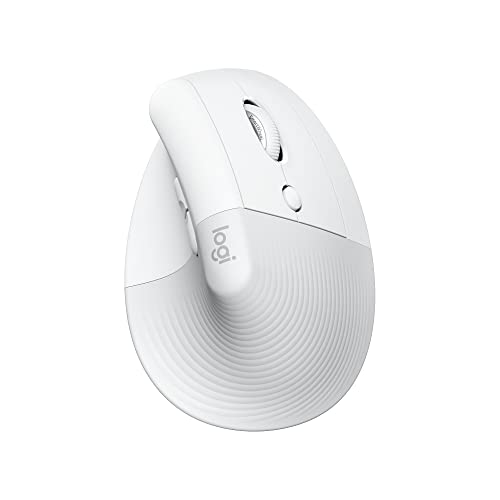
Logitech Lift for Mac Vertical Ergonomic Wireless Mouse – Off White

Logitech MX Master 3S Bluetooth Wireless Mouse No Receiver – Graphite
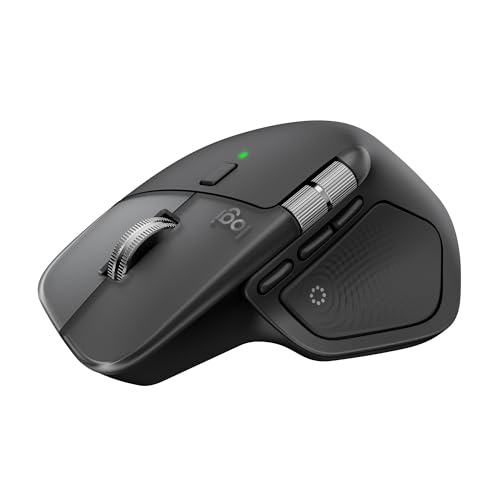
Logitech MX Master 4 for Mac, Ergonomic Bluetooth Mouse

Logitech Lift Vertical Ergonomic Wireless Mouse – Graphite

Logitech Lift Vertical Ergonomic Wireless Mouse – Rose

Logitech Lift Vertical Ergonomic Wireless Mouse – Off White

ProtoArc EM11 NL Wireless Ergonomic Vertical Mouse, Rechargeable, Black
More Details On Our Top Picks
The PHILIPS mouse makes sense for a desk that shifts between a MacBook, a work laptop, and maybe a tablet dock. Its Bluetooth pairing and USB-A/C support reduce the usual adapter shuffle, which helps more than it sounds like it should.
The side scroll control is handy in spreadsheets or timeline-heavy apps, and the silent click feel suits open offices or late-night work. The trade-off is simple, the right-handed shape narrows the fit, so left-hand users need to look elsewhere.
What We Like
- Bluetooth and wired-style USB flexibility make multi-device work less fussy.
- Silent click behavior fits shared offices and video calls.
- Side scroll support helps with wide sheets and long timelines.
- Rechargeable design cuts down on battery swaps.
- Five DPI levels give you room to tune pointer speed.
Things To Consider
- Right-handed shaping limits who can use it comfortably.
- Side controls can take a little time to learn.
- Multi-device features matter less on a single desktop.
Feature Snapshot
Who It Suits Best
Mac users who split time across two computers and care about quiet clicks will get the most from this shape and feature mix.
Swap It Out When
Logitech Lift for Mac Vertical Ergonomic Wireless Mouse – Off White suits you better when a full vertical grip matters more than side scroll control.
This is the cleanest Mac-first shape in the first half of the list, and that matters in small offices where desk clutter never seems to stay gone. Bluetooth-only pairing keeps the setup lean, though it also means you won’t have a receiver option as a backup.
Quiet clicks and four customizable buttons make it feel restrained rather than flashy. Compared with the PHILIPS mouse, you give up side scroll support, but you get a more sculpted vertical stance that some hands will settle into faster.
Highlights
- Vertical form encourages a more neutral hand angle.
- Bluetooth-only setup keeps the desk tidy.
- Quiet clicks suit shared spaces and long work sessions.
- Four customizable buttons let you trim repetitive steps.
Minor Gripes
- No USB receiver means less fallback flexibility.
- Bluetooth-only pairing can be less convenient on older gear.
- The upright shape asks for a short adjustment period.
Core Details
Who Will Love This
MacBook or iPadOS users who want a vertical grip and very little desk clutter will feel right at home here.
A Better Fit Elsewhere
Logitech Lift Vertical Ergonomic Wireless Mouse – Graphite suits you better when you want the same shape with receiver support for a more mixed setup.
The MX Master 3S is the most feature-rich shape in this group, and that shows up the moment you spend hours in Photoshop, spreadsheets, or a browser full of tabs. MagSpeed scrolling, which means a fast magnetic wheel with smooth free-spin behavior, gives you a different rhythm from the simpler wheels on the Lift models.
The 8K DPI sensor helps with precision across many surfaces, even glass according to the listing, and the quiet-click tuning keeps the larger body from sounding busy. You do give up the comfort of a receiver in the box and the mouse is clearly aimed at serious desk use, not quick travel.
Upsides
- MagSpeed scrolling handles long documents and feeds with ease.
- 8K DPI tracking supports precise pointer work.
- Quiet clicks keep the larger body from feeling loud.
- Programmable buttons help cut down repeated actions.
- Bluetooth-only design stays simple on a Mac desk.
Room For Improvement
- No receiver or charging cable is included in the Bluetooth edition.
- The fuller body favors desk setups over travel bags.
- All those controls can take time to map into muscle memory.
- Its richer feature set may be more than a light user needs.
Technical Sheet
Built With In Mind
Heavy desk workers and creative multitaskers who stay mostly on one machine will get the most from this mouse.
Look Elsewhere When
Logitech Lift for Mac Vertical Ergonomic Wireless Mouse – Off White suits you better when a lighter vertical posture matters more than advanced control features.
This is the most Mac-tuned premium option in the list, and the haptic feedback gives you a more tactile sense of control than the simpler Lift lineup. Haptic means a touch response you can feel through the mouse body, which is useful in apps where scrolling and switching actions happen all day.
USB-C charging, ultra-fast scrolling, and compatibility across macOS, iPadOS, and Windows make it a serious desk anchor. The honest read is that you are paying for refinement and depth of features, so it suits you best when your mouse is a work tool first and a travel accessory second.
Best Bits
- Haptic feedback adds tactile control during navigation.
- Ultra-fast scrolling helps with large documents and timelines.
- USB-C charging keeps cabling familiar for newer setups.
- Cross-platform support broadens its usefulness.
- Mac-focused tuning makes the fit feel deliberate.
Areas To Watch
- Its premium feature set goes beyond casual browsing needs.
- The fuller design favors a dedicated desk.
- Advanced controls can take a little setup time.
Feature Rundown
The Right Fit
People who spend long sessions editing, organizing, or moving across many windows will get the most out of this model.
Where A Sibling Pick Shines
Logitech MX Master 3S Bluetooth Wireless Mouse No Receiver – Graphite suits you better when you want a similarly capable desk mouse without moving up to the newer Mac-specific model.
The Graphite Lift splits the difference between the Mac-only version and the heavier premium deskside mice above it. Bluetooth or the included Logi Bolt USB-A receiver gives you more room to move between machines, and that matters in mixed laptop setups.
Quiet clicks and four customizable buttons keep the focus on day-to-day work instead of gadgetry. Compared with the PHILIPS mouse, you lose side scroll, but you gain a more distinct vertical posture that many office users settle into over a week or two.
Reasons To Buy
- Bluetooth and Logi Bolt support add useful pairing flexibility.
- Vertical design encourages a more relaxed hand position.
- Quiet clicks help keep shared work areas calmer.
- Four customizable buttons make common shortcuts easier.
Softer Spots
- No side scroll means less help for wide sheets.
- The vertical angle can feel unfamiliar at first.
- Receiver support helps, though it still suits desk use more than travel.
Details At A Glance
Whose Shelf It Belongs On
Hybrid workers who split their time between a Mac and another computer will get strong value from this shape and connection mix.
Another Choice May Suit
Logitech Lift for Mac Vertical Ergonomic Wireless Mouse – Off White fits you better when Bluetooth-only simplicity matters more than receiver flexibility.
The Rose version keeps the same vertical idea as the Graphite Lift, but its finish gives the desk a softer visual profile. That can matter more than people expect in a compact home office, especially alongside lighter laptops or pale desk accessories.
Like the other Lift variants, it supports Bluetooth and the included Logi Bolt USB-A receiver, so setup stays flexible. The trade-off is also the same, the shape asks you to adapt to a taller hand position, and that’s not everyone’s favorite on day one.
Bright Spots
- Vertical orientation helps reduce wrist twist.
- Bluetooth and receiver support widen compatibility.
- Quiet clicks keep the mouse low-key in shared rooms.
- Four customizable buttons trim repetitive work.
Small Caveats
- The rose finish is more about style than function.
- Vertical posture can feel unusual during the first few days.
- It still makes more sense on a desk than in a pouch.
Core Details
Perfect Match For
Users who want a calm-looking vertical mouse for a home office or desk with lighter decor will appreciate this version most.
Skip It When
Logitech MX Master 3S Bluetooth Wireless Mouse No Receiver – Graphite suits you better when advanced scrolling matters more than a softer visual style.
The Off White Lift feels like the cleanest visual match for a tidy Mac setup, and that understated look can keep a desk from feeling cluttered. The hardware story is the same as the other Lift versions, with Bluetooth and Logi Bolt support giving you two connection paths.
You still get the quiet-click behavior and four customizable buttons, so it holds up well for email, writing, and document cleanup. Compared with the Rose model, the performance profile is nearly the same, so your decision here is mostly about color and how it fits the rest of your setup.
Positives
- Neutral finish blends well with many Mac workspaces.
- Bluetooth and receiver support add practical flexibility.
- Quiet clicks keep long sessions from feeling noisy.
- Four customizable buttons help streamline daily tasks.
Honest Caveats
- The shape still asks for a vertical grip adjustment.
- Color is the main reason to choose this over the Rose or Graphite versions.
- It remains a desk mouse more than a travel companion.
Key Specs
Made For
Mac users who like a neutral finish and want a vertical mouse for day-to-day office work will find this version easy to live with.
Reach For A Different Pick When
PHILIPS Ergonomic Wireless Mouse, Multi-Device Bluetooth (USB-A/C) for Laptop & Mac/PC, Silent Productivity Mouse suits you better when side scroll support matters more than the Lift family’s shape.
ProtoArc takes a more budget-conscious route, but it still brings a 58-degree vertical body that supports a more natural wrist position than a flat mouse does. That angle can feel surprisingly helpful during long email sessions or regular office work, especially for people who want a vertical shape without stepping into the pricier Logitech range.
Three-device support across Bluetooth and 2.4G USB-A is the big practical bonus, and the 500mAh battery charges by USB-C. The catch is that the package list is sparse in the source data, so you should expect a more stripped-back experience than the more polished Lift or MX Master options.
Plus Points
- 58-degree vertical design promotes a more upright grip.
- Three-device support suits mixed workstations.
- Bluetooth and 2.4G add connection flexibility.
- USB-C charging keeps power management simple.
Trade Offs
- Feature information is slimmer than the larger-brand options.
- The more basic presentation suggests a stripped-back setup.
- Vertical mice still ask for an adjustment period.
Quick Facts
Who Should Grab It
You’ll get the most from this mouse in a mixed-device workspace where vertical comfort matters, but your budget stays under tighter control.
Look Elsewhere When
Logitech Lift Vertical Ergonomic Wireless Mouse – Graphite suits you better when you want more refined button support and a more established accessory ecosystem.
How To Choose The Right Ergonomic Mouses For Mac
Shape Comes First
For Mac work, the shape usually matters more than raw sensitivity. A vertical mouse changes wrist angle, while a sculpted standard mouse keeps a more familiar hand posture, so your comfort choice starts there.
Desk workers who spend hours in documents or browsers often adapt well to a vertical body. People who jump between light browsing and creative tasks may prefer a sculpted mouse like the MX Master line because it offers more controls without forcing a steep shape change.
Connection Style And Device Switching
Bluetooth-only mice keep the desk cleaner, which suits a MacBook setup with few ports. A receiver, especially a USB-A one, adds flexibility for desktops, older laptops, or places where Bluetooth pairing gets awkward.
Multi-device support matters in real life more than in spec sheets. You notice it the moment your workday includes a home Mac, a work laptop, and a tablet, because swapping without unplugging saves small pockets of time that add up.
Controls, Noise, And Workflow Fit
Quiet clicks are worth attention in shared spaces, and side scroll or programmable buttons become useful once your day includes wide spreadsheets or app shortcuts. Those features can feel minor at first, then suddenly become the reason a mouse stays on your desk.
The trade-off is complexity, since more buttons and wheels usually take time to memorize. A simple Lift model suits straightforward office work, while the MX Master family fits people who want their mouse to do more than point and click.
Battery And Charging Practicality
Rechargeable mice reduce battery clutter, but charging habits still matter. USB-C is the easiest path for newer Mac setups because it lines up with the same cables many laptops already use.
For daily use, think about whether your mouse lives at one desk or moves around with you. A lighter, simpler model usually works better for commuting, while a larger premium mouse makes more sense beside a docked Mac and a second screen.
Things Worth Knowing First
Common Shopping Slip Ups
One common mistake is focusing only on shape and ignoring connection support. A mouse can feel great in hand yet become annoying if it lacks the right pairing option for your Mac or work laptop.
Another misstep is picking extra controls you’ll never use. Side scroll, haptic response, and programmable buttons can be useful, but they only pay off when your work style actually calls for them.
The Case For Spending Up
Higher-tier models usually spend more on sensors, scroll systems, button feel, and desktop ergonomics. That extra cost shows up most clearly for people who sit at a computer all day and want smoother navigation across large files or many windows.
The upgrade makes sense when the mouse is a primary work tool, not just a pointer. For light browsing or a shared family machine, a simpler vertical mouse can be enough.
Final Thoughts
Your best Mac mouse depends on how much control you want versus how much simplicity you want to keep. The Lift models are easy to recommend for ergonomic comfort, the MX Master 3S and 4 suit heavier desk work, and the PHILIPS and ProtoArc options cover the middle ground with different feature mixes. Choose the shape that matches your hand first, then let the connection type and controls narrow the field. That keeps the decision sensible instead of fussy.
