
Long desk days get easier when your keyboard and mouse stop fighting your hands. That matters whether you split time between home and office, share a family computer, or spend hours answering messages and building spreadsheets. The eight picks below lean into wave-shaped keybeds, cushioned rests, multi-device switching, and quieter input, so you can match the setup to your desk, your hands, and your work style.
Some options stay simple and familiar, while others add extras like rechargeable power, vertical mouse design, or more programmable controls. The right match depends on how much desk space you have, how often you switch devices, and how much comfort you want from the first hour to the last.
The Shortlist At A Glance
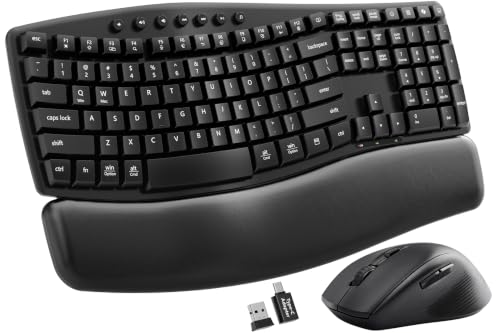
SABLUTE MA41 Quiet Ergonomic Wave Keyboard Set

Logitech MK955 Signature Slim Wireless Keyboard Mouse Combo

Kensington Pro Fit Ergonomic Wireless Keyboard and Mouse – Black (K75406US)

Logitech MK850 Performance Wireless Keyboard and Mouse Combo – Graphite

MEETION Ergonomic Wireless Keyboard and Mouse Combo with Wave Keys

Purple MA31 Ergonomic Wireless Keyboard and Mouse Combo, Full Size Wave Key

SABLUTE Ergonomic Wireless Keyboard and Mouse Combo, Rechargeable 4000mAh Backlit Keyboard
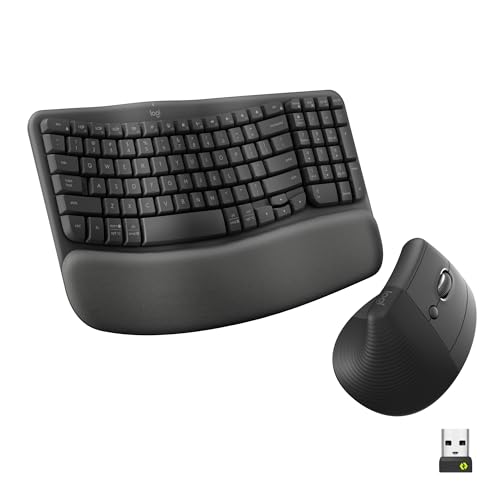
Logitech Wave Keys & Lift Vertical Mouse Ergonomic Wireless Combo, Graphite
More Details On Our Top Picks
This SABLUTE set leans into comfort without getting fussy. The wave-shaped keyboard, soft leather palm rest, and memory-foam wrist support make sense for long email sessions or a home office desk that sees daily use. The included USB-A and USB-C adapter broadens compatibility, which helps when your laptop mix changes from one day to the next.
The 2.4GHz wireless link keeps the desk tidy, and the dual-system switch suits households or teams that move between Windows and Mac. One honest trade-off, though, is that this style works best for people who want a shaped typing surface rather than a slim travel board. It feels like a comfort-first setup, not a minimalist one.
Strong Points
- Wave key layout supports a more relaxed hand position during long typing sessions.
- Memory foam wrist support helps take pressure off the edge of the desk.
- USB-A and USB-C adapter support makes it easier to move between newer and older machines.
- Dual-system switching suits mixed Windows and Mac workspaces.
Things To Consider
- The fuller shape asks for more desk space than a slim compact set.
- The comfort focus may feel less suited to frequent travel.
- Leather-style surfaces usually need a quick wipe now and then to stay tidy.
Feature Snapshot
Who It Suits Best
You fit this set well if you spend steady hours at a desk and want a softer resting surface with simple wireless use.
Where A Sibling Pick Shines
Logitech MK955 Signature Slim Wireless Keyboard Mouse Combo suits commuters and hybrid workers who want a slimmer feel and three-device switching.
Compared with the SABLUTE MA41, this Logitech leans slimmer and more streamlined. The larger-hand focus matters, because a keyboard can look compact and still feel cramped, while this one is clearly aimed at a roomier hand posture. Quiet typing and clicking make it an easy desk companion for shared spaces or late-night work.
Switching across three devices is the feature that gives it everyday flexibility, especially for people bouncing between a laptop, desktop, and tablet. Bluetooth and Multi-OS support widen the appeal, though a slim profile usually means you trade away some of the plush, cushioned feel that the first pick brings.
What We Like
- Roomier layout suits larger hands better than many slim sets.
- Quiet typing and clicking help keep noise down in shared spaces.
- Three-device switching supports busy desk setups without constant re-pairing.
- Bluetooth and Multi-OS support broaden compatibility across common work systems.
Room For Improvement
- Minimal styling leaves less of a cushioned feel than thicker ergonomic sets.
- The slim shape may feel too flat for some hand positions.
- Multi-device use works best once your desk devices are already paired and organized.
Details At A Glance
Who Should Grab It
You make the most of this combo when your desk rotates between several devices and you want a slimmer, quieter profile.
Swap It Out When
SABLUTE MA41 Quiet Ergonomic Wave Keyboard Set suits anyone who wants more padding under the palms and a more sculpted typing surface.
The Kensington pair goes straight to the point: contoured shape, wireless connection, no clutter. That kind of straightforward design works well on a budget-conscious office desk or a spare room that needs a dependable setup without extra bells and whistles. It feels less polished than the Logitech picks, though the simplicity is part of the appeal.
For many home-office setups, the honest read is that simple ergonomics matter more than flashy extras. This combo leans into that idea with a matching keyboard and mouse that keep the learning curve low. It’s a sensible option for someone who wants to type comfortably without chasing a feature list.
Highlights
- Contoured design adds basic ergonomic shaping without a complicated setup.
- Matching keyboard and mouse create a tidy, cohesive desk look.
- Wireless operation keeps cables off a small or shared desk.
Points To Note
- It does not lean into premium extras like device switching or rechargeable power.
- The simpler build may feel less substantial than some higher-end Logitech sets.
- Basic wireless gear usually rewards occasional battery checks so the desk stays interruption-free.
Core Details
Built With In Mind
You suit this combo well if you want a no-drama ergonomic setup for everyday office tasks and don’t need advanced switching.
Another Choice May Suit
Logitech MK850 Performance Wireless Keyboard and Mouse Combo – Graphite makes more sense for multitaskers who want extra mouse controls and a larger wave-shaped board.
The MK850 feels built for heavier desk work, especially when you juggle apps all day and want the mouse to carry some of the load. Its oversized wave-shaped keyboard gives your hands more room than the Kensington set, and the full-size mouse with eight customizable buttons adds serious utility. In a busy office, that extra control can save time.
Bluetooth or the included USB-A receiver gives you a choice of connection styles, which is useful on laptops that stay in place all week. The trade-off is size, because this setup takes up more room than the slimmer MK955. For many power users, that’s a fair trade.
Reasons To Buy
- Large wave-shaped keyboard gives a roomier typing surface.
- Eight customizable mouse buttons support frequent shortcuts and workflow control.
- Bluetooth and USB-A receiver options give you flexibility across devices.
- The layout suits long desk sessions where comfort and control both matter.
Softer Spots
- The larger footprint needs more desk real estate than slim sets.
- Customization brings value, but it also asks for a little setup time.
- Its bigger shape may feel overbuilt for casual email-and-browser use.
Feature Rundown
Best Suited To
You get the most from this pick if your desk work is heavy, shortcut-driven, and spread across many tabs or apps.
Look Elsewhere When
Logitech MK955 Signature Slim Wireless Keyboard Mouse Combo makes more sense for smaller desks and a lighter touch.
MEETION keeps the formula simple, which is useful for a desktop PC or a straightforward home station. The natural wave keys and hard wrist rest give you the ergonomic basics without pushing the design into fancier territory. That makes it easy to understand and easy to live with.
The full-size layout helps when you want a familiar typing surface, and the 4 DPI optical mouse adds a basic way to tune pointer movement. Compared with the more premium Logitech sets, this one asks less from your budget and more from your tolerance for plain styling. For many casual workspaces, that trade is fine.
Best Bits
- Wave-style keys offer a more natural hand angle than flat boards.
- Full-size layout is comfortable for everyday office tasks and number entry.
- 4 DPI mouse setting gives a basic pointer-speed adjustment.
- Simple setup works well on a desktop PC or mixed home desk.
Minor Gripes
- The design is straightforward rather than premium-feeling.
- Hard wrist support may feel less plush than foam or leather-style rests.
- Basic gear usually benefits from routine dusting around the keys and rest area.
Feature Card
Whose Shelf It Belongs On
You fit this combo well if you want the ergonomic basics covered without moving up to a heavier feature set.
Reach For A Different Pick When
Logitech MK850 Performance Wireless Keyboard and Mouse Combo – Graphite suits you better once shortcut buttons and a larger mouse matter more.
This Purple MA31 lands in a useful middle ground between the plain MEETION set and the more loaded Logitech options. The memory foam leather wrist rest gives it a softer landing zone for long typing days, and the six-button mouse adds more control than basic two-button designs. That makes it a thoughtful pick for office work, laptop use, or a tablet-adjacent desk.
The stable 2.4GHz wireless connection and USB-A to USB-C adapter support help it fit mixed setups without much fuss. The purple finish also gives it a bit of personality, which matters more than people admit on a desk you stare at all day. The practical catch is that a more finished palm rest usually needs a little care to keep it looking neat.
Bright Spots
- Memory foam wrist support adds softness for longer desk sessions.
- Six-button mouse gives you more control than a basic mouse.
- USB-A and USB-C adapter support helps across newer and older computers.
- Full-size wave key layout feels familiar while still aiming for comfort.
Areas To Watch
- The purple styling won’t suit every desk setup.
- More surface texture usually means more wiping to keep it clean-looking.
- The extra mouse controls help, but they can also make the first setup feel busier.
Spec Overview
Perfect Match For
You suit this combo best if you want comfort features, a little extra mouse control, and a desk look that isn’t plain black plastic.
Consider Something Else When
Logitech Wave Keys & Lift Vertical Mouse Ergonomic Wireless Combo is a better fit for you if a vertical mouse feels more natural in hand.
Backlighting changes the feel of a keyboard more than most people expect, especially in a dim room or on a late shift. This SABLUTE set adds that plus a rechargeable 4000mAh battery, so it pushes beyond the simpler battery-powered style of the earlier picks. The soft faux lambskin palm rest keeps the comfort story going without making the desk look bulky.
Wave keys help with a more natural typing path, and the Windows, Mac, and Chrome OS compatibility broadens day-to-day use. The trade-off is that extra feature depth usually means more attention to charging and lighting preferences. For a workspace that lives after dark, that’s a sensible compromise.
Positives
- Backlit keys help in low-light desk setups and evening work sessions.
- Rechargeable 4000mAh power cuts down on routine battery swaps.
- Soft faux lambskin palm rest adds a cushioned landing area for long typing.
- Wave key shape keeps the typing posture closer to a comfort-first layout.
- Wide operating-system support makes it easier to move across common platforms.
Small Caveats
- Lighting and charging features add some management compared with simpler sets.
- The softer rest may need occasional care to stay looking fresh.
Core Details
Who Will Love This
You’re the right match for this one if your desk work often happens in low light and you want charging convenience built in.
Where Shoppers Go Wrong
Logitech MK955 Signature Slim Wireless Keyboard Mouse Combo is a better fit for anyone who wants a slimmer board and three-device switching more than lighting.
This Logitech combo stands apart because the mouse changes shape rather than just size. A vertical mouse holds the hand in a more upright position, and that’s a meaningful shift for long desk days or anyone who feels ordinary mice never sit quite right. The wave-shaped keyboard and cushioned palm rest keep the keyboard side equally focused on comfort.
It can connect to up to three devices, which makes it especially handy in mixed-office setups or a home desk that serves more than one computer. The real trade-off is adaptation, since a vertical mouse feels different enough that some people need time before it feels natural. For shape-conscious comfort, though, this one makes a strong case.
Upsides
- Vertical mouse shape gives your hand a different, more upright grip.
- Wave keyboard and cushioned palm rest work together for comfort.
- Three-device support helps across laptop, desktop, and tablet-style workflows.
- Graphite finish fits easily into a restrained office setup.
Honest Caveats
- A vertical mouse takes adjustment, especially for people used to flat mice.
- The comfort-first design may feel unusual during the first few days of use.
- Like most shaped desk gear, it rewards a bit of space for a cleaner layout.
Technical Sheet
Who Should Grab It
You suit this combo best if you want the keyboard and mouse to work together as a true comfort-first desk setup.
Skip It When
Logitech MK955 Signature Slim Wireless Keyboard Mouse Combo is the easier fit for anyone who wants a more familiar mouse shape and a slimmer profile.
How To Choose The Right Ergonomic Wireless Keyboard And Mouse Comboes
Start With Hand Position And Desk Space
Ergonomics starts with shape, not just brand names. Wave keyboards give your hands a more curved path, while cushioned palm rests help reduce the hard edge you feel on the desk front. Vertical mice change wrist angle more aggressively, so they suit you best when a flatter mouse leaves your hand feeling cramped.
Desk space matters just as much. A larger board like the MK850 gives you room to stretch out, but it can crowd a compact work area fast. Slimmer sets such as the MK955 fit tighter desks better, though they usually feel less padded.
Match Connectivity To Your Routine
2.4GHz wireless usually uses a small USB receiver, which is handy on desktops and laptops that stay put. Bluetooth keeps one receiver off the desk, and it helps when port space is tight. Multi-device switching matters most for people moving between a work laptop, a personal computer, and a tablet.
The connection choice also affects day-to-day friction. A receiver-based set can feel simpler on one machine, while Bluetooth and switching features reward a busier desk life. For hybrid work, that difference adds up.
Look Past The Keyboard And Check The Mouse
The mouse often decides whether a combo feels ordinary or genuinely comfortable. A six-button or eight-button mouse gives more control for browser tabs, editing, or file work, while a basic mouse stays easier to learn. A vertical mouse can feel more natural for some hands, but it asks for an adjustment period.
DPI, or dots per inch, is the pointer sensitivity setting. Lower numbers usually feel slower and steadier, while higher numbers move faster across the screen. You get the best match when the mouse design and sensitivity fit your work style instead of forcing you to adapt all day.
Decide How Much Convenience You Want
Rechargeable power is useful in a low-light workspace or any desk you don’t want to open often for batteries. Backlighting helps in dim rooms, though it adds another setting to manage. Soft faux leather or lambskin-style rests can feel nicer under the palms, but they usually ask for more care than hard plastic.
The right upgrade depends on how often you sit at the desk and how much polish you want from the setup. Casual email and browsing can live happily with a simpler pair, while long work sessions usually justify the better rests, device switching, or extra mouse controls.
What To Weigh Before You Order
Traps First Timers Fall Into
People often focus on keyboard shape and ignore the mouse, then wonder why the combo still feels awkward. Another common miss is desk size, because a roomy wave board can overwhelm a narrow workspace. Battery type matters too, since rechargeable and battery-powered sets fit different routines.
Compatibility deserves a quick check as well. Windows and Mac support is common here, but multi-device switching and Bluetooth do not serve every desk the same way. A little attention upfront saves you from a setup that looks right but feels wrong.
Where The Extra Money Goes
Higher-tier sets usually spend more on shape, materials, and control. That can mean a better palm rest, more refined key feel, or a mouse with extra buttons and a more specialized grip. Those details matter most when your workday runs long or your desk is shared across multiple devices.
Paying up makes sense when comfort becomes part of daily routine instead of a nice extra. A vertical mouse, rechargeable power, or stronger device switching can justify the jump for hybrid workers, office managers, and anyone typing for hours at a stretch.
Final Thoughts
Your best match depends on how you work, not just how a combo looks in the product photo. The SABLUTE MA41 and Logitech MK955 cover the comfort-versus-slimness trade-off well, while the MK850, Wave Keys & Lift, and SABLUTE backlit set step further into specialized use. Pick the one that fits your desk, your hands, and your daily routine, and the whole setup feels calmer from day one.
