
Competitive mouse choices live or die on feel, shape, and speed, and the wrong pick can make a long session feel clumsy fast. You want a model that suits your grip, matches your desk setup, and stays comfortable through scrims, ranked runs, or late-night practice.
This roundup focuses on lean wireless designs, tuned sensors, and click systems that matter in real play. Some picks lean minimalist, some lean feature-rich, and a few are better for hands that want a familiar right-handed shape or a more traditional button layout.
Quick Look at the Shortlist

ASUS ROG Harpe Ace Aim Lab Wireless Esports Gaming Mouse 54g

Logitech G PRO X2 SUPERSTRIKE Wireless Gaming Mouse Black White

Razer Viper V4 Pro Wireless Esports Gaming Mouse 49g Black

Razer Viper V4 Pro Wireless Esports Gaming Mouse 50g White

ATTACK SHARK R5Ultra 8K Carbon Fiber Wireless Gaming Mouse White

SteelSeries Esports FPS Gaming Mouse Prime Edition 69g
ASUS ROG Harpe II Ace Wireless Esports Gaming Mouse 2025 48g Black
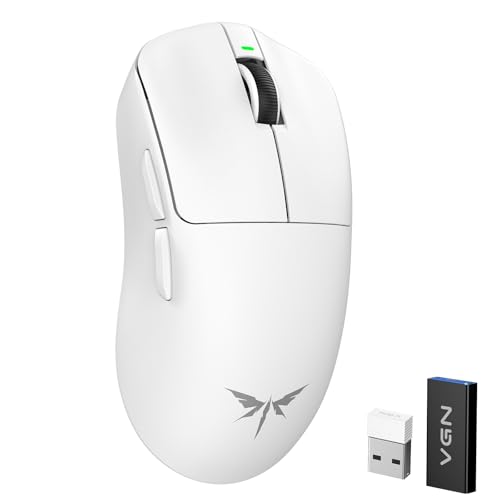
VGN Dragonfly F1 MOBA Wireless Gaming Mouse 55g White
More Details On Our Top Picks
The Harpe Ace sits in that sweet spot where the shape sounds serious but the weight stays friendly for long aim sessions. At 54g with tri-mode connectivity, it fits well for you if your desk shifts between wired, 2.4GHz wireless, and Bluetooth on PC or Mac.
The 36K DPI ceiling gives you plenty of sensitivity range, though the bigger value is the way the mouse avoids feeling fussy in hand. The right-handed shell and Aim Lab tuning focus suit players who want a clean, no-nonsense tool more than a flashy showcase piece.
Highlights
- 54g weight helps keep flicks and micro-corrections easy to manage.
- Tri-mode connectivity gives you more room to match your setup.
- PC and Mac support makes it easier to move between work and play.
- The right-handed shape should feel familiar for many claw or palm-leaning grips.
Points To Note
- The right-hand shape narrows the fit for left-handed use.
- Higher DPI support sounds impressive, though most aim work lives far below that ceiling.
- Wireless mode adds another device to keep charged, so desk habits matter.
Feature Snapshot
Who It Suits Best
You’re a strong match for this mouse if you want a light right-handed shell, shift between platforms, and prefer a balanced all-rounder over an extreme specialist.
Where A Sibling Pick Shines
ASUS ROG Harpe II Ace Wireless Esports Gaming Mouse 2025 48g Black suits you better when you want newer tuning tools and an even lighter feel.
This Logitech model leans into click feel more than most of the lighter shapes around it. The customizable rapid-trigger magnetic analog switches and adjustable haptics give you a more tuned hand-feel, which matters a lot during repeated bursts of aim and tap control.
At 61g with USB-C charging and PC/Mac support, it stays usable for daily play without turning into a desk ornament. The honest read is that it suits you best when button response and tactile feedback matter as much as pure weight savings.
Strong Points
- Adjustable click haptics let you tune how the button press feels.
- Magnetic analog switches offer a more specialized control style than standard click hardware.
- 61g weight keeps it light enough for fast motion without going ultra-minimal.
- USB-C charging makes cable management simpler on a modern setup.
- PC and Mac support helps it slot into mixed environments.
Small Caveats
- The extra tuning features may feel unnecessary for very simple setups.
- Click customization is useful, though it adds another setting layer to learn.
- The shape and control style may suit deliberate aim more than pure plug-and-play minimalism.
Core Details
Who Will Love This
You’ll get the most from this mouse if you like shaping button feel, play precision-heavy games, and want a lighter body without losing tactile feedback.
Another Choice May Suit
Razer Viper V4 Pro Wireless Esports Gaming Mouse 49g Black is a cleaner match for you if speed and a more stripped-down feel matter more than switch tuning.
Speed-focused players will notice how little this 49g shell asks of the hand. The 50K DPI optical sensor, 8K polling, and Gen-4 optical switches point toward a mouse built for quick reaction work, and that matters most in games where tiny movement changes pile up.
The 180Hr battery claim is especially useful for long stretches away from a cable, though your actual routine still depends on brightness, polling settings, and use habits. Compared with the Logitech pick, this one feels more stripped to performance essentials and less about tactile adjustment.
Upsides
- 49g weight keeps lift-off and directional changes easy.
- 8K polling helps support very fine motion tracking in the right setup.
- 50K DPI sensor gives you ample sensitivity headroom.
- Gen-4 optical switches point to fast, light click response.
- USB-C charging is convenient for a modern desk.
- The long battery claim fits people who dislike frequent charging.
Worth Noting
- The high-performance focus leaves less room for extra frills.
- 8K polling can make the most sense on a strong, well-matched setup.
- The design favors speed-first play, so comfort can depend on your grip style.
Technical Sheet
Best Suited To
You’re the right fit for this model if you play fast aim games, care about ultra-low weight, and want a mouse that keeps the focus on movement and click speed.
Swap It Out When
Logitech G PRO X2 SUPERSTRIKE Wireless Gaming Mouse Black White makes more sense for you if tailored click feel matters more than raw speed-first tuning.
The white version keeps the same performance-first backbone as the black model, but the colorway changes the desk feel in a small, useful way. At 50g, it stays in the ultra-light zone, and that can feel especially nice during long sessions where every gram seems to matter.
The 50K DPI optical sensor, 8K polling, and Gen-4 optical switches carry over the serious hardware story, so this is more about preference than a different class of mouse. In most setups, the choice comes down to whether you want the brighter look, not a different behavior profile.
Bright Spots
- 50g mass keeps the hand workload low.
- The white finish gives a cleaner visual match for lighter desk setups.
- 50K DPI support leaves plenty of room for tuning.
- 8K polling keeps the feature set firmly in the premium lane.
- USB-C charging helps make upkeep straightforward.
Areas To Watch
- The white shell may show grime sooner than darker finishes, so care matters.
- The feature set mirrors the black model closely, leaving little between them beyond color preference.
- Speed-first shaping still means grip comfort should be checked against your hand style.
Details At A Glance
The Right Fit
This suits you best if you want the same fast hardware as the black version, but prefer a white finish that looks cleaner on a lighter desk.
Look Elsewhere When
ASUS ROG Harpe Ace Aim Lab Wireless Esports Gaming Mouse 54g is the more balanced call for you if you want a little more middle-ground feel and tri-mode flexibility.
This ATTACK SHARK model packs a lot into a very light shell. The 39g weight, 42K DPI ceiling, and PixArt PAW3950 MAX sensor make it feel aimed at fast aim work, while the wired, Bluetooth, and 2.4GHz options give you more connection flexibility than the stripped-back picks above it.
The carbon fiber material and 100 percent virgin grade PTFE feet stand out for desk feel, since PTFE feet are the smooth glide pads under the mouse. That can be a real plus for competitive play, though the very feature-rich approach also means you’re getting a mouse that feels more technical than simple.
Reasons To Buy
- 39g weight keeps the shell extremely easy to move.
- PixArt PAW3950 MAX sensor gives you a high-end tracking foundation.
- 42K programmable DPI offers broad setup control.
- Three connection modes support more desk and travel setups.
- PTFE feet help the mouse glide more smoothly on a pad.
- The carbon fiber build gives it a more specialized feel than standard plastic shells.
Minor Gripes
- The wider feature set may take longer to get comfortable with.
- Very light shells can feel a bit sparse to hands that like more body.
- The hybrid connectivity story adds flexibility, but it also adds setup choices.
Feature Rundown
Whose Shelf It Belongs On
You’ll appreciate this most if you want an ultra-light mouse with a serious sensor and you like choosing between wired and wireless use.
Reach For A Different Pick When
Razer Viper V4 Pro Wireless Esports Gaming Mouse 49g Black is the cleaner fit for you if you want a more polished premium lane without the extra connectivity branches.
SteelSeries takes a more grounded path here, with a 69g body and five programmable buttons that speak to straightforward FPS use. The design was developed with input from more than 100 pros, which tells you the shape and control layout were built around sustained comfort and repeatable movement.
The TrueMove Pro sensor, magnetic optical switches, and RGB lighting round out a mouse that feels practical rather than flashy. Compared with the lighter ASUS and Razer models, this one asks less from the hand on the scale side and more from your comfort with a slightly fuller frame.
Best Bits
- 69g weight gives the mouse a steadier, more planted feel.
- Five programmable buttons support common FPS actions.
- TrueMove Pro sensor offers precise 1-to-1 tracking behavior.
- Magnetic optical switches are built for fast click response.
- RGB lighting adds a visual touch without changing the core function.
Softer Spots
- It is heavier than several other picks in this roundup.
- The design leans more toward FPS utility than broad feature variety.
- RGB lighting is nice to have, though it does not affect play feel.
At A Glance
Built With In Mind
This fits you best if you play FPS titles, like a slightly fuller grip, and want a mouse that feels more planted than featherlight.
Where A Sibling Pick Shines
ASUS ROG Harpe Ace Aim Lab Wireless Esports Gaming Mouse 54g is the better match for you if you want a lighter shell and tri-mode flexibility.
The Harpe II Ace looks like the more forward-leaning ASUS option in this group, and the spec sheet backs that up with 48g weight, 42K DPI, 8K polling, and a 101Hr battery claim. That mix makes it feel tuned for players who want a very light shell but still want room to adjust settings through the web-based tool.
The right-handed shape and tri-mode connectivity keep it practical for daily use, while the PC and Mac support broadens its desk appeal. The trade-off is simple, it’s still a right-hand design, so the fit depends on your grip and hand shape more than the spec list alone.
Standout Traits
- 48g weight puts it in the ultra-light lane.
- 42K DPI gives you wide sensitivity range.
- 8K polling supports fast motion reporting.
- The web-based tool adds easy tuning from a browser.
- Tri-mode connectivity lets you use it in more ways.
- PC and Mac support makes it versatile across setups.
Room For Improvement
- The right-handed shape still limits who will feel at home with it.
- Very light mice sometimes feel too airy for hands that like more body.
- The tuning tool is useful, though it asks you to spend a little time on setup.
Quick Facts
Perfect Match For
You’re a strong fit for this model if you want a very light right-handed mouse, like tuning your setup, and play on either PC or Mac.
Another Choice May Suit
Razer Viper V4 Pro Wireless Esports Gaming Mouse 49g Black is the cleaner swap for you if you want the same ultra-light lane without leaning on browser-based tuning.
The VGN Dragonfly F1 brings a slightly different flavor to the list, leaning toward MOBA use while still sitting comfortably in esports territory. At 55g, it stays light enough for fast motion, and the PAW3395 sensor paired with 26K DPI keeps the tracking story practical for competitive sessions.
The anti-slip silver coating grip and optimized tactile click feel are useful touches for longer play, especially when your hand tends to get a little loose after repeated games. Compared with the lighter Razer and ASUS picks, this one feels a touch more textured and grip-aware.
Positives
- 55g weight keeps movement easy without going too barebones.
- PAW3395 sensor gives you a respected tracking base.
- 26K DPI covers a broad set of sensitivity preferences.
- The anti-slip coating should help with steadier hand placement.
- 4000Hz polling support adds another layer for fast input-minded setups.
Trade Offs
- The MOBA focus may feel less tailored to pure FPS specialists.
- 4000Hz support helps most in the right setup, not every desk.
- The grip coating is helpful, though texture preference can be personal.
Core Details
Who Should Grab It
This is a smart fit for you if you split time between MOBA and esports play and want a light mouse with a grippier feel than the smoothest shells in this roundup.
Where Another Pick Suits Better
SteelSeries Esports FPS Gaming Mouse Prime Edition 69g suits you better if you want a more straightforward FPS shape and a heavier planted hand feel.
How To Choose The Right Esports Mouses
Shape, Weight, And Grip Feel
Mouse shape matters as much as sensor specs, especially in long sessions where a bad fit starts to feel like a pebble in your shoe. A right-handed shell such as the ASUS Harpe line works well for many claw and palm-leaning grips, while flatter, lighter bodies often suit fingertip players who want quicker repositioning.
Weight changes how much effort your wrist and fingers spend all match long. The 39g ATTACK SHARK, 48g Harpe II Ace, and 49g Razer Viper V4 Pro all sit in the ultra-light lane, while the 69g SteelSeries Prime Edition brings a steadier feel that some FPS players still prefer.
Sensor, Polling, And Click Hardware
Sensor numbers are worth reading as a range of control, not a trophy badge. A 50K DPI sensor, 42K DPI sensor, or 18K CPI sensor all matter less than whether the mouse tracks smoothly at your chosen sensitivity and keeps cursor movement predictable.
Polling rate is how often the mouse reports movement to the computer, and higher numbers can help motion feel more immediate in a strong setup. Click hardware matters too, since magnetic optical switches and adjustable haptics change the feel of repeated taps, which is a real concern in shooters and high-action games.
Battery, Connectivity, And Desk Use
Wireless freedom is great, but your charging routine still shapes the experience. A 180Hr battery claim or 101Hr claim helps a lot for busy weeks, while tri-mode support gives you a safety net when you move between PC, Mac, wired use, and wireless gaming.
The honest read is that convenience features only help when they fit your habits. USB-C charging, browser-based tuning tools, and multi-mode connectivity matter most for desks that also pull duty for school, work, or travel.
Pick Around Your Game, Not Just Your Spec Sheet
Fast aim shooters reward low weight and clean tracking, while MOBA play often benefits from grip texture and button comfort. That’s why the VGN Dragonfly F1 feels more at home in hybrid use, while the SteelSeries Prime Edition leans more firmly into straightforward FPS handling.
You’ll usually be happiest when the mouse matches your most common session, not your rarest one. A little restraint here pays off later, because the right shell tends to fade into the background and let your hand do the work.
What To Weigh Before You Choose
Where Shoppers Go Wrong
Many people focus on DPI alone and overlook the shape that lives under the hand for hours. Others choose the lightest mouse on paper, then find it too sparse for relaxed control, especially during slower games or desk work.
Skip that trap by matching the mouse to your grip style and your main game type first. Then look at battery life, connectivity, and button feel as the features that fine-tune daily comfort.
When Paying More Pays Off
Higher-tier mice usually cost more because of lighter shells, more specialized switches, better tuning tools, and more careful sensor implementation. You’re paying for finer motion control, more deliberate click feel, and extra setup flexibility, not just a higher number on a spec card.
That upgrade makes sense for competitive players, heavy multitaskers, and anyone who notices small differences in click response or hand fatigue. For simpler use, a well-balanced model like the ASUS Harpe Ace often gives you enough without chasing every premium feature.
Closing Thoughts
You have several strong paths here, and the right one depends on how you play, not just how fast the spec sheet looks. The Razer Viper V4 Pro models suit speed-first hands, the ASUS Harpe series handles all-around play well, and the SteelSeries Prime Edition brings a more grounded FPS feel. For a lighter budget-minded route, the ATTACK SHARK and VGN options deserve a close look. The best match is the one that feels natural before the match even starts.
