
Extra-large PC cases earn their keep when your parts list runs wide, tall, or both, especially with long graphics cards, thick radiators, and plenty of drives. You also get easier cable routing and less cramped airflow, which matters in a gaming setup that stays on for hours or a workstation packed with storage. The trade-off is simple, bigger cases ask for more desk or floor space, and the best choice depends on how much hardware you plan to grow into.
Quick Shortlist For Spacious PC Builds

HYXN H2 (2026) ATX PC Case, Dual-Chamber, 8 Fans
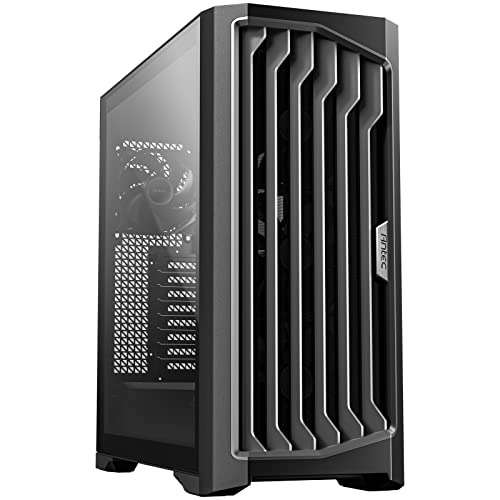
Antec Performance 1 FT Full Tower E-ATX PC Case

DARKROCK EC2 ATX Mid Tower Gaming PC Case

Antec Flux Pro Full-Tower E-ATX PC Case, Black

HYTE Y70 Touch Infinite Dual Chamber ATX Case, Snow White

DARKROCK Classico Storage Master ATX NAS Case

Geometric Future M5 Tempered Glass Mid Tower, Black/Yellow

CORSAIR AIR 5400 RS-R ARGB Triple-Chamber Mid-Tower PC Case, Black
More Details On Our Top Picks
HYXN goes straight at airflow and leaves very little to chance, which suits a hot gaming build with a large graphics card and a chunky radiator. The dual-chamber layout splits the system space from the cable side, so the inside tends to look cleaner without making the build feel cramped. You may find the sheer size a little much for a tight desk nook, but that’s the trade-off for this much breathing room.
It stands apart from the simpler DARKROCK EC2 by leaning harder into fan count and radiator support, so your parts have more space to breathe. For most people building a high-output tower, that’s the point.
Strong Points
- Eight pre-installed ARGB fans give you a ready-made cooling base without immediately adding more hardware.
- Six 140 mm fans and two 120 mm fans point to strong case airflow for parts that run warm.
- 420 mm radiator support suits large liquid-cooling setups and broadens your upgrade path.
- Dual-chamber construction helps keep cables and power hardware separated from the main view area.
- Type-C 3.2 support is handy for newer accessories and front-panel convenience.
Things To Consider
- The larger footprint asks for generous desk or floor clearance.
- With this much glass-and-fan presence, dusting will be part of normal upkeep.
- The fan-heavy setup can feel overbuilt for a modest office rig.
Feature Snapshot
Who It Suits Best
High-heat gaming setups and builders who want a roomy, fan-forward chassis will get the most from this one.
A Better Fit Elsewhere
Geometric Future M5 Tempered Glass Mid Tower, Black/Yellow suits you better when you want a sturdier 1.2 mm steel frame and toolless side access for frequent hardware changes.
After HYXN’s fan-heavy layout, Antec’s full tower feels more deliberate and less flashy, which is useful in a workstation that needs room for large boards and long components. The three PWM fans give you speed control tied to heat, so the cooling profile can stay calmer during light use and ramp up under load. That said, the tower format takes real space, so it fits best where size is part of the plan.
Compared with the DARKROCK EC2, this case is the more serious fit for oversized motherboards and expansion-heavy builds. The honest read is that it’s built for people who want headroom first and cosmetics second.
What We Like
- Full tower proportions make room for larger board layouts and more complex builds.
- E-ATX support opens the door to oversized motherboards and expansion-focused systems.
- PWM fans adjust their speed with system demand, which helps balance noise and cooling.
- The roomy chassis can make installation less awkward for large coolers and long cards.
Softer Spots
- The size asks for a dedicated spot, not a crowded shelf.
- Plain full-tower styling may feel restrained beside HYTE’s display-heavy Y70 Touch Infinite.
- Cleaning a larger interior takes a little more time, especially around fan filters and corners.
Core Details
Made For
Builders assembling large E-ATX systems, especially in a workstation or multi-drive setup, will appreciate the extra room.
Another Choice May Suit
HYXN H2 (2026) ATX PC Case, Dual-Chamber, 8 Fans is the better match for gaming rigs that want stronger stock airflow and a more aggressive cooling focus.
DARKROCK keeps this one straightforward, and that’s a strength for a first build or a no-drama upgrade path. Type-C readiness adds modern front-panel convenience, while the tempered glass side panel gives you a clean view of the parts without making the case feel ornate. One thing worth considering, though, is that the included fan count starts small, so you may build out cooling as your hardware grows.
Relative to Antec Performance 1 FT, the EC2 is easier to approach and less imposing, which suits a mid-size gaming tower better than a giant workstation shell. It’s the kind of case that fits neatly into a normal setup without asking for a full rearrange.
Upsides
- ATX mid-tower sizing keeps the footprint more manageable than a full tower.
- Support for 50 series graphics cards gives the case a newer hardware target.
- Up to eight 120 mm fans and 360 mm radiator support leave room for airflow upgrades.
- Tempered glass side panel helps you show the build without extra clutter.
- One pre-installed fan gives you a basic starting point right away.
Room For Improvement
- With only one fan included, your cooling plan may need more parts later.
- Mid-tower space is sensible, but it offers less expansion room than the larger Antec cases here.
- Glass panels ask for regular wiping to keep smudges from standing out.
Quick Facts
Right Fit For
Gamers who want a tidy ATX case with modern front I/O and room to expand cooling will feel at home here.
Swap It Out When
HYXN H2 (2026) ATX PC Case, Dual-Chamber, 8 Fans makes more sense for you when stock airflow matters more than a simpler, smaller build path.
Antec’s Flux Pro feels like the most design-conscious tower in the group, with walnut wood on the front panel giving the black shell a warmer, furniture-like look. The 90-degree rotated PSU mount changes the internal layout to help airflow and cable flow, while the temperature display keeps system readout visible at a glance. It asks for space and a more deliberate build plan, so it fits best in a setup where the case itself is part of the room.
Compared with the simpler Performance 1 FT, this model leans harder into presentation and thermal layout. That balance is great for a showcase machine, though it may be more case than a bare-bones workstation needs.
Highlights
- Six included PWM fans give you a strong starting cooling setup.
- Walnut wood front panel adds a distinctive finish without turning the case gaudy.
- High-airflow design suits powerful components that stay under load for long stretches.
- Rotated PSU mount can make internal routing feel cleaner and more open.
- CPU and GPU temperature display gives you quick status visibility.
Points To Note
- The feature set is rich, but that also makes the case more demanding to plan and assemble.
- Wood and black finishes reward careful cleaning so dust and fingerprints stay under control.
- The full-tower scale is overkill for compact desk setups.
At A Glance
Built With In Mind
Showpiece builds and high-end desktops with serious thermal demands will get the most out of this case.
Look Elsewhere When
HYXN H2 (2026) ATX PC Case, Dual-Chamber, 8 Fans is the easier match for you when the priority is raw airflow over decorative materials and display features.
HYTE’s Y70 Touch Infinite is the showpiece in this list, and the integrated 2.5K touchscreen makes that obvious from across the room. The dual-chamber structure helps keep the main chamber visually clean, while the 10-fan capacity and included PCIe 4.0 riser cable lean into serious custom builds. You’ll pay for the screen and the styling, so it makes the most sense when the case is part display object, part hardware home.
Against the Antec Flux Pro, this one is less about warm materials and more about presentation tech. The result feels tailored for a desk setup where visual identity matters as much as thermals.
Reasons To Buy
- Integrated 2.5K touchscreen makes the front of the case unusually interactive.
- Dual-chamber structure helps keep the build compartmentalized and tidy.
- 10-fan capacity gives you plenty of room for airflow planning.
- Included PCIe 4.0 riser cable supports cleaner GPU positioning in a display-focused build.
- Snow White finish suits bright, minimalist setups especially well.
Small Caveats
- The screen and styling add cost, so it’s not the practical route for every build.
- A display-forward case needs more careful cleaning to keep the front looking crisp.
- The visual focus may matter less to you than raw enclosure volume or drive space.
Technical Sheet
Who Will Love This
Style-focused builders who want a conversation-starting case with strong layout flexibility will appreciate this one.
Where A Sibling Pick Shines
Geometric Future M5 Tempered Glass Mid Tower, Black/Yellow is the calmer match for you when you want premium materials and tool-free access without the touchscreen emphasis.
This DARKROCK model speaks to a very specific kind of build, the sort where drive bays matter as much as the graphics card. With room for ten 3.5-inch hard drives and three 2.5-inch SSDs, it suits a home NAS, media archive, or backup tower that stays busy day after day. The included four 120 mm fans are a useful start, though the real appeal is storage density rather than showpiece styling.
Compared with HYTE Y70 Touch Infinite, this case is far less about display and far more about practical volume. The honest trade-off is that you’re paying for structure and bay count, not visual flair.
Best Bits
- Supports 10 x 3.5-inch hard drives, which is a serious amount of storage room.
- Also accepts 3 x 2.5-inch SSDs for mixed drive setups.
- Four included 120 mm fans help the chassis start with useful airflow.
- Top and front radiator support adds cooling flexibility for a storage-heavy tower.
- USB 3.0-ready front I/O keeps day-to-day transfers convenient.
Areas To Watch
- The case is purpose-built, so it makes less sense for a minimalist gaming rig.
- Drive-focused interiors usually take more planning during cable routing and airflow setup.
- Owners with only a few drives may find the bay count more than they need.
Details At A Glance
Who Should Grab It
Storage-heavy home server builders and media hoarders will get the most value from this chassis.
A Better Fit Elsewhere
CORSAIR AIR 5400 RS-R ARGB Triple-Chamber Mid-Tower PC Case, Black makes more sense for you when airflow and a cleaner show-build layout matter more than drive bay density.
Geometric Future takes a cleaner, more structural route than the more decorative HYTE case, and that’s easy to appreciate in a build you open often. The 1.2 mm steel frame gives the chassis a sturdier feel on paper than many lighter shells, while toolless panels make upgrades and cleaning less fiddly. In most gaming rooms, that mix of solid material and easy access lands well.
It sits nicely between the airflow-first HYXN and the storage-first DARKROCK Classico, which makes it a balanced pick for builders who want flexibility without extra fuss. The black and yellow finish is distinctive, so it suits someone who wants a little edge without going loud.
Plus Points
- 1.2 mm steel construction points to a firmer-feeling shell.
- Toolless panels make routine maintenance and upgrades easier.
- Support for 420 mm and 360 mm radiators gives you strong cooling flexibility.
- Five pre-installed 140 mm ARGB PWM fans mean the airflow setup starts strong.
- Type-C front support helps with modern peripherals.
Honest Caveats
- Black and yellow styling is distinctive, so it won’t blend into every room.
- Tempered glass and ARGB lighting usually reward a bit of extra dust care.
- The more premium feel may matter less than storage capacity for NAS-style use.
Spec Overview
The Right Fit
Builders who want a sturdy mid tower with easy access and broad cooling support will find a good match here.
Reach For A Different Pick When
DARKROCK Classico Storage Master ATX NAS Case suits you better when drive capacity matters more than a refined mixed-material design.
CORSAIR leans into a triple-chamber layout here, which separates the build into clear zones and helps the case feel orderly even with ambitious hardware inside. The reverse-rotor RS120-R fans are aimed at low-noise airflow, so the setup makes sense for a high-end desktop where sound and cooling both matter. It’s a strong fit for someone who wants a polished internal layout more than a crowded tower packed with drive bays.
Compared with the Geometric Future M5, this model feels even more specialized for a clean, modern showcase build. The trade-off is a narrower use case, but that’s often the point with a case this intentional.
Best Bits
- Triple-chamber layout helps sort components into cleaner internal zones.
- Three pre-installed reverse-rotor ARGB fans provide a neat starting airflow setup.
- High-airflow ducts support thermals without forcing the interior to look busy.
- Reverse motherboard support suits display-oriented builds and nontraditional layouts.
- Low-noise design focus fits a desktop that stays on for long sessions.
Minor Gripes
- The specialized chamber layout asks for a more careful first build.
- Showcase styling means you’ll likely spend more time keeping the interior tidy.
- The case is highly focused, so it may be more than a plain office setup needs.
Feature Rundown
Whose Shelf It Belongs On
Showcase builders who want a clean, high-end case with a carefully segmented interior will appreciate this one most.
Where A Sibling Pick Shines
HYTE Y70 Touch Infinite Dual Chamber ATX Case, Snow White is the better match for you when an integrated screen matters more than a quieter, more restrained chamber layout.
How To Choose The Right Extra-Large Pc Cases
Space, Clearance, And Internal Layout
Size is the first real filter, because an extra-large case only helps when you can place it properly and still reach the rear cables. Full towers and wide dual-chamber shells make sense for long graphics cards, tall air coolers, and big radiators, but they can be awkward under a shallow desk or beside a wall. A case like the Antec Performance 1 FT gives you broad internal room, while something like the HYXN H2 focuses more on cooling density inside a mid-tower footprint.
Cooling Style And Fan Planning
Think about whether you want a case that arrives nearly complete, like the HYXN H2 with eight fans, or one that starts simpler and leaves room for your own setup. PWM fans, meaning pulse-width-modulated fans, can adjust speed based on temperature, which helps keep noise more sensible during lighter use. Radiator support matters too, since 360 mm and 420 mm mounts give you different levels of liquid-cooling headroom.
Storage, Aesthetics, And Build Frequency
Storage-heavy builders need drive cages and bay counts, not just open space, so the DARKROCK Classico deserves attention for NAS or media-duty systems. Style-focused setups lean in a different direction, where the HYTE Y70 Touch Infinite and Antec Flux Pro offer display value, material contrast, and a more curated look. Frequent upgraders usually appreciate toolless panels and easier access, which is where the Geometric Future M5 earns its place.
Things Worth Knowing First
Hidden Buying Traps
Shoppers often focus on fan count and ignore physical depth, so the case looks perfect until the radiator or GPU eats the last bit of room. Another common miss is drive support, because a spacious shell can still be wrong for a storage-heavy build. Always match the enclosure to the hardware you already own, not the hardware you hope to add someday.
Finish matters too. Tempered glass, wood accents, and glossy panels look great, but they ask for more cleaning and a little more care during handling.
The Upgrade Payoff
Higher-tier cases usually cost more because you’re paying for thicker steel, more pre-installed fans, more complex chamber layouts, or extras like touch displays and riser cables. In this category, that money also buys easier cable routing, broader radiator support, and a cleaner finished look. The upgrade pays off when your system runs hot, uses large parts, or sits in a room where the case itself is part of the setup.
For a simple office tower, those extras can be overkill. For a high-end gaming rig or a storage server that stays busy, they make daily use feel far less cramped.
Frequently Asked Questions
What makes a case “extra-large” here?
In this roundup, that means a roomy enclosure with enough internal volume for oversized boards, large coolers, or broader storage layouts. Full towers and spacious dual-chamber mid towers both fit that idea.
Do you need a full tower for gaming?
No, many gaming setups do fine in a larger mid tower with strong airflow. A full tower helps more when your parts are oversized or you want extra expansion room.
Are pre-installed fans worth paying for?
They save you from building airflow from scratch and make first setup easier. That matters most in hot-running systems or large cases that would otherwise feel empty.
What matters more, radiator support or fan count?
They solve different problems, so the better choice depends on your cooling plan. Radiator support helps liquid cooling, while fan count helps immediate case airflow.
Which style suits a storage server best?
A case with many drive bays and sensible cooling is the better route, such as the DARKROCK Classico Storage Master ATX NAS Case. A display-heavy model is usually better reserved for a showcase desktop.
Closing Thoughts
The right extra-large PC case makes your build feel easier to assemble and easier to live with afterward. You get more room for cables, larger cooling hardware, and parts that would crowd a smaller shell. The smart move is to match the case to your real build plan, not just the biggest option on the page. Choose for airflow, storage, or presentation, and the rest falls into place naturally.
