
Fingertip grip puts most of the control on your fingers, so shape, weight, and surface feel matter more than a flashy spec sheet. The right pick can help you hold a steadier line in fast games, ease hand fatigue during long sessions, or keep a mouse from sliding when your palm warms up. This roundup focuses on grip tape, ultra-light gaming mice, and one handheld pointer that fits presentation work better than desk duty.
Quick Look At The Shortlist

Lizard Skins DSP Computer Mouse Grip 0.5mm Crimson Red

TALONGAMES Mouse Anti Slip Grip Tape Logitech G102 G203 G304 G305 G Pro Wired

Pulsar Gaming Gears X2 Crazylight Wireless Gaming Mouse Mini Forest
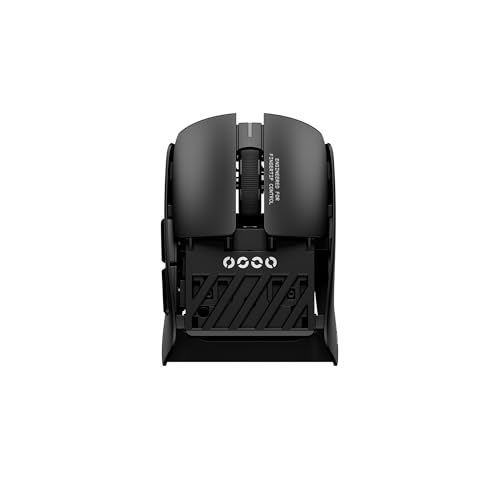
Pulsar Gaming Gears Pulsar Lab X2F Wireless Gaming Mouse Mini Black

Pwnage Ultra Grip Pre-Cut Anti-Slip Grip Tape
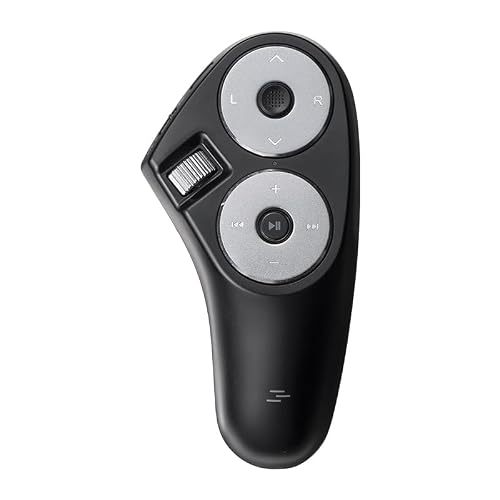
SANWA Bluetooth 2.4G Wireless Handheld Mouse 3 in 1 Presentation Clicker

WLMOUSE Beast X Mini Pro Ultra-Light 34g Magnesium Gaming Mouse Black
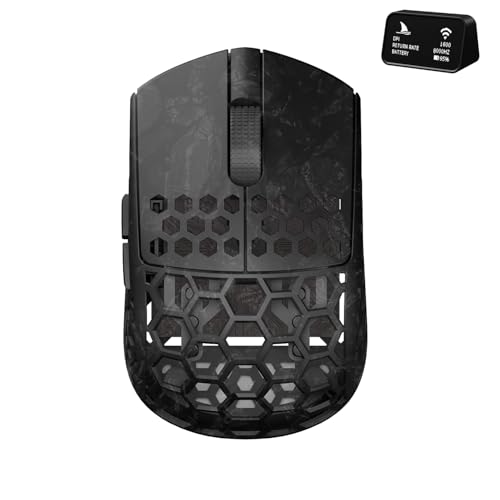
Darmoshark M5Air Mini Fingertip Grasp Gaming Mouse Carbon Fiber
More Details On Our Top Picks
Grip tape is the simplest way to change how a mouse feels, and this 0.5 mm sheet aims for a barely-there change in thickness. That matters for fingertip users who want more traction without turning a compact shell into a padded brick.
Because it’s cut to fit, you can shape it around the curves of your own mouse rather than settle for a loose generic strip. The trade-off is the usual one with custom grip sheets, your install takes a little care, and a clean application matters more than style.
Strong Points
- Thin 0.5 mm profile keeps the mouse feeling familiar in hand.
- Cut-to-fit layout gives you control over where traction matters most.
- The textured surface can help steady finger pressure during fast flicks.
- Crimson Red gives your setup a more personal look without changing the shape.
Things To Consider
- Fit depends on how carefully you trim and place it.
- It’s a surface solution, so it won’t change the mouse body itself.
Key Specs
Who It Suits Best
It suits you best when your current mouse already feels right in shape and you only want more traction for fingertip control.
A Better Fit Elsewhere
TALONGAMES Mouse Anti Slip Grip Tape works better for Logitech G102, G203, G304, G305, and G Pro Wired owners who want a more model-specific fit.
Compared with the Lizard Skins sheet, this one is built around a few specific Logitech mice, so the fit should feel less improvised. The 0.5 mm polymer layer keeps the mouse slim while the diamond texture is aimed at better friction, which is exactly what long aim sessions tend to demand.
The pre-cut format is handy for anyone who dislikes trimming tiny edges, and the adhesive is meant to peel away cleanly. One thing worth noting, grip tape still needs careful placement, especially on glossy shells where any misalignment shows fast.
What We Like
- Model-matched sizing gives the tape a more exact feel on supported Logitech mice.
- Thin construction helps preserve the mouse’s original shape.
- Diamond texture adds traction for steadier fingertip pressure.
- Pre-cut pieces shorten the setup process.
- Moisture handling can help during warmer, longer sessions.
Room For Improvement
- Compatibility stays narrow, so it’s not a universal answer.
- Placement still rewards patience and a steady hand.
- Edge wear can depend on how often you rest and lift the mouse.
Feature Rundown
Made For
It suits Logitech G102, G203, G304, G305, and G Pro Wired owners who want a tailored grip upgrade without changing the mouse’s shape much.
Where A Sibling Pick Shines
Pwnage Ultra Grip Pre-Cut Anti-Slip Grip Tape is the better fit for you if you want a more universal grip set that can travel across keyboards, mice, and gamepads.
This one moves from surface grip to full mouse hardware, and the 36 g body is the headline. For fingertip players, that kind of weight can make rapid direction changes feel less tiring, especially in games that reward repeated micro-corrections.
The symmetrical shell, flat sides, and back-moderate hump give it a balanced shape that should suit people who keep most of the mouse control in the fingers. The catch is that very light mice can feel a little sparse to anyone used to fuller palm support, so the shape matters as much as the mass.
Highlights
- 36 g weight keeps the mouse extremely light in day-to-day motion.
- Symmetrical shape works well for many fingertip and claw setups.
- Flat sides help keep your fingers planted.
- 32K DPI and 8K support suit high-speed competitive play.
Points To Note
- Very light shells can feel less planted to palm-heavy hands.
- The shape rewards fingertip habits more than relaxed full-hand grips.
Core Details
Who Should Grab It
It suits competitive fingertip players who want a very light wireless mouse with a shape that still leaves room for control.
Another Choice May Suit
Darmoshark M5Air Mini Fingertip Grasp Gaming Mouse suits you better if you want a carbon-fiber shell and programmable buttons alongside the same lightweight idea.
The X2F stays in the lightweight lane, but the center hump changes the feel in a useful way. Compared with the X2 Crazylight, this one gives your fingers a little more structure, which can help during longer desktop sessions where perfect hover control matters.
HUANO switches bring a more tactile click profile than many soft-feeling shells, and that usually matters most to people who want clear button feedback. The honest read is that the mini size is still a very specific fit, so it rewards fingertip users who know they like compact shapes.
Bright Spots
- 38 g weight keeps it quick without feeling feather-light.
- Center hump gives the hand a more guided landing point.
- Symmetrical body keeps the shape straightforward.
- HUANO switches offer firmer click feedback.
- 8K and 32K DPI support suit responsive gaming setups.
Softer Spots
- Mini sizing can feel cramped for larger hands.
- Center-hump shaping will not suit every fingertip grip style.
Feature Card
Best Suited To
It suits fingertip players who want a mini wireless mouse with a firmer, more shaped feel than the ultralight X2 Crazylight.
Skip It When
Lizard Skins DSP Computer Mouse Grip makes more sense for you if your current mouse shape already works and you only want extra traction.
Universal grip tape like this earns its place by making more than one device feel less slippery. Unlike the more mouse-specific TALONGAMES sheet, this set aims at keycaps, mouse buttons, gamepads, and other gear, so it suits mixed setups that need the same tactile help in several places.
The 0.5 mm thickness keeps it discreet, and the sweat-absorbing texture is a practical touch for long desk sessions. The trade-off is that a universal fit always asks you to think a little harder about placement, since each device has different curves and button shapes.
Upsides
- Pre-cut pieces save you from trimming and guesswork.
- Universal fit reaches across several kinds of gear.
- Thin build keeps the added layer subtle.
- Texture helps improve hold during warm or long sessions.
Small Caveats
- Universal coverage is useful, but it can’t match every device as closely as a model-specific set.
- Placement takes more thought on curved surfaces.
Details At A Glance
The Right Fit
It suits you best when your desk setup spans a mouse, keyboard, and controller, and you want the same traction feel across all three.
Look Elsewhere When
TALONGAMES Mouse Anti Slip Grip Tape is the tighter choice for Logitech G102, G203, G304, G305, and G Pro Wired users.
This handheld mouse goes in a different direction from the gaming picks, and that’s the point. For presenters, classroom setups, or a laptop bag that sees frequent travel, the 3 in 1 design gives you mouse control, a remote feel, and scroll access in one compact shape.
It also works across Bluetooth and 2.4G wireless, so you have two connection paths instead of one. The trade-off is obvious, though, it’s less about pure fingertip gaming shape and more about flexible control for slides, media, and portable use.
Reasons To Buy
- Handheld form keeps it easy to carry and use away from a desk.
- Three control roles make it useful for presentations and light pointer tasks.
- Bluetooth and 2.4G support widen connection options.
- Scroll support adds a familiar browsing feel.
Areas To Watch
- Its shape is aimed more at presentation work than high-speed gaming.
- Handheld ergonomics differ a lot from standard fingertip mice.
Technical Sheet
Who Will Love This
It suits presenters, trainers, and frequent travelers who want compact control more than a traditional gaming shell.
Reach For A Different Pick When
Pulsar Gaming Gears X2 Crazylight Wireless Gaming Mouse Mini Forest is the stronger match for fingertip gaming and rapid aim work.
With a 34 g magnesium shell, this mouse sits in the very light end of the category, yet the material choice gives it a more serious feel than a simple plastic shell usually does. Compared with the Pulsar X2 Crazylight, this one leans harder into high-end hardware cues, including the PAW3950 HS sensor and customizable side panels.
That mix helps you treat it as a precision tool rather than just an ultralight shell. The honest read is that the mini format and side-panel options make it a better match for experienced fingertip users who already know their preferred shape and click style.
Plus Points
- 34 g weight keeps the mouse exceptionally easy to move.
- Magnesium build gives the shell a more substantial feel.
- PAW3950 HS sensor and 8K polling support fast-response play.
- Customizable side panels let you fine-tune the hand feel.
Minor Gripes
- Mini sizing may feel tight for larger hands.
- Customization adds flexibility, but it also asks you to spend more time dialing in fit.
Core Details
Perfect Match For
It suits experienced fingertip players who want a very light mouse with a magnesium shell and enough tuning potential to feel personal.
Swap It Out When
Pulsar Gaming Gears Pulsar Lab X2F Wireless Gaming Mouse Mini Black is the gentler fit for you if you want a slightly more guided center-hump shape.
Carbon fiber gives this one a different character from the magnesium WLMOUSE and the lighter plastic-bodied Pulsars. At 31 g, it’s even lighter on paper than the rest of the group, and the tri-mode setup plus Bluetooth support makes it a stronger all-round desktop companion for people who still want fingertip-friendly handling.
The five programmable buttons add flexibility for macros, browser work, or games that benefit from extra commands. The trade-off is that a feature-rich light mouse often asks more of your setup preferences, so it’s best for someone who values tuning and function together rather than a bare-bones shell.
Standout Traits
- 31 g weight keeps movement extremely easy.
- Carbon fiber build gives the mouse a distinct premium feel.
- Tri-mode connectivity adds setup flexibility.
- Bluetooth support broadens desk and laptop use.
- Five programmable buttons add useful control options.
Worth Noting
- More features can mean more setup decisions.
- Mini fingertip shape won’t suit every hand size.
Feature Snapshot
Built With In Mind
It suits fingertip users who want a very light mouse with extra controls and broader connectivity for both work and play.
Where Another Pick Suits Better
Lizard Skins DSP Computer Mouse Grip fits better for you if your current mouse already feels good and you only want a simple traction boost.
How To Choose The Right Fingertip Grip Mouses
Shape Comes First
Fingertip grip depends on the front half of the mouse more than the back. Low weight, flat sides, and a shape that gives your index and middle fingers a clear landing zone usually matter more than a tall palm fill. Mini bodies can feel quick and precise, but they also ask more from your finger control.
Center humps and back-moderate humps change how much support your hand gets. That can feel helpful during long desktop use, though some fingertip users prefer a flatter shell that stays out of the way. The right shape feels almost invisible after a few minutes, which is usually the sign you’re close.
Weight Changes The Whole Experience
Lightweight mice make small corrections easier, especially in games that demand fast aim changes. A 31 g or 34 g shell can feel like a different category from a heavier everyday mouse, almost like taking ankle weights off before a run.
That light feel is useful, but it’s not a universal win. Some hands like a little more planted resistance, and too little mass can make a mouse feel twitchy on certain pads. For long work sessions, balance matters as much as pure low weight.
Surface Grip Versus Full Hardware Changes
Grip tape solves a specific problem: your mouse already fits, but it slips once your palms warm up or your fingers sweat. It’s a smart upgrade for people who want a tighter hold without relearning shape, and the 0.5 mm sheets in this roundup keep that change subtle.
A full mouse swap does more than add traction. You also change click feel, sensor behavior, shell material, and button layout, so the jump is bigger and the fit needs more thought. That’s why grip tape works as a quick fix, while a new mouse works better for a deeper shape reset.
Connection And Button Layout Matter Too
Wireless gaming mice in this group use different connection styles and control counts, which can change how useful they feel outside games. Bluetooth helps with laptops and multi-device desks, while 2.4G suits low-latency gaming setups and simpler pairing.
Programmable buttons also matter for fingertip users who want shortcuts without reaching for the keyboard. You may not need many extra inputs for pure aim games, but browser work, macros, and media control can make those buttons surprisingly useful.
Things Worth Knowing First
Hidden Buying Traps
Shoppers often focus on weight alone and ignore shape, which is how a very light mouse can still feel awkward. Another common miss is buying grip tape without checking the exact mouse model or the curves around the main buttons.
Small fit details matter because fingertip control relies on repeatable finger placement. A sheet that’s a little off, or a shell that’s too tall, can get annoying fast in daily use.
The Case For Spending Up
Higher-tier mice usually cost more because of shell materials, lighter construction, better sensors, faster polling support, and more finish work around the buttons. That extra money also tends to buy a more deliberate shape, which is often what fingertip users feel first.
The upgrade makes sense when you game often, use your mouse for hours, or care about tiny motion changes. For casual office use, a simple grip tape set may be the more sensible spend.
Final Thoughts
Your best fingertip grip mouse comes down to what you want to change, not just what looks advanced on the page. Grip tape helps with traction, ultralight mice change how fast and loose the hand feels, and a handheld presenter mouse serves a very different job. For most setups, the right answer is the one that matches your grip style and your desk habits without forcing a long adjustment period. That’s the choice that tends to feel right after the novelty wears off.
