
You want a fingertip mouse that feels quick without getting twitchy, and that balance matters more than raw sensor numbers on a spec sheet. For daily work, long gaming sessions, or a mixed desk setup, shape, weight, switch feel, and device switching can matter as much as DPI or polling rate. The eight options below cover slim office use, lightweight esports-style shells, and a vertical choice for anyone who wants a different wrist angle.
Quick Look At The Shortlist

Logitech MK955 Signature Slim Wireless Keyboard Mouse Combo

Logitech G PRO X2 SUPERSTRIKE Wireless Gaming Mouse

Pulsar Gaming Gears X2 Crazylight Wireless Gaming Mouse, Mini, PRX Edition
Keychron M5 8K Vertical Ergonomic Mouse

Q9 Wireless Mouse, 2.4G/BT Clear Mouse with RGB Lighting (Silver)
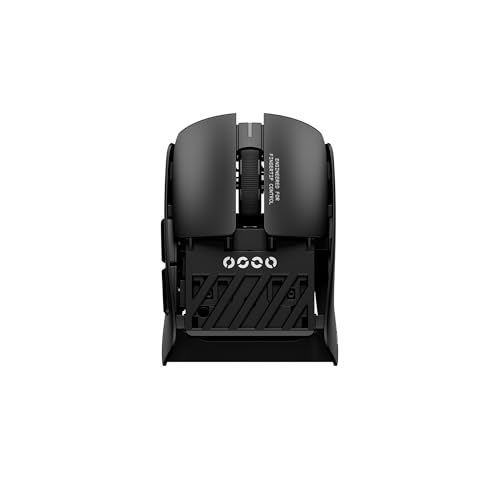
Pulsar Gaming Gears Pulsar Lab X2F Wireless Gaming Mouse, Mini, Black

V8 Gaming Mouse, Ultra-Lightweight 36g±3g, Symmetrical Shape
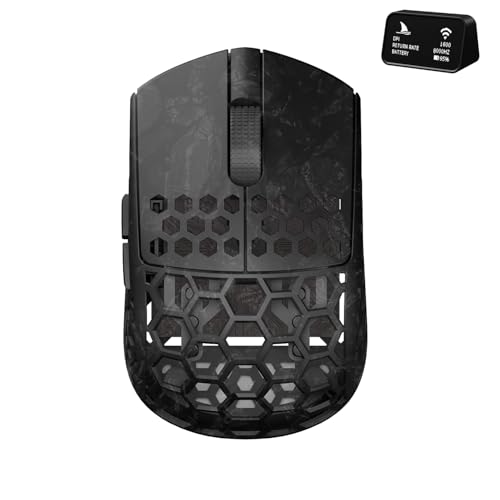
Darmoshark M5Air Mini Fingertip Grasp Gaming Mouse Carbon Fiber
More Details On Our Top Picks
The MK955 fits a desk that needs one wireless setup for work and a little home-use flexibility. Quiet typing and quiet clicking help in shared spaces, and multi-device switching matters when you move between a laptop, desktop, and tablet without wanting another dongle tangle.
Compared with the gaming-focused mice farther down the list, this combo is about calm, not speed. You may find the larger-hand fit more comfortable for all-day office use, though the full keyboard-plus-mouse bundle takes more room than a standalone fingertip mouse.
Strong Points
- Quiet key and click feel suits shared offices and late-night work.
- Switching across three devices makes mixed-device days smoother.
- The combo approach reduces clutter on a small desk.
- Multi-OS support helps you move between Windows and Mac without fuss.
Things To Consider
- It takes more desk space than a standalone mouse.
- The larger-hand angle may feel less snug for very small hands.
- A combo set is harder to pack for travel than a single mouse.
Core Details
Who It Suits Best
Desk workers who want a quiet, tidy setup with easy device switching will get the most from this combo.
Where Another Pick Suits Better
The Pulsar Gaming Gears X2 Crazylight Wireless Gaming Mouse, Mini, PRX Edition is a better fit for fingertip-focused gaming and a much lighter feel.
This one is built for players who care about click response as much as sensor feel. Magnetic analog switches, rapid-trigger behavior, and adjustable haptics point straight at competitive play, and the 61 g body keeps the mouse from feeling bulky during quick lifts.
On a desk, it makes more sense for a focused gaming setup than for plain office tasks. The trade-off is simple enough: you get a highly tuned shell, but you give up the easygoing, do-everything feel of the MK955 combo.
Highlights
- Rapid-trigger switch design suits fast click timing.
- Adjustable haptics let you tune how the clicks feel.
- 61 g weight helps quick repositioning during play.
- USB-C charging is convenient for modern gaming setups.
- The PC and Mac pairing broadens desktop compatibility.
Room For Improvement
- The tuning focus makes it less casual than a standard office mouse.
- Competitive features matter most to dedicated players, not everyone.
- Lightweight shells can feel less substantial to some hands.
Feature Snapshot
Who Will Love This
Competitive PC players who want switch tuning and a lighter shell will get the most value from this model.
Look Elsewhere When
The Keychron M5 8K Vertical Ergonomic Mouse is the better fit for workdays that put comfort ahead of rapid click tuning.
The X2 Crazylight Mini keeps the shell tiny and the mass very low, which is exactly what fingertip grip fans tend to want. Its symmetrical shape, flat sides, and back-moderate hump create a familiar hand position for quick aim changes, especially in fast desktop games.
Compared with the Logitech G PRO X2 SUPERSTRIKE, this Pulsar is less about click tuning and more about reducing drag from the mouse itself. The honest read is that very small mice are a snug fit, so large-hand users may want a different shape altogether.
Positives
- 36 g weight keeps cursor movement feeling almost weightless.
- Mini sizing helps fingertip and claw control stay crisp.
- Symmetrical layout works well for ambidextrous positioning preferences.
- 32K DPI support gives you plenty of sensitivity headroom.
- 8K support suits setups that value very high reporting speed.
Softer Spots
- The mini shell may feel too compact for broader hands.
- Very light mice can take a short adjustment period.
Technical Sheet
Perfect Match For
Fingertip and claw players who want a very small, very light wireless shell will appreciate this shape most.
Another Choice May Suit
The Darmoshark M5Air Mini Fingertip Grasp Gaming Mouse Carbon Fiber suits you better if you want carbon fiber styling and a tri-mode connection mix.
The M5 takes a different path from the low-slung fingertip shapes above, because its vertical form changes how your hand rests on the shell. That angle can feel more natural during long document work or mixed laptop use, and the three connection modes make it easy to move between desktop, wireless, and wired setups.
Its 5 DPI levels and programmable buttons add flexibility, though this shape is less about fast flick aim and more about a relaxed grip posture. In most workspaces, that trade-off is fine, but pure gaming hands may still prefer the lighter Pulsar or SCYROX options.
Upsides
- Vertical design changes the wrist angle in a meaningful way.
- 2.4 GHz, Bluetooth 5.3, and wired modes cover many setups.
- Rechargeable design keeps charging simple.
- Programmable buttons add shortcuts for work tasks.
- Five DPI levels give you easy sensitivity changes.
Points To Note
- Vertical mice need a short adjustment period for many hands.
- It is less suited to pure fingertip gaming than flatter shells.
- The shape takes more desk discipline than a compact mini mouse.
Details At A Glance
The Right Fit
Desk users who want a vertical hold and flexible connection options will get the most from this Keychron model.
Swap It Out When
The Pulsar Gaming Gears X2 Crazylight Wireless Gaming Mouse, Mini, PRX Edition fits better for fingertip-heavy gaming and a lower, quicker shell.
The Q9 is a simple, low-drama mouse for shared desks, light office work, and casual home use. Four DPI steps from 800 to 4800 let you keep pointer speed in a comfortable range, and the ultra-quiet click feel makes it easier to use in a living room or a quiet office corner.
Compared with the Keychron M5, this one stays more traditional and less posture-focused. The transparent look and RGB lighting add personality, though the practical upside still comes down to its easy wireless pairing across PC, laptop, Mac, and tablet use.
Best Bits
- Ultra-quiet clicking suits shared rooms.
- Four DPI settings make everyday adjustment easy.
- Bluetooth support broadens device compatibility.
- The 500 mAh battery gives the mouse a practical everyday power reserve.
- RGB lighting and clear styling add a little visual flair.
Small Caveats
- The light-duty focus is better for office tasks than intense gaming.
- Transparent shells show fingerprints and dust more readily.
- RGB styling may matter less to minimal desk setups.
Core Details
Whose Shelf It Belongs On
Shoppers who want a low-noise everyday mouse with Bluetooth support and simple DPI control will find this one easy to live with.
Reach For A Different Pick When
The Logitech G PRO X2 SUPERSTRIKE Wireless Gaming Mouse is the better call for fast click response and a more competition-leaning setup.
The X2F sits close to the fingertip sweet spot: tiny body, low mass, and a center hump that helps the shell disappear in the hand. That shape is useful for players who want the mouse to feel quick without forcing an extreme grip, and the HUANO switch mention hints at a click feel aimed at gaming use.
Compared with the X2 Crazylight Mini, this model is a touch heavier on paper and uses a different hump profile, so the hand feel will not be identical. You may prefer it more for fingertip control than for broad palm contact, because the whole design stays narrow and deliberate.
What We Like
- 38 g weight keeps it very easy to lift and reposition.
- Mini format works well for fingertip-focused grip styles.
- Center hump can feel natural during quick mouse movements.
- 32K DPI gives you high sensitivity room.
- 8K support keeps it in the fast-response category.
Worth Noting
- Very small mice are less comfortable for larger hands.
- The narrow shell asks for a committed fingertip grip.
Feature Rundown
Best Suited To
Fingertip players who want a tiny wireless shell with a low-friction feel will get the most from this model.
Where A Sibling Pick Shines
The Keychron M5 8K Vertical Ergonomic Mouse is the more comfortable route for long work sessions that favor posture over speed.
The V8 leans hard into the enthusiast side of fingertip mice. Kailh optical switches, a Nordic 52840 MCU, a PAW 3950 sensor chip, and a web-based driver suggest a mouse built for people who like to tune details rather than just plug in and forget it.
In use, that matters most for claw and fingertip gamers who want a very light shell with deeper control over settings. The catch is that all that tuning only helps when you actually care about it, so simple desk work may not use half of what this model can do.
Reasons To Buy
- About 36 g keeps the mouse fast and easy to lift.
- Symmetrical shape suits claw and fingertip posture.
- Optical switches are a strong fit for rapid gaming input.
- The web-based driver makes configuration more flexible.
- 8K dongle support fits high-refresh gaming setups.
Areas To Watch
- The tuning depth matters most for people who enjoy customization.
- Lightweight shells can feel less planted than heavier mice.
- Web-based setup may feel less direct than a simple app for some users.
Core Details
Who Should Grab It
Claw and fingertip gamers who want a very light, deeply tunable shell should feel right at home here.
Skip It When
The Pulsar Gaming Gears X2 Crazylight Wireless Gaming Mouse, Mini, PRX Edition makes more sense for someone who wants a simpler lightweight shape without as many tuning details.
The M5Air Mini brings the kind of shape fingertip users usually ask for, a small body, very low mass, and a carbon fiber build note that gives it a more premium feel on paper. Tri-mode support means you can move between connection styles, and the 8K/Bluetooth combo broadens how you might use it across laptop and desktop setups.
It feels like a direct rival to the Pulsar mini models, but with a stronger emphasis on material styling and connection flexibility. The trade-off is that very small mice always ask for a hand that likes compact control, so this is less forgiving than a fuller everyday mouse like the MK955 or the Q9.
Positives
- 31 g weight keeps the mouse extremely easy to move.
- Mini fingertip shape suits precision-focused play.
- Tri-mode support gives you flexible connection options.
- PAW3950 sensor support pairs well with high-sensitivity use.
- Five programmable buttons add useful control for games or shortcuts.
Minor Gripes
- Very compact mice are not comfortable for every hand size.
- The light shell may feel too small for relaxed office use.
- Carbon fiber styling matters more to some setups than others.
Feature Card
Built With In Mind
Fingertip grip users who want a tiny, very light gaming mouse with flexible connectivity will be the best match here.
A Better Fit Elsewhere
The Q9 Wireless Mouse, 2.4G/BT Clear Mouse with RGB Lighting (Silver) suits you better for a calmer office mouse with quieter clicks and a less aggressive gaming focus.
How To Choose The Right Fingertip Mouses
Shape And Size Matter First
Fingertip mice live or die by shell size. A mini body like the Pulsar X2 Crazylight or Darmoshark M5Air Mini helps you move mainly from the fingers, while a fuller shape can start to feel slow or awkward.
Symmetry also matters because it keeps the hand position predictable. Flat sides and a modest hump usually suit fingertip grip better than deep palm arches, especially during quick aim changes or repeated cursor lifts.
Weight Changes How The Mouse Moves
Low weight reduces the effort needed for stops and starts. A 31 g to 38 g shell feels very different from a work mouse like the MK955 combo, and that difference shows up in fast games or long sessions with many tiny movements.
Very light mice can feel lively, almost like a pen gliding across a page. That’s great for control-heavy play, though some people prefer a bit more body in hand so the mouse feels planted instead of airy.
Switch Feel And Sensor Specs Have A Job
Click switches shape the feedback you get from every press. Magnetic analog switches, optical switches, or quieter everyday switches all serve different habits, from rapid-fire gaming to late-night work in a shared space.
Sensor figures matter too, but only after the shape feels right. High DPI and 8K support help in capable gaming setups, yet a comfortable grip and sensible button placement usually affect your day more than a bigger number on the box.
Connection Options Should Match Your Routine
Bluetooth, 2.4 GHz wireless, and wired support each have a place. Bluetooth is handy for laptops and tablets, 2.4 GHz usually suits gaming or steadier desktop use, and wired mode can make sense for a desk that stays put.
The right mix depends on your routine. A commuting laptop user may care more about easy pairing, while a home gamer often values the steadier feel of a dedicated wireless dongle and a lighter shell.
Things Worth Knowing First
Common Shopping Slip Ups
Many people focus on DPI and ignore hand shape. That mistake leads to mice that look fast on paper but feel cramped in daily use, especially with fingertip grips that need a narrow, supportive shell.
Another common miss is buying a tiny mouse for a larger hand without checking the hump and side profile. Cleaning also matters, because clear shells, glossy finishes, and small crevices tend to show dust and fingerprints more quickly.
What The Higher Tier Buys
Higher-tier fingertip mice usually pay for lighter shells, better sensors, more careful switch tuning, and deeper software control. You also see more specialized shapes, like the X2F center hump or the V8’s web-based configuration, which give you finer control over how the mouse behaves.
The upgrade makes sense when you spend real time gaming, editing, or doing precision work. For casual browsing or basic office tasks, a simpler mouse like the Q9 often covers enough ground without asking for the extra spend or setup effort.
Final Thoughts
Your best fingertip mouse depends less on marketing flair and more on how the shell fits your hand and your day. The Pulsar and Darmoshark mini models make the strongest case for fast fingertip control, while the Keychron M5 and Logitech MK955 shift toward comfort and everyday use. Pick the one that matches your grip, your desk habits, and how much tuning you actually want to manage, and you’ll land much closer to the right feel from the start.
