
Choosing the right flight stick changes the feel of every sortie, whether you’re easing through short hops in a civ sim or juggling extra controls in a combat setup. Some models keep things simple and desk-friendly, while others add throttle units, more buttons, and a heavier base that feels steadier in long sessions. This roundup helps you sort the feature sets without getting lost in the jargon.
Quick Shortlist For A Cleaner Desk Setup

Thrustmaster TCA Sidestick Airbus Edition Flight Sim Joystick PC

PXN 2113PRO PC Joystick USB Gaming Flight Simulator Controller

Thrustmaster TCA Captain Pack X Airbus Sidestick & Throttle XBOX PC

Logitech G Saitek X52 Pro Flight Control System Black/Silver
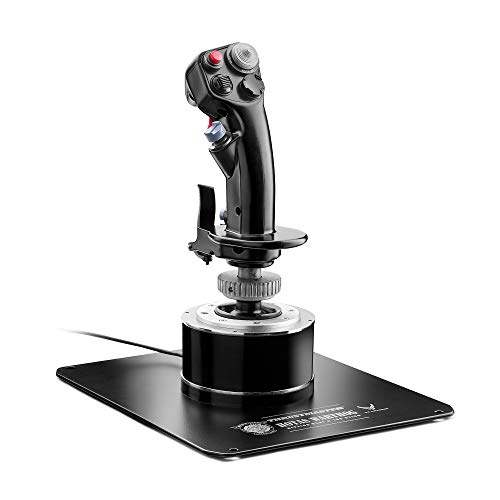
Thrustmaster HOTAS Warthog A-10C Replica Metal Flight Stick PC

PXN-2119Pro Flight simulator controls Flight Stick with Vibration

Thrustmaster Sol-R1 Hall-Effect Space Combat Flight Sim Joystick PC

Thrustmaster T-Flight Stick X USB Ergonomic Flight Sim Joystick PC
More Details On Our Top Picks
Airbus-style controls make this stick feel purpose-built for civil flying, and that matters more than it sounds like on paper. The built-in throttle and thrust reverser keep your left hand close to the action, so short-haul hops and approach work stay tidy without a desk full of extras.
The magnetic sensor design is the quiet strength here, since hall-effect sensing uses contactless positioning to help avoid wear from rubbing parts. That should appeal to sim pilots who want a clean, compact setup, although the Airbus layout is more specialized than a generic stick for mixed-game use.
Highlights
- A320-inspired grip suits Airbus-style procedures.
- Built-in throttle keeps the desk neater.
- Thrust reverser adds useful landing control.
- Seventeen mapped inputs cover common cockpit tasks.
- Contactless sensing is a smart fit for repeated use.
Things To Consider
- The Airbus focus is less flexible for unrelated game genres.
- The integrated layout leaves less room for a separate throttle upgrade.
- Desk placement matters, since the stick is meant to sit in a fixed position.
Feature Snapshot
Who It Suits Best
Civil flight sim fans who want an Airbus-flavored cockpit feel will get the most from this one.
Where A Sibling Pick Shines
Thrustmaster T-Flight Stick X USB Ergonomic Flight Sim Joystick PC suits beginners who want a simpler, more general-purpose layout.
Starter setups often need something straightforward, and this PXN model keeps the feature set easy to understand. The throttle and vibration support make it more engaging than a barebones stick, especially for casual flight sessions on a Windows PC.
That extra motion feedback can help with immersion, though it also adds another layer of preference, since not every sim pilot wants vibration in the hand. The honest read is that this fits best as a low-commitment first step rather than a long-term cockpit centerpiece.
Upsides
- USB connection keeps setup simple on a PC desk.
- Throttle control adds more than a basic arcade-style stick.
- Vibration can make lighter flying sessions feel less flat.
- Compact control set is easy to learn quickly.
Areas To Watch
- The feature set is lean compared with the Thrustmaster and Logitech options.
- Vibration may not suit every flying style.
- It looks best in a casual setup, not a heavily expanded cockpit.
Core Details
Built With In Mind
First-time sim setups and casual PC fliers are the natural fit here.
Look Elsewhere When
Thrustmaster HOTAS Warthog A-10C Replica Metal Flight Stick PC suits you better when you want a heavier, more committed desk setup.
This pack pushes farther than the single-sticked Airbus option because it adds the matching throttle quadrant. For Microsoft Flight Simulator style flying, that combination makes cockpit flow smoother, with the extra quadrant controls handling more of the routine work from one spot.
You also get a strong map-friendly layout, and that matters when a session starts to feel busy in taxi, climb, and descent. The trade-off is obvious: the wider footprint asks for more room, so a crowded desk will notice it fast.
Bright Spots
- Stick and throttle together create a fuller cockpit setup.
- Airbus-style design keeps the controls familiar for civil flying.
- Four axes and many mapped inputs reduce keyboard dependence.
- Twist rudder support helps you steer without separate pedals.
- Good fit for multi-step cockpit workflows.
Small Caveats
- The larger layout takes more desk space than the Sidestick alone.
- The more complete setup can be overkill for simple arcade flying.
Details At A Glance
Right Fit For
You get the most from this pack when you want a more complete Airbus-style desk for Microsoft Flight Simulator sessions.
Another Choice May Suit
Thrustmaster TCA Sidestick Airbus Edition Flight Sim Joystick PC is the cleaner match for you when desk space matters more than extra quadrant controls.
The X52 Pro sits in a middle lane that suits a lot of PC sim desks, especially when you want a flight control system rather than a plain stick. The black and silver finish looks restrained, and the layout has enough going on to stay useful without feeling packed wall to wall with switches.
Compared with the more Airbus-specific Thrustmaster picks, this one is easier to think of as a general sim companion. That makes it appealing for mixed flying habits, though the lack of listed specialized aircraft branding means it feels less exacting than the Warthog or Captain Pack.
Reasons To Buy
- Full control system gives you more than a basic joystick.
- Neutral styling fits a wide range of desk setups.
- Well balanced for users who split time across different sim types.
- Good middle ground between simple sticks and heavy cockpit rigs.
Worth Noting
- It does not lean as clearly toward one aircraft family as the Airbus-focused picks.
- The more involved layout may feel like extra learning for absolute beginners.
- Finish and desk care matter, since visible surfaces tend to show wear over time.
Technical Sheet
Whose Shelf It Belongs On
This fits PC sim fans who want a middle-of-the-road control system without moving straight into a heavyweight cockpit replica.
Swap It Out When
PXN 2113PRO PC Joystick USB Gaming Flight Simulator Controller works better for you when a simpler starter stick makes more sense than a full system.
The Warthog feels aimed at serious desk setups, and the all-metal handle plus weighted base explain why. In a busy sim session, that heavier footprint can keep the stick planted, which is reassuring when you make sharp inputs during combat flying or long climbs.
The hall-effect sensor system matters because it relies on magnetic measurement instead of physical contact, a setup that tends to stay smooth over time. You also get a dense control layout, so this is the sort of stick that rewards people who want a lot of commands under their fingers rather than a light, casual feel.
Standout Traits
- All-metal construction gives the stick a solid, substantial feel.
- Weighted base helps it stay put on a desk.
- Hall-effect sensing supports precise input handling.
- Detachable grip adds flexibility in how you arrange the setup.
- Nineteen buttons and multiple hats cut down on keyboard reach.
- The A-10C layout suits combat-focused sim routines.
Points To Note
- The weight and metal build are less travel-friendly than lighter sticks.
- It can feel like more hardware than you need for relaxed flying.
- Advanced layout means more setup time and more things to keep organized.
Core Details
Made For
Serious sim pilots and combat-focused setups get the most out of this heavy, control-rich stick.
Another Choice May Suit
Thrustmaster T-Flight Stick X USB Ergonomic Flight Sim Joystick PC is the better fit when you want a lighter and simpler starting point.
This PXN stick is all about straightforward compatibility on Windows 7, 8, and 10, which gives it a clear lane for older or simpler PC setups. The vibration support adds some tactile feedback, but the real appeal is that it stays focused on the basics instead of trying to become a full cockpit on its own.
For home desks that need a no-drama stick, that kind of focus can be the right trade. The main limitation is just as clear, since the listing leaves out Mac and several console platforms, so the fit depends heavily on what your machine actually runs.
Best Bits
- Windows support covers a broad set of older PCs.
- Vibration adds a little more feedback during play.
- Simple control style keeps the learning curve modest.
- Good choice for a basic desk without extra hardware.
Minor Gripes
- Platform limits rule out several non-Windows setups.
- It stays on the simple side compared with the more control-heavy picks.
- More advanced sim fans may outgrow it quickly.
Feature Rundown
The Right Fit
You fit this one best when you want a basic Windows stick for casual sim use on an older or simpler PC.
Reach For A Different Pick When
Thrustmaster TCA Captain Pack X Airbus Sidestick & Throttle XBOX PC makes more sense when you want a fuller stick-and-throttle setup.
The Sol-R1 is clearly built for people who want more mapped actions than a simple stick can offer. With 44 programmable buttons, a central throttle, and a ministick, it’s closer to a command station than a basic joystick, which helps in space combat or deep cockpit workflows.
The detachable ambidextrous grip is a thoughtful touch for left-handed or right-handed desks, and the backlit design makes the layout easier to read in dim rooms. That said, all those controls only help when you’re willing to spend the time mapping them properly, so it rewards organized setups more than casual fly-bys.
Plus Points
- Forty-four programmable actions give you serious mapping room.
- Ambidextrous grip supports left- and right-handed use.
- Central throttle and ministick suit complex control demands.
- Backlit design helps in darker gaming spaces.
- Hall-effect sensing is a good match for repeat use.
Trade Offs
- The control count can take time to learn.
- It makes more sense in a committed sim corner than in a shared family desk.
Core Details
Who Should Grab It
Space sim and combat sim fans who want deep control mapping and a left-or-right-hand friendly layout are the best match here.
Skip It When
Thrustmaster T-Flight Stick X USB Ergonomic Flight Sim Joystick PC is the easier route when you want fewer controls and a quicker setup.
For a lot of PC sim desks, this is the least intimidating place to start. Plug-and-play setup, adjustable resistance, twist rudder control, and a detachable throttle create a simple path into flight sims without asking you to assemble a larger cockpit right away.
The weighted base helps the stick sit more firmly, which matters more than it sounds during quick corrections. Compared with the X52 Pro and Warthog, this one is lighter on extras and easier to live with, though experienced sim pilots may outgrow its 12-button layout sooner.
Strong Points
- Plug-and-play setup makes first use easy.
- Adjustable resistance lets the stick feel more to your liking.
- Twist rudder and detachable throttle cover the basics well.
- Weighted base helps reduce desk wobble.
- Simple layout is friendly for casual flying sessions.
Room For Improvement
- It offers fewer buttons than the more advanced picks above it.
- Experienced sim fans may want more mapping space later.
- Cleaning around the base and throttle area takes a little regular attention on a busy desk.
At A Glance
Best Suited To
Beginner and casual sim setups that need a simple, dependable starting point belong here.
A Better Fit Elsewhere
Logitech G Saitek X52 Pro Flight Control System Black/Silver suits you better when you want a step up in overall control layout.
How To Choose The Right Flight Joysticks For Pc
Match The Stick To Your Sim Style
Civil sim flying and combat flying ask for different things. Airbus-style controls like the Thrustmaster TCA Sidestick or Captain Pack suit you when you want procedural consistency, while the Warthog and Sol-R1 lean harder into dense input mapping and faster command access.
A simpler stick makes more sense for shorter sessions or mixed game use. A more specialized layout pays off when you keep flying the same aircraft family or the same combat style again and again.
Look Closely At Control Count And Layout
Buttons, hats, triggers, twist rudder, and throttle placement shape how often you reach for the keyboard. A higher count, like the Sol-R1’s 44 programmable actions or the Warthog’s 19 buttons and multiple hats, suits complex cockpit work, while 12-button or 17-button designs stay easier to learn.
More controls help most once your hands know where everything lives. The trade-off is learning time, and that can feel like too much on a first desk setup.
Think About Desk Space And Physical Feel
Weight and footprint matter more than many shoppers expect. A heavy base, like the Warthog’s, keeps the stick planted during forceful inputs, while integrated throttle designs reduce clutter but ask for a dedicated space on the desk.
Lighter sticks are easier to move and store, which helps in shared rooms or smaller setups. Heavier systems feel steadier, but they also ask for more commitment in how you arrange your workspace.
Check Compatibility Before You Commit
Platform support should be clear before you lock in a pick. Some models are aimed at Windows PCs, while the Thrustmaster TCA Captain Pack X also covers Xbox and PC, and the PXN-2119Pro listing narrows support more tightly than the others.
That detail matters in a real home setup because the wrong platform match turns a good control set into a frustrating one. Stick with the model that fits your machine first, then choose the control style second.
What To Weigh Before You Commit
Common Shopping Slip Ups
Plenty of setups go wrong because the stick is picked for looks instead of control layout. A cockpit-style replica sounds appealing, but it can feel clumsy on a small desk or in a mixed-use room.
Another common miss is overlooking platform support. A Windows-only stick is fine for a PC sim rig, but it won’t help much in a setup that needs broader compatibility.
What The Higher Tier Buys
More expensive flight sticks usually spend that money on material quality, sensor type, and control density. Metal handles, weighted bases, hall-effect sensors, and fuller throttle units all add to the feel and the parts count.
That upgrade makes sense when your sim time is regular and your desk stays dedicated. For occasional flying, a simpler model often leaves you happier because it asks for less room, less setup, and less upkeep.
Final Thoughts
The best flight joystick for your PC depends on how you fly, not just how much hardware sits on the desk. The Thrustmaster picks reward civil sim fans who want a cockpit feel, the Warthog suits a heavier combat setup, and the T-Flight Stick X keeps things approachable. Match the stick to your sim habit and your workspace will feel a lot less fussy.
