
Some desk setups want more than a plain black mouse. The eight picks below lean into clear shells, RGB lighting, OLED readouts, macro buttons, tri-mode links, and other features that fit gaming rigs, travel bags, home offices, and mixed-use workstations. You get a practical spread here, from simple plug-and-play models to more feature-heavy options that suit heavier clicking and finer control. The right choice usually comes down to how much style, speed, and device switching you actually use.
Quick Look At Our Top Picks

LOFREE Touch PBT Wireless Mouse

memzuoix 2.4G Aesthetic Wireless Mouse

SMAIGE Gaming Mouse Wired 6 Buttons
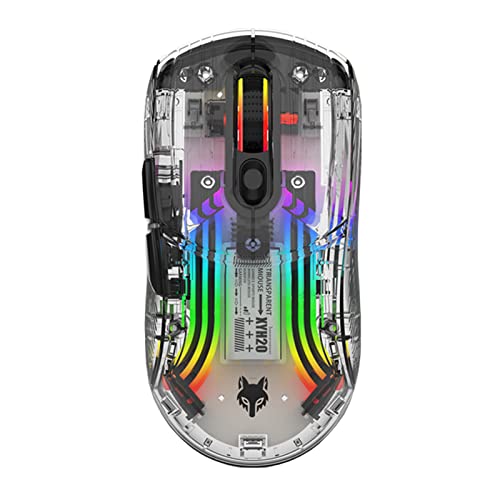
Attoe Bluetooth Wireless Mouse

SEUNKWANG Wireless Clear Mouse Dual Mode

EWEADN G5 Wired Gaming Mouse

Aula SC620 Wireless Gaming Mouse

FMOUSE Wireless Mouse Gaming Tri-Mode
More Details On Our Top Picks
The LOFREE Touch leans into a cleaner, more design-forward desk feel than the rest of the list. Its PBT shell, the durable plastic often chosen for a firmer hand feel, sits alongside USB receiver, Bluetooth, and wired connection support, so you can keep it moving between a laptop, a Mac, or a desktop without much fuss.
The OLED screen gives you a quick status read that feels handy on a busy workday, and 4000 DPI adds enough pointer range for general work and lighter creative tasks. Glass-surface compatibility is a useful detail for glass desks, though battery habits and the screen itself add a little complexity compared with simpler plug-and-play picks like the SMAIGE model.
Strong Points
- OLED screen adds a clean status read.
- Three connection paths suit mixed device setups.
- PBT construction should wear well over time.
- Glass-surface support helps on modern desks.
- 4000 DPI gives a comfortable middle ground for daily pointer use.
Things To Consider
- The feature set asks for a little more attention than basic office mice.
- OLED and rechargeable use add another item to keep charged.
- The design focus may feel unnecessary for plain document work.
Feature Snapshot
Who It Suits Best
You get the most from this one in a modern home office or hybrid setup where style, multi-device use, and a display readout all matter.
A Better Fit Elsewhere
The SMAIGE Gaming Mouse Wired 6 Buttons suits you better for a no-nonsense, wired setup that stays simple during long office or game sessions.
The memzuoix mouse goes hard on personality, which is exactly why it stands apart from the calmer LOFREE unit. Customizable covers and LED mood lighting make it feel more like a desk accessory than a plain utility tool, while the rechargeable build and five-button layout keep it practical for office tasks.
Its 1200 DPI rating suits basic navigation, web work, and steady pointer movement more than fast gaming. That trade-off is honest, and for people who spend most of the day in documents, email, and browser tabs, the softer speed can feel perfectly fine.
What We Like
- Custom covers help the mouse feel personal.
- LED lighting adds a visible style cue without changing the shape.
- Five-button layout covers common shortcuts well.
- Rechargeable design avoids disposable batteries.
Room For Improvement
- 1200 DPI keeps it in the basic-control lane.
- The style-first approach may feel busy on a plain office desk.
- Custom covers can add a little extra upkeep.
Core Details
Made For
You’re the best match for this one if your workspace leans playful and you spend most of your time on light office tasks, not fast-paced gaming.
Where A Sibling Pick Shines
The Attoe Bluetooth Wireless Mouse is a better fit for you if you want a more dramatic transparent shell and dual-mode connectivity with a stronger gaming look.
The SMAIGE wired mouse keeps the formula simple, and that’s a strength for first-time gaming setups or spare desktop stations. Four DPI steps from 1000 to 3200 let you tune sensitivity without software, and the seven-color breathing light adds a bit of theater without turning the desk into a light show.
Because it uses a USB connection with no driver install, it fits right into older PCs, laptops, and even some TV setups that accept USB peripherals. The honest trade-off is that it’s more about convenience than refinement, so you may feel the wired format more than you would on the wireless picks above.
Upsides
- Plug-and-play setup keeps things straightforward.
- Four DPI steps cover casual gaming and office tasks.
- The ergonomic shape should feel familiar in long sessions.
- USB 2.0 and 3.0 support widen compatibility.
Minor Gripes
- The wired layout limits desk freedom.
- Lighting may matter less for plain work use.
- 3200 DPI is useful, though not especially high by gaming standards.
At A Glance
Right Fit For
You’ll like this most if you want a starter gaming mouse that stays simple, plugs in fast, and still looks energetic on a shared desk.
Skip It When
The SEUNKWANG Wireless Clear Mouse Dual Mode makes more sense for you if you want a cordless layout and a softer, more portable feel.
The Attoe mouse is the most openly showy pick in the group, thanks to its transparent shell and RGB treatment. That style pairs with a dual-mode wireless setup, so you get a cleaner desk without giving up flexibility across short- and mid-distance use.
The 15-meter working distance is generous for a living room desk or a cluttered office, though your mileage naturally depends on the space and interference around it. Compared with the memzuoix mouse, this one feels more performance-minded and less decorative, even though both lean into visual flair.
Reasons To Buy
- Transparent housing creates a striking desk look.
- Dual-mode wireless support adds flexibility.
- RGB lighting can be tuned or switched off.
- Ergonomic shaping helps during longer sessions.
Areas To Watch
- The lighting-forward design will not suit every setup.
- Wireless performance depends on the environment around your desk.
- Clear shells usually show dust and fingerprints more readily.
Details At A Glance
Whose Shelf It Belongs On
This suits you best if you want a vivid, transparent mouse for gaming corners, creative desks, or any setup where looks matter as much as function.
Look Elsewhere When
The LOFREE Touch PBT Wireless Mouse fits better for you if you want a cleaner office feel with an OLED screen and glass-surface support.
The SEUNKWANG mouse sits in a sweet spot between style and portability, especially for someone who carries a laptop between rooms or works in shared spaces. Dual-mode Bluetooth and 2.4G support make it easy to hop between devices, and the compact shape should tuck into a bag without asking for much room.
The 4800 DPI ceiling gives it more headroom than the memzuoix unit, so you get a little extra responsiveness without jumping into a full gaming monster. It still feels closer to an everyday travel mouse than a heavy-duty play mouse, and that restraint is part of its appeal.
Bright Spots
- Compact shape suits smaller bags and tight desks.
- Two connection modes add everyday flexibility.
- 4800 DPI gives a useful speed range.
- RGB lighting adds style without needing a large shell.
Softer Spots
- The small footprint may feel less filling in larger hands.
- Clear styling can show smudges more easily.
- It leans more travel-friendly than gaming-heavy.
Quick Facts
Best Suited To
You’ll appreciate this most if you split time between a laptop, a café table, and a home desk, and you want one mouse to handle all three.
Another Choice May Suit
The FMOUSE Wireless Mouse Gaming Tri-Mode makes more sense for you if you want a lighter 65g shell and wired, wireless, and Bluetooth flexibility in one pick.
The EWEADN G5 is the most button-heavy pick here, and that makes it feel built for people who want more control under their fingertips. Nine macro buttons, a rapid fire key, and programmable input support give you more ways to map repeated actions, which is useful in action-heavy games or repetitive desktop work.
The adjustable tail and aluminum base add a more tuned, substantial feel than the lighter travel-first options in this roundup. That extra structure can be nice at a stationary PC, though it also means this isn’t the mouse you’d toss casually into a tiny pouch and forget about.
Best Bits
- Nine macro buttons support dense control layouts.
- Programmable input fits custom gaming or productivity setups.
- Aluminum base adds a sturdier feel.
- 12800 DPI gives plenty of top-end sensitivity.
- Rapid fire key suits action-focused play.
Small Caveats
- The feature depth adds setup complexity.
- The heavier construction may not suit travel use.
- Lots of buttons can take time to memorize.
Feature Rundown
The Right Fit
You should gravitate to this one if your desk stays put and you want a wired mouse with serious button mapping for games or intricate workflows.
Swap It Out When
The Aula SC620 Wireless Gaming Mouse is a better match for you if you want similar control depth but prefer wireless freedom and USB-C charging support.
The Aula SC620 brings together tri-mode connectivity, a 12000 DPI ceiling, and macro support in a way that feels aimed at people who juggle more than one device. USB-C, 2.4GHz, and Bluetooth 5.3 cover a wide spread of setups, so it slots naturally into a laptop bag, a desktop station, or a mixed home office.
Compared with the EWEADN G5, this one gives up the aluminum base and extra wired certainty, but it gains wireless flexibility and a cleaner daily routine. For many setups, that trade feels sensible, especially when you want one mouse to move between work and play without constant cable handling.
Positives
- Three connection modes make device switching easier.
- USB-C support keeps charging straightforward.
- 12000 DPI leaves room for fast pointer work.
- Macro support helps with repeat tasks.
- RGB lighting adds a familiar gaming accent.
Worth Noting
- Feature depth can take a little setup time.
- The performance focus may be more than casual office work needs.
Spec Overview
Built With In Mind
This is a strong match for you if your desk setup changes often and you want a wireless gaming mouse that can also handle everyday laptop work.
Where A Sibling Pick Shines
The FMOUSE Wireless Mouse Gaming Tri-Mode suits you better if you want a lighter body and a more office-friendly mix of wired and wireless use.
The FMOUSE option feels like the most flexible all-rounder in the group, especially for people who split time between office work and light gaming. Tri-mode support, 4800 DPI, and charge-while-using capability make it easy to keep in rotation without a lot of downtime, and the 65g weight keeps it feeling nimble in hand.
The hollow RGB shell gives it a sharper visual identity than plain office mice, but it still reads more practical than theatrical. Compared with the Aula SC620, it trades some top-end control depth for a lighter body and a straightforward mixed-use rhythm, which may suit you better on a busy desk.
Highlights
- Tri-mode support covers cable and wireless needs.
- Charge-while-using behavior reduces interruption.
- 65g weight helps it feel quick and easy to move.
- 4800 DPI is a solid middle ground for mixed use.
- Custom macro programming adds useful flexibility.
Points To Note
- The hollow shell design may not suit every style preference.
- It leans more versatile than deeply specialized.
- RGB styling can show dust more clearly on a white-gray finish.
Core Details
Who Should Grab It
You’re a good match for this mouse if you want one device that can handle a work laptop, a home PC, and occasional gaming without feeling overly specialized.
Reach For A Different Pick When
The LOFREE Touch PBT Wireless Mouse suits you better if you want a more premium-feeling shell and an OLED screen for a cleaner desktop presentation.
How To Choose The Right Futuristic Computer Mouses
Connection Style Shapes Daily Use
Wireless models keep the desk cleaner, while wired picks remove charging anxiety and usually feel more direct on a fixed setup. Tri-mode mice, such as the Aula SC620 and FMOUSE, help you move between laptop, desktop, and tablet-style routines without swapping hardware.
Bluetooth helps with modern laptops and tablets, and a 2.4G receiver usually feels more immediate for desktop work. For a commute bag or a café desk, lighter connection habits often matter more than raw specs.
DPI Is About Pointer Pace, Not Hype
DPI means dots per inch, a rough measure of how far the pointer moves for a given hand motion. Lower numbers like 1200 DPI suit calm office navigation, while 4000, 4800, 12000, and 12800 DPI give more range for gaming, large monitors, or faster cursor travel.
Higher numbers sound exciting, but they do not suit every hand. People doing spreadsheets or web work often prefer steady control, while gamers usually want more room to tune sensitivity.
Shape, Weight, And Surface Fit Matter More Than Flash
Clear shells, RGB lighting, and OLED screens create the futuristic look, but shape and grip decide whether the mouse feels easy after two hours. A 65g shell like the FMOUSE tends to move quickly, while an aluminum-base design like the EWEADN G5 can feel more planted.
Surface support matters too. The LOFREE model works on glass, which helps on modern desks, while more traditional mice may feel better on a mat or standard work surface.
Buttons And Extra Controls Reward Specific Use Cases
Macro buttons, rapid fire keys, and programmable inputs matter most when you repeat the same actions often. That makes the EWEADN G5 and Aula SC620 more useful for gaming or shortcut-heavy workflows than the simpler memzuoix mouse.
More controls also mean more setup time. You gain flexibility, but you also take on a little learning and maintenance, so the extra hardware only pays off for people who will actually use it.
A Quick Reality Check
Mistakes Worth Dodging
Plenty of people chase lighting first and forget about grip shape, connection type, or weight. That usually leads to a mouse that looks great in a photo but feels awkward during a full workday.
Another common slip is choosing far more DPI and button complexity than your tasks need. A simple office setup often does better with a calmer mouse than with a feature-packed gaming shell.
The Upgrade Payoff
Higher-tier models usually cost more because of added connection modes, extra buttons, better materials, or specialty features like OLED status screens. Those parts of the build make sense for people who swap devices often or use the mouse for both play and work.
You get the most value from that spend when the added control saves time every day. For a spare desktop or occasional browsing machine, a simpler mouse often keeps the experience cleaner.
Final Thoughts
The best futuristic mouse for your setup depends on whether you want style, control, portability, or a little of all four. LOFREE and Attoe bring the strongest visual identity, while the Aula SC620 and EWEADN G5 lean harder into gaming control. For a simpler desk, the SMAIGE or memzuoix options stay approachable. Pick the one that fits your habits, not just your eye.
