
You need a Gaming Computer I9 that matches your space, display, and daily habits, not just a fast processor on a spec sheet. A desktop can deliver stronger expansion and cooling, while a laptop helps you move between rooms, dorms, and travel bags. You’ll also find compact workstations here, though their integrated graphics suit productivity more than demanding modern games. This shortlist covers high-end desktops, portable gaming, large storage, and practical entry points so you can choose with fewer surprises.
The Shortlist At A Glance
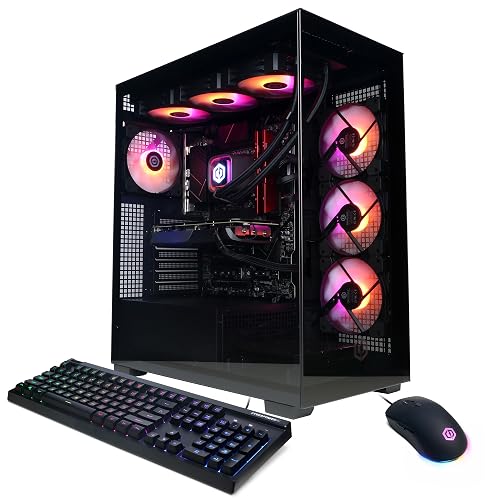
CYBERPOWERPC Gamer Xtreme VR Gaming PC i9-14900KF RTX 4070 Super
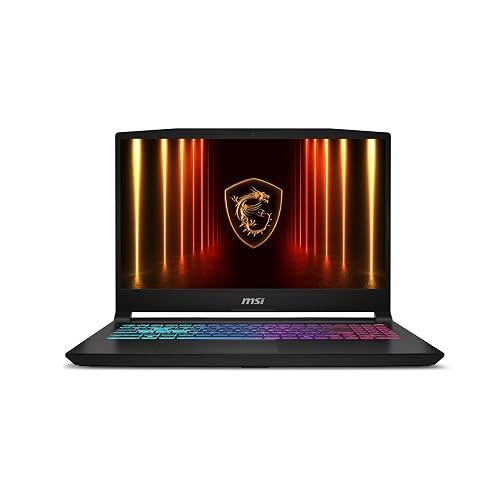
msi Katana 15 HX Gaming Laptop i9-14900HX RTX 5070

CyberPowerPC Gamer Xtreme VR PC i9-14900KF RTX 5070
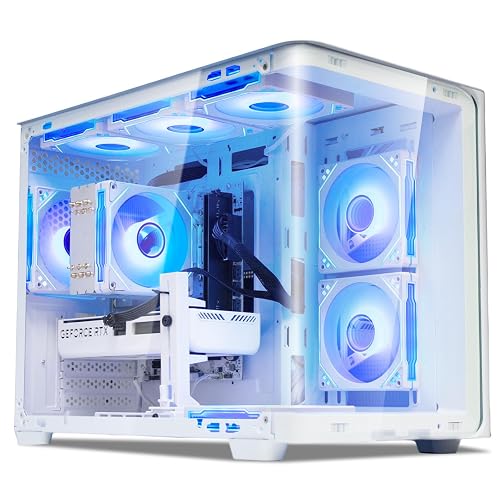
suevery Prebuilt Gaming PC Core I9 RTX 5060TI 8G
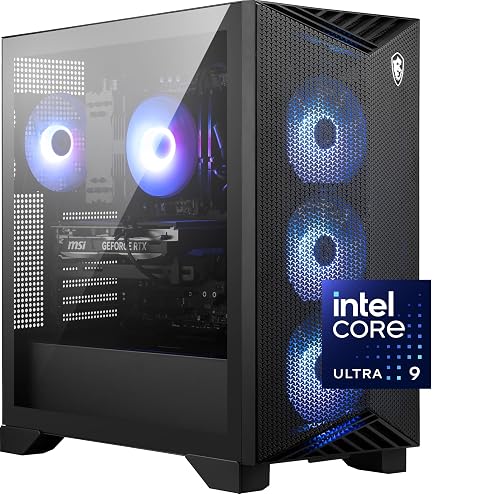
msi Aegis R2 AI Gaming Desktop Ultra 9 285 RTX 5070Ti
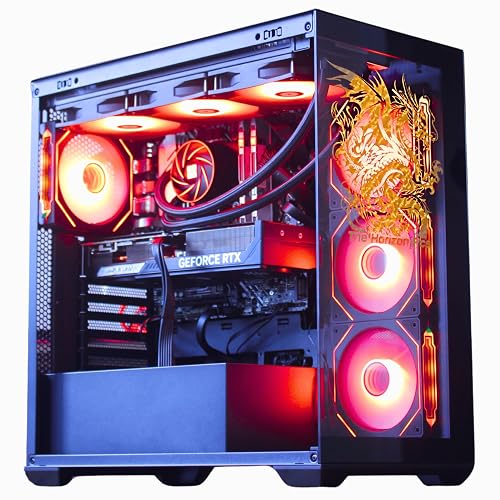
The Horizon Autherium Dragon RGB I9 RTX Gaming PC 64GB 5TB
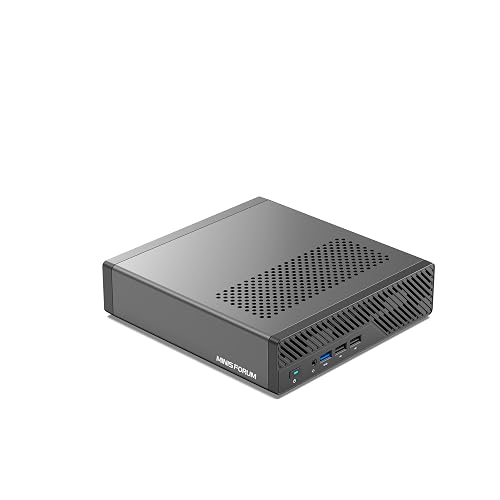
MINISFORUM MS-01 Mini Workstation i9-13900H 32GB 1TB SSD
More Details On Our Top Picks
For a home setup built around a high-refresh monitor, this CyberPowerPC gives you a capable starting point without forcing you to assemble every part yourself. The Core i9-14900KF supplies 24 cores, while 32GB of DDR5 memory, a newer high-speed memory type, leaves room for games, voice chat, browsers, and creative software together.
The RTX 4070 Super has 12GB of graphics memory, and the 2TB PCIe Gen4 solid-state drive gives your library useful breathing room. You may find the tower less convenient than the MSI Katana 15 HX during a commute, but Wi-Fi readiness and Windows 11 Home keep the first setup approachable.
Strong Points
- 24-core Core i9 processor suits gaming alongside demanding background tasks.
- 32GB DDR5 helps reduce pressure during multitasking.
- 2TB PCIe Gen4 SSD provides quick storage with generous capacity.
- RTX 4070 Super graphics with 12GB memory fit detailed desktop gaming.
- Desktop parts generally offer easier future access than a laptop chassis.
Things To Consider
- The desktop needs a dedicated workspace, monitor, keyboard, and mouse.
- Case dust can build around fans over time, so regular cleaning belongs in your ownership routine.
Key Specs
Who It Suits Best
You’ll get the most from this tower as a home gamer who wants strong multitasking and plentiful fast storage without building a system from separate components.
Consider Something Else When
Choose the msi Katana 15 HX Gaming Laptop i9-14900HX RTX 5070 instead for portable gaming between dorms, offices, or frequent trips.
A 15.6-inch QHD+ screen, meaning a resolution above standard 1440p-class QHD, gives the Katana 15 HX a sharper presentation than a typical full-HD gaming laptop. Its 165Hz refresh rate can make fast camera movement look smoother, which suits competitive sessions at a desk or a gaming café.
The Core i9-14900HX and RTX 5070 create a strong portable pairing, while 32GB DDR5 handles game launchers, streaming tools, and browser tabs with less fuss. The honest trade-off is the 1TB NVMe SSD, which fills sooner than the 2TB desktop drives here, and laptop heat management deserves clear desk space during long sessions.
What We Like
- QHD+ resolution keeps fine interface details and game environments crisp.
- 165Hz refresh rate favors quick movement and responsive-feeling play.
- 32GB DDR5 suits gaming plus streaming and everyday multitasking.
Trade Offs
- 1TB storage gives you less room than the larger desktop configurations.
- Portable gaming laptops need clear ventilation and routine dust care around their intake areas.
- Carrying the system, charger, and accessories adds more weight than a fixed desktop setup.
At A Glance
Made For
This laptop fits students, commuters, and apartment dwellers who need high-end gaming power without reserving a permanent desk.
Not Your Match When
Pick the msi Aegis R2 AI Gaming Desktop Ultra 9 285 RTX 5070Ti for a fixed setup with a desktop chassis and 2TB SSD.
Compared with Item 1, this Gamer Xtreme keeps the same Core i9-14900KF and 32GB DDR5 foundation but moves to an RTX 5070 with 12GB of graphics memory. That difference matters most on a desktop paired with a high-resolution monitor, where newer graphics hardware can better suit demanding game settings.
You also get a 2TB PCIe 4.0 NVMe SSD, liquid CPU cooling, a tempered side panel, custom RGB lighting, and included keyboard and mouse. Seven-point-one-channel audio and Wi-Fi 5 broaden the setup, though Wi-Fi 5 is an older wireless standard than newer connectivity generations, so a wired LAN connection may suit a busy household better.
Highlights
- RTX 5070 graphics with 12GB memory target modern high-detail gaming.
- Liquid CPU cooling can help manage heat from the high-core-count processor.
- Video output includes HDMI and three DisplayPort connections for multi-monitor layouts.
- USB-C, USB-A, LAN, Wi-Fi, and Bluetooth cover varied desk accessories.
- Keyboard and mouse reduce the number of setup parts you need separately.
- One-year parts and labor coverage plus ongoing technical support add setup assistance.
Room For Improvement
- Wi-Fi 5 may feel less suitable than a wired connection in congested wireless spaces.
- Liquid cooling brings more components to monitor than a basic air-cooled tower.
Technical Sheet
Right Fit For
You’ll appreciate this tower as a serious desktop gamer who wants RTX 5070 graphics, multiple display outputs, and included peripherals in one package.
A Better Fit Elsewhere
Choose the CYBERPOWERPC Gamer Xtreme VR Gaming PC i9-14900KF RTX 4070 Super for a more straightforward desktop configuration with the same memory and larger SSD class.
The suevery configuration takes a different approach from CyberPowerPC’s 32GB systems. You get the Core i9-14900HX with 24 cores and 32 threads, plus an RTX 5060 Ti with 8GB of graphics memory, so the processor is ambitious while the graphics card places this tower closer to a practical mainstream gaming setup.
That balance can work well for a first desktop, especially with a 1TB NVMe SSD and a bundled tower format. You may find 16GB DDR5 adequate for games and ordinary tasks, but heavy streaming, editing, or large browser workloads leave less breathing room than the 32GB and 64GB choices elsewhere.
Upsides
- 24-core, 32-thread processor supports demanding multitasking.
- NVMe SSD technology helps games and Windows load promptly.
- Desktop form makes the setup more approachable than assembling separate components.
Worth Noting
- 16GB memory gives you less multitasking headroom than most picks here.
- RTX 5060 Ti 8GB is a more restrained graphics choice than the RTX 5070 and RTX 5070 Ti towers.
- Check internal access and cooling clearance before planning future upgrades.
Quick Facts
Best Suited To
This desktop suits a first-time PC gamer who wants a Core i9 platform and a ready-made tower for everyday gaming.
Where A Sibling Pick Shines
The Horizon Autherium Dragon RGB I9 RTX Gaming PC 64GB 5TB suits you more when large projects, many applications, and extensive storage matter as much as gaming.
MSI’s Aegis R2 moves beyond the older Core i9 naming used by several desktops here, pairing the Core Ultra 9 285 with an RTX 5070 Ti. That newer platform makes sense for you when current-generation processing and graphics matter more than the lower initial complexity of a basic tower.
Air cooling keeps the design more familiar than CyberPowerPC’s liquid-cooled Gamer Xtreme, and the 32GB DDR5 plus 2TB M.2 NVMe SSD gives you a comfortable gaming and application base. The catch is straightforward: air-cooled layouts depend on clean airflow, so leave room around the case and keep dust from collecting in the intake path.
Bright Spots
- Core Ultra 9 285 provides a newer processor platform for demanding use.
- RTX 5070 Ti targets high-detail gaming on a strong desktop display.
- 32GB DDR5 supports games, streaming, editing, and everyday software together.
- 2TB M.2 NVMe SSD offers quick storage access and useful capacity.
- USB Type-C adds a modern connection for compatible accessories.
Points To Note
- Air cooling can require more attention to case airflow and dust removal than a sealed liquid loop.
- The source lists Windows 11 Home, so business-focused users may need a different software edition.
Feature Snapshot
Who Will Love This
This desktop fits experienced gamers who want a newer Core Ultra platform, RTX 5070 Ti graphics, and room for a substantial installed library.
Swap It Out When
Choose the msi Katana 15 HX Gaming Laptop i9-14900HX RTX 5070 for gaming in multiple locations rather than at one permanent desk.
Large local storage changes the way you manage a gaming and creative workstation. The Horizon combines 64GB of RAM with 5TB total storage, including a 1TB M.2 NVMe SSD for speed and a 4TB 7200RPM hard drive for files that don’t need solid-state access every second.
The RTX 5070 OC is factory overclocked, meaning its graphics settings are tuned above a standard reference profile, and the system adds a 360mm all-in-one liquid cooler. That hardware suits you for video projects, large game libraries, and heavy multitasking, though the bigger cooling system and two-drive arrangement demand careful case access and more maintenance awareness than Item 4.
Reasons To Buy
- 64GB memory gives demanding creative applications substantial working room.
- 5TB combined storage reduces the need for immediate external drives.
- 1TB NVMe SSD prioritizes speed for the operating system and active software.
- 4TB 7200RPM hard drive suits archives, recordings, and less frequently used files.
- RTX 5070 OC graphics and a 360mm cooler suit ambitious desktop workloads.
Small Caveats
- Hard-drive storage is generally slower than the included NVMe drive, so place active games and applications on the SSD.
- A 360mm liquid cooler needs sufficient case clearance and occasional inspection of the cooling hardware.
- Windows 11 Pro adds business-oriented controls that may be unnecessary for a simple home gaming desk.
Details At A Glance
Built With In Mind
This tower is aimed at creators, streamers, and power users who keep large files nearby and run several demanding applications beside their games.
Reach For A Different Pick When
The suevery Prebuilt Gaming PC Core I9 RTX 5060TI 8G is a better fit for a simpler first desktop with lighter memory and storage needs.
The MINISFORUM MS-01 is the outlier here: a small workstation rather than a conventional gaming tower. Its Core i9-13900H and 32GB DDR5 make sense for coding, virtual machines, media work, and office multitasking, while the compact chassis can sit behind a monitor or on a shallow desk.
Connectivity is its defining strength, with two 10Gbps SFP+ ports, two 2.5G RJ45 ports, two USB4 connections, HDMI, and a PCIe 4.0 x16 slot. You may find the integrated graphics less suitable for demanding modern games than every RTX-equipped item above, so this pick works best for network-heavy productivity with lighter gaming expectations.
Plus Points
- Compact format suits small desks, labs, and office workstations.
- Two 10Gbps SFP+ ports support demanding wired network setups.
- Two 2.5G RJ45 ports add flexible Ethernet connectivity.
- Two USB4 ports support compatible high-bandwidth accessories.
- Support for three M.2 drive formats gives storage expansion options.
Areas To Watch
- The source does not specify a dedicated RTX graphics card, so demanding gaming is not its natural role.
- 1TB SSD capacity is modest beside the 2TB and 5TB desktop options.
- Small systems can make internal maintenance and component access more involved.
- Its workstation focus may leave you needing a separate graphics solution for advanced game rendering.
Core Details
Whose Shelf It Belongs On
This mini workstation suits developers, network enthusiasts, and office users who value compact hardware and extensive connectivity above dedicated gaming graphics.
Another Choice May Suit
The CyberPowerPC Gamer Xtreme VR PC i9-14900KF RTX 5070 is the stronger match for you when modern AAA gaming and dedicated graphics are central.
How To Choose The Right Gaming Computer I9
Start With The Graphics Card
The processor matters for game logic, background applications, and high frame rates, but the graphics card usually carries the largest share of visual rendering. An RTX 4070 Super, RTX 5070, RTX 5070 Ti, and RTX 5060 Ti sit at different performance tiers, so match the card to your monitor rather than choosing by processor name alone.
A 1080p high-refresh display places different demands on your system than a QHD+ panel. Competitive players often value a fast refresh rate, while cinematic single-player games benefit from stronger graphics hardware and more graphics memory.
Match Memory And Storage To Your Habits
Your game library, recording folder, and creative apps can fill a 1TB SSD sooner than expected. A 2TB drive gives you more room, while the Horizon system’s 5TB combination separates quick active storage from a large archive.
For ordinary gaming, 16GB RAM can serve as a starting point. You’ll appreciate 32GB for streaming, browsers, and multitasking, while 64GB makes more sense for video editing, large projects, or virtual machines.
Choose Desktop Or Laptop Around Your Routine
A desktop gives you a permanent setup, broader cooling options, and easier access to peripherals. That suits a dedicated room or office, especially with the CyberPowerPC and MSI towers.
A laptop trades some upgrade convenience for mobility. The MSI Katana 15 HX brings its display and keyboard with you, which helps in dorms, shared homes, and regular travel.
Don’t Ignore Connectivity And Cooling
Count the ports you need before settling on a chassis. Multiple DisplayPort outputs help with multi-monitor work, USB-C supports newer accessories, and the MINISFORUM’s 10Gbps SFP+ ports target specialized network setups.
Cooling also affects ownership. Air-cooled systems need clear intake and exhaust paths, while liquid-cooled systems add pumps, radiators, and tubing to the maintenance picture. Leave room around the case and plan periodic dust removal.
Things Worth Knowing First
Mistakes Worth Dodging
A common mistake is pairing a powerful Core i9 processor with a display that can’t show the benefit. Match the graphics card and monitor resolution first, then consider refresh rate, storage, and memory.
You can also overlook the difference between a desktop and a laptop configuration. A tower needs a monitor and peripherals, while a laptop already includes a screen and keyboard but gives you less internal access.
Where The Extra Money Goes
Higher-tier systems generally allocate more toward graphics hardware, memory, storage, cooling, or newer processor platforms. Those upgrades matter most during demanding games, content creation, high-resolution play, and multitasking.
You may not need the Horizon’s 64GB and 5TB layout for casual gaming. Spending up makes more sense when your workload regularly fills storage, uses large project files, or keeps many applications open.
Final Verdict
You can choose the CYBERPOWERPC Gamer Xtreme VR PC i9-14900KF RTX 5070 for a strong desktop gaming base, the MSI Katana for portable QHD+ play, or the MSI Aegis R2 for newer platform hardware. The Horizon suits demanding storage and memory needs, while the MINISFORUM makes sense for compact networked work rather than graphics-heavy games. Start with your display, desk, and software habits, then choose the configuration that supports those priorities without paying for hardware you won’t use.
