
Long desk sessions ask a lot from your wrist, forearm, and patience, especially when you split time between gaming and regular work. These vertical and vertical-adjacent picks cover fast MMO button layouts, thumb-trackball control, quiet office-friendly clicks, and multi-device setups that suit a crowded desk.
Some are better for competitive play, others make more sense for daily spreadsheets, schoolwork, or a laptop you move around the house. You’ll find clear trade-offs in shape, wireless mode support, DPI range, and button count, so you can match the mouse to how you actually sit and work.
The Shortlist At A Glance

Redragon M811 Wired RGB MMO Gaming Mouse 10000 DPI Remapping Keys
DELUX Seeker Ergonomic Mouse Wireless, Vertical Mouse with OLED Screen

Nulea Wireless Trackball Mouse Ergonomic 21.7 Tilt Stand Thumb Control

Razer Pro Click V2 Vertical Wireless Mouse, 6 Button Ergonomic Design

Uineer Ergonomic Wireless Vertical Mouse, 3-Mode Bluetooth 5.0/4.0 & 2.4GHz
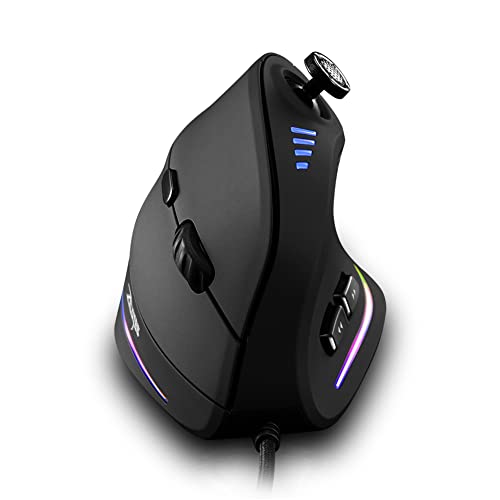
zelotes Wired Gaming Mouse with Joystick, 10000DPI, 11 Programmable Buttons
Keychron M5 8K Vertical Ergonomic Mouse Wireless, 2.4 GHz/Bluetooth 5.3/Wired

Gaming Mouse with 5 D Rocker, Wireless Vertical Mouse with 24000 DPI
More Details On Our Top Picks
The M811 leans hard into hotkey-heavy play, which makes sense for MMO sessions and broad desktop control alike. Fifteen programmable buttons, including a 2 plus 8 side-button layout, give you plenty of room for abilities, macros, or app shortcuts, and the wired connection avoids battery chatter during long evenings.
The five DPI steps start at 500, 1000, 2000, 3000, and 6200, with software support for a wider range up to 12400. That range helps you slow things down for precise cursor work or speed things up for frantic play, though the button-dense shell will feel busier than a simpler vertical mouse like the DELUX Seeker.
Strong Points
- Fifteen programmable buttons suit games that reward layered inputs.
- Five onboard DPI levels make switching speeds straightforward.
- Wired operation keeps the desk setup simple.
- The hand-shaped body suits long sessions better than a flat shell.
- Macro-heavy work, not just gaming, gets room to breathe.
Things To Consider
- The button count can feel crowded at first.
- The shape is more MMO-focused than office-minimal.
- Wired use keeps cable management part of the setup.
Feature Rundown
Who It Suits Best
You’ll get the most from this mouse if your evenings revolve around MMOs, crowded skill bars, or frequent remapping.
Another Choice May Suit
Keychron M5 8K Vertical Ergonomic Mouse Wireless, 2.4 GHz/Bluetooth 5.3/Wired is a better match for you if you want a more premium vertical shape with broader connection options.
The Seeker feels built for someone who wants a vertical mouse to do more than sit quietly on the desk. Its OLED screen gives you a quick visual readout, while the thumb wheel and six-button layout make it useful for scrolling-heavy work, creative apps, or a long day of browser tabs.
Connection support spans Bluetooth, 2.4G, and wired use, so you can keep one mouse on a desktop and still move it to a laptop without fuss. Silent clicks are a nice touch in shared spaces, though the more feature-rich shell can feel busier than the simpler Uineer when you just want a light daily driver.
What We Like
- OLED screen adds at-a-glance status feedback.
- Thumb wheel helps with horizontal or vertical scrolling tasks.
- Three connection modes suit mixed desk and travel use.
- Silent clicks fit shared offices and late-night sessions.
- Rechargeable design avoids constant battery swapping.
Room For Improvement
- The extra features add some setup complexity.
- The shape may feel tall at first for flat-mouse users.
- RGB lighting is more about style than necessity.
Core Details
Made For
You’ll like this best for a desk setup that mixes office work, browser-heavy multitasking, and occasional gaming.
Skip It When
Redragon M811 Wired RGB MMO Gaming Mouse 10000 DPI Remapping Keys suits you better when your main goal is a dense grid of programmable game controls.
Trackballs change the feel of desk work in a very real way, and this Nulea leans into that idea with thumb control and a 21.7-degree tilt stand. Your hand stays put while the ball does the movement, which can be a relief on tight desks, in studio corners, or beside a laptop stand.
Four DPI levels and support for Bluetooth, 2.4G, and three-device switching make it more adaptable than a pure single-device pointer. The trade-off is familiar trackball upkeep, since the ball area needs occasional cleaning, but that same desk-saving design is exactly why some people never go back.
Best Bits
- Thumb-operated control reduces hand travel across the desk.
- 21.7-degree tilt gives the hand a more natural angle.
- Three-device switching helps you move between setups.
- Rechargeable power keeps the design tidy.
- Four DPI levels offer sensible pointer tuning.
Worth Noting
- Trackball use usually asks for a short adjustment period.
- The ball cavity benefits from regular dust cleanup.
- Fast flick-style gaming feels different here than on a standard mouse.
Details At A Glance
The Right Fit
You’ll appreciate this most in compact workspaces, shared desks, or a laptop-first routine where desk movement is limited.
Where A Sibling Pick Shines
Uineer Ergonomic Wireless Vertical Mouse, 3-Mode Bluetooth 5.0/4.0 & 2.4GHz is a better match for you if you want a more familiar vertical mouse shape with less adjustment.
This one is aimed at people who want a vertical mouse that still feels polished on a work desk. Six buttons keep the layout restrained, and the mix of 2.4GHz, Bluetooth, and USB-C wired use makes it easy to move between a laptop, desktop, or dock without changing habits.
The One Click AI Prompt feature and Chroma RGB push it toward a more modern, feature-forward feel, which may appeal to hybrid users more than pure office minimalists. Compared with the DELUX Seeker, it looks less experimental and more like a premium all-rounder, though that also means you’ll pay for extras you may not use every day.
Positives
- Three connection paths support flexible desk setups.
- USB-C wired mode keeps it usable while charging or docked.
- Six-button layout stays tidy for daily work.
- Vertical shape suits longer sessions better than a flat mouse.
- Windows and Mac support broadens its appeal.
Small Caveats
- Feature extras may be more than basic office users need.
- RGB styling adds visual flair, not utility.
- The premium feel makes it a more deliberate choice.
Feature Snapshot
Built With In Mind
You’ll get the most from this mouse if your desk mixes productivity, creative work, and a bit of after-hours play.
Another Choice May Suit
Uineer Ergonomic Wireless Vertical Mouse, 3-Mode Bluetooth 5.0/4.0 & 2.4GHz is the simpler path for you if you want fewer extras and a lighter daily carry.
The Uineer keeps things straightforward, which is a relief in a category that can get crowded with extras. Three connection modes, a USB-A receiver, and support for laptop, Mac, iPad, and PC use make it easy to move from one device to another without much setup drama.
Silent clicks help in shared spaces, and the rechargeable design is handy for daily desk work. Four DPI levels and LED lighting round it out, though you won’t get the deeper button customization or feature-heavy feel of the Razer Pro Click V2.
Upsides
- Three connection modes give you flexible pairing options.
- Works across laptop, tablet, and desktop setups.
- Silent clicking suits offices and late-night work.
- Rechargeable power keeps the routine simple.
- Four DPI levels cover basic speed tuning.
Softer Spots
- The feature set stays basic beside the more advanced picks.
- LED lighting is mostly cosmetic.
- Three-device switching is useful, but not deeply adjustable.
Core Details
Whose Shelf It Belongs On
You’ll like this most as a simple vertical mouse for everyday computing, especially around roommates, office desks, or schoolwork.
Look Elsewhere When
zelotes Wired Gaming Mouse with Joystick, 10000DPI, 11 Programmable Buttons is the stronger match for you if custom inputs matter more than quiet simplicity.
The joystick on this mouse is the headline feature, and it changes the way you think about side input. By default it maps to W, A, S, D, and spacebar, so it can serve movement-heavy games or specialized control setups without relying only on the main buttons.
Eleven programmable buttons, 5-level DPI adjustment from 1500 to 10000, and a PMW3325 optical chip give it a more game-first profile than the more office-leaning Uineer. The vertical shape helps with wrist posture, though the joystick and extra controls make it more of a specialist tool than a casual desktop mouse.
Bright Spots
- Thumb joystick adds a control style you rarely see here.
- Eleven programmable buttons support deep remapping.
- Five DPI steps make speed changes easy.
- The vertical body suits longer gaming or work sessions.
- Wired connection keeps input simple and direct.
Points To Note
- The joystick changes the learning curve.
- Button-rich layouts need a little setup time.
- The shape is geared more toward function than subtle styling.
Technical Sheet
Best Suited To
You’ll appreciate this most if your setup leans toward games, simulations, or custom command mapping.
Where A Sibling Pick Shines
Razer Pro Click V2 Vertical Wireless Mouse, 6 Button Ergonomic Design is a smoother fit for you if you want a cleaner vertical mouse with fewer learning steps.
The Keychron M5 sits in the part of the field that feels purpose-built for someone who wants more control without giving up a vertical grip. Its 8K framing, 2.4 GHz, Bluetooth 5.3, and wired support point to a more flexible desktop life, especially for people who bounce between laptop work and a fixed gaming setup.
Five DPI levels reaching up to 30K make it the most adjustable pointer here on paper, and that extra headroom matters for fine cursor moves or fast in-game turns. Compared with the Redragon M811, it trades the MMO button wall for broader connection choice and a more modern ergonomic profile.
Highlights
- Very wide DPI ceiling for fine tuning.
- Three connection paths suit mixed workspaces.
- Vertical design keeps the wrist angle more relaxed.
- Rechargeable build fits a cleaner desk setup.
- Programmable buttons add useful customization.
Areas To Watch
- The higher-spec build makes this a more deliberate choice.
- Power users may need time to settle on settings.
- The premium feature mix is more than casual users require.
Core Details
Who Will Love This
You’ll get the most from this mouse if you want a premium-feeling vertical option for both office time and gaming.
Swap It Out When
zelotes Wired Gaming Mouse with Joystick, 10000DPI, 11 Programmable Buttons is the stronger call for you if extra game controls matter more than wireless flexibility.
The Attoe mouse mixes a 5D rocker with a vertical wireless body, so you get a control set that feels aimed at fast-moving input rather than plain scrolling. Twelve programmable buttons and a 24000 DPI ceiling give it a stronger spec sheet than most of the simpler picks here, which makes it a reasonable fit for game-heavy desks.
That said, the design asks more from you than the Uineer or Nulea, because extra controls always bring more setup and a little more learning. The honest read is that this makes the most sense for users who want a lot of input options in one shell and do not mind spending time arranging them.
Reasons To Buy
- Five-direction rocker adds a distinctive control layer.
- Twelve programmable buttons expand shortcut options.
- 24000 DPI ceiling leaves plenty of tuning room.
- Wireless design keeps the desk cleaner.
- The vertical body helps reduce the flat-mouse feel.
Honest Caveats
- The extra inputs may take time to memorize.
- It feels more specialized than a simple daily mouse.
- More setup usually means more maintenance of your button map.
Feature Card
Perfect Match For
You’ll like this most if your gaming setup benefits from lots of custom inputs in one mouse.
Reach For A Different Pick When
Keychron M5 8K Vertical Ergonomic Mouse Wireless, 2.4 GHz/Bluetooth 5.3/Wired is a better fit for you if a more polished vertical shape matters more than extra control layers.
How To Choose The Right Gaming Vertical Mouses
Shape First, Then Button Load
Vertical mice change wrist angle, while trackballs change how you move the cursor altogether. That difference matters more than branding because a palm-friendly shell can feel great in long sessions, but a thumb cluster or trackball can slow you down until muscle memory catches up.
Button count needs the same attention. MMO-heavy layouts like the Redragon M811 and zelotes wired model help once you’ve assigned macros, while simpler six-button designs suit mixed work and light gaming without turning the mouse into a control panel.
Connection Style Affects Daily Use
Wired mice keep input simple and remove battery planning from the picture, which suits fixed desks and long evening sessions. Wireless models matter more for laptop users, shared spaces, or setups that shift between rooms, and multi-mode options are handy when you use both Bluetooth and a dongle.
That’s also where compatibility becomes practical instead of abstract. A mouse that supports Windows, Mac, laptop, iPad, or three-device switching can save desk space and make one pointer do more jobs, though the trade-off is usually a busier setup menu.
DPI Numbers Need Context
DPI, or dots per inch, describes pointer sensitivity, but the raw number only helps when you tie it to your screen size and habits. Higher ranges like 24K or 30K matter most for people who want very fine tuning, while midrange steps often make daily navigation easier to control.
For gaming, the useful question is not “highest number wins,” it’s whether the mouse gives you enough steps to match different games or work tasks. A broad range helps, but clean step changes and comfortable shape usually matter more than a huge headline figure.
Think About The Desk You Actually Use
A wide desk with a full keyboard gives you room for a larger ergonomic shell or a wired MMO mouse. A cramped apartment desk or a laptop stand setup usually benefits more from a compact vertical mouse or a trackball that keeps movement local.
Cleaning and upkeep matter too. Buttons, thumb wheels, and trackball housings gather dust over time, so a design with fewer openings can be easier to live with, even when the spec sheet looks less exciting.
Things Worth Knowing First
Where Shoppers Go Wrong
One common mistake is chasing the highest DPI number and ignoring shape. A mouse that feels awkward in your hand will bother you faster than one with a smaller spec sheet, especially during work sessions that run longer than a match.
Another slip-up is buying a control-heavy gaming mouse for a desk that only needs everyday navigation. The Redragon M811 and zelotes model make sense for macro lovers, but a simpler choice like the Uineer is easier to live with for office use.
Where The Extra Money Goes
Higher-tier models usually pay for more flexible connection modes, richer button programming, better sensor tuning, and more refined materials or shaping. That matters most when you move between devices, use the mouse for both play and work, or want more control without a clunky feel.
For lighter use, the upgrade may not matter much. Once your setup includes long hours, multiple devices, or very specific input habits, the extra cost starts to make sense because the mouse feels less like a tool you tolerate and more like one that disappears into the routine.
Closing Thoughts
Your best match depends on how you use your desk, not just how many buttons the box promises. For MMO-heavy play, the Redragon M811 and zelotes wired mouse bring the most control, while the Keychron M5 and Razer Pro Click V2 feel more polished for mixed work and gaming. If you want something simpler, the Uineer and Nulea keep the learning curve lower. Choose the shape that fits your hand and your habits, and the rest gets easier.
