
Half rack server cabinets make sense when your gear has outgrown a shelf but a full-size enclosure would swallow the room. You get better cable control, cleaner airflow paths, and a setup that looks intentional instead of improvised. That matters in a home lab, a small office, or a studio corner where every inch counts.
The eight picks below cover open-frame mobility, wall-mount enclosures, and heavier enclosed racks. You’ll see clear differences in depth, load handling, door style, and cooling layout, so you can match the cabinet to your gear instead of forcing the gear to fit the cabinet.
Quick Look At The Shortlist

AxcessAbles 12U Network Rack with Wheels, 18″ Depth

Tecmojo 6U Wall Mount Server Cabinet Black
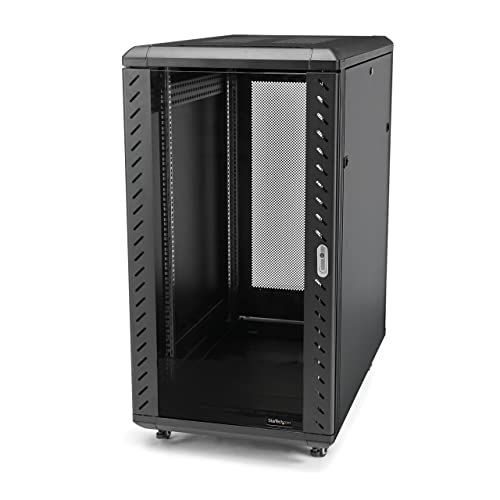
StarTech 22U 4-Post Server Cabinet RK2236BKF

StarTech.com 12U Wall Mount Server Cabinet

Sysracks 12U Wall Mount Server Rack Cabinet 24″ Deep

Tecmojo 12U Wall Mount Rack Cabinet Elite Collection

Tecmojo 12U Wall Mount Server Cabinet 17.7inch Depth

StarTech 18U 4-Post Server Cabinet RK1833BKM
More Details On Our Top Picks
An open-frame rack like this makes sense for a studio corner or a small server area where you need access without fuss. The 19-inch mounting format covers common audio, video, and network gear, and the 18-inch depth keeps the footprint fairly trim. The 1.5 mm steel frame and 3-inch lockable casters point to a setup that can move without feeling flimsy.
The honest read is that open sides leave gear exposed, so dust control and cable tidiness matter more here than on the enclosed cabinets below. For a DJ rig, patch-panel wall, or compact lab bench, that trade-off can be worth it because you can roll the rack into place and reach the back fast.
Strong Points
- 550-pound load rating gives you room for heavier mixed gear.
- Rolling casters help you reposition the rack without dragging it.
- Open access makes cable swaps and hardware changes less awkward.
- 18-inch depth fits tighter rooms better than deeper cabinet styles.
Things To Consider
- Open sides leave gear more exposed to dust and accidental bumps.
- Heavy loads still need careful balancing, especially on movable setups.
- Cleaning around the frame takes a little more attention than with enclosed cabinets.
Feature Snapshot
Who It Suits Best
You get the most from this rack in a studio, garage lab, or small AV setup where mobility matters more than enclosure.
A Better Fit Elsewhere
StarTech 18U 4-Post Server Cabinet RK1833BKM suits you better when you want an enclosed cabinet with a more finished look and less open exposure.
This 6U cabinet leans small, which is exactly why it works for modest network closets, a few AV components, or a router-and-patch-panel stack. The wall-mount format keeps floor space clear, and the glass front with side panels gives you a cleaner, more contained look than an open rack. A cooling fan is included, so you’re not left building the whole airflow setup from scratch.
Six rack units is not much, so the fit is best for a focused setup rather than a gear pile. You may find it especially handy in an apartment office or service nook where a floor cabinet would feel oversized, but the shallow size means planning cable bends matters.
Highlights
- Wall mounting keeps the cabinet off the floor and out of the way.
- Front door and side panels help the setup look tidy.
- Included fan supports basic airflow planning for compact gear stacks.
- 6U size suits small, controlled equipment groups.
Small Caveats
- The 6U format fills quickly once you add switches and accessories.
- Wall installation needs careful placement and secure anchoring.
- Shallower enclosures can make rear cable access tighter than open-frame racks.
Core Details
Who Should Grab It
You’re the best fit for this cabinet when you need a compact wall enclosure for a small number of 19-inch devices.
Skip It When
AXA AXCESSABLES 12U Network Rack with Wheels, 18″ Depth works better for anyone who needs more room, rolling mobility, and an open layout for frequent changes.
This is the sort of cabinet that belongs in a serious equipment room, not squeezed into a casual corner. The 22U height, 33-inch depth, and lockable vented doors give you the enclosure depth and front protection that dense server stacks usually ask for. Adjustable depth from 5.7 to 33 inches also helps you line up mixed hardware without improvising too much.
Compared with the smaller wall-mount picks, this one is built for weight, clearance, and cleaner organization across a larger stack. The trade-off is space, plain and simple, so you need room for both the cabinet itself and the airflow and service access around it.
Upsides
- High weight capacity supports substantial server and network loads.
- Adjustable depth gives you more flexibility with different gear sizes.
- Lockable vented doors help keep the front controlled while still allowing airflow.
- Casters and feet add placement flexibility for heavier installations.
- Four-post layout helps support equipment more evenly than lighter frames.
Areas To Watch
- The cabinet needs meaningful floor space and planning room.
- Large depth can feel excessive for modest home-lab stacks.
- Moving it is easier than lifting it, but still not casual work.
Details At A Glance
Built With In Mind
You’re in the right lane here for a small server room, studio backline area, or office rack that needs a larger enclosure.
Look Elsewhere When
Sysracks 12U Wall Mount Server Rack Cabinet 24″ Deep fits better for a home lab that needs a lighter wall-mount format and fewer rack units.
Some setups need a straightforward wall cabinet more than they need extra features, and that’s where this 12U enclosure fits. It gives you a secure, enclosed home for network or telecom gear without taking over the room, which makes sense in a back office or a modest wiring closet. Compared with the smaller 6U Tecmojo cabinet, you get more growth room before things start feeling crowded.
The trade-off is that larger wall enclosures still ask for careful mounting and a sensible plan for cable access. For installations that stay fairly static, that’s a fair exchange, especially when you want the front of the rack closed off and the gear kept in one place.
What We Like
- 12U capacity gives you a more practical amount of headroom than a 6U cabinet.
- Wall-mounted design keeps your floor clear.
- Enclosed format helps your setup look cleaner and more finished.
- Works well for networking, telecom, and mixed rack gear.
Points To Note
- Wall mounting still takes planning and proper support.
- Enclosed cabinets can make rear access slower than open racks.
- Heavier or deeper hardware may call for a larger enclosure instead.
Quick Facts
Right Fit For
You’ll like this most for a tidy office cabinet, telecom closet, or light server setup that stays in one place.
Another Choice May Suit
StarTech 22U 4-Post Server Cabinet RK2236BKF suits you better when the rack needs deeper clearance and a much larger equipment stack.
Home lab setups often need more than a box with rails, and this cabinet leans into that need. You get a 12U wall-mount enclosure with a 24-inch depth, plus a fan, a PDU, one shelf, and a locking glass door, so the first layer of add-ons is already accounted for. That mix makes it easier to get a contained rack going without cobbling together every accessory separately.
The catch is that more included parts also means more planning at installation time. For a lab bench, media closet, or gear wall that stays organized, that extra structure is helpful, though a minimalist setup may not need all of it.
Best Bits
- Included fan and PDU add practical setup value.
- Shelf support helps with devices that do not mount cleanly.
- 24-inch depth gives more breathing room than shallower wall cabinets.
- Locking glass door keeps the front neat and accessible.
- Strong match for a home lab that keeps growing.
Worth Noting
- Extra parts mean more time spent laying out the installation.
- Wall mounting still needs proper support for the finished weight.
- A feature-heavy cabinet can feel like more than you need for a simple router stack.
Technical Sheet
Made For
You fit this cabinet well when your home lab or AV wall needs a fuller feature set in one enclosed unit.
Swap It Out When
Tecmojo 12U Wall Mount Server Cabinet 17.7inch Depth is the better choice for a shallower install in a tighter utility space.
This Tecmojo cabinet sits in a useful middle zone, sturdier than the lightest wall mounts but not as imposing as the big floor enclosures. The 176-pound load rating, 23.6-inch depth, and two cooling fans make it feel built for a rack that actually works for daily use, not just display. For a network closet, studio support wall, or small office stack, that balance matters.
Two fans give you more airflow support than the simpler wall units above, though the enclosure still asks for a sensible cleaning routine and clear cable routing. You may find it more comfortable than the 6U cabinet once your equipment count starts creeping up.
Positives
- Higher load capacity offers more confidence with denser equipment.
- Two fans help support airflow inside the cabinet.
- 23.6-inch depth suits a wider set of rack gear.
- Enclosed build keeps the setup tidy and contained.
Minor Gripes
- Wall mounting still requires careful support and placement.
- The enclosed format takes more effort to access than an open rack.
- Extra depth can be more than a very small install needs.
Feature Card
The Right Fit
You’ll appreciate this cabinet most in a wall-mounted installation that needs more depth and stronger load handling.
Where A Sibling Pick Shines
Sysracks 12U Wall Mount Server Rack Cabinet 24″ Deep is the better match for someone who wants a shelf and PDU included from the start.
Shallow wall cabinets can be a relief in narrow utility rooms, and this one is cut to 17.7 inches deep. The 12U layout still gives you usable vertical room, while the lockable door, side panels, cooling fan, and glass front keep the enclosure feeling more finished than an open rack. For a compact router stack, a small switch bank, or AV gear in a tight wall bay, that combination is useful.
The depth is the main attraction here, but it also sets the boundary. Larger or deeper hardware may feel cramped, so this is better suited to gear you know will fit comfortably with room for cabling.
Standout Traits
- Shallow depth helps in tight rooms and narrow wall spaces.
- 12U capacity still leaves room for a meaningful setup.
- Lockable front door and side panels keep the cabinet contained.
- Cooling fan adds a basic airflow layer for enclosed gear.
Softer Spots
- Very deep hardware may not sit comfortably inside.
- Rear access can feel tighter than with open-frame racks.
- Cleaning the enclosure and managing cables takes a little more care than with exposed designs.
Feature Rundown
Whose Shelf It Belongs On
You’re a strong match for this cabinet when the wall space is tight and the equipment depth stays modest.
Reach For A Different Pick When
StarTech 22U 4-Post Server Cabinet RK2236BKF makes more sense for a deeper, floor-based rack that needs much more room overall.
For a lot of half-rack style installs, this is the most balanced floor cabinet in the list. It ships assembled, includes a shelf, and uses lockable mesh doors, so you’re starting with a finished enclosure rather than a pile of pieces. The 18U height and 29-inch depth give it enough room for a serious stack without pushing all the way to the bulk of the 22U model above.
Compared with the open AxcessAbles rack, this feels much more controlled and enclosed. The trade-off is obvious, though, because you give up some of that open-access convenience in exchange for a neater, more protective cabinet that suits a permanent location.
Reasons To Buy
- Arrives assembled, which cuts down on setup time.
- Shelf support helps with mixed equipment and non-rack gear.
- Lockable mesh doors balance airflow and front access.
- 18U height offers a roomy but still manageable cabinet size.
- Casters make it easier to move during installation or rework.
Room For Improvement
- Mesh doors expose gear more than solid front panels do.
- Floor placement still takes meaningful room compared with wall mounts.
- The larger enclosure may be more cabinet than a tiny home lab needs.
At A Glance
Best Suited To
You’ll get the most from this cabinet in a permanent network room, office closet, or larger home lab that needs a polished enclosure.
A Better Fit For
AXA AXCESSABLES 12U Network Rack with Wheels, 18″ Depth suits you better when mobility and open access matter more than enclosure.
How To Choose The Right Half Rack Server Cabinets
Start With Fit, Not Feature Count
Rack units tell you how much vertical space you have, but depth decides whether your hardware actually sits inside cleanly. A 6U or 12U wall cabinet works for compact network gear, while deeper 18U and 22U cabinets suit stacked servers, power gear, and thicker cable bends.
Depth matters just as much as height. Shallow enclosures save space, yet they can feel tight fast once you add front connectors, rear plugs, and airflow room.
Choose The Mounting Style Around Your Room
Wall-mount cabinets keep floor space open, which helps in closets, utility rooms, and small offices. Open-frame or rolling cabinets suit labs and studios where you change gear often and want fast access to the rear.
Floor cabinets make more sense when the load is heavier or the stack will stay put for a long time. They feel more like furniture for equipment, while wall units behave more like part of the room.
Think About Cooling And Access Together
Fans, mesh doors, and vented panels all help move air, but they also change how easy the rack is to service. A cabinet with a glass or solid front can look cleaner, though open sides or mesh doors often make maintenance simpler.
You’ll feel that difference most in a warm closet or a busy lab. The more packed the rack gets, the more you’ll care about airflow paths and easy cable reach.
A Quick Reality Check Before You Choose
Mistakes Worth Dodging
Shoppers often focus on rack units and ignore depth, which leads to cramped installs and awkward cable bends. Mounting hardware is another common miss, especially for wall cabinets that need proper anchors and a sensible wall surface.
Open racks can also surprise people who wanted tidy coverage. Dust, cable exposure, and a more industrial look are part of the package, so the style should match the space.
The Upgrade Payoff
Higher-tier cabinets usually cost more because they give you heavier frames, more steel, fuller enclosures, better door hardware, and more thoughtful accessory support. That extra structure matters most when you’re mounting dense hardware, moving the rack around, or trying to keep a room looking polished.
The upgrade makes sense for a permanent server corner, a serious home lab, or a studio setup that grows over time. For a smaller network cluster, a simpler cabinet often keeps the budget and the footprint easier to live with.
Frequently Asked Questions
What size cabinet works for a small home lab?
A 12U wall cabinet handles a modest mix of switches, routers, and patch panels very well. A 6U unit suits a tighter setup with fewer devices.
Do you need a fan in a rack cabinet?
A fan helps when gear runs warm or the cabinet sits in a closed room. Small, lightly loaded racks can sometimes manage with room airflow alone, but enclosure design still matters.
Is an open rack better than an enclosed cabinet?
Open racks make access easier and usually feel simpler to service. Enclosed cabinets look cleaner and add more physical protection around the gear.
How much depth should you look for?
Depth should match your deepest device plus cable room at the rear. Shallow cabinets work for compact gear, while deeper models fit server stacks more comfortably.
Does a wall-mount cabinet save enough space to matter?
Yes, wall mounting keeps the floor clear and helps in small rooms. That benefit stands out most in closets, utility areas, and narrow offices.
Closing Thoughts
The right half rack cabinet comes down to three things: how much gear you have, how much space the room gives you, and how often you need to touch the back of the rack. The open AxcessAbles rack suits movable setups, the Tecmojo wall cabinets fit tighter spaces, and the StarTech floor enclosures make more sense once the stack gets deeper and heavier. Match the cabinet to the room first, then the hardware, and you’ll end up with a setup that feels orderly instead of forced.
