
Hard Drive Y Cables sound simple until you need the right one for a desktop bay, an external drive enclosure, or a dash cam setup that wants a longer run. The wrong choice can leave you short on reach, short on power, or stuck with a connector that fits the port but not the job. This roundup keeps the focus on fit, cable type, and everyday convenience so you can match the cable to the device instead of guessing.
Quick Look At Our Shortlist

Cable Matters 3-Pack SATA Power Y-Splitter 8 inches
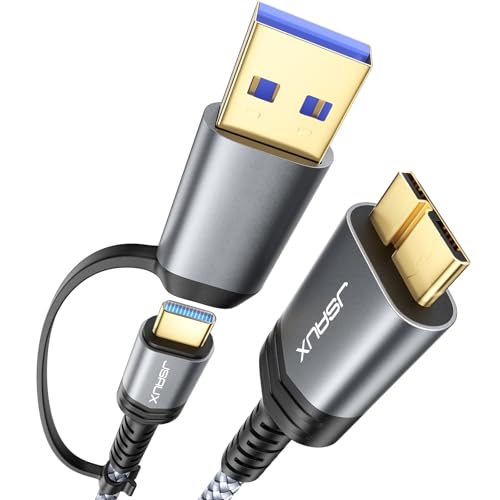
JSAUX Hard Drive Cable 1.6FT 20Gbps Micro B to USB C/A Cord

SATA Cable III for SSD HDD Data 3 PCS 15 Inch

SaiTech IT USB 3.0 Y Cable Dual-A to Micro-B 1 ft

WAVLINK SATA to USB Type-A Hard Drive Cable 5Gbps

2-Pack USB 3.0 Micro B Cable External Hard Drive Data Cord 3 ft

VIOFO 6FT SSD Hard Drive Data Connection Cable A329S Series
VIOFO 8.2FT SSD Hard Drive Data Connection Cable A329S Series
More Details On Our Top Picks
For a desktop build with extra SATA drives, this 8-inch splitter keeps the wiring tidy without asking for much space. You get a plain 15-pin power Y layout, so the job is simple: one source, two destinations, less clutter around the drive cage.
The trade-off is obvious, the reach is short, so this suits cases where the power connector is already close to the target drives. That makes it a sensible fit for home towers, small shop machines, and any setup where neat cable routing matters more than length.
Strong Points
- Three-pack format gives you spares for future installs or quick replacements.
- 8-inch length helps keep slack under control inside a crowded case.
- Works cleanly for HDDs, SSDs, and optical drives that use SATA power.
- Good fit for tidy cable paths near the drive bay.
Things To Consider
- Short length can feel cramped in larger towers.
- You still need a case layout that leaves room for the split branch.
- Best treated as an internal helper cable, not a long-reach fix.
Feature Snapshot
Who It Suits Best
You’ll get the most out of this in a desktop PC with drives grouped close together and no need for extra slack.
A Better Fit Elsewhere
WAVLINK SATA to USB Type-A Hard Drive Cable 5Gbps suits people who need an external drive link rather than an internal power split.
This JSAUX cable is built for portable drives that still use Micro-B, the older flat connector that shows up on a lot of external enclosures. The 1.6-foot length and nylon-braided jacket make it a neat desk companion, and the USB-C/A support gives you more host-device flexibility than the simple splitter above.
In a travel bag or a crowded work desk, that shorter run can be a real advantage because it keeps the cable from tangling into a heap. The catch is that the model is more about drive connection convenience than all-purpose reach, so it fits best where the enclosure sits close to the computer.
Highlights
- Micro-B to USB-C/A compatibility broadens use with newer and older ports.
- Nylon braid adds a tougher feel for daily packing and unpacking.
- 1.6-foot length keeps a portable setup compact.
- Useful for external drives, cameras, and other Micro-B gear listed by the maker.
Areas To Watch
- Micro-B is a specific connector, so port match matters.
- Short length may feel limiting on a floor-mounted tower.
- The feature set is focused, not broad, so it suits a narrower set of devices.
- Braided cables can hold a bit more shape in storage.
Details At A Glance
Built With In Mind
You’ll like this most as a compact link for portable storage users who swap between USB-C and USB-A computers.
Where A Sibling Pick Shines
Smays 2-Pack USB 3.0 Micro B Cable makes more sense for someone who wants a simpler two-cable replacement set for a WD My Passport-style drive.
Compared with the splitter in the first slot, this one is about data, not power, and that shift matters in a desktop with SATA drives that need clean signaling. The 15-inch run gives you room to route around drive cages, while the straight and angled ends help with awkward port placement.
The three-cable bundle is the part that will matter most for most home builders, because it covers a few drives without sending you back to the parts drawer. The caveat is that it stays in the SATA lane only, so it’s a fit for internal drive hookups rather than external docking jobs.
Upsides
- Three-piece pack is handy for a multi-drive system or spare stock.
- 15-inch length gives useful routing room in standard towers.
- Straight and angled ends can help with port clearance.
- Color variety makes cable tracing easier during future maintenance.
Small Caveats
- Internal SATA only, so it won’t replace a USB drive cable.
- Longer than a short jumper, which adds a little slack to manage.
- Plastic connectors can feel basic compared with pricier sleeved options.
Core Details
The Right Fit
This suits desktop builders who want a straightforward SATA data set for SSDs, HDDs, or optical drives.
Another Choice May Suit
Cable Matters 3-Pack SATA Power Y-Splitter 8 inches is the better match for a rig that needs more power outlets instead of more data leads.
This SaiTech IT cable is aimed at external hard drives that need a little extra help from a second USB-A plug. That dual-A design matters for older portable drives that can get picky about power, and the 1-foot run keeps the desk footprint small.
Compared with JSAUX’s braided short cable, this one is less about finish and more about the dual-plug function itself. You may find it especially useful on a laptop desk setup where one port alone does not always feel like enough for an older enclosure.
Positives
- Dual USB-A power feed can help certain bus-powered drives stay steadier.
- Micro-B end keeps it aligned with many older external enclosures.
- 1-foot length reduces cable spread on a tight workspace.
- USB 2.0 backward compatibility widens use with older hardware.
Room For Improvement
- Short reach limits where the drive can sit.
- Dual-connector design can crowd nearby ports on thin laptops.
- It’s a fit for a narrower group of devices than a plain USB cable.
Quick Facts
Whose Shelf It Belongs On
This is a smart fit for anyone using a bus-powered external hard drive that wants the extra USB-A plug format.
Skip It When
WAVLINK SATA to USB Type-A Hard Drive Cable 5Gbps fits better for a 2.5-inch or 3.5-inch SATA drive that needs a broader adapter setup.
This is the broadest utility play in the list, because it bridges SATA drives to USB Type-A with support for both 2.5-inch and 3.5-inch drive sizes. The included power adapter is the key piece here, since larger 3.5-inch drives usually need more than a simple data line can provide.
For someone who swaps drives around at a desk or keeps an older archive drive alive, that extra flexibility is very handy. The trade-off is that the setup is less tidy than a bare cable, so you trade clean simplicity for a lot more reach in what it can handle.
Bright Spots
- Works with SATA I, II, and III devices.
- Handles both 2.5-inch SSD/HDD units and 3.5-inch HDDs.
- Included power adapter broadens what the cable can support.
- UASP support can help compatible systems move data more efficiently.
- Useful for drive cloning, recovery work, and regular file access.
Points To Note
- External power makes the setup bulkier than a simple USB cord.
- Desk space matters more because there are more parts in play.
- Best for SATA drives, not for Micro-B style enclosures.
Feature Rundown
Best Suited To
This belongs with desktop users, tinkerers, and anyone who wants one cable setup for a mix of SATA drive sizes.
Look Elsewhere When
Smays 2-Pack USB 3.0 Micro B Cable is the neater pick for a simple portable drive replacement with less adapter bulk.
Smays keeps things straightforward, and that’s part of the appeal for portable drive owners. This is a 3-foot Micro-B USB 3.0 cord sold as a two-pack, so it works well for a desk drive and a spare, or for two similar enclosures that use the same connector.
Compared with the SaiTech IT Y cable, you lose the extra USB-A power lead, but you gain a cleaner, simpler shape that’s easier to toss in a drawer or bag. For a WD My Passport-style drive or a Seagate portable unit, that kind of plain replacement often feels like the least fussy route.
Best Bits
- Two-pack gives you a ready backup cable.
- 3-foot length offers more breathing room than the short options.
- USB 3.0 Micro-B format matches many portable drives.
- Works nicely for home office storage and basic drive swaps.
Softer Spots
- Micro-B format limits use to compatible drives.
- No extra power branch, so it’s not the answer for every enclosure.
- Longer than a desk-jumper cable, which adds a bit more slack to manage.
Technical Sheet
Whose Shelf It Belongs On
This fits someone who wants a simple replacement cable for a portable external drive and likes having a second one in reserve.
Reach For A Different Pick When
JSAUX Hard Drive Cable 1.6FT 20Gbps Micro B to USB C/A Cord makes more sense for a tighter, more modern USB-C-friendly setup.
Built for the VIOFO A329S series, this 6-foot cable is the first one here that clearly leans into vehicle use rather than home storage. That matters because dash cam installs usually live with awkward trim paths, and a longer run can make routing less cramped.
It’s a more focused product than the WAVLINK adapter, and that narrow fit is exactly the point. You may find it best when your camera setup needs a purpose-made SSD connection instead of a general USB storage cable.
Reasons To Buy
- 6-foot length gives useful routing room in a vehicle cabin.
- Made for the A329S series, so the fit is clearly targeted.
- Useful for cleaner cable paths through trim and across a dash.
- Better reach than the shorter portable-drive cables above.
Worth Noting
- Series-specific design narrows the audience.
- Longer cable can leave more slack to tuck away.
- Not aimed at desktop internal drive work.
Core Details
Right Fit For
You’ll want this for a VIOFO A329S dash cam setup where the cable path needs extra reach and a clean install.
Swap It Out When
VIOFO 8.2FT SSD Hard Drive Data Connection Cable A329S Series makes more sense if your vehicle layout needs even more slack for routing.
This is the longer sibling to the 6-foot VIOFO cable, and that extra reach can make all the difference in larger vehicles or more involved trim routing. The 2.5-meter length gives you more freedom to hide slack neatly, though the cable itself also asks for a little more planning during install.
For a dash cam setup that needs room to travel across the cabin, this is the more forgiving choice. It’s not a general-purpose cable, though, so the value lives mostly in the A329S-specific use case rather than broad compatibility.
Plus Points
- 8.2-foot length offers generous routing room.
- 2.5-meter spec is helpful for larger cabin layouts.
- Made for the A329S series, which keeps the fit targeted.
- Good choice for cleaner hidden cable runs.
Areas To Watch
- Extra length means more cable to tuck away.
- Specific to one VIOFO series, so it has a narrow role.
- Not the right pick for desktop drive use.
Feature Card
Who Will Love This
This suits VIOFO A329S owners who need the longest practical cable run for a tidy vehicle install.
Where Another Pick Fits Better
VIOFO 6FT SSD Hard Drive Data Connection Cable A329S Series is the neater choice for a shorter cabin layout that doesn’t need as much slack.
How To Choose The Right Hard Drive Y Cables
Match The Connector Before Anything Else
Start with the port shape, because SATA power, SATA data, Micro-B, USB-A, and USB-C all solve different problems. A cable can look close enough on a listing and still miss the mark for your drive or enclosure. That’s why the first pass should be about the exact ends on both sides, then the device that needs them.
Length Changes How Neat The Setup Feels
Short cables like the Cable Matters splitter and the SaiTech IT Y cable work best when the device sits close to the source. Longer choices such as the VIOFO pair make more sense in vehicles or larger desks where routing matters more than tidiness. The honest read is that extra length helps with placement, but it also leaves more slack to hide.
Power Needs Are Easy To Underestimate
Some drives only need a data line, while others need more help from the host side or an added power adapter. That’s why the WAVLINK cable stands apart from the simpler USB and SATA leads in this list. For older bus-powered externals, a dual-plug design can be the difference between stable behavior and a stubborn connection.
Think About Storage, Not Just Installation
Braided cables and bundled packs make sense for households that keep spare parts around or move drives between rooms. The JSAUX and Smays options are practical here because they give you either a tougher jacket or a second cable in reserve. That small bit of foresight often saves you a second search later, and it keeps a drawer from turning into a tangle.
What To Weigh Before You Choose
Mistakes Worth Dodging
A common misstep is buying for speed alone and forgetting the connector type, especially with Micro-B and SATA models. Another is grabbing a cable that’s too short for the route you need, which turns a simple install into a cramped one. Keep the device placement, port layout, and power source in view from the start.
The Upgrade Payoff
Higher-tier models usually cost more because they add broader compatibility, extra power support, or longer reach. The WAVLINK adapter is the clearest example, since it covers more drive sizes and includes the power piece that some setups need. Paying up makes sense when you swap drives often, need a cleaner external workflow, or want fewer separate accessories on the desk.
Frequently Asked Questions
What does a Hard Drive Y Cable actually do?
It branches one connection into two paths, usually for power or extra USB support. That makes it useful for drive setups that need more than a plain single-cable link.
Are SATA power splitters the same as SATA data cables?
No, they handle different jobs. SATA power splitters feed power, while SATA data cables carry the drive signal to the motherboard or host.
Why do some external drive cables have two USB-A plugs?
The second plug can supply extra power for certain bus-powered drives. That helps with drives that draw more than one port can comfortably provide.
Do longer cables hurt convenience?
Longer cables help with routing, especially in vehicles and larger desks. They also create more slack, so you need a bit more patience with cable management.
Which option suits a portable hard drive best?
A simple Micro-B USB 3.0 cable usually fits best for portable enclosures. The Smays 2-Pack USB 3.0 Micro B Cable is the most straightforward match in this list for that job.
Closing Thoughts
The right Hard Drive Y Cables make daily use calmer, whether you’re cleaning up a PC build, replacing a worn portable drive lead, or routing a camera cable through a vehicle. Your best match comes down to connector type, length, and whether the device needs extra power. Once those three line up, the rest gets much easier. The picks above give you a solid spread, from simple internal splitters to more specific external and dash cam options, so you can choose with less second-guessing.
