
Messy front-panel audio leads can turn a neat PC build into a tangle, especially in mid-tower and full-tower cases where the F_AUDIO header sits far from the front I/O. You’re mostly choosing between reach, connector type, and how tidy the run looks once the side panel goes back on. The right cable keeps the front headphone and mic jacks usable without forcing a cramped bend near the motherboard edge.
This roundup focuses on practical fit for builders, upgraders, and anyone sorting out a short chassis lead. You’ll see a mix of straight extensions, female-to-female couplers, and splitter-style parts, so the short list covers more than one kind of layout problem.
Quick Look At The Shortlist
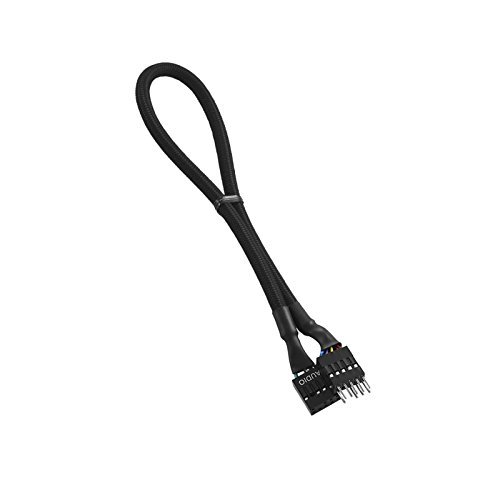
CableMod ModFlex Sleeved Audio Extension (Black, 30cm)

Motherboard Extension Cable Set 22AWG Silver Plating Cord Gold-Plated Plug Six Kinds POWE LED HDD LED Power SW Reset SW
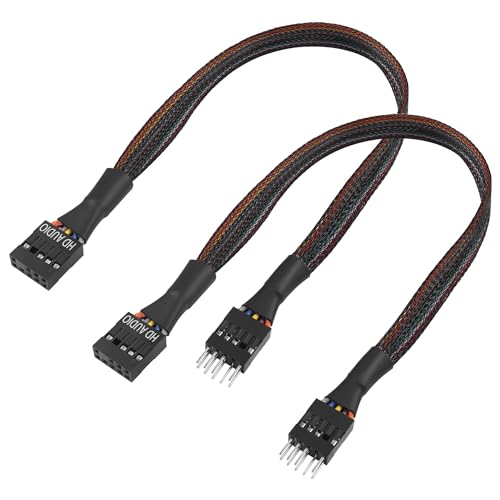
QIANRENON 9Pin HD Audio Motherboard Connector Cable 9Pin Male to Female ATX Front Audio Extension Cable 30cm/11.8in 2Pcs
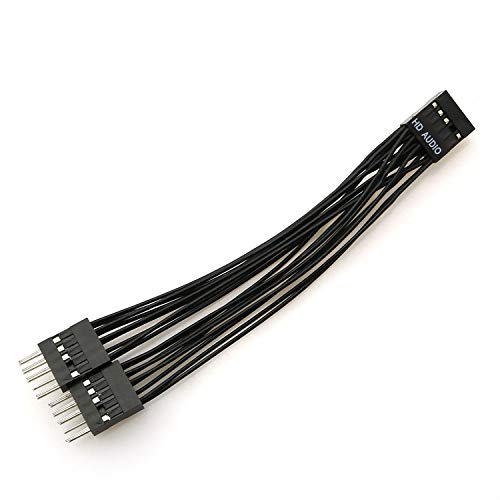
ZRM&E 9-Pin High-Definition Audio Expansion Line 10cm Motherboard Audio 1 Female to 2 Male Splitter Cable Lead Wire

Computer Motherboard Front Audio Extension Cable Male to Female Connection Sleeve 9PIN HD Audio 30cm Chassis Cabling
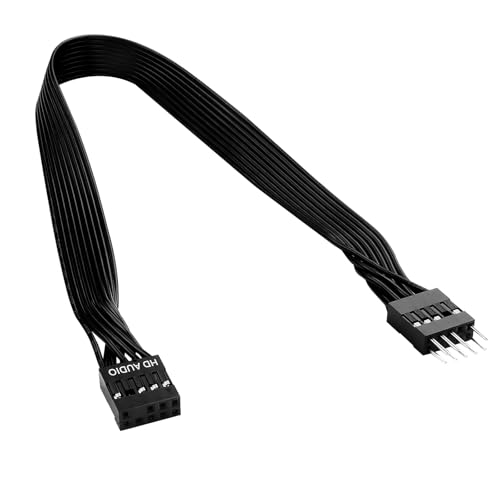
30cm PC Motherboard Front Audio Extension Cable Male to Female Black Ribbon HD Audio 9PIN Connector 24AWG Tinned Copper

Motherboard HD Audio Extension Cable 9 Pin 30cm(11.8in) Female to Female Connection for Front Audio

9 Pin Motherboard Front Audio Extension Cable 20cm(7.9in) Male to Female Connection for HD Audio
More Details On Our Top Picks
That sleeved finish gives this CableMod piece a cleaner look than the plain cable styles farther down the list. In a windowed case, 30cm of reach usually gives you enough slack to route around a graphics card shroud without making the cable look stretched tight.
The honest trade-off is simple, it’s more about presentation than about solving tricky connector layouts. Builders who care about a neat path from the motherboard header to the front panel will appreciate it most, while a cramped mini-ITX setup may want something shorter.
Strong Points
- Sleeved outer finish helps the cable blend into a tidy build.
- 30cm length gives comfortable slack in many mid-tower cases.
- Black color keeps the run visually quiet behind a side panel.
- Works well for front audio leads that just need a cleaner path.
Things To Consider
- It leans toward appearance, so layout fixes are not its main job.
- Longer-than-needed routing can leave extra length to tuck away.
- Shorter cases may not need this much reach.
Feature Snapshot
Who It Suits Best
You get the most from this one as a case builder who cares about a clean interior and already has a workable cable path.
A Better Fit Elsewhere
LUORNG’s Computer Motherboard Front Audio Extension Cable makes more sense for a shopper who wants a plain utility lead with tinned copper and less emphasis on cosmetics.
This set is the broadest option in the group, and it’s really aimed at a full front-panel refresh rather than a single audio fix. The 22AWG wire, meaning a thicker conductor than lighter-gauge leads, matters because it usually holds up better when several case headers need rerouting at once.
Gold-plated plugs and silver-plated cord construction point toward better contact quality and a more finished feel, though the real value here is coverage. You’ll like it most for a DIY rebuild where power, reset, HDD LED, POWE LED, front USB, and HD audio all need attention together.
Upsides
- Covers several common motherboard header types in one set.
- 22AWG wire is a sturdy choice for repeated internal handling.
- Gold-plated plugs help the connectors feel more substantial.
- Good for neatening a crowded case during a wider rebuild.
- Useful when the front panel wiring is a mixed-length mess.
Areas To Watch
- It’s a broader kit than many audio-only projects need.
- The bundle can leave you with extra pieces to store.
- Matching each plug to the correct header takes a careful hand.
Core Details
Made For
You’ll get the most from this set in a full PC refresh, especially when several front-panel cables need a coordinated reset.
Another Choice May Suit
QIANRENON’s 9Pin HD Audio Motherboard Connector Cable is the cleaner match for a shopper who only needs front audio extension and wants less extra wiring.
Compared with the CableMod pick, this QIANRENON cable is less about appearance and more about straightforward front-audio reach. The 30cm length gives you enough room to move a chassis lead away from a tight corner, which helps in cases where the header sits far from the front panel cutout.
Because it comes as a 2-piece set, it suits a second build, a spare, or a small workshop bin where you keep common parts within reach. The trade-off is plainness, yet for many ATX layouts that’s exactly the point.
Highlights
- Male-to-female layout is easy to understand at a glance.
- 30cm reach helps bridge a longer gap inside many cases.
- Two cables in the pack give you a spare on hand.
- Useful for cleaning up a front-audio run without much fuss.
Small Caveats
- The look is basic, so it’s less suited to showcase builds.
- Two-packs can be more than a single quick fix needs.
- Careful header alignment still matters during installation.
Details At A Glance
Best Suited To
You’re the right fit for this one when you want a simple front-audio extension and like having a spare cable nearby.
Where A Sibling Pick Shines
Aukuoy’s 9 Pin Motherboard Front Audio Extension Cable fits better for compact cases that need a shorter 20cm run instead of this 30cm pair.
Short splitters like this one matter most in close quarters, and that’s where the ZRM&E design makes sense. A 10cm lead keeps the link short, so it suits a motherboard header that sits near the front panel bundle instead of across the case.
The one-female-to-two-male layout is the real hook, and it helps when your chassis wiring needs a branch rather than a simple extension. You may find it most useful in a DIY setup where the audio path is already defined and you just need a compact handoff point.
Reasons To Buy
- Very short length helps avoid extra slack in tight interiors.
- Splitter layout can bridge a special header arrangement.
- Good match for compact cable paths near the board edge.
- Simple form factor makes it easy to place neatly.
Worth Noting
- The short lead is not useful for long-distance routing.
- Splitter-style parts need close attention during setup.
- It suits specific layouts more than general extension jobs.
Technical Sheet
Who Should Grab It
You’re the best match for this cable when your case needs a short branching solution instead of a longer front-audio run.
Swap It Out When
ELFJMZP’s 30cm PC Motherboard Front Audio Extension Cable works better for a builder who needs more routing room than this 10cm splitter allows.
LUORNG’s cable sits in the practical middle of the pack, with enough length to solve a short front-audio run and not so much that you’re fighting loops behind the tray. The tinned copper material is a sensible choice here, since tinned conductors usually suit internal PC wiring that you want to keep straightforward and dependable-looking.
In a normal mid-tower, that 30cm span can make an awkward header feel manageable without turning the back side into a knot. The trade-off is that it’s a plain utility lead, so it serves function better than style.
Best Bits
- Tinned copper construction suits everyday case wiring.
- 30cm length reaches across many standard interiors.
- Male-to-female format keeps the connection easy to trace.
- Good utility choice for repairs and modest upgrades.
Room For Improvement
- It won’t add visual polish to a showcase build.
- Plain cabling can look less organized unless routed carefully.
- Longer cases may still call for a different reach.
Feature Rundown
The Right Fit
You’re in the sweet spot for this cable when you want a simple front-audio extension that solves the job without drawing attention.
Look Elsewhere When
CableMod’s ModFlex Sleeved Audio Extension is the better call for a showcase build where the cable’s appearance matters as much as reach.
The black ribbon layout gives this ELFJMZP cable a neater profile than a round lead, so it tucks better along case edges and flat surfaces. That matters in builds where every millimeter behind the motherboard tray feels spoken for, and the 24AWG tinned copper conductors add a sturdier internal-wiring feel.
You’ll probably like it most in an ATX case where front audio needs a straight, tidy route rather than a decorative one. The only real catch is that flat ribbon cables can still feel awkward if you prefer to bundle everything into a single sleeve.
Positives
- Ribbon shape helps the cable lie flatter in the case.
- 24AWG wire gives a solid-feeling internal cable path.
- 30cm length suits many front-audio extension jobs.
- Black finish blends well with dark interiors.
- Good for routing along edges and corners.
Minor Gripes
- Flat cable shape may not suit every bundling preference.
- It still needs careful routing to keep the build tidy.
- Extra slack can collect behind the tray in smaller cases.
Spec Overview
Built With In Mind
You’re a strong match for this cable if you care about flat routing and want the front-audio line to disappear into the build.
Reach For A Different Pick When
QIANRENON’s 9Pin HD Audio Motherboard Connector Cable is a better match for someone who prefers a two-pack and a more standard round-lead approach.
Female-to-female cables are less common in this category, and that gives Aukuoy’s 30cm extender a distinct role. It works as a coupler between two matching ends, so you’re not extending directly in the usual way, you’re joining two existing audio segments.
For most desk-side builds, that makes sense only when the case layout already has the right connectors waiting in the path. The upside is flexibility, and the catch is that you need a setup built around that coupler-style connection.
Standout Traits
- Female-to-female layout fills a narrower use case.
- 30cm reach gives room for a mid-length join.
- Good for odd cable paths that standard extensions can’t solve.
- Simple form keeps the internal run easy to trace.
Points To Note
- It only makes sense in specific connector setups.
- Most standard extension jobs need a different connector layout.
- Careful identification of both ends is important during install.
Feature Card
Whose Shelf It Belongs On
You should grab this one only when your front-audio path calls for a female-to-female join rather than a standard extension.
Skip It When
Aukuoy’s 9 Pin Motherboard Front Audio Extension Cable is the better fit for most builders who simply need a conventional male-to-female run.
This Aukuoy lead is the shortest straightforward extension in the group, and that makes it a smart match for cases where the audio header sits close but not quite close enough. The 20cm span trims excess slack, which can make cable management feel less like herding cats and more like a quick tidy-up.
HD Audio support keeps it aligned with modern front-panel audio wiring, and the male-to-female layout is the familiar route for a direct extension. You’ll probably prefer it over longer options when the case is already spacious enough and you only need a modest reach.
Bright Spots
- 20cm reach suits shorter gaps inside larger cases.
- Male-to-female layout is easy to install and follow.
- Short cable length helps limit extra slack.
- Good fit for clean, low-clip cable routing.
Softer Spots
- It’s too short for distant motherboard headers.
- Builders with oversized cases may need more length.
- The basic design gives you utility, not visual flair.
Core Details
Who Will Love This
You’re the best match for this one when the header is close enough that a short, neat extension solves the problem cleanly.
Where Shoppers Go Wrong
ELFJMZP’s 30cm PC Motherboard Front Audio Extension Cable is the better fit for a deeper case where 20cm won’t quite reach.
How To Choose The Right Hd Audio Cables To Motherboard
Match The Connector Shape Before Anything Else
Front audio wiring usually comes down to male-to-female extensions, female-to-female couplers, or splitters. The connector shape has to match the path inside your case, so the wrong type can leave you with a part that looks right but won’t join cleanly.
Think of the motherboard header as the anchor point and the chassis lead as the other end of the chain. Once you know which ends you already have, the choice becomes much simpler.
Length Should Follow The Case, Not The Label
20cm can be enough in a roomy case where the front panel sits close to the board, while 30cm makes more sense in mid-tower and full-tower layouts. Longer isn’t automatically better, because too much slack can crowd fan paths and make the tray side harder to close neatly.
Shorter cables feel cleaner when the header is nearby. Longer ones help when the run has to pass around a graphics card, drive cage, or PSU shroud.
Wire Build Affects Handling More Than Hype
22AWG wire is thicker than lighter signal leads, so it can suit heavier internal use and repeated routing. Tinned copper, sleeving, ribbon construction, and plating all affect how the cable behaves in the case, especially when you bend it around corners.
Sleeved cables look finished, ribbon cables lay flatter, and plated connectors can feel more deliberate at the plug. The trade-off is that each style solves a different problem, so the neatest-looking option is not always the easiest to install.
Choose For The Build You Actually Have
A showcase PC rewards sleeved or black ribbon leads that disappear against the interior. A working tower in a home office usually cares more about reach, connector fit, and whether the cable can be tucked away without fuss.
That’s why a two-pack, a splitter, or a short coupler can be the right answer even when it looks less polished on paper. The best fit is the one that matches your case layout, not the flashiest part in the group.
Things Worth Knowing First
Mistakes Worth Dodging
Many people grab the wrong connector type and only notice the problem once the side panel is already off. Others choose length by guesswork, then end up with either a taut run or a loop of extra cable that gets in the way of airflow.
Front audio also gets mixed up with other motherboard headers, so label checking matters. A careful look at the board manual and the case cable ends saves a lot of frustration.
The Upgrade Payoff
Higher-tier cables usually cost more because of the wire construction, connector finish, and the way the cable is made to sit inside a case. Sleeving, ribbon layout, thicker gauge wire, and plated plugs all add to the materials side of the equation.
The upgrade is worth it when the PC is visible, the cable run is awkward, or you’re refreshing several front-panel leads at once. For a simple spare, a basic lead often makes more sense.
Frequently Asked Questions
What does HD audio mean on a motherboard cable?
HD audio is the common front-panel audio header format used on many desktop motherboards. It lets the case’s headphone and mic ports connect to the board through a matching 9-pin layout.
How long should a front audio extension be?
Short runs often work at 20cm, while 30cm gives more flexibility in larger cases. The right length depends on how far the front panel sits from the motherboard header.
Can you use a splitter for front audio?
A splitter only makes sense when your connector layout calls for one. Most standard builds need a simple extension instead, so the header shape has to guide the choice.
Why does wire gauge matter in these cables?
Wire gauge describes thickness, and 22AWG is thicker than many light internal leads. That usually helps the cable feel sturdier during routing and re-routing.
What’s the simplest choice for a first PC build?
A basic male-to-female 30cm extension is the easiest place to start for most builds. It covers a common front-audio gap without forcing you into a specialty connector style.
Closing Thoughts
The right Hd Audio Cables To Motherboard choice depends less on brand labels and more on the shape of your case. A clean sleeved lead suits a showcase tower, a short 20cm extension fits tighter layouts, and a splitter only earns its keep in a specific routing job. Once you match connector type and length to the actual interior, the rest gets much easier. That’s the part worth slowing down for, because a small cable can make the whole build feel finished.
