
Long cable runs can turn a simple desk or media room into a tangle of lag, weak control, and guesswork. You need Hdmi And Usb Extenders that match the room, the distance, and the devices you already own, not just a long spec list. This roundup keeps the focus on practical use, from a home office with a remote PC to a rack setup that needs keyboard, mouse, and display control across Cat5e or Cat6. The good choices here make everyday work feel orderly instead of fussy.
Quick Look At Our Shortlist
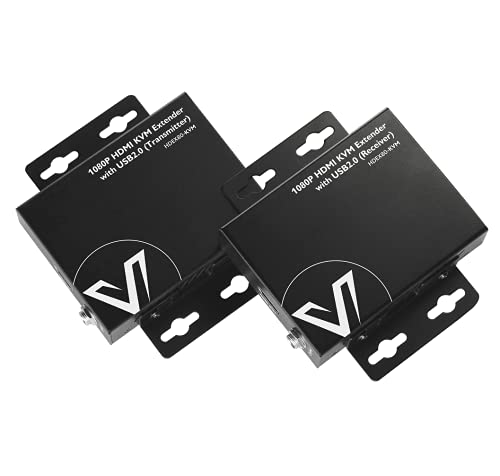
AV Access HDMI KVM USB Extender to260ft/80M

AV Access 4K HDMI USB KVM Extender TCP/IP 390ft

164ft/50m HDMI KVM USB Extender with Loop Out
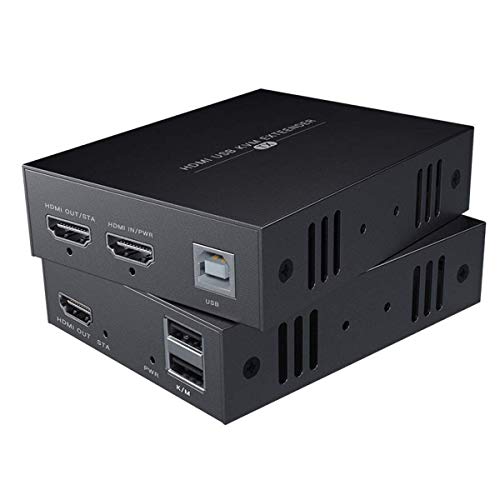
HDMI KVM USB Extender Transmit 1080p HD Video 50m

4K HDMI KVM USB Extender 393ft with Audio Port
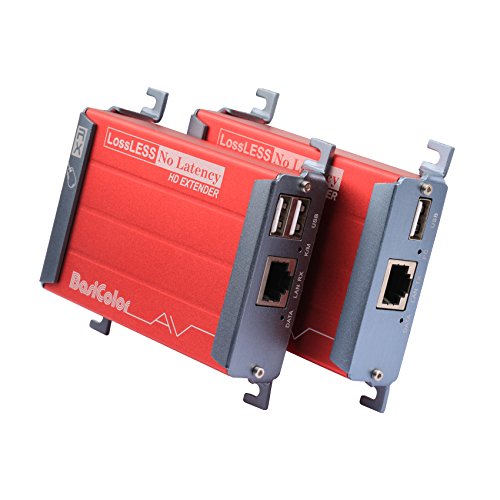
Basicolor HDMI KVM USB Extender with PoC 80m
USB 3.0 to HDMI Adapter with USB Hub

HDMI USB KVM Extender Dual Monitor 197ft
More Details On Our Top Picks
This model keeps things plain and workable, which matters in a home office where the PC sits across the room but your keyboard and mouse need to feel immediate. The PoE, or power over Ethernet, setup also helps reduce clutter near the far end, and the two USB 2.0 ports give you room for the basics without extra gear.
Compared with the more network-flexible AV Access unit below, this one feels more focused on straightforward KVM extension than on elaborate switching tricks. That trade-off suits you well in a single-workstation setup, though a packed control rack may want the more feature-heavy options later in the list.
Strong Points
- Cat5e, Cat6, Cat6a, and Cat7 support gives you room to match the cable already in the wall.
- Zero-latency positioning suits day-to-day pointer work and typing across a longer run.
- Two USB 2.0 ports cover keyboard and mouse without forcing an extra hub into the chain.
- PoE can simplify the far-end setup, which is handy in a desk nook or equipment shelf.
- Plug-and-play style setup reduces the amount of tinkering needed before a normal office session.
Things To Consider
- USB 2.0 is fine for input devices, but it does not suit heavier peripherals that need more bandwidth.
- The 260-foot class reach depends on cable quality and a tidy run, so messy in-wall wiring can change the experience.
- You may find the feature set a little lean if you want audio routing or local preview at the sender side.
Feature Rundown
Who It Suits Best
Office users and home lab owners who want a clean remote keyboard-and-monitor link will get the most from this one.
A Better Fit Elsewhere
AV Access 4K HDMI USB KVM Extender TCP/IP Over Single Cat5e/6/6a/7 to 390ft suits you better when the network side matters and you need more room for advanced control.
Networked KVM setups usually ask for more patience, and this AV Access unit answers with a very broad reach and a three-port USB hub. That makes it a stronger fit for a control rack, a security room, or a long cable path where you want keyboard, mouse, and extra USB breathing room without crowding the desk.
Compared with Item 1, the TCP/IP design gives you a more flexible path across the network side, though that extra flexibility can feel like overkill for a simple desk extension. The DIP switch support for multiple sets points toward more complex installs, so casual use stays possible, but tidy planning matters more here than on the simpler models.
What We Like
- TCP/IP transport gives you more install flexibility than a straightforward point-to-point extender.
- 390-foot class reach suits larger rooms, AV closets, or mixed-use equipment spaces.
- 1080p at 120Hz support is a useful touch for smoother motion in compatible setups.
- Three USB hub ports make room for more than the usual keyboard and mouse pairing.
- DIP switch support for up to 16 sets helps in multi-unit environments.
Room For Improvement
- The extra flexibility also means setup planning matters more than with a simpler plug-and-play extender.
- The feature set leans toward advanced installations, so a basic home desk may not need this much hardware.
- Careful labeling of cables helps, especially in shared racks where several similar runs are easy to mix up.
Feature Snapshot
Built With In Mind
You get the most from this pick in rack rooms, AV cabinets, and other places where the network path matters more than a simple desk run.
Where A Sibling Pick Shines
AV Access HDMI KVM USB Extender to260ft/80M is the calmer choice for a single workstation that only needs the essentials.
The loop-out port is the detail that makes this one feel thoughtful, because you can keep a local display at the transmitter while sending the same signal down the line. In a small control booth or a desk with a nearby monitor, that split view can make day-to-day use far less awkward.
Unlike the AV Access networked unit above, this avedio links model stays centered on a direct Cat cable run rather than a more elaborate network path. You also get two USB 2.0 ports for mouse and keyboard control, which is enough for many office and media-room setups, though not ideal for heavy peripheral stacks.
Highlights
- Loop out support lets you keep a local screen active while the remote screen stays connected.
- 1080p at 60Hz keeps the focus on steady full-HD use instead of chasing flashy extras.
- Two USB 2.0 ports cover the basics for remote computer control.
- Zero-latency positioning suits tasks where pointer response matters, such as admin work or menu navigation.
Minor Gripes
- The USB side stays modest, so a larger accessory stack needs a separate plan.
- The transmitter-to-PC USB-B connection is an extra step that matters during first setup.
- Local and remote cable labeling helps keep the loop-out arrangement easy to maintain.
Core Details
Who Will Love This
Small studios, booth operators, and office setups with a nearby local monitor will get the most value here.
Look Elsewhere When
AV Access 4K HDMI USB KVM Extender TCP/IP 390ft is the smarter direction for a larger networked system that needs more routing flexibility.
PWAYTEK keeps this one stripped to the essentials, which is often the right mood for a spare workstation, a small server nook, or a remote monitor station. The 50-meter class range and mouse-and-keyboard control make it easy to understand, and that simplicity can be a virtue in rooms where you do not want a fussy setup.
Compared with Item 3, this model leaves out the loop-out convenience, so the arrangement is more direct and less flexible. That trade-off usually suits a clean single-path install, while larger AV benches may prefer a unit with extra routing options.
Upsides
- 1080p support at a 50-meter reach fits many practical room layouts.
- The design keeps the focus on HDMI plus keyboard and mouse control.
- Cat5e and Cat6 support makes it easy to match common cabling.
- Simple structure can be easier to store and maintain than fuller-featured units.
Softer Spots
- No loop-out detail is listed, so local-monitor use is less flexible than on Item 3.
- The feature set is straightforward, which is fine for basics but thin for elaborate AV paths.
- Clean cable routing matters here, since a simple extender depends on tidy installation habits.
At A Glance
The Right Fit
You should focus on this one for compact control stations and straightforward long-run keyboard-and-monitor use.
Swap It Out When
Basicolor HDMI KVM USB Extender with PoC 80m fits you better when you want the extra reach and the single-adapter power approach.
This PWAYTEK model leans into a fuller feature set, and you can feel that in the audio port, loop out, and IR support. IR, or infrared remote control, matters most in setups where the display or source sits far away but you still want a simple way to send commands across the room.
Compared with Item 4, this one stretches farther and gives you more routing options, which is exactly why it fits a media rack or multi-room AV corner better than a bare-bones desk setup. The honest read is that the extra features make sense only when your space can use them, because a simple office run will not need this much hardware.
Best Bits
- 4K support makes it a better match for sharper source chains and higher-resolution displays.
- 393-foot class range opens the door to larger room layouts.
- Audio port, loop out, and IR support add control options beyond the basics.
- Useful for PC, DVR, NVR, TV, monitor, and projector setups, based on the listing.
Areas To Watch
- The broader feature set can feel like too much for a simple keyboard-and-display extension.
- Extra ports and controls can make installation a little more involved than a plain extender.
- Storage and cable management matter more here because the device does more than one job.
Details At A Glance
Whose Shelf It Belongs On
You will appreciate this most in larger media spaces, rack rooms, and multi-device control points.
Not Your Match When
HDMI KVM USB Extender Transmit 1080p HD Video 50m is the cleaner choice for a smaller room that only needs the basics.
Basicolor takes a calm, workaday route here, with PoC and a long 80-meter reach doing most of the heavy lifting. That makes it a sensible pick for a straightforward office extension, especially in mixed operating systems, since the listing calls out Windows, mac OS, and Linux support.
Compared with the PWAYTEK models above, this one feels less feature-dense but easier to live with in a clean point-to-point setup. The trade-off is clear enough, more basic on the surface, yet still strong for keyboard and mouse work across a long Cat run.
Positives
- 80-meter reach gives you generous room for longer cable paths.
- PoC helps simplify the power arrangement at one end of the link.
- Windows, mac OS, and Linux support broadens the practical fit.
- Point-to-point use works well for desk-to-rack and room-to-room control.
- Lossless positioning and no-delay wording suit interactive mouse and keyboard work.
Small Caveats
- The design stays centered on core KVM use, so extra AV routing features are limited.
- USB storage and webcams are only mentioned for a shorter effective distance, so that matters for peripheral-heavy setups.
- As with any long Cat cable run, tidy installation helps keep the link consistent.
Quick Facts
Right Fit
You will like this best in simple office, lab, or utility-room setups where dependable remote control matters more than extra bells and whistles.
Where Another Pick Suits Better
4K HDMI KVM USB Extender 393ft with Audio Port suits you better for a larger AV layout that needs more features and more reach.
This AKWOR unit sits in a different lane from the Cat-based extenders above, because it acts like a dock-style bridge from USB 3.0 to HDMI. That makes it more useful for a laptop, a travel bag, or a desk that needs a second display without redesigning the whole room.
The built-in driver approach helps keep setup less intimidating, though the Windows 7 note on extend mode is an important limit to remember. The HDMI port also expects an HDMI-to-HDMI cable, so the small caveat is mostly about matching the right cable rather than the device itself.
Bright Spots
- Mirror and extend modes give you two common multi-monitor layouts.
- 1920 by 1080 output suits everyday office work and portable display setups.
- USB-A and USB-C data and power ports make the unit more flexible for newer computers.
- Built-in driver support reduces the amount of separate software hunting.
Worth Noting
- Windows 7 does not support extend mode according to the listing.
- The HDMI connection must be HDMI to HDMI, so adapters are not part of the path.
- As a compact adapter, it fits best beside a laptop rather than in a rack-style install.
Feature Card
Built For In Mind
You will get the best fit from this one on a laptop desk, a temporary workstation, or a compact home office.
Another Choice May Suit
AV Access HDMI KVM USB Extender to260ft/80M is a better match when you need a true long-run KVM link instead of a local adapter-style setup.
Dual-monitor support changes the feel of a remote workstation, because you can keep one eye on two separate views instead of juggling windows on a single screen. This v AV Access unit also adds four USB 2.0 ports, which makes it a stronger fit for a control desk with both input devices and a small accessory stack.
Compared with Item 1, the dual-view layout is the big reason to move up here, even though the range is shorter than the longer single-display choices in the list. The trade-off is easy to understand, you give up some reach, but you gain a more capable desktop-style working surface on the far end.
Reasons To Buy
- Dual-monitor output lets you spread work across two displays instead of one.
- Four USB 2.0 ports give you more room for keyboard, mouse, and extras.
- Zero-latency wording suits hands-on control where pointer feel matters.
- PoC can simplify the power arrangement in a tidy remote setup.
Points To Note
- The 197-foot reach is solid, though shorter than the longest options in this roundup.
- USB 2.0 is enough for input devices, but not aimed at heavy data work.
- Dual-display setups ask for a little more organization on the desk and at the source end.
Core Details
The Right Fit
You should look here for a dual-screen remote desk, a monitoring station, or a control room that needs more screen space.
Where A Sibling Pick Shines
AV Access 4K HDMI USB KVM Extender TCP/IP 390ft works better for network-heavy installs that care more about routing flexibility than dual displays.
How To Choose The Right Hdmi And Usb Extenders
Match The Extender To The Room
Distance is the first filter, but not the only one. A 50-meter point-to-point unit fits a small office or media cabinet, while a 390-foot TCP/IP model makes more sense when the run crosses racks, walls, or shared infrastructure. The cable type matters too, because Cat5e, Cat6, Cat6a, and Cat7 support can save you from reworking a clean in-wall install.
Decide How You Plan To Control The Source
KVM means keyboard, video, and mouse, which is the core use case for most of these picks. A simple two-port unit suits a desk where you only need the basics, while a model with four USB ports or a USB hub helps a control station with extra peripherals. The trade-off is that more ports usually mean more hardware to manage.
Look At Power And Local Viewing Options
PoC and PoE both reduce the number of adapters or power points you need near one end of the link. That matters in a wall-mounted setup, a rack shelf, or any spot where outlets are awkwardly placed. Loop out, meanwhile, lets you keep a local display at the transmitter, which is useful in workspaces where someone still needs to see the source on site.
Choose The Style That Fits Your Workflow
A USB 3.0 to HDMI adapter fits a laptop desk and portable work better than a long-run Cat extender. Dual-monitor KVM units suit busy control rooms, but a basic full-HD extender is often enough for home office use. You save money and clutter by matching the device to the real task, not the largest spec sheet.
A Quick Reality Check Before You Order
Common Shopping Slip Ups
A lot of mismatches start with cable assumptions, especially around whether the run uses Cat5e, Cat6, or newer cabling. Another easy miss is overbuying features, like IR or TCP/IP, for a setup that only needs keyboard and mouse control at a single desk. Take a minute to map the room first, because tidy planning beats swapping hardware later.
The Upgrade Payoff
Higher-tier models usually cost more because they add more display paths, more USB ports, or more routing flexibility. That extra headroom makes sense in a rack room, a security station, or a dual-monitor workstation where small workflow gains add up. A simple office rarely needs that much hardware, so the smarter move is paying for the features you will use every day.
Frequently Asked Questions
What does KVM mean in this category?
KVM stands for keyboard, video, and mouse. It lets you place the computer away from the desk while still controlling it normally.
Do all of these units need the same cable type?
No, the cable support varies by model and matters a lot for installation planning. Some work with Cat5e and Cat6, while others also list Cat6a or Cat7.
Is zero latency the same as no lag in practice?
The term points to immediate signal transfer rather than a delayed control path. Real-world feel still depends on cable quality and setup discipline.
Why do some models mention PoC or PoE?
Those terms describe ways to move power across the link instead of relying on extra wall plugs at both ends. That can clean up the install in tight spaces.
Which pick suits a laptop desk best?
The USB 3.0 to HDMI Adapter with USB Hub fits that role most naturally. It is the most portable choice here and does not ask for a long Cat run.
Closing Thoughts
You do not need the most loaded extender to get a smoother workspace, just the one that matches your room and your devices. The simple AV Access and Basicolor picks suit straightforward control jobs, while the TCP/IP and dual-monitor options make more sense once the setup grows. For a laptop desk, the AKWOR adapter keeps things compact. Choose the path that fits your day-to-day routine, and the cabling stays out of your way.
