
DisplayPort cables look simple until a monitor upgrade exposes the weak link. You need the right match for resolution, refresh rate, cable length, and your graphics setup, especially for fast gaming panels and high-resolution desktop work.
This roundup focuses on eight options that make more sense for real setups than raw numbers alone. Some are better for shorter desk runs, some suit long reaches behind a tower, and some are the safer route for newer 8K or 16K-capable gear.
Quick Look At Our Top Picks
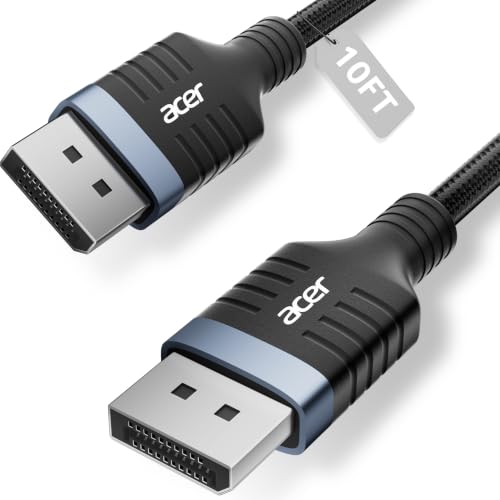
Acer 8K DisplayPort Cable 10FT, DP 1.4 Cable

Highwings 80Gbps Displayport Cable 2.1 6.6FT

Silkland 80Gbps DisplayPort Cable 2.1 6.6FT/2M

IVANKY VESA Certified 8K DisplayPort Cable 1.4 6.6ft

Silkland 80Gbps DisplayPort Cable 2.1 10FT/3M
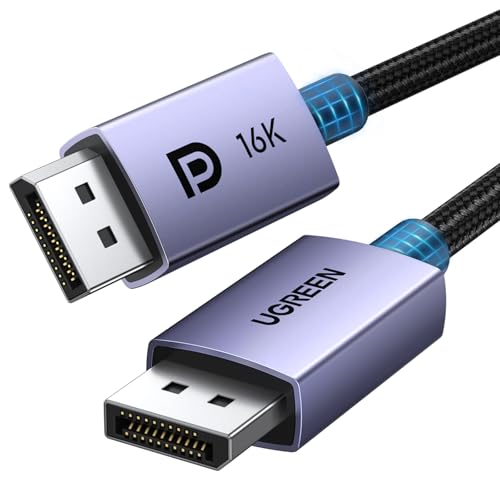
UGREEN 16K 6.6FT DisplayPort Cable 2.1 54Gbps

Silkland 54Gbps 16K DisplayPort Cable 2.1 6.6FT
Silkland 80Gbps DisplayPort Cable 2.1 5FT/1.5M
More Details On Our Top Picks
A 10-foot DisplayPort cable earns its place fast in a room with a tower under the desk or a monitor arm that leaves little slack. This Acer option leans on the older DisplayPort 1.4 standard, so it suits gaming monitors and PCs that need 8K at 60Hz or 4K at high refresh rates without chasing the newest spec tier.
The braided outer jacket should help it feel less fussy in daily desk use, and the added length gives you routing freedom behind a standing desk or across a wider setup. The trade-off is simple, though, a longer run can be less convenient to hide, so this is a cleaner fit for spacious desks than minimal battlestations.
Strong Points
- 10-foot reach gives you room to route around a larger desk or a rear-mounted PC.
- DisplayPort 1.4 support suits many gaming monitors that still live in the 4K refresh-rate sweet spot.
- 32.4Gbps bandwidth gives you headroom for demanding video signals on compatible gear.
- Braided construction usually feels better for everyday handling than a plain rubber cable.
- Compatibility notes for FreeSync, G-Sync, HDR, and HDCP 2.2 make it easier to match common gaming and media setups.
Areas To Watch
- The 10-foot length can be more cable than a compact desk really needs.
- DisplayPort 1.4 is solid, but it sits below the newer 2.1-era headroom in this roundup.
- Longer braided cables are a little less forgiving when you need a very clean, tight bend behind a monitor.
Feature Card
Who It Suits Best
You get the most from this cable in a roomy desk setup where extra length matters more than absolute minimalism. It fits gamers and PC users who want a dependable 1.4-spec cable with broad compatibility.
A Better Fit Elsewhere
Highwings 80Gbps Displayport Cable 2.1 6.6FT is the sharper match for a newer high-refresh rig that needs more bandwidth in a shorter run.
High-refresh rigs need a cable that keeps pace without turning the back of your desk into clutter, and this 6.6-foot Highwings model does that neatly. Its DisplayPort 2.1 design targets newer gaming hardware, including setups chasing 8K at 120Hz or 4K at 240Hz, so it feels aimed at people who care about headroom more than bare minimum compatibility.
The braided cord should handle day-to-day movement well, though the short length means it is better for a monitor and tower sitting close together. That’s the trade-off here, you gain signal capacity and a cleaner run, but you lose flexibility for awkward routing across larger furniture.
What We Like
- 80Gbps bandwidth gives you plenty of room for demanding modern display signals.
- 6.6 feet keeps the cable manageable on most desktop gaming setups.
- Support for 16K, 8K, and 4K refresh combinations makes it a future-minded choice.
- Compatibility with HDR10, DSC 1.2a, FreeSync, and G-Sync lines up with common high-end monitor features.
- Braided construction usually helps with everyday handling and wear resistance around a crowded desk.
Points To Note
- The shorter run is less forgiving for tower-to-monitor setups that need more slack.
- Its high-spec focus makes it more cable than some basic office screens require.
- Near-wall routing can feel tighter on deeper desks because the length is fixed at 6.6 feet.
Core Details
Right Fit For
Fast-paced gamers with a short desktop run benefit most, especially when the monitor and PC are close together. It also suits anyone building around newer DisplayPort 2.1-capable hardware.
Another Choice May Suit
Silkland 80Gbps DisplayPort Cable 2.1 10FT/3M is the better call for a roomier setup that needs the same high bandwidth with more reach.
This Silkland cable stands out because it pairs very high bandwidth with VESA certification, which gives cautious upgraders a little more confidence in what the cable is built to meet. The 6.6-foot length keeps it practical for a normal desk, and the long feature list makes it feel aimed at serious displays that can actually use the extra bandwidth.
Compared with the Acer 10-footer, it gives you a tighter, cleaner run, and compared with the Highwings option, it adds the reassurance of certification. The honest read is that you pay attention to this one when you want a shorter cable that still feels like a serious piece of kit rather than a basic accessory.
Upsides
- VESA certification adds a clear fit signal for spec-conscious monitor setups.
- 80Gbps bandwidth supports very demanding display paths.
- 6.6 feet works well for standard desk layouts without excess slack.
- Support for 16K, 8K, and very high 4K refresh rates gives it wide room to grow.
- DisplayPort 2.1 and DP80 labeling make the feature set easy to place in a modern system.
Small Caveats
- The high-spec focus can be more than a basic office monitor needs.
- Shorter length means less freedom for unusual desk layouts.
- With so many headline features, it makes sense mainly for users who will actually use them.
Details At A Glance
Who Will Love This
You get the most from this cable in a high-end gaming or creator desk where the monitor deserves a modern, well-specified link. It also suits anyone who prefers a certification-backed option over a purely spec-heavy listing.
Swap It Out When
IVANKY VESA Certified 8K DisplayPort Cable 1.4 6.6ft makes more sense for a simpler setup that does not need 2.1-era bandwidth.
IVANKY takes a more traditional route than the Silkland 2.1 options, and that makes it appealing for setups that still live comfortably inside DisplayPort 1.4 territory. You get VESA certification, support for dynamic HDR, and compatibility with FreeSync and G-Sync, so the cable feels well matched to a gaming monitor that does not need the newest bandwidth class.
The 6.6-foot length is easy to manage on a desk, and the backward compatibility with older DisplayPort versions helps reduce compatibility headaches. One thing worth considering is that HDMI and Mini DisplayPort are out, so this is strictly for the right port type rather than a universal fix.
Highlights
- VESA certification adds a useful quality signal for standard monitor connections.
- 6.6-foot length suits most desktop runs without excess clutter.
- DisplayPort 1.4 support fits a huge range of gaming and productivity displays.
- Dynamic HDR and HDCP 2.2 support make it easier to pair with compatible media and monitor gear.
- FreeSync and G-Sync support make it a sensible match for many gaming setups.
Things To Consider
- It is limited to DisplayPort-to-DisplayPort use, so HDMI and Mini DP are off the table.
- The older 1.4 standard is fine for many systems, but it is not the newest option here.
- The shorter length is practical, though longer desk layouts may need a different pick.
Technical Sheet
Whose Shelf It Belongs On
This belongs with gaming and office setups that want a straightforward, certified DisplayPort 1.4 cable. It also suits someone who values compatibility notes more than chasing the newest spec class.
Look Elsewhere When
Highwings 80Gbps Displayport Cable 2.1 6.6FT makes more sense for a newer system that wants more headroom and a more aggressive feature list.
Ten feet makes a difference the moment your tower sits on the floor or your monitor has to reach past a desk riser. This Silkland cable keeps the same high-bandwidth 2.1-era focus as the shorter 80Gbps picks, but the added length is what makes it useful for awkward layouts, wall-mounted screens, or rooms where the PC cannot sit close.
The trade-off is plain: longer runs are easier to route, but they are also less tidy in a tight gaming nook. You may find it best for households that value reach and compatibility with newer hardware over the compact feel of a 6.6-foot cable.
Best Bits
- 10-foot length solves placement problems that shorter cables often cannot.
- 80Gbps capacity lines up with very demanding display equipment.
- Support for 16K, 8K, and very high 4K refresh rates leaves room for future upgrades.
- DP 1.4 backward compatibility broadens the range of gear it can sit with.
- The braided build should hold up well to ordinary cable handling and repositioning.
Minor Gripes
- The length can create extra slack that takes planning to hide cleanly.
- It makes most sense in bigger rooms, not cramped laptop-dock corners.
- High-spec capability matters more here than it would for a basic work monitor.
Feature Rundown
Best Suited To
Remote desk setups, larger gaming rooms, and mounts that need extra slack all benefit from this cable. It also suits users building around newer monitors that need plenty of bandwidth.
Reach For A Different Pick When
Acer 8K DisplayPort Cable 10FT makes more sense if you want a longer run but prefer a simpler DisplayPort 1.4-based option.
UGREEN takes a slightly lower-bandwidth route than the 80Gbps entries, but it still brings a strong set of modern features to a 6.6-foot cable. That makes it a sensible middle ground for someone who wants VESA certification, DisplayPort 2.1 support, and a braided finish without stepping into the most extreme spec tier in the roundup.
For a mixed-use desktop with work during the day and gaming at night, that balance is easy to appreciate. The catch is that it will not match the headroom of the higher-end 80Gbps picks, so it belongs more with practical upgrades than with all-out display chasing.
Reasons To Buy
- VESA certification gives you a clearer standard reference than a vague spec list.
- 54Gbps bandwidth is still substantial for serious desktop displays.
- 6.6-foot length is easy to manage in most work or gaming spaces.
- Support for 8K at 240Hz and 1080P at 540Hz gives the cable useful high-refresh range.
- HDR, HDCP, DSC 1.2a, FreeSync, and G-Sync notes make it fit many common setups.
Worth Noting
- It sits below the 80Gbps options in raw bandwidth.
- Some shoppers will want a longer run for a less cramped desk layout.
- The feature set is strong, though not as aggressive as the most ambitious cables here.
Quick Facts
Made For
You get the best fit from this cable in a balanced setup that needs modern DisplayPort features without overbuying capacity. It also suits anyone who likes certification as part of the buying decision.
Where A Sibling Pick Shines
Silkland 80Gbps DisplayPort Cable 2.1 6.6FT/2M is the stronger move for users who want more bandwidth ceiling on a newer monitor.
This Silkland cable trims the feature set a little compared with the 80Gbps models, and that may suit you just fine on a 1440p or high-refresh 4K display. The 6.6-foot length is easy to live with, and the VESA certification keeps the cable from feeling like a stripped-down afterthought.
The two-pack note in the source data is worth noticing for anyone outfitting more than one setup, though the real appeal is still the middle ground between price-minded practicality and decent gaming specs. It does not chase the wildest numbers in the list, and that restraint is part of its charm.
Standout Traits
- VESA certification gives this cable a trustworthy starting point.
- 6.6-foot length works well on common desk arrangements.
- 54Gbps bandwidth is enough for many high-refresh gaming needs.
- Support for 16K at 30Hz, 8K at 120Hz, and 4K at 240Hz covers a wide spread of use cases.
- Pack-of-two availability can help you cover multiple devices or keep a spare.
Areas To Watch
- Its bandwidth sits below the 80Gbps options in this roundup.
- 16K at 30Hz is more of a capability marker than a daily desktop target for most setups.
- The shorter run leaves less freedom for unusual room layouts.
Feature Snapshot
The Right Fit
It fits a desk setup where you want competent DisplayPort 2.1-era features without leaning into the cost of the most aggressive models. The pack format also suits people outfitting a second monitor or backup station.
Not Your Match When
Highwings 80Gbps Displayport Cable 2.1 6.6FT is the better match for a newer system that benefits from the extra bandwidth ceiling.
Short cables often make sense on the cleanest desks, where the tower sits under the monitor and every inch of slack becomes visual clutter. This Silkland 5-foot option keeps the 80Gbps, DP80, and VESA-certified story intact, then trims the length down to something that works best for close-range, high-spec setups.
The result is neat and practical, especially for compact gaming stations or minimalist workspaces with a monitor arm. The limitation is equally clear, it is not the cable you want for a room with a PC across the desk or a wall-mounted display that needs reach.
Positives
- 5-foot length keeps slack low on compact desks.
- 80Gbps bandwidth supports demanding high-end monitor paths.
- VESA certification gives the cable a stronger standards-based profile.
- Support for 16K, 8K, and high-refresh 4K targets makes it future-minded.
- UHBR20 and HDR10+ notes show a clearly modern feature set.
Room For Improvement
- The short length limits placement flexibility.
- It is best suited to close hardware, not far-apart components.
- People with larger desks may find the reach too tight for comfortable routing.
Core Details
Built With In Mind
You benefit most from this cable in a tight, well-planned desktop where the PC and monitor sit close together. It suits enthusiasts who want a short, high-capacity cable with little excess.
Skip It When
Silkland 80Gbps DisplayPort Cable 2.1 10FT/3M is the smarter choice for any setup that needs the same bandwidth with much more reach.
How To Choose The Right High Speed Displayport Cables
Match The Cable To The Display
Start with the monitor, not the marketing number. A 4K high-refresh panel, an 8K display, and a 1440p esports screen all ask different things from the cable, so the right pick depends on resolution, refresh rate, and the DisplayPort version your gear can actually use.
DisplayPort 1.4 still fits many common gaming and productivity setups, while 2.1 models give you more headroom for newer hardware. That extra headroom matters most on high-end graphics cards and monitors, where bandwidth limits can become the bottleneck long before the cable itself looks old.
Length Changes The Experience
Cable length sounds boring until you try to route one behind a deep desk. A 5-foot cable keeps things tidy for close hardware, while a 10-foot cable helps when your tower sits farther away, your monitor arm needs slack, or the room layout is simply awkward.
Longer is not automatically better, though. Extra length can add clutter and make clean cable management harder, so the better choice is the shortest cable that still leaves comfortable slack.
Look Beyond The Headline Numbers
Bandwidth figures matter because they describe how much display data the cable can carry, but the rest of the label matters too. Features such as HDR, DSC 1.2a, HDCP, FreeSync, and G-Sync support tell you how well the cable fits a modern gaming or media setup, and certification from VESA gives another useful reference point.
Think of certification and compatibility notes as the cable’s receipt trail. They do not replace your hardware choices, but they help you sort a serious cable from one that merely sounds impressive on paper.
Choose For Your Desk, Not Just Your Specs
A compact workspace calls for a short, flexible cable with enough capacity for the monitor you already own. A larger room, a wall-mounted screen, or a tower on the floor often needs extra length more than the most extreme bandwidth figure.
Shoppers building a new gaming setup usually get the best balance from a 6.6-foot certified option. People chasing unusual refresh-rate targets, especially with newer GPUs and monitors, are better served by the higher-bandwidth 80Gbps picks.
Things Worth Knowing First
Common Shopping Slip Ups
Many people focus on resolution numbers and ignore the port version on the monitor or graphics card. That can leave you with a cable that sounds impressive but does not line up cleanly with the gear on your desk.
Another common miss is length. A cable that is too short creates frustration, while one that is much longer than needed turns a neat setup into a loose tangle.
What The Higher Tier Buys
More expensive cables in this category usually buy you more bandwidth, stronger certifications, and support for more demanding refresh-rate and resolution combinations. In practical terms, that means more room for newer monitors, recent graphics cards, and more ambitious desk builds.
The upgrade matters most for users with high-refresh 4K panels, newer 8K-capable gear, or a setup that needs both power and cleaner routing. For a standard office monitor, though, the extra capacity can be more than you need.
Frequently Asked Questions
Do All DisplayPort Cables Work The Same Way?
No, version, bandwidth, and length all affect how well the cable fits your setup. A cable that works fine for a basic monitor may not suit a newer high-refresh panel.
Is DisplayPort 1.4 Still Useful In 2026?
Yes, DisplayPort 1.4 still matches a lot of gaming and productivity gear. It remains a sensible choice for many 4K and 1440p setups.
Why Does Cable Length Matter So Much?
Longer cables help with routing, but they also add slack that you need to manage. Shorter cables keep a desk cleaner, provided the monitor and PC sit close enough together.
What Does VESA Certification Add?
VESA certification gives you a standards-based reference point, which helps you compare one cable to another. It is especially useful when the product page includes a long list of display claims.
Should You Always Choose The Highest Bandwidth?
Not always, because the cable still needs to match your actual monitor and graphics setup. The best fit is the one that meets your current display needs without adding unnecessary bulk or length.
Closing Thoughts
The right DisplayPort cable feels invisible once it is in place, and that is the point. You want the monitor to do the talking, not the cable behind it. For most desks, a certified 6.6-foot pick gives you the cleanest balance of reach, compatibility, and sanity. Larger setups can justify the 10-foot options, while newer high-refresh gear benefits most from the 80Gbps models. Pick the one that fits your room and your screen, and the rest gets easier.
