
Old IDE and PATA drives still show up in file recovery jobs, parts drawers, and older desktops that refuse to retire. The right connector or adapter keeps those drives usable without forcing you to replace hardware that still has work left in it.
That matters most for you if you move data between generations of storage, repair older towers, or want a simple bridge for a 2.5-inch notebook drive or a 3.5-inch desktop disk. Some picks are tiny board adapters, others are full external kits, and that difference changes everything about how you’ll use them.
The Shortlist At A Glance
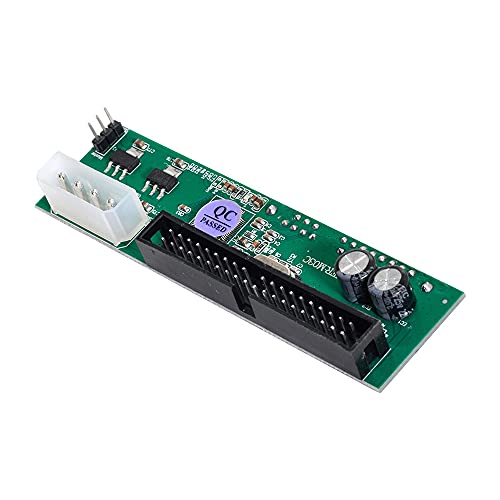
NFHK SATA Disk to IDE/PATA 40Pin Converter Adapter PCBA

cablecc IDE/PATA 40Pin Disk to SATA Female Converter Adapter PCBA

Belcheri USB 3.0 to IDE and SATA Adapter

VoroDcip Hard Drive Reader USB 3.0 & Type C to SATA IDE Adapter

RIITOP IDE 40-Pin Male to Female Hard Drive Extension Cable 6 inch

xiwai SATA Female to IDE 44Pin Converter Adapter PCBA

SinLoon 2.5′ IDE 44Pin Female to SATA Male Adapter

SABRENT 2.5 to 3.5 IDE Disk Drive Convert Notebook Hard Disk Drive to Desktop ADP IDE23
More Details On Our Top Picks
NFHK keeps the setup lean, which suits a desktop bench where you only need a SATA drive talking to an older 40-pin IDE/PATA port. The PCBA format, meaning the adapter is built as a small printed circuit board, stays compact and avoids the clutter of a full enclosure.
That compact shape helps in cramped cases, but it also means you’re dealing with a bare adapter rather than a cushioned, all-in-one tool. For routine drive swaps or older workstation repairs, that’s usually enough.
Strong Points
- Small board format keeps the install tidy.
- Works well for older desktop drive bays.
- Helps you bridge SATA media to IDE hardware without extra bulk.
- Easy to store in a parts drawer.
Things To Consider
- Bare-board design leaves the parts exposed during handling.
- Best suited to careful desktop installation, not rough travel use.
Feature Snapshot
Who It Suits Best
Retro-PC tinkerers and desktop repair hobbyists who need a simple internal bridge will get the most from it.
Where A Sibling Pick Shines
Belcheri USB 3.0 to IDE and SATA Adapter suits you better when you want external access to several drive types in one recovery setup.
cablecc flips the direction from the first pick, so it makes more sense for turning a 40-pin IDE/PATA disk into something that presents a SATA female connection. That narrower job profile is handy in repair work where you already know the host side you need to feed.
The PCBA layout keeps it plain and space-saving, though that also means you’ll want to handle the board with some care during installation. For a desktop cabinet or bench-top troubleshooting session, the honest read is that it does exactly the sort of quiet work this category needs.
What We Like
- Clear use case for old IDE disks.
- Compact board shape saves room inside a system.
- Useful for desktop recovery tasks and drive reuse.
Small Caveats
- Single-purpose design gives you less flexibility than a multi-interface kit.
- Bare board handling calls for a steady touch.
Core Details
Who Should Grab It
You’ll appreciate it most for desktop repairs and legacy-disk transfers where a simple IDE-to-SATA path is enough.
Another Choice May Suit
VoroDcip Hard Drive Reader USB 3.0 & Type C to SATA IDE Adapter fits you better when your job involves external access and modern laptop ports.
Belcheri moves into external adapter territory, so it makes sense for anyone who wants to access drives on a desk instead of inside a case. USB 3.0 gives you a common data link, and the included 12V power adapter matters because 3.5-inch drives usually need their own power source.
That broader scope is the real value here, especially for mixed old hardware where you might need to read both SATA and IDE media. The trade-off is setup complexity, since a kit with power and cabling asks for a little more desk space than the tiny board-style picks above.
Highlights
- Handles both SATA and IDE drive families.
- USB 3.0 makes it useful for modern computers.
- Included power support helps with larger desktop disks.
- Good fit for recovery work and data moves.
Areas To Watch
- External setup creates more cable clutter than a simple PCB adapter.
- Desk space matters more with a powered kit.
Quick Facts
Made For
You’ll get the most value from it in recovery sessions, data migration jobs, or home labs with mixed legacy drives.
Skip It When
RIITOP IDE 40-Pin Male to Female Hard Drive Extension Cable 6 inch fits you better for a simple inside-the-case spacing fix.
VoroDcip stands out because it adds both USB 3.0 and Type C, which helps a lot on newer laptops that have fewer legacy ports. The 12V/2A power supply is another useful detail, since that level of external power is aimed at drive access rather than a bare signal pass-through.
Up to 20TB support, as listed, also makes it feel more future-facing than the smaller board-only adapters in this roundup. The catch is that the whole kit asks for more setup space, so it suits a desk, not a pocket.
Reasons To Buy
- USB 3.0 and Type C cover more modern machines.
- Works as a recovery tool for mixed drive types.
- 12V/2A power helps with full-size disks.
- Listed support up to 20TB broadens the use case.
Worth Noting
- More parts mean more cable management on the desk.
- External kits tend to take more storage space than a small adapter board.
Feature Rundown
The Right Fit
You’ll like it most for desktop recovery work, laptop-based troubleshooting, and mixed storage access on newer machines.
Swap It Out When
Belcheri USB 3.0 to IDE and SATA Adapter is the better choice for you when a simpler external kit and fewer connection options feel easier to manage.
RIITOP is the quiet utility item in this group, because it doesn’t convert signals so much as give you six inches of breathing room between IDE connectors. That makes a lot of sense in older towers where cable routing gets cramped fast, especially around a 3.5-inch PATA drive.
The flat ribbon style helps with tidy routing, though you’re still working inside the limits of the old 40-pin standard. For cable management jobs and case-fit fixes, it’s the kind of plain tool that earns its keep without asking for attention.
Best Bits
- Six-inch length is handy for tight case layouts.
- Flat ribbon shape can be easier to route.
- Good fit for extending a 3.5-inch PATA drive connection.
Room For Improvement
- Only solves spacing, not interface conversion.
- Best suited to older IDE-based systems.
Spec Overview
Whose Shelf It Belongs On
You’ll want it in a parts kit for desktop maintenance, drive swaps, or any build where the IDE lead needs a little extra reach.
Look Elsewhere When
NFHK SATA Disk to IDE/PATA 40Pin Converter Adapter PCBA suits you better when the job calls for signal conversion, not just a longer cable.
xiwai is a better match for smaller notebook-class drives than the desktop-focused adapters above. The 44-pin layout is the key detail, because 2.5-inch IDE drives use that denser connector style and need a board built around it.
That makes it handy for laptop drive recovery or older portable hardware, where size and connector shape matter more than fancy extras. It’s still a bare PCBA, so it rewards careful handling and a tidy work area.
Upsides
- 44-pin layout matches 2.5-inch IDE drives.
- Small board shape is easy to store and reuse.
- Useful for laptop drive access and data migration.
Softer Spots
- Not built for 3.5-inch desktop IDE drives.
- Open-board design needs careful handling during install.
Technical Sheet
Built With In Mind
You’ll get the most from it in laptop repair work, especially where a 2.5-inch IDE disk needs a simple bridge.
Where A Sibling Pick Shines
SABRENT 2.5 to 3.5 IDE Disk Drive Convert Notebook Hard Disk Drive to Desktop ADP IDE23 suits you better if you want a notebook-to-desktop adapter with a more established desktop-friendly fit.
SinLoon keeps the job focused on 2.5-inch IDE disks, and the single male SATA 7+15-pin port tells you it’s meant to feed a SATA interface directly. That connector count matters because it lines up with the older drive on one side and the newer host on the other without adding extra fuss.
For notebook disk recovery or quick bench use, that directness is appealing. The trade-off is scope, since this adapter is more specialized than the broader external kits like Belcheri and VoroDcip.
Positives
- Direct 2.5-inch IDE to SATA conversion.
- Male SATA 7+15-pin side fits standard SATA hookups.
- Small format suits parts bins and quick jobs.
Minor Gripes
- Built for a narrow drive class.
- Less adaptable than a powered external kit.
Details At A Glance
Perfect Match For
You’ll like it most for compact notebook drives that need a direct path into a SATA system.
Reach For A Different Pick When
Belcheri USB 3.0 to IDE and SATA Adapter is the better fit for mixed-drive recovery and external bench work.
SABRENT is the clean notebook-to-desktop bridge in the group, and that specific job makes it useful for old 2.5-inch IDE drives that need to live inside a larger chassis. Compared with xiwai’s smaller-board approach, this one feels more purpose-built for desktop installation.
That makes it a solid fit for system rebuilds, archived laptop disks, and legacy file access where you’d rather mount the drive than juggle it externally. The honest limitation is scope, since it’s not the flexible all-in-one option that Belcheri or VoroDcip offer.
Plus Points
- Purpose-built for notebook drive to desktop use.
- Simple format suits internal mounting jobs.
- Helpful for old laptop disks you want to reuse.
Points To Note
- Less versatile than external powered kits.
- Best for one specific adapter job.
Core Details
Who Will Love This
You’ll appreciate it most for desktop rebuilds or archived notebook disks that need a stable internal home.
Where Shoppers Go Wrong
NFHK SATA Disk to IDE/PATA 40Pin Converter Adapter PCBA is the better match when your goal is SATA-to-IDE conversion instead of notebook-to-desktop fitting.
How To Choose The Right Ides To Ide Connector
Match The Direction Of The Connection
The first thing to sort out is direction, because an IDE-to-SATA adapter does a very different job from a SATA-to-IDE board. The little NFHK and cablecc boards in this roundup are directional, so they fit a specific workflow rather than every old drive you own. That detail sounds small, but it decides whether the drive even shows up the way you expect.
USB kits like Belcheri and VoroDcip are easier to understand at a glance because they present a drive externally. That suits recovery sessions and bench work, while the internal boards make more sense for permanent installs. The wrong direction is the fastest way to end up with a part that looks right and does nothing useful.
Choose Internal Or External Use First
Internal adapters work best in older towers, repair benches, and cases that still have room to spare. RIITOP is just a cable, so it solves spacing, not conversion, while SABRENT focuses on putting a notebook drive into a desktop frame. Those are tidy, low-clutter options for people who know exactly where the drive will live.
External kits are the better route for drive recovery, cloning jobs, and mixed old media. Belcheri and VoroDcip add power support and more interface options, which helps when a 3.5-inch disk needs its own supply. You pay for that flexibility with more cables on the desk, and that’s the real trade-off.
Pay Attention To Connector Type And Drive Size
2.5-inch IDE drives use a 44-pin layout, while many 3.5-inch IDE drives use 40 pins, so the connector count matters just as much as the brand name. xiwai and SinLoon are built around the 44-pin notebook style, and NFHK and cablecc speak more directly to the older 40-pin desktop side. That is the sort of detail that saves you from ordering the wrong bridge.
Size matters for storage and handling too. A bare PCBA is easy to tuck away, but it also asks for careful installation and a protected work surface. A ribbon cable or full reader kit takes more room, yet it can be simpler to live with once the drive is in use.
A Quick Reality Check
Wrong Turns To Avoid
Many people focus on the connector shape and forget the actual drive class. A 2.5-inch notebook disk and a 3.5-inch desktop disk often need different adapter styles, and that mix-up causes most of the frustration in this category.
Another common miss is overlooking power. A small signal board is fine for some jobs, but full-size drives and external recovery setups often need a proper power source, as seen in Belcheri and VoroDcip.
Why Top Tier Costs More
Higher-tier kits usually include more than a bare board, and that extra hardware adds convenience. USB 3.0 plus Type C, a power adapter, and support for more drive formats all increase the usefulness of the kit.
You should pay up when the job is mixed or time-sensitive, especially in a repair shop or home lab with several generations of storage. For a one-off internal swap, a small adapter like NFHK or RIITOP is usually the cleaner choice.
Frequently Asked Questions
What does IDE to SATA adapter mean?
It means the adapter helps an older IDE or PATA drive connect to newer SATA hardware, or the other way around depending on the model. The exact direction matters, so the label on the board should match your drive and host port.
Do 2.5-inch and 3.5-inch drives use the same connector?
No, they often use different pin layouts and sometimes different power needs. A 44-pin notebook drive usually needs a different adapter from a 40-pin desktop drive.
Can you use these for data recovery?
Yes, the external kits are especially useful for reading older disks on a modern computer. That setup is common for file access, cloning, and pulling data from retired hardware.
Is a powered adapter better than a passive board?
Powered kits are better for larger drives and external use because they supply the extra electricity the drive needs. Passive boards work well when the host system already provides the right internal support.
Which pick works best for laptop drives?
xiwai and SinLoon are the most focused on 2.5-inch IDE notebook drives. SABRENT also makes sense when you want to place that notebook disk into a desktop-style setup.
Closing Thoughts
The right Ides To Ide Connector depends less on brand hype and more on connector count, drive size, and whether you want an internal bridge or an external recovery kit. NFHK, cablecc, and RIITOP keep things simple for old desktops, while Belcheri and VoroDcip make more sense for mixed-drive work. For notebook disks, xiwai, SinLoon, and SABRENT cover the most realistic use cases. Match the part to the job and the setup stays calm, which is usually what you want from legacy storage.
