
A 24-inch Full HD monitor sits in the sweet spot for desks that need clarity without taking over the room. You get enough screen space for spreadsheets, browsing, light editing, and casual gaming, while keeping text and windows comfortably sized on a typical setup. The six picks below lean toward different needs, from smoother motion to simpler office use, so you can match the panel, ports, and stand to your routine instead of guessing.
The Shortlist At A Glance

LG 24U411A-B 24-inch Full HD IPS Monitor, 120Hz
Samsung 24 S3 (S32GF) FHD IPS Monitor, LS24F320GANXZA

LG 24G411A-B 24-inch Ultragear Full HD Gaming Monitor
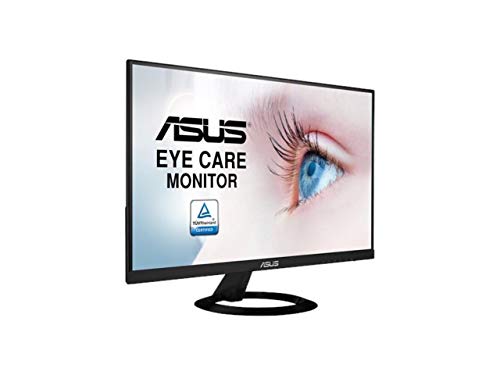
ASUS VZ249HE 24-inch Full HD IPS Eye Care Monitor

Dell 24 Plus Monitor S2425HSM, 23.8-inch FHD 144Hz

MSI PRO MP243L E14 24-inch IPS FHD Monitor, 144Hz
More Details On Our Top Picks
LG’s 24U411A-B leans into comfort and smooth desktop use, which makes sense for a monitor that spends its life in front of documents, browser tabs, and everyday streaming. The IPS panel, or in-plane switching panel, keeps color and contrast steadier from the side than older panel types, and the 120Hz refresh rate helps motion look cleaner than a basic 60Hz screen.
Reader Mode and Flicker Safe give it a softer edge for long work sessions, while HDR10 adds a bit more range to supported video and games. The slim stand base keeps the footprint neat, though the real trade-off is simple, this model is more about comfort and balance than extra gaming flair.
Bright Spots
- 120Hz refresh feels more fluid in day-to-day scrolling and lighter gaming.
- IPS viewing angles suit desks shared by more than one person.
- Reader Mode helps reduce harsh-looking white pages during long work blocks.
- Flicker Safe is a sensible touch for marathon spreadsheet sessions.
Points To Note
- It does not lean into high-end gaming features, so fast competitive play has stronger options elsewhere.
- The slim base saves space, though it leaves less room for desk accessories underneath.
Feature Snapshot
Who It Suits Best
You get the most from this model in a home office, a student desk, or a compact work setup that needs a cleaner image without moving into gaming-first territory.
Where A Sibling Pick Shines
LG 24G411A-B is the stronger match for competitive gaming, since it adds 144Hz, 1ms MBR, and sync support that matter more once speed becomes the priority.
This Samsung keeps the formula simple, with an IPS panel for steady color across the screen and a 120Hz refresh rate that gives the desktop a cleaner feel. For mixed use, that combination matters more than flashy extras, especially on a desk that shifts between work calls, films, and the occasional game.
Game Picture Mode and adjustable color and contrast settings make it easier to tune the image by content type, which is handy if your day moves from text-heavy tasks to entertainment. The honest read is that it favors versatility over hardware drama, and that restraint works in its favor.
What We Like
- IPS viewing keeps the image stable across wider angles.
- 120Hz motion is smoother than a standard office display.
- Game Picture Mode gives you more control over the look of different content.
- Its shape fits neatly into a secondary desk or compact setup.
Minor Gripes
- Gaming tuning is useful, but it still sits below dedicated fast-action models.
- The source details focus on image behavior, so ergonomic flexibility is not a major part of the pitch.
Core Details
Made For
You get the best fit here as a general-purpose monitor for a mixed home desk, especially when you want color stability without moving up to a more aggressive gaming screen.
Look Elsewhere When
LG 24G411A-B suits fast-paced gaming better, because its 144Hz panel and motion-focused features line up more closely with action-heavy play.
LG pushes harder here than it does with the 24U411A-B, and the difference shows up in motion-first features rather than simple office polish. The 144Hz refresh rate, 1ms MBR, which means motion blur reduction, and NVIDIA G-Sync Compatible plus AMD FreeSync support all point toward a setup where speed and tear reduction matter.
That makes this a natural fit for console-style action, PC shooters, and fast sports titles, especially on a desk where the monitor is doing more than just handling email. HDR10 adds a little extra range for supported content, though the trade-off is that you’re paying for gaming focus instead of broad everyday extras.
Highlights
- 144Hz refresh gives fast-moving content a cleaner look.
- 1ms MBR is aimed at reducing blur in quick scenes.
- G-Sync Compatible and FreeSync support help smooth out variable frame rates.
- HDMI and DisplayPort make it easier to connect different systems.
- IPS viewing angles keep the image usable from a side seat.
Areas To Watch
- It is geared more toward play than office comfort features.
- The slim stand keeps the profile tight, but it does not add much desk utility.
- Fast-game tuning is useful, though casual users may not need the extra headroom.
Feature Rundown
Best Suited To
You fit this monitor best as a gamer who wants a compact 24-inch panel with higher motion headroom and sync support.
Another Choice May Suit
LG 24U411A-B is the calmer match for mixed office use, since Reader Mode and Flicker Safe make it easier on long workdays.
ASUS keeps this one stripped down in a useful way, which suits desks that need a clean 24-inch display without a lot of extra fuss. The Full HD IPS panel gives you familiar sharpness and steady viewing angles, and HDMI plus VGA make it easier to connect older laptops, desktop towers, or mixed office hardware.
That VGA port is the quiet differentiator here, because it still matters in schools, back-office workstations, and older home computers. The trade-off is obvious enough, this monitor is more about dependable compatibility than speed features or gaming extras.
Positives
- HDMI and VGA cover both modern and older setups.
- IPS keeps text and menus readable from off-center seating.
- Its plain design fits well in workrooms and study corners.
Room For Improvement
- It lacks the higher refresh rates that make motion look smoother.
- Feature count is modest, so it is less exciting for mixed gaming use.
At A Glance
Right Fit For
You suit this model best if you want a straightforward office monitor that can plug into older equipment without drama.
A Better Fit Elsewhere
Samsung 24 S3 (S32GF) makes more sense for mixed entertainment and work, since its 120Hz panel brings smoother motion.
Dell gives you a slightly smaller 23.8-inch panel, but the feature set is where this one starts to separate itself from the simpler ASUS and Samsung choices. The 144Hz refresh rate, 1ms response claim, built-in 2 x 3W speakers, and height, tilt, pivot, and swivel adjustment make it easier to shape the setup around the desk rather than the other way around.
For shared spaces, that adjustability matters more than it looks on paper, especially if the monitor sits between work and entertainment use. Ash White also gives the unit a cleaner visual tone, though the honest trade-off is that you’re paying for convenience and flexibility rather than bare-bones simplicity.
Best Bits
- Four-way stand adjustment helps with ergonomic positioning.
- Built-in speakers reduce clutter from a separate audio setup.
- 144Hz suits smoother scrolling and lighter gaming.
- 23.8-inch sizing still feels familiar on a compact desk.
Softer Spots
- Built-in speakers are handy, though separate speakers still tend to sound fuller.
- The size is slightly under the 24-inch mark, which may matter to some setups.
Details At A Glance
Whose Shelf It Belongs On
You fit this Dell best if you want a tidy home-office monitor that also handles casual play and everyday media with less setup fuss.
Swap It Out When
LG 24U411A-B is the steadier swap for a pure work desk, since its Reader Mode and Flicker Safe lean harder into long-session comfort.
MSI aims this model at the overlap between office work and lighter gaming, and the spec mix backs that up cleanly. You get a 144Hz IPS panel, FreeSync support, HDR Ready labeling, HDMI and VGA inputs, a VESA mountable design, tilt adjustment, and a 4-side slim bezel that helps the screen feel neat on a desk or in a dual-monitor layout.
The 1ms figure adds a speed-focused note, though the bigger story is flexibility, because this one can slide between a work station and a casual play setup without needing much compromise. The catch is that the feature list is practical rather than luxurious, which suits plenty of home offices.
Standout Traits
- 144Hz and 1ms support a responsive feel for fast motion.
- VESA mounting gives you more stand and arm options.
- HDMI and VGA widen compatibility across older and newer systems.
- Four-sided slim bezels help in multi-monitor arrangements.
Small Caveats
- Tilt is the only stand adjustment listed, so desk positioning is more limited than on the Dell.
- HDR Ready is a basic compatibility note, not a substitute for a fuller premium feature set.
- It feels geared toward practicality, so style-first shoppers may want something more polished.
Quick Facts
Built With In Mind
You fit this MSI best if you want a work-friendly 24-inch monitor that still leaves room for casual gaming and a cleaner dual-screen desk.
Reach For A Different Pick When
Dell 24 Plus Monitor S2425HSM is the smarter step up for posture control, since its height, tilt, pivot, and swivel adjustments go further.
How To Choose The Right 24 Inch Full Hd Monitors
Panel Type And Motion Speed
IPS panels suit most desks because they keep color and contrast steadier from the side, which matters in shared rooms and small workstations. A higher refresh rate, such as 120Hz or 144Hz, makes scrolling and motion look cleaner than a standard 60Hz display. The trade-off is that motion upgrades often cost more, so casual office use does not always need the faster tier.
Stand Design And Desk Space
A slim base helps on tight desks, while height, tilt, pivot, and swivel adjustment matter more if you sit for long sessions or share the screen with others. Pivot means the screen can rotate upright, which helps with coding, long documents, and tall spreadsheets. More movement in the stand usually means a more flexible setup, but it can also add bulk and raise the price.
Ports And Device Match
HDMI covers most modern laptops, desktops, and consoles, while VGA still matters for older office gear and legacy systems. DisplayPort shows up more often on gaming-focused models and can be useful for higher refresh support on some setups. Match the port list to the device you already own, because the cleanest monitor on paper is frustrating without the right cable path.
Comfort Features And Daily Use
Reader Mode, Eye Saver-style settings, Flicker Safe, and similar image tools matter most on workdays that stretch past a few hours. Those features do not make the screen faster, but they can make long text sessions feel less harsh. For daily work, that comfort often matters more than one extra gaming feature.
A Quick Reality Check
Common Shopping Slip Ups
A lot of people focus on panel size and ignore the stand, which becomes a problem on shallow desks. Others chase gaming specs and end up with a monitor that feels awkward for spreadsheets or video calls. Port mismatch is another easy miss, especially with older desktops that still rely on VGA.
Where The Extra Money Goes
Higher-tier models usually spend money on smoother motion, better stand adjustment, and broader input support. Built-in speakers, VESA mounting, and sync features also raise the cost because they widen the monitor’s role. That extra spend makes sense when the screen has to do double duty for work and play.
Frequently Asked Questions
Is 24 Inches Big Enough For Work?
Yes, for a lot of desks it lands in a comfortable middle ground. You get enough room for two side-by-side windows without the footprint of a larger screen.
Does Full HD Look Sharp At 24 Inches?
It usually does, because 1080p is well matched to this size. Text and menus stay easy to read without forcing you to scale everything too much.
Do You Need 120Hz Or 144Hz?
Not for basic office tasks, but the smoother feel is easy to notice during scrolling and gaming. A faster refresh rate makes the desktop feel livelier.
Which Ports Matter Most?
HDMI is the most broadly useful connection for modern gear. VGA only matters when you still use older hardware.
Are Eye Comfort Features Worth It?
They matter most on long workdays and late sessions. Reader Mode and flicker-reduction tools can make the screen feel easier to live with.
Closing Thoughts
You have six solid ways to approach a 24-inch Full HD desk setup, and the right one depends on how you split time between work, media, and gaming. LG 24U411A-B feels balanced, Samsung keeps things versatile, LG 24G411A-B leans hard into speed, ASUS stays simple, Dell adds ergonomic flexibility, and MSI covers the middle ground well. The best match is the one that fits your desk, your devices, and the way you actually sit down to use it.
