
27 inch screens sit in a practical middle ground, large enough for split windows and detailed work, yet still manageable on a normal desk. That makes them useful for office setups, home study stations, casual gaming, and mixed-use spaces where a bulky panel would feel out of place.
This roundup focuses on the details that change day-to-day ownership: panel type, refresh rate, input options, stand adjustment, and comfort features such as flicker reduction or low blue light modes. You get a clearer path to the right fit instead of a wall of vague specs.
Quick Look At The Shortlist

LG 27U411A-B 27-inch Full HD IPS Monitor 120Hz

Samsung 27 S3 (S32GF) FHD Monitor 120Hz IPS

AOC 27B35H3 27 Inch FHD Monitor 120Hz Fast IPS

Amazon Basics 27-inch Computer Monitor 120Hz IPS

Samsung 27 Odyssey G5 (G51F) QHD Gaming Monitor 180Hz

ArcticPro 27 Inch Monitor 120Hz FHD IPS 1ms
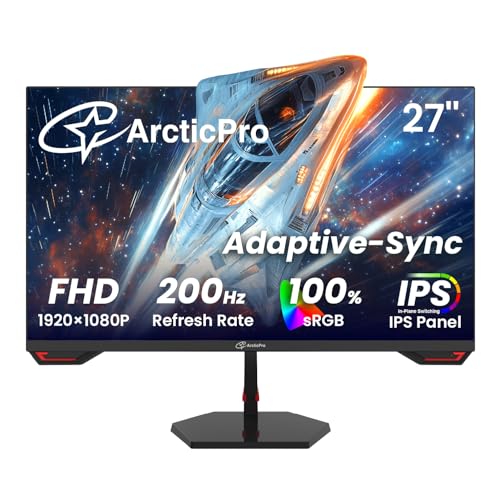
ArcticPro 27 Inch 200Hz Gaming Monitor FHD IPS
More Details On Our Top Picks
LG’s 27U411A-B keeps the formula straightforward, with a Full HD IPS panel, 120Hz refresh rate, HDR10, and a slim stand base. IPS, short for in-plane switching, usually gives you steadier color and wider viewing angles than basic TN panels, which helps in a shared office or on a side desk.
The Reader Mode and Flicker Safe features point toward longer sessions, especially for document work, light editing, or a dorm setup that runs late. The trade-off is plain enough, it stays at 1080p, so you get comfort and motion smoothness rather than extra desktop space.
What We Like
- 120Hz keeps scrolling and cursor motion smoother than a standard 60Hz desk screen.
- IPS panel support helps text and color stay more consistent across wider angles.
- Reader Mode gives you a practical comfort setting for long paperwork sessions.
- Flicker Safe is useful for anyone parked at a monitor for much of the day.
Things To Consider
- 1080p on 27 inches is comfortable, though not as dense as a higher-resolution panel.
- The slim stand base keeps the footprint neat, but it won’t satisfy anyone wanting a more adjustable stand.
- You may want an external arm later, since desks with deep cable clutter can make fixed bases feel cramped.
Feature Snapshot
Who Will Love This
You work from home, study for long stretches, or want a simple screen that feels easier on the eyes than a bare-bones office panel.
Where A Sibling Pick Shines
Samsung’s Odyssey G5 suits you better for fast gaming, while the LG 27U411A-B makes more sense for balanced everyday desk use.
Samsung’s S3 keeps the design quiet and office-friendly, but it still brings a 120Hz IPS panel and Eye Saver Mode into the mix. That combination makes sense for email-heavy days, browser work, and evening use where softer viewing settings matter more than flashy styling.
Compared with the LG above, this one leans a bit more toward Samsung’s comfort-first tuning. The extended service contract and surge coverage belong to the protection plan, while the monitor itself stands out for a tidy, low-drama presence on a work desk.
Highlights
- 120Hz motion helps the screen feel responsive during daily navigation.
- IPS panel support suits mixed seating positions in a shared office or apartment.
- Eye Saver Mode is a sensible extra for late work sessions.
- The clean design fits neatly beside a laptop dock or compact desktop tower.
Softer Spots
- Its strengths are comfort and simplicity, not aggressive gaming credentials.
- The supplied information stays light on stand adjustability, so desk ergonomics may depend on your setup.
- That minimal look is attractive, though it leaves less room for feature-heavy enthusiasts.
Details At A Glance
Right Fit For
You want a clean everyday monitor for productivity, browsing, and light entertainment without a lot of visual noise.
A Better Fit Elsewhere
LG’s 27U411A-B is the closer match for you if Reader Mode and Flicker Safe matter more than Samsung’s simpler desk presence.
AOC pushes this model toward users who want a broader feature set without moving into a gaming-first price tier. Fast IPS, 1ms MPRT, Adaptive Sync, HDMI 1.4, VGA, VESA compatibility, tilt adjustment, and low blue light coverage make it a practical match for mixed desks, older PCs, and a second-screen role.
Unlike the two Samsung picks, this one gives you VGA alongside HDMI, which still matters for older towers and some office hardware. The trade-off is simple, the design is more function-led than polished, so it suits a workbench or multipurpose room better than a design-forward studio.
Best Bits
- VGA and HDMI support help it connect to newer and older systems.
- Adaptive Sync reduces visible tearing in supported games and motion-heavy apps.
- VESA compatibility makes arm mounting straightforward for a cleaner desk.
- Low blue light support is useful for long spreadsheet or document sessions.
Areas To Watch
- The feature list is broad, but the overall look stays utilitarian.
- VGA is handy for legacy gear, though most modern desks won’t need it.
- The tilt-only approach may leave some setups wanting more posture adjustment.
Core Details
Who Should Grab It
You need a sensible all-purpose monitor for a mixed computer setup, especially one that still includes legacy hardware.
Swap It Out When
LG’s 27U411A-B fits better for comfort features, while the AOC 27B35H3 makes more sense for connector flexibility and basic mounting options.
The Amazon Basics model keeps things stripped back in a useful way: 27 inches, 120Hz, 1080P, IPS, HDMI, DisplayPort, and VESA compatibility. That makes it easy to place in a home office, especially on desks where you want a monitor that plays nicely with both laptops and desktop towers.
Compared with the AOC above, this one swaps extra comfort and legacy extras for a cleaner office-first mix of DisplayPort and VESA support. The honest read is that it makes the most sense for straightforward work setups, where you care more about compatibility than about a long feature sheet.
Positives
- DisplayPort and HDMI make it easier to match modern computers and docks.
- VESA compatibility gives you flexibility for arm mounting and tighter desk layouts.
- 120Hz can make daily navigation feel smoother than a basic office screen.
- The simple design suits workspaces that need a low-key look.
Room For Improvement
- It stays focused on fundamentals, so feature hunters may want something richer.
- 1080P on a 27-inch panel is workable, though not especially sharp for detail-heavy editing.
- Desk ergonomics may depend on your stand preference, since the listing leans more on compatibility than adjustability.
Feature Rundown
Made For
You want a clean desk monitor for work, school, or home use, and you prefer simple connectivity over extra gaming extras.
Another Choice May Suit
AOC’s 27B35H3 is the better fit for you if VGA, low blue light support, and tilt adjustment matter more than Amazon Basics’ pared-back approach.
The Odyssey G5 takes a very different path from the office-leaning picks above, starting with QHD resolution, 180Hz refresh, 1ms response, AMD FreeSync, HDR10, and a height-adjustable stand. QHD means 2560 x 1440, so you get more room for detail than on the 1080p models, which matters on a 27-inch panel for games and dense multitasking.
This one suits fast-moving play, but it also feels more premium on a desk because the stand adjusts for posture. The catch is that the extra sharpness and gaming features only matter if you actually need them, since a casual office setup may never use the headroom.
Reasons To Buy
- QHD resolution gives you visibly more workspace and finer image detail than 1080p.
- 180Hz refresh suits fast shooters, racing games, and high-motion play.
- AMD FreeSync helps reduce tearing on supported graphics cards.
- Height adjustment makes it easier to match your chair and desk setup.
- HDR10 adds a contrast tool for compatible content.
Minor Gripes
- The feature set is clearly aimed at gaming, so it can feel overbuilt for plain office work.
- QHD asks more of your graphics hardware than 1080p does.
- The richer setup can be more than you need for email, spreadsheets, and basic browsing.
At A Glance
Best Suited To
You game regularly and want a 27-inch monitor that offers more detail and speed than a standard office screen.
Look Elsewhere When
LG’s 27U411A-B is the safer choice for you if everyday work comfort matters more than QHD gaming performance.
ArcticPro leans into desk-friendly extras, starting with a three-sided frameless design, ultra-slim build, 99% sRGB coverage, Adaptive Sync, VESA mounting, and HDMI plus VGA ports. sRGB is a standard color space, so 99% coverage usually matters most for people who want colors to look more consistent in photos, web graphics, or general content work.
Compared with the AOC, this one feels more polished visually and more useful for mixed media tasks. The compromise is still the same old 1080p question at 27 inches, so it shines more from its feature mix than from raw pixel density.
Standout Traits
- 99% sRGB coverage is useful for content that depends on more consistent color.
- Three-sided frameless styling gives it a cleaner look in multi-monitor setups.
- Adaptive Sync helps keep motion cleaner in supported games and video.
- VGA and HDMI support make it practical for mixed hardware.
Small Caveats
- Its style-forward design doesn’t erase the limits of 1080p at 27 inches.
- The included feature set is broad, so it may feel more than basic office needs call for.
- A frameless look often means you notice dust and fingerprints more quickly on the bezel area.
Spec Overview
Whose Shelf It Belongs On
You want a 27-inch monitor that balances a cleaner look with useful compatibility for work, study, and light creative tasks.
Reach For A Different Pick When
Amazon Basics’ 27-inch monitor is a better fit for you if you want a more restrained office-first build, while ArcticPro suits a more feature-conscious desk.
ArcticPro’s 200Hz model is built for speed first, and that shows in the 200Hz refresh rate, 1ms response time, Adaptive Sync, IPS panel, three-sided frameless design, ultra-slim body, and DisplayPort plus HDMI inputs. Compared with the 120Hz ArcticPro above, it gives you more headroom for fast motion, especially in shooters or competitive play.
That extra pace makes sense for serious gaming sessions, though it won’t matter much for spreadsheet work or web browsing. The bluelight filter is a handy comfort feature, but the real value sits in the refresh rate and motion handling rather than in office features.
Upsides
- 200Hz gives you much more motion headroom than 120Hz models.
- 1ms response time suits fast-action games and quick camera movement.
- IPS panel support helps keep the picture stable from a range of seating positions.
- DisplayPort and HDMI give you practical connection flexibility.
- The ultra-slim, frameless look keeps a gaming desk visually tidy.
Honest Caveats
- The spec mix is strongly gaming-focused, so casual office use won’t need everything here.
- FHD on 27 inches is fine for speed, though not as sharp as QHD for dense work.
- Motion-first features matter most with a capable graphics source behind them.
Technical Sheet
The Right Fit
You game often and want a 27-inch screen that leans hard into speed rather than office comfort.
Where A Sibling Pick Shines
Samsung’s Odyssey G5 is the more balanced upgrade for you if QHD resolution and a height-adjustable stand matter more than ArcticPro’s higher refresh rate.
How To Choose The Right 27 Inch Monitors
Start With The Job, Not The Sticker
A 27-inch monitor can serve a spreadsheet desk, a gaming station, or a mixed home setup, but the right panel depends on what fills most of your hours. 1080p is fine for general use and lighter budgets, while QHD makes sense for people who want sharper text or more room for side-by-side windows. Refresh rate matters too, because 120Hz already feels smoother than a basic office display, and 180Hz or 200Hz starts to matter for fast games.
IPS panels are the safer all-round choice for color consistency and viewing angles. TN and VA are not part of this roundup, which tells you something useful already, these picks lean toward everyday clarity rather than niche speed-only designs.
Check The Desk, Not Just The Screen
Stand shape, VESA support, HDMI, DisplayPort, and VGA all change how painless the setup feels. A VESA mount lets you move the monitor to an arm or wall bracket, which helps on tight desks, while DisplayPort is often the easier match for desktop PCs and HDMI stays common for laptops and consoles.
Height adjustment is worth more than it sounds, especially for long sessions. A screen that lands at the right eye level feels calmer through the day, and a fixed stand can become the weak spot even on a strong panel.
Pick The Comfort Features You Will Actually Use
Flicker reduction, low blue light, Eye Saver Mode, and Reader Mode are not flashy terms, but they matter during long office days or late-night study. They are comfort tools, not magic tricks, and the right one depends on how much time your eyes spend on text.
HDR10 and Adaptive Sync deserve separate attention. HDR10 can improve contrast handling in compatible content, while Adaptive Sync helps reduce tearing in supported games, so neither feature should sway you unless your content really calls for it.
Match The Monitor To The Hardware Behind It
Older desktops still benefit from VGA support, which is why some of these 27-inch picks stand out in mixed offices. Newer systems usually gain more from HDMI or DisplayPort, and gaming rigs can justify higher refresh rates far more easily than a basic work laptop.
That match-up matters more than a glossy feature list. The best 27-inch monitor for you is the one that fits the computer, the desk, and the hours you spend in front of it.
Things Worth Knowing First
Common Shopping Slip Ups
Shoppers often fixate on refresh rate and ignore resolution, then end up with a fast screen that still feels cramped for work. Another common miss is skipping port checks, which turns a good monitor into a headache when the laptop only has HDMI and the desk setup wants DisplayPort.
Stand adjustment gets overlooked too. A panel can look right on paper and still feel awkward at eye level, especially on a shallow desk or in a shared room.
What The Higher Tier Buys
Higher-tier 27-inch monitors usually spend more on sharper panels, faster refresh rates, stronger motion handling, and better stand adjustment. QHD resolution and 180Hz or 200Hz are the clearest signs that the price is going toward detail and speed rather than just a larger shell.
You also pay for nicer extras such as more controlled color, better ergonomic stands, and broader connection support. Those upgrades matter most for gaming, creative work, or any setup you sit at for long stretches.
Frequently Asked Questions
Is 27 Inches Too Big For Everyday Desk Use?
No, 27 inches is a very practical size for most desks. It gives you room for two windows side by side without feeling oversized.
Is 1080p Good Enough At 27 Inches?
Yes, it works well for general use, streaming, and casual gaming. QHD simply gives you a crisper image and more working space.
Do You Need 120Hz For Office Work?
You do not need it, but it makes motion feel smoother during scrolling and window changes. That can make long sessions feel less abrupt.
Why Does IPS Matter So Much?
IPS panels usually keep color and contrast steadier when you move off center. That helps in shared spaces and on desks where you do not sit perfectly square to the screen.
Should You Pay More For Gaming Features?
Only when gaming is a real part of your routine. For office work and casual browsing, a simpler IPS panel with comfort features is often enough.
Closing Thoughts
You have seven solid paths here, and the right one depends on how you use your desk, not on marketing noise. LG and Samsung’s S3 are the calm everyday choices, AOC and Amazon Basics cover practical work setups, and the two Odyssey and ArcticPro models push harder into gaming speed or extra features. Keep resolution, refresh rate, and stand ergonomics in the same frame, because that mix shapes daily comfort more than any single spec. Pick the monitor that fits your hours, your hardware, and your desk space, and the choice gets much easier.
