
Shopping for 55 Inch Monitors usually means you need more than a big screen. You may be setting up a living room display, a gaming corner, a control-room style desk, or a storefront sign that needs to stay readable from across the room.
The right choice depends on brightness, connectivity, mounting, and how much desk or wall space you can spare. You’ll also want to separate true monitors from commercial displays and massive gaming panels, because the best fit can look very different from one setup to the next.
The Shortlist At A Glance
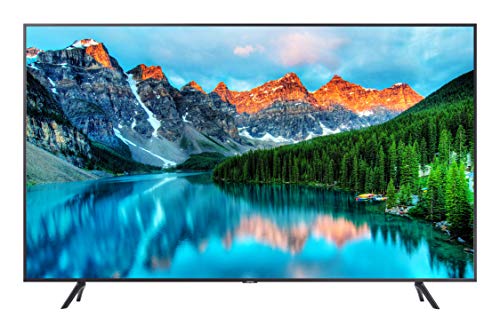
Samsung BE55T-H Pro TV 55-Inch Commercial Signage Display

Samsung Odyssey Neo G9 (G95NC) Dual 4K UHD Curved Gaming Monitor

Samsung 55-Inch Class M70H Series Smart TV
Samsung 43″ M7 (M70F) Series 4K UHD Smart Monitor

Samsung Odyssey Ark 2nd Gen 4K UHD Curved Gaming Monitor

monTEK Ultrawide Monitor Arm Max 57″ with USB

Samsung Business QB55R 55 Inch 4K UHD Commercial Signage Display
More Details On Our Top Picks
This one makes sense for storefronts, waiting areas, and office walls where a 55-inch screen needs to work as signage first and entertainment second. The 250-nit brightness is enough for controlled indoor lighting, though it won’t feel as punchy in sunlit spaces.
The built-in speakers, HDMI, USB, and tuner keep the setup straightforward, which matters when you want fewer boxes hanging off the back. Compared with the gaming-heavy picks later in the list, this is the calmer, more business-minded route.
Strong Points
- Commercial display focus suits menu boards, notices, and lobby loops.
- 4K resolution helps text, graphics, and photos look cleaner at close range.
- HDMI, USB, and tuner support keep source options flexible.
- Built-in speakers reduce the need for extra audio gear in simple installs.
Points To Note
- 250 nits can feel modest in bright, open rooms.
- Business-first design gives you less gaming flair than the Odyssey models.
- Menu and content setup can take a little patience for first-time signage owners.
Feature Rundown
Who It Suits Best
You’ll get the most from this pick in a business setting where clear messaging matters more than gaming features.
Where A Sibling Pick Shines
Samsung Business QB55R 55 Inch 4K UHD Commercial Signage Display suits shop owners who want a similar commercial layout with Wi-Fi on the feature list.
Your desk needs serious space for this one, because the 57-inch panel and 1000R curve are built to wrap your field of view rather than sit politely in the corner. The Dual 4K layout, 240Hz refresh rate, and 1ms response time make the spec sheet read like a wish list for sim racers and competitive gamers who spend long sessions at the desk.
DisplayPort 2.1 matters here, since it gives the connection bandwidth a modern edge, and Quantum Mini-LED backlighting is there for richer control over light and dark areas on screen. Compared with the BE55T-H Pro, this is all about immersion and motion, not signage or simple office duty, so the trade-off is footprint and cost complexity.
What We Like
- Dual 4K resolution gives you a huge working and gaming canvas.
- 240Hz refresh rate suits fast motion and sharp camera pans.
- 1ms response time helps reduce blur in quick-moving scenes.
- 1000R curvature creates a wraparound feel that can suit cockpit-style setups.
- DisplayPort 2.1 gives you a current connection path for demanding rigs.
Room For Improvement
- The size asks for a deep desk or a dedicated stand.
- Setup is not casual, so cable planning matters.
- The gaming-first shape is overkill for basic office work.
Core Details
Made For
You’ll appreciate this most in a gaming setup where size, speed, and curvature matter more than desk simplicity.
Another Choice May Suit
Samsung 55-Inch Class M70H Series Smart TV fits someone who wants a more relaxed all-purpose screen for streaming and daily use.
This is the calm middle ground in the lineup, a 55-inch set that aims to handle streaming, casual gaming, and family viewing without turning your room into a cockpit. Mini LED backlighting usually helps with more controlled contrast than basic LED panels, and the 4K resolution keeps everyday content looking clean.
The Motion Xcelerator plus DLG 120Hz setup should appeal to anyone who watches sports or plays on a console now and then, while the broad free-content angle makes it easy to leave on for background viewing. Compared with the Odyssey models, this one is less dramatic but easier to live with day to day.
Upsides
- 55-inch size works well in living rooms and multipurpose spaces.
- Mini LED technology can improve contrast handling over plain edge-lit sets.
- Motion-focused features suit sports and games with quick action.
- Smart TV format keeps setup simpler than a PC-first monitor.
- Broad free-content access helps fill time without extra hardware.
Minor Gripes
- Feature depth can feel excessive for someone who only wants basic streaming.
- Smart TV menus may take a little time to learn.
- Wall-mount or stand planning still matters in smaller rooms.
At A Glance
Right Fit For
You’ll like this most in a shared room where one screen has to cover streaming, casual gaming, and everyday viewing.
Look Elsewhere When
Samsung 57″ Odyssey Neo G9 (G95NC) suits dedicated gamers who want a much more immersive curved panel and faster motion features.
Think of this as the hybrid pick for a desk that doubles as a media spot. The 43-inch size lands in a more manageable zone than the 55-inch screens, which helps in home offices where a huge panel would feel like too much wall.
USB-C, HDMI, and USB-A cover a broad mix of laptops and accessories, and the smart TV apps plus Gaming Hub make the panel feel less like a plain work monitor. Compared with the M70H TV, this one leans harder into desk use, so the trade-off is a smaller screen for better placement flexibility.
Highlights
- USB-C makes laptop connection cleaner for modern workstations.
- HDMI and USB-A keep older gear and peripherals in the mix.
- Smart TV apps let you move from work to streaming without extra hardware.
- Gaming Hub adds another layer of flexibility for casual play.
Areas To Watch
- 43 inches is smaller than the main 55-inch displays in this roundup.
- Desk clutter can build up if you plug in several devices at once.
- For living-room distance, you may want something larger from this list.
Details At A Glance
Built With In Mind
You’ll get the best match here in a home office or studio where space is tight but flexibility matters.
A Better Fit Elsewhere
Samsung 55-Inch Class M70H Series Smart TV suits you better for living-room viewing where a fuller 55-inch screen feels more natural.
The rotating Ark format is the boldest shape in the group, and that alone tells you this is meant for a dedicated setup rather than casual desk duty. With 4K resolution, 165Hz refresh, 1ms response, and support for up to four inputs in multi-view, it can handle game feeds, chat, and secondary windows without feeling cramped.
The height-adjustable screen helps it adapt to a cockpit-style desk, and the curved 1000R panel adds the sort of wraparound presence that feels almost like sitting inside the display. Compared with the Neo G9, this one is more about flexible control and multi-source layout than pure speed.
Reasons To Buy
- Multi-view support lets you manage several sources on one panel.
- 165Hz and 1ms suit responsive gaming and quick transitions.
- 1000R curvature pulls the image into a more enclosed viewing position.
- Height adjustment helps the screen line up with your seating position.
- Quantum Mini-LED backlighting supports stronger contrast control.
Softer Spots
- The shape asks for planning, especially on smaller desks.
- Multi-input use can mean more cable management than a standard monitor.
- Its specialized layout may feel excessive outside a gaming den or media room.
Quick Facts
Perfect Match For
You’ll appreciate this most if your setup revolves around gaming, multiple sources, and a dramatic curved display.
Swap It Out When
Samsung 57″ Odyssey Neo G9 (G95NC) is the better fit for sim-focused gamers who want the widest possible curved view and faster motion handling.
Big monitors need proper support, and this arm is built for that job more than for flashy looks. The 17 to 57-inch compatibility and 59.4-pound limit make it relevant for large curved panels, especially in a gaming room or office where desk space is too valuable to waste.
The height-adjustable design, USB 3.0A/C ports, and VESA 75/100 support make it practical for a more organized workstation. Compared with the display picks in this roundup, the value here comes from cleaning up the whole setup, though the trade-off is that installation needs care and a sturdy desk.
Best Bits
- Supports a wide range of large curved monitors.
- 59.4-pound capacity suits heavier panels.
- Height adjustment helps line up the screen with your seating position.
- USB 3.0A/C adds convenient connectivity at the arm.
- VESA 75/100 support covers common mounting patterns.
Small Caveats
- Installation takes more attention than a simple stand swap.
- A very light desk may not be the right base for it.
- Desk clamps and routing can need a little tidying after setup.
Feature Snapshot
Whose Shelf It Belongs On
You’ll want this on a desk that already supports a large monitor and needs better ergonomics.
Reach For A Different Pick When
Samsung 43″ M7 (M70F) Series 4K UHD Smart Monitor is the cleaner choice for a lighter home-office screen with fewer mounting demands.
This display speaks to businesses that need steady signage more than feature-packed entertainment. The 55-inch size, 4K panel, HDMI, Wi-Fi, and 350-nit brightness give it a useful blend for meeting rooms, reception desks, or retail messaging.
Compared with the BE55T-H Pro, this one adds wireless convenience on the feature list, while staying in the same general commercial lane. The honest read is that it’s still a business tool first, so home users looking for a casual TV may find the tone too utilitarian.
Positives
- Business signage layout suits indoor commercial messaging.
- Wi-Fi can simplify content delivery in connected spaces.
- 4K resolution keeps business graphics and text looking clear.
- 55-inch size works well for medium-sized rooms and counters.
Honest Caveats
- 350 nits are still best for indoor use rather than harsh sunlight.
- Commercial styling may feel plain in a living room.
- Content setup takes some planning for business owners new to signage screens.
Core Details
Who Should Grab It
You’ll find this a smart fit for business spaces that want signage with simple connectivity and a clean footprint.
Skip It When
Samsung 55-Inch Class M70H Series Smart TV is better for households that want a more relaxed TV experience with broader entertainment appeal.
How To Choose The Right 55 Inch Monitors
Start With The Room, Not The Spec Sheet
A 55-inch screen can feel just right in a lounge, conference room, or gaming den, but it can overwhelm a shallow desk fast. Measure viewing distance, stand depth, and wall clearance before you get pulled in by refresh-rate numbers or AI branding.
Commercial displays like the BE55T-H Pro and QB55R suit signage-heavy spaces, while the Odyssey panels belong in setups where immersion matters more than simplicity. That split saves you from buying the wrong kind of large screen for the room you actually have.
Match Brightness And Motion To The Job
Brightness matters more than many people expect. A 250-nit panel can work indoors in controlled light, while 350 nits gives a bit more headroom for business spaces, and high-end gaming panels go much farther with Mini LED backlighting and HDR support.
Motion specs matter just as much for gaming and sports. Higher refresh rates, like 165Hz or 240Hz, help fast movement look smoother, while 1ms response times matter most for twitchy play and quick camera shifts.
Check The Connections Before The Cart
USB-C, HDMI, USB-A, Wi-Fi, tuner support, and DisplayPort 2.1 all solve different problems. Laptops usually benefit from USB-C, consoles and streaming boxes lean on HDMI, and gaming rigs may call for DisplayPort and higher-bandwidth input support.
That’s where the monitor arm matters too, especially for oversized curved displays. A strong VESA-compatible mount or arm can make a huge screen easier to live with, while a weak stand turns every cable swap into a chore.
Think About Use Over Hype
The smartest choice usually comes from the way you spend time in front of the screen. Casual streaming, office work, storefront signage, and cockpit-style gaming all ask for different features, even when the panels share the same 55-inch size.
Choose the screen that solves the most annoying part of your day, not the one with the longest feature list. A clean fit tends to age better than a flashy mismatch.
Things Worth Knowing First
Common Shopping Slip Ups
Many people focus on size alone and forget about stand depth, wall clearance, or how far they sit from the screen. That mistake can make a 55-inch panel feel awkward instead of impressive.
Another common miss is buying a gaming monitor for signage or a commercial display for casual streaming. Those categories overlap in size, but their strengths are very different.
Where The Extra Money Goes
Higher-tier models usually pay for faster motion handling, better backlighting, stronger contrast control, and more flexible connectivity. On the gaming side, that can mean high refresh rates, low response times, and modern ports such as DisplayPort 2.1.
On the business side, the higher spend often goes into brightness, commercial uptime focus, and easier content control. That upgrade makes sense when the screen is a daily work tool instead of a once-in-a-while entertainment piece.
Frequently Asked Questions
Are 55 Inch Monitors Too Large For A Desk?
They can be, depending on desk depth and how far you sit back. A monitor arm or a deep desk makes a big difference for comfort.
Do Commercial Displays Work For Home Use?
They can work, but the menu layout and brightness tuning often feel more business-focused than relaxed. A smart TV usually feels easier for family viewing.
Is 4K Enough For A Screen This Large?
Yes, 4K keeps text and video reasonably sharp at 55 inches. You still want a sensible viewing distance so the screen feels clear rather than overly close.
What Matters More For Gaming, Refresh Rate Or Screen Size?
Both matter, but refresh rate usually has the bigger impact on smooth motion. Screen size helps immersion, while refresh rate helps the image feel more responsive.
Do I Need A Monitor Arm For A 55-Inch Display?
Not always, but an arm helps when desk depth is limited or you want a cleaner setup. Large curved panels especially benefit from strong support and proper alignment.
