
Fitting a full-size graphics card into a small case sounds simple until cable bends, cooler height, and airflow all start competing for space. You need a chassis that matches your parts instead of forcing awkward compromises, especially for a gaming desk, a living-room setup, or a travel-friendly rig. The eight picks below focus on cases that leave enough room for a serious GPU without losing sight of portability, cooling, or plain day-to-day usability.
Quick Look At The Shortlist
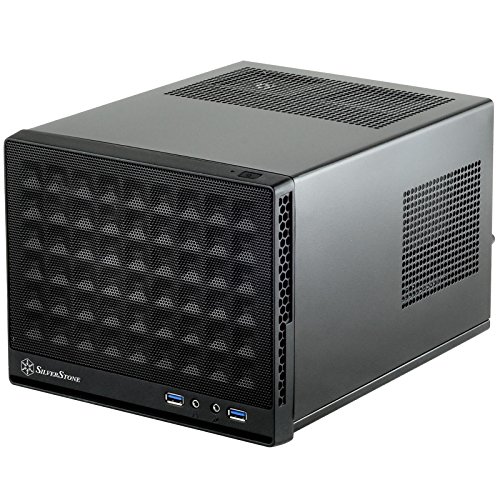
SilverStone SST-SG13B-USA Mini-ITX Case Mesh Front Panel Black

SOEYi U320 M-ATX/ITX Portable Desktop Case Black

JONSBO/JONSPLUS Z20 Black Micro-ATX Mini Tower PC Case
KXRORS S300 Mini-ITX PC Gaming Case USB-C Port
KXRORS S300 Gaming Case USB-C Port
Lian Li A3-mATX Computer Case 26.3L Black A3X.US
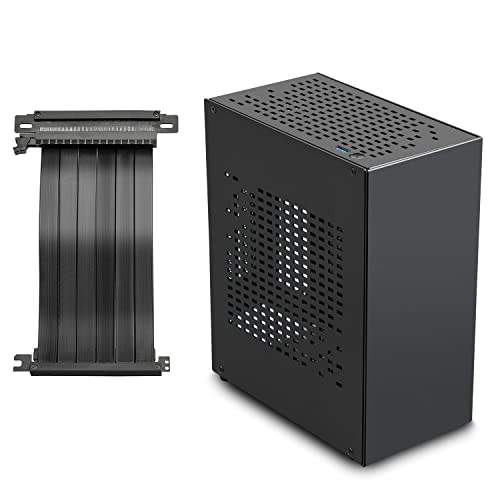
JOYJOM Aluminum Mini ITX Case PCIe 3.0 Riser Black
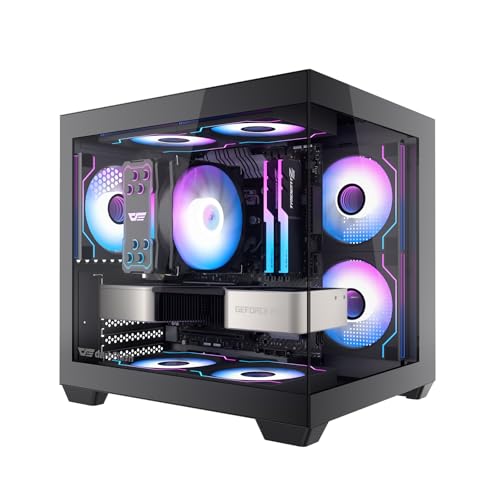
darkFlash ITX PC Case C275P Black
More Details On Our Top Picks
The mesh front gives this SilverStone a more practical personality than its tiny footprint suggests. In a cramped gaming desk setup, that kind of front intake space matters because a full-size GPU can throw more heat into the case than a plain front panel can handle well.
The trade-off is obvious, though, since ultra-compact cases ask you to plan your parts carefully around airflow and cable length. You benefit most here when you want a minimal box that still leaves room for a serious graphics card and don’t mind a build that rewards patience.
What We Like
- Mesh front design helps intake air reach the GPU area more directly.
- Very small footprint suits desks, shelves, and tighter entertainment centers.
- The layout favors builds where space matters more than visual flourish.
- Good fit for compact systems that still need a full-size graphics card.
Things To Consider
- Tight internal room can make cable routing slower than in larger cases.
- Small enclosures usually leave less margin for oversized coolers and power leads.
- Dust care matters more with mesh-front designs, so regular cleaning helps.
Feature Snapshot
Who It Suits Best
You get the most from this case as a compact-gaming build or small living-room PC where footprint matters as much as GPU support.
A Better Fit Elsewhere
SOEYi U320 M-ATX/ITX Portable Desktop Case Black suits you better when carry handles and a roomier shell matter more than ultra-small dimensions.
Handles change the whole experience here, especially for LAN nights or desk-to-room moves. The support for a 310 mm graphics card gives you much more breathing room than the smaller SilverStone above, while the 135 mm CPU cooler limit keeps the tower from getting unwieldy.
The honest read is that this shape makes sense for people who want portability without giving up standard desktop parts. ATX and SFX power supply support broadens your options, though the mix of part sizes means you still need to check fit carefully before you build.
Upsides
- Carrying handles make moving the system much easier.
- Fits a 310 mm graphics card, which suits many full-size cards.
- ATX and SFX support gives you useful power supply flexibility.
- Room for a 135 mm CPU cooler helps with real desktop hardware.
- Portable shape works well for frequent movers and event setups.
Areas To Watch
- Large-card clearance still needs a careful part check, especially with front cables.
- Smaller portable cases can feel cramped during first-time assembly.
- Handles help transport, but they do not reduce overall component weight.
- Cleaning around the interior can take extra patience because the case is compact.
At A Glance
Made For
You get the best match here as a portable desktop system for gaming events, dorm use, or frequent room changes.
Another Choice May Suit
JONSBO/JONSPLUS Z20 Black Micro-ATX Mini Tower PC Case suits you better when you want a more tower-like layout with a different balance of size and component headroom.
The detachable handle is the first clue that this case is meant to move well without feeling like a toy. Compared with the SOEYi U320, the JONSBO/JONSPLUS Z20 leans more toward a clean mini-tower shape, which tends to suit builders who want a firmer desktop presence.
Support for a 240 mm all-in-one cooler, meaning a liquid cooler with a 240 mm radiator, opens up a stronger cooling path than many tiny shells allow. You may find that helpful in a hotter room or with a graphics card that dumps plenty of heat into the case.
Reasons To Buy
- Detachable handle adds carry convenience without changing the core tower shape.
- 240 mm AIO support gives you a stronger cooling route than air-only compact cases.
- H160 mm cooler support helps with taller air coolers too.
- Micro-ATX compatibility gives you broader board choices than Mini-ITX-only cases.
- Mini size still keeps the build footprint modest for a desk or shelf.
Small Caveats
- The stronger hardware focus can make part planning more detailed than in simpler cases.
- Liquid-cooling support helps, but hose routing still deserves a careful look.
- Cleaning around a compact tower usually takes a little more patience.
Details At A Glance
Built With In Mind
You fit best here as a small-form builder who wants a carry-friendly tower and enough cooling headroom for a stronger desktop setup.
Where A Sibling Pick Shines
SilverStone SST-SG13B-USA Mini-ITX Case Mesh Front Panel Black suits you better when the absolute smallest footprint matters more than the Z20’s extra layout flexibility.
This S300 version keeps the Mini-ITX footprint tight while still adding front I/O with USB 3.0 and Type-C, which is handy for modern devices and quick transfers. The included PCIe 3.0 x16 riser cable matters because a riser is the flexible connector that lets the graphics card sit in a different orientation, and that can change how the whole build fits.
Compared with the JONSBO/JONSPLUS Z20, this case is more narrowly focused on compact gaming and transport-friendly assembly. You get SFX power supply support in the 100 mm to 130 mm range, so the payoff is a neat layout, but the trade-off is that parts planning needs to stay precise.
Best Bits
- Front USB-C adds modern convenience for peripherals and storage devices.
- PCIe 3.0 riser cable is included, which helps simplify the build path.
- SFX power supply support suits a compact power setup.
- Cable-management features help the interior stay tidier than many tiny cases.
- Portable size works well for desk relocation or occasional travel.
Points To Note
- Mini-ITX space always asks for careful part matching.
- The 100 mm to 130 mm SFX power supply range narrows your choices.
- Assembly takes patience because riser-based layouts leave little extra room.
Core Details
Right Fit For
You fit this case best as a portable Mini-ITX gamer who wants modern front ports and a cleaner riser-driven layout.
Swap It Out When
SOEYi U320 M-ATX/ITX Portable Desktop Case Black makes more sense when you want more room around a larger card and a handle for moving the system.
This sibling S300 keeps the same compact-minded approach but trims the presentation to the essentials. That makes it easy to picture in a clean desk build, especially where you want the case to disappear and let the GPU and monitor setup do the talking.
Compared with the USB-C-labeled version above, this one is the quieter choice on the spec sheet, which can actually be useful for straightforward builds. The trade-off is that less flash usually means less to lean on for feature lovers, but that also keeps the focus on fit and function.
Plus Points
- Simple mini-ITX layout works well for low-fuss systems.
- USB-C front I/O still gives you modern connection convenience.
- Compact shell helps save desk or shelf space.
- Good match for small gaming rigs that do not need extra frills.
Room For Improvement
- Feature-light designs can feel plain beside more display-oriented cases.
- As with most compact shells, part fitting deserves careful attention.
- Internal cleaning can be a little tedious in a tight build.
Technical Sheet
The Right Fit
You suit this case best as a practical Mini-ITX builder who values clean basics more than a feature-packed shell.
Look Elsewhere When
darkFlash ITX PC Case C275P Black fits better for you when tempered-glass presentation and pre-installed fans matter more than a pared-back layout.
The 26.3 liter size tells you this case is not the tiniest thing on the list, and that extra space can make a real difference while routing cables and choosing cooling parts. Unlike the smaller KXRORS shells, the Lian Li A3-mATX is built around more layout freedom, which tends to help when your GPU is large and your cooling plan is a little more ambitious.
No fans are included, so you get more control but also more responsibility during part selection. That trade-off suits experienced builders who already know what fan curve, radiator size, and board layout they want, and it can be a very sensible path for a tidy custom setup.
Strong Points
- 26.3 liter size gives you more internal breathing room than the tiniest cases here.
- Supports both M-ATX and ITX boards, which widens build choices.
- 360 mm AIO support opens the door to a larger liquid-cooling setup.
- No-fan design lets you choose your own airflow parts from scratch.
- The DAN collaboration gives it a more refined small-form identity.
Softer Spots
- You need to source all case fans yourself.
- Larger flexibility also means more part planning before assembly starts.
- Dust maintenance depends more on the filters and fan setup you choose.
Feature Rundown
Whose Shelf It Belongs On
You fit this case best as a hobbyist or performance-minded builder who wants more routing room and flexible cooling in a compact tower.
A Better Fit Elsewhere
SilverStone SST-SG13B-USA Mini-ITX Case Mesh Front Panel Black suits you better when you want the smallest possible footprint and can live with a tighter layout.
Aluminum gives this JOYJOM case a more polished feel than the steel-heavy compact boxes around it. The PCIe 3.0 riser cable means the graphics card can be mounted through a flexible connection, which often helps with a cleaner internal layout in very small builds.
The design suits a showpiece system where material feel matters as much as raw compatibility. You may find that the smaller shell asks for careful hardware choices, but that’s the price of getting a tidy Mini-ITX footprint with room for a proper GPU.
Bright Spots
- Aluminum construction gives the case a clean, premium look and lighter feel.
- PCIe 3.0 riser cable supports a more flexible GPU placement.
- Mini ITX sizing keeps the build compact for a desk or media shelf.
- Good fit for display-oriented systems where appearance matters.
Trade Offs
- Smaller layouts leave less forgiveness during part selection.
- Aluminum surfaces can show handling marks more readily than darker textured finishes.
- Compact case cleaning and cable work still call for patience.
Core Details
Perfect Match For
You fit this case best as a style-conscious builder who wants an aluminum shell and a compact system with a clean GPU layout.
Reach For A Different Pick When
Lian Li A3-mATX Computer Case 26.3L Black A3X.US suits you better when you want more room for hardware flexibility and a larger cooling plan.
Three pre-installed PWM ARGB fans give this darkFlash case a more complete starting point than the fan-less Lian Li A3-mATX. That matters in a display-heavy build because you get airflow support and lighting straight out of the box, along with dual tempered glass for a more open side view.
Its support for a 240 mm AIO adds cooling flexibility for a compact tower with a visual focus. The trade-off is simple: glass and lighting can make a build feel finished, but they also leave less room for the plain, utilitarian look that some setups need.
Positives
- Three pre-installed PWM ARGB fans reduce the number of parts you need to source.
- Dual tempered glass suits a showcase-style desktop.
- 240 mm AIO support gives you a solid cooling option for a small case.
- Mini size keeps the footprint manageable on a desk.
- Good choice for people who want a finished-looking build quickly.
Areas To Watch
- Glass panels usually need more careful cleaning to stay clear.
- Display-first styling can leave less focus on hidden cable space.
- Lighting is a taste issue, so the look may feel busy in subdued rooms.
Feature Card
Who Will Love This
You suit this case best as a display-focused builder who wants lighting, glass, and compact GPU support in one package.
Consider Something Else When
SilverStone SST-SG13B-USA Mini-ITX Case Mesh Front Panel Black fits you better when airflow-first simplicity matters more than a glass-heavy presentation.
How To Choose The Right Itx Cases For Full Size Gpu
Check The Graphics Card First
The GPU is the hard stop in most compact builds. Start with length, thickness, and whether the card’s power plugs sit on the end or the side, because connector position can add awkward clearance needs even when the raw card length fits.
From there, look at how the case handles the card physically. A riser cable, a vertical mount, or a standard horizontal bay changes cable routing and can decide whether the build feels neat or crowded.
Cooling Room Matters More Than Marketing
A full-size GPU can warm a small case fast, so intake path matters as much as fan count. Mesh fronts, room for a 240 mm or 360 mm radiator, and sensible internal spacing all help the system breathe under load.
Builders in warm rooms or with high-output cards usually benefit from a little extra room, even if the case stays small on the outside. That margin can make assembly easier too, which is worth a lot the first time you route cables in a tight shell.
Think About Motherboard And Power Supply Format
Mini-ITX cases keep things tiny, but some small towers also accept M-ATX boards. That extra board size can help with headers, expansion, and layout choices, especially in more ambitious gaming builds.
Power supply support deserves the same attention. SFX units save space, ATX units are often easier to source, and a case that supports both gives you more flexibility without forcing a single path.
Match The Case To Your Daily Routine
Portable handles, front USB-C, and lighter materials matter most for systems that move often. A living-room rig or desk-side tower may care more about finish, cooling style, and how often you’ll open the panel for upgrades.
The right choice usually feels obvious once you connect the case shape to your routine. A compact shell can be a joy or a hassle, depending on whether you value easy movement, cleaner cables, or a stronger visual presence.
Things Worth Knowing First
Common Shopping Slip Ups
Many people focus on case size alone and forget GPU thickness, cooler height, or connector clearance. That’s how a promising build turns into a cramped one, especially in Mini-ITX shells.
Another common miss is buying a case that needs extra accessories the listing does not include. A riser cable, fans, or a specific power supply format can change the total parts plan fast.
What The Higher Tier Buys
More expensive small cases usually spend the extra cost on materials, smarter layouts, and better support for cooling or moving the system. You also tend to get cleaner panel fit, stronger hinges or handles, and fewer awkward compromises inside.
That upgrade makes sense when you build often, carry the machine around, or want the system to look finished from the start. For a basic office-style build, the extra spend may not move the needle much.
Frequently Asked Questions
Can A Mini-ITX Case Still Fit A Full-Size GPU?
Yes, many can, but the fit depends on card length, thickness, and cable clearance. You need to check the exact case dimensions before you settle on parts.
Is A Riser Cable Important For Small GPU Builds?
It often helps when the case uses a vertical or offset GPU layout. That flexible connection can make a tight interior much easier to arrange.
Should You Choose M-ATX Over Mini-ITX?
M-ATX usually gives you a little more room and board flexibility. Mini-ITX stays smaller, so the right choice depends on how much space you want to save.
Do Glass Side Panels Help Or Hurt A Small Build?
They help the system look polished and let you show off the components. They can also make dust and cable clutter more visible, so neat wiring matters more.
What Matters Most For Cooling In A Compact Case?
Front intake space and radiator support matter a lot. A small case with poor airflow can feel far warmer than its size suggests.
Final Thoughts
The right case for a full-size GPU is the one that fits your card, your cooler, and your daily routine without turning assembly into a puzzle. SilverStone and KXRORS lean compact, Lian Li gives you more breathing room, and darkFlash adds a display-forward finish. Think about how often you move the machine, how much cooling headroom you want, and how tidy you want the interior to feel. Once those pieces line up, the choice gets much easier.
