
Travel work gets easier when your mouse fits the trip instead of fighting it. A good travel mouse should stay slim in a laptop sleeve, track cleanly on cramped tray tables, and avoid adding cable clutter to your bag. The eight picks below cover corded, Bluetooth, foldable, and rechargeable options, so you can match the tool to your commute, hotel desk, or cross-country flight.
Quick Look At Our Shortlist
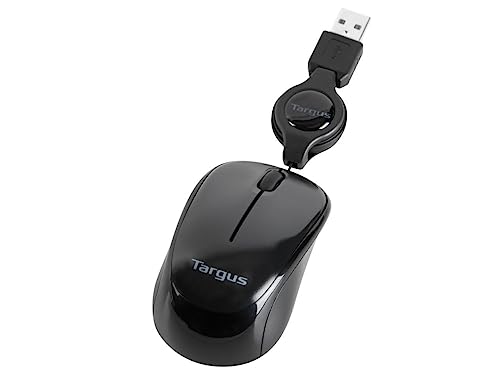
Targus Compact Mouse AMU75US
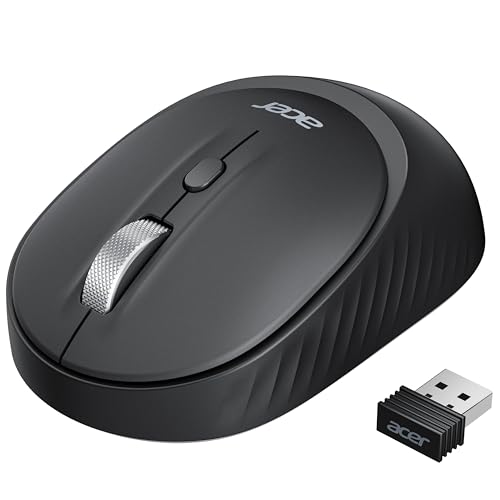
Acer Bluetooth Wireless Mouse for Small Hands

ESR MagMouse Snap-to-Carry Bluetooth Mouse

Logitech Mobi Fold Foldable Wireless Mouse (Graphite)

Logitech Mobi Fold Foldable Wireless Mouse (Off-White)

Logitech M240 Compact Silent Bluetooth Mouse
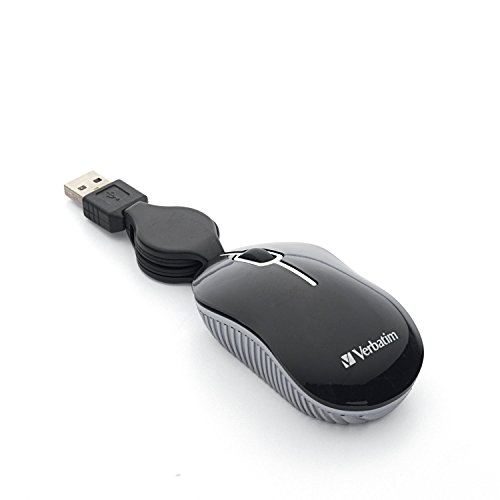
Verbatim Wired Optical Mini USB-A Mouse
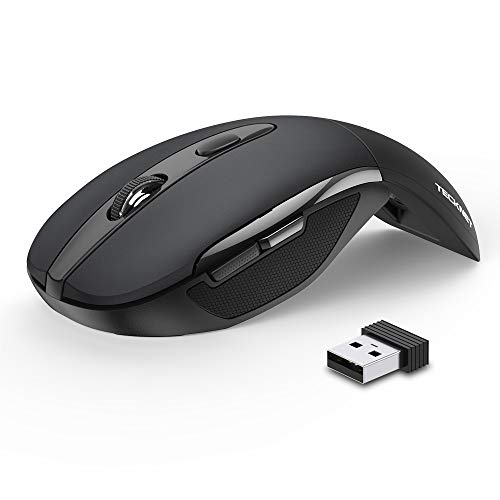
TECKNET Folding Wireless Mouse
More Details On Our Top Picks
The Targus keeps things plain and useful, which suits hotel desks and borrowed workspaces nicely. Its retractable 2.5-foot USB cord helps you avoid cable tangles, and the Blue Trace tracking is meant to handle mixed surfaces better than a basic optical mouse. You trade away wireless freedom, but the payoff is one less thing to charge or pair.
That makes it a sensible carry-on companion for office travelers who want a dependable corded setup. The black and gray finish looks understated, and the adjustable cord length adds a bit of neatness in tight bag pockets, though the wired layout still asks for a USB port and a little desk management.
Strong Points
- Retractable cord keeps packing cleaner.
- Blue Trace tracking helps on varied desk surfaces.
- No charging routine to remember.
- Simple setup suits fast work stops.
Points To Note
- USB tether limits freedom in cramped seats.
- Best for laptops with available USB-A ports.
- Less appealing for people who want a pocket-size wireless setup.
Core Details
Who It Suits Best
Desk workers who travel with a USB-A laptop and want a no-fuss corded mouse will get the most from it.
A Better Fit Elsewhere
Logitech M240 Compact Silent Bluetooth Mouse suits you better if a wireless setup matters more than keeping a cable on hand.
This Acer leans into flexibility, with Bluetooth and 2.4GHz wireless in one shell. That means you can link two devices over Bluetooth and keep a third ready through the USB-A receiver, though the two modes cannot run together at the same time. For short trips or shared work bags, that kind of switching can be more useful than a fancier shell.
The smaller body makes sense for compact hands, and the left-right design keeps it friendly for either side. The trade-off shows up in the details: four buttons and three DPI steps give you enough control for office work, but the fit will feel modest to anyone used to a fuller palm grip.
What We Like
- Bluetooth and 2.4GHz support broadens device options.
- Three-device switching helps mixed laptop and tablet use.
- Small-hand shape feels less bulky in transit.
- Three DPI settings help you adjust pointer pace.
Softer Spots
- Bluetooth and 2.4GHz cannot be used together.
- Smaller size may feel cramped for larger hands.
- Four-button layout keeps things basic rather than feature-heavy.
Feature Rundown
Built With In Mind
Students, travelers, and office workers with smaller hands will appreciate the compact shell and simple control set.
Look Elsewhere When
ESR MagMouse Snap-to-Carry Bluetooth Mouse makes more sense for you if built-in charging and carry-on organization matter more than a smaller grip.
The ESR takes a more travel-minded route than the Targus and Acer picks. Its built-in charging cable and reusable adhesive holder point to a mouse that wants a fixed place in your bag or on your laptop case, which can help keep small accessories from vanishing between hotel stays. Bluetooth 5.0 and 2.4GHz support also give you some connection flexibility.
The ergonomic shape should suit people who spend a long stretch at a laptop, though the adhesive holder makes the whole setup a bit more committed than a plain pocket mouse. That trade-off feels fair for frequent flyers and remote workers who value organization, but casual users may see the add-ons as more gear than they need.
Highlights
- Built-in charging cable cuts down on separate cords.
- Reusable holder helps keep the mouse attached and organized.
- Bluetooth 5.0 and 2.4GHz widen compatibility.
- Ergonomic shape supports longer work sessions.
- Black finish keeps it low-key in a travel kit.
Room For Improvement
- Adhesive holder adds another piece to manage.
- More moving parts can mean more cleaning around the mount area.
- Less minimalist than a basic compact mouse.
Details At A Glance
Who Will Love This
Frequent travelers who like organized gear and want the mouse to stay paired with the rest of the setup will feel at home here.
Another Choice May Suit
Logitech M240 Compact Silent Bluetooth Mouse is a cleaner match for you if you want fewer moving parts and less attachment hardware.
This Logitech leans into a folding form that suits slim packing better than a standard shell. Quiet clicks, Bluetooth, and Fast Pair make it appealing for conference rooms or shared desks where a softer button sound is welcome, and the 4K DPI setting suggests a more precise pointer feel on larger displays. The honest read is that the folding mechanism is the main attraction, so you’ll want to care about how much space it saves.
Graphite gives it a restrained look that pairs well with a neutral laptop bag, and compatibility with Chromebook, PC, and Mac broadens its appeal. Compared with the ESR MagMouse, this one looks simpler and more streamlined, though it gives up the attachment-focused convenience of that model.
Positives
- Foldable body packs flatter than most travel mice.
- Quiet clicks suit shared spaces and late work sessions.
- 4K DPI can feel more exact on large screens.
- Fast Pair streamlines Bluetooth setup on supported devices.
- Works across Chromebook, PC, and Mac.
Areas To Watch
- Folding hardware adds complexity compared with a fixed shell.
- Higher precision settings may feel sensitive for casual browsing.
- More suited to people who value packing efficiency than a full-size grip.
Feature Snapshot
Right Fit For
Travelers who want a slim, quiet mouse for shared spaces and compact packing will appreciate this one most.
Where A Sibling Pick Shines
ESR MagMouse Snap-to-Carry Bluetooth Mouse fits better for you if attached storage and built-in charging matter more than fold-flat styling.
The Off-White version brings the same foldable idea as the graphite model, but the lighter finish gives it a different look in your bag or on a bright desk. Quiet clicks, Bluetooth connectivity, Fast Pair, and 4K DPI all aim at the same travel-friendly brief, so the real choice here is mostly about color and how the mouse fits your setup. In most carry-on kits, that softer shade will either feel clean or show marks sooner, depending on how you pack.
Because the feature set matches the graphite version closely, the main appeal is a clean visual style paired with broad platform support for Chromebook, PC, and Mac. The trade-off is also familiar, since the foldable design brings a little more mechanical complexity than a basic shell like the Logitech M240.
Bright Spots
- Foldable shape helps reduce bag bulk.
- Quiet clicks suit classrooms, lounges, and shared work tables.
- Fast Pair speeds up Bluetooth setup on supported devices.
- Broad platform support makes switching devices easier.
Small Caveats
- Light finish may show scuffs more readily in a packed bag.
- Fold hardware adds moving parts to keep track of.
- Feels more style-led than the plain M240.
Core Details
Whose Shelf It Belongs On
Style-minded travelers who still want compact functionality will get the most out of this version.
Swap It Out When
Logitech M240 Compact Silent Bluetooth Mouse is the cleaner choice for you if you want a simpler shell and fewer moving parts.
The M240 stays focused on the basics that matter for travel, starting with Bluetooth and no USB receiver. That keeps your bag lighter and frees up a port on the laptop, which is handy during airport layovers or hotel desk sessions. Quiet clicks and three non-customizable buttons make it feel restrained rather than fancy, and that’s part of the appeal.
Its compact shape and 18-month battery life point to a mouse that wants to be forgotten between work blocks. The trade-off is obvious, though: you don’t get extra controls or a playful feature set, so people who want lots of shortcuts may prefer the Acer or TECKNET instead.
Positives
- No receiver needed, which keeps packing simple.
- Quiet clicks suit shared spaces.
- Compact body slips easily into laptop sleeves.
- Long battery life reduces routine upkeep.
Worth Noting
- Three buttons keep control options basic.
- No dongle means Bluetooth compatibility matters.
- Less adaptable than models with more input choices.
Quick Facts
Made For
Travelers who want a simple Bluetooth mouse that disappears into daily carry will appreciate this model most.
A Better Fit Elsewhere
Acer Bluetooth Wireless Mouse for Small Hands suits you better if you want more control over device switching and pointer speed.
Verbatim keeps the formula stripped down: wired, mini, and ready to plug into a USB-A port. The retractable cable is the part that matters most for travel, since it helps avoid the snaggy cord mess that plain wired mice can create in a backpack. For backup kits and occasional business trips, that simplicity can feel reassuring.
You do give up wireless freedom, and the mini shape won’t suit every hand for a full workday. Even so, the mouse makes sense for hotel desks, classroom bags, or as a spare tucked into your laptop sleeve, especially since there’s very little setup to manage.
Upsides
- Retractable cable helps with neat storage.
- Plug-and-play use skips pairing steps.
- Mini size works well in small bags.
- USB-A design suits older laptops and docks.
Things To Consider
- Corded design reduces freedom on crowded tray tables.
- Mini body may feel cramped during longer sessions.
- Best treated as a simple backup or travel spare.
Technical Sheet
The Right Fit
Travelers who want a simple spare mouse for short trips or older laptops will find this one easy to live with.
Skip It When
Logitech M240 Compact Silent Bluetooth Mouse is a better match for you if wireless use and a cleaner desk setup matter more.
TECKNET goes after the packing problem directly, since the folding shell is built for travel bags rather than desk permanence. The 2.4G connection, plug-and-play setup, and onboard nano receiver storage keep the process simple, and the three DPI levels let you slow down or speed up the cursor for different screen sizes. You may find the folding style especially handy on planes, where every bit of space matters.
The auto sleep mode and two-year battery life make it feel like a low-maintenance option for occasional and regular trips alike. Compared with the Logitech M240, it offers more pointer tuning and a more compact folded shape, though the extra mechanism also adds a little more to think about.
Reason To Buy
- Folded shape saves space in small travel pouches.
- Three DPI steps help tailor pointer speed.
- Plug-and-play setup keeps first use simple.
- Auto sleep mode supports lighter upkeep.
- Nano receiver stores inside the mouse body.
Minor Gripes
- Folding parts add another point to keep clean.
- 2.4G wireless depends on the tiny receiver.
- More travel-focused than desk-focused in feel.
Feature Card
Best Suited To
Travel-heavy laptop users who want a foldable, low-maintenance mouse with adjustable pointer speed will benefit most here.
Consider Something Else When
Logitech M240 Compact Silent Bluetooth Mouse is the better fit for you if you want to skip the receiver completely.
How To Choose The Right Laptop Mouses For Travel
Size, Shape, And Packing Sense
Travel mice work best when they disappear into your routine. A slim shell like the Logitech M240 or a foldable design like the TECKNET saves space in a laptop sleeve, while a more sculpted grip such as the ESR MagMouse can feel friendlier during long sessions. The right shape depends on your bag setup and how long you usually stay at the keyboard.
Hand size matters more than many people expect. Smaller hands often do well with compact bodies like the Acer, while larger hands may prefer something with a fuller curve or a foldable shell that still opens into a steadier hold. A mouse that fits your palm keeps travel work from feeling fiddly.
Connection Type And Setup Speed
Bluetooth keeps the desk cleaner because there’s no receiver to chase, and that helps on trains, in airports, or in shared offices. Models like the Logitech M240 lean into that simplicity, while the Acer and TECKNET add wireless receiver options for machines that do better with a dongle. Corded choices still have a place, especially for older laptops or backup kits.
Connection flexibility matters when you move between a laptop, tablet, and work computer. Dual-mode or multi-device support can spare you extra gear, but it also adds a little more setup logic. For most people, the better choice is the one that matches the devices you already carry, not the one with the longest feature list.
Travel Convenience Versus Extra Features
Quiet clicks can matter in a hotel lobby or on a red-eye flight, where a loud mouse gets old fast. Folding designs, retractable cords, and built-in charging cables all solve a different packing problem, so the real question is whether you want fewer parts or more adaptability. A cleaner design usually means less hassle, while richer feature sets can help more involved work habits.
Pointer speed also deserves attention. DPI is the setting that changes how fast the cursor moves, and adjustable steps help when you jump from a small laptop screen to a larger hotel monitor. People who edit spreadsheets or juggle multiple windows often notice that detail right away.
Things Worth Knowing First
Hidden Buying Traps
One common miss is choosing a mouse that looks compact but still feels awkward in hand. Another is forgetting whether your laptop has USB-A ports, because a wired model or receiver-based mouse depends on that connection. The safer move is matching the mouse to the ports and surfaces you actually use.
Battery and storage habits matter too. A travel mouse that needs frequent attention can become another item you keep checking, while a model with sleep mode or a long battery cycle feels calmer to carry. On the other hand, moving parts like fold hinges or adhesive mounts ask for a little more care when you pack or clean them.
What The Higher Tier Buys
Higher-priced travel mice usually spend the extra money on convenience and finish. That can mean quieter buttons, a fold-flat body, built-in charging, Fast Pair support, or a more polished grip shape that feels steadier over long workdays. Those details matter most for people who travel often enough to notice small frictions again and again.
The upgrade makes sense when your mouse is part of your daily carry, not a rare backup. If you only use it a few times a month, a simpler pick like the Verbatim or Logitech M240 may be enough. Regular flyers, remote workers, and people who move between machines will usually feel the value faster.
Final Thoughts
For travel work, the best mouse is the one that keeps your bag lighter and your setup calmer. The Logitech M240 is the easiest all-around carry, the TECKNET and Logitech Mobi Fold models reward tight packing, and the ESR MagMouse helps you stay organized on the move. If your laptop life changes from week to week, one of these will fit that rhythm without asking for much in return.
