
Small mice can make a cramped desk, a packed backpack, or a long travel day feel a lot easier to manage. You want something that slips beside your laptop without adding bulk, tracks cleanly on the move, and still feels steady in hand after a few hours of work. The picks below focus on compact shape, connection style, button layout, and the kind of control that matters during everyday use. That keeps the shortlist grounded in real life instead of specs alone.
Quick Look At Our Shortlist

wegear USB Wireless Mouse, 2.4GHz Cordless Black

WL300 Bluetooth Mouse Silent Wireless Mouse Grey


Gabongcui Cute Mini Wireless Mouse Red
Uiosmuph Mini Wireless Bluetooth Mouse Black

Logitech M185 Compact Ambidextrous Wireless Mouse Swift Grey

VssoPlor 2.4G Slim Wireless Mouse Black and Gold
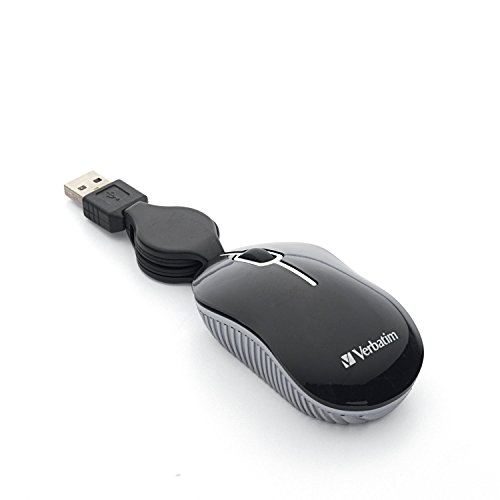
Verbatim Wired Optical Mini USB-A Mouse Black 98113
More Details On Our Top Picks
The wegear mouse leans into practical control rather than a flashy shape. Six buttons and a 4,000 DPI ceiling give you room for broad pointer movement and quick adjustments, which helps on a laptop desk or a couch tray.
That broader control set makes more sense than the simpler mini options like the Gabongcui or Verbatim picks, especially for daily spreadsheet work or browser-heavy use. The trade-off is size, since a fuller shell can feel less pocket-friendly than the slim travel models in this roundup.
Strong Points
- Six-button layout gives you more control for shortcuts and side actions.
- Adjustable DPI helps you tune pointer speed for different screen sizes.
- Wireless 2.4 GHz use keeps the desk clear of cable clutter.
- The ergonomic shape should suit longer sessions better than flat travel shells.
- Its stated battery span is appealing for commuters who dislike frequent charging.
Points To Note
- The fuller body takes more bag space than the smallest carry-first options.
- 2.4 GHz use needs the USB receiver, so you’ll want to keep track of that tiny piece.
- The wider feature set can feel unnecessary for very light, occasional use.
Feature Snapshot
Who It Suits Best
You’ll get the most from this pick if you want a wireless mouse for everyday laptop work and prefer a more substantial hand feel.
Where A Sibling Pick Shines
Uiosmuph Mini Wireless Bluetooth Mouse Black suits travelers and multi-device users more neatly, since its tri-mode setup fits a busier carry bag.
The WL300 is built for places where loud clicking gets old fast, like shared offices, libraries, or late-night home desks. Its sculpted grip and six-button layout make it feel more deliberate than the smaller travel-first models, yet it still stays compact enough for a laptop bag.
Bluetooth connection matters here because it can spare you a USB port, which is handy on thinner laptops with fewer connectors. The trade-off is simple: Bluetooth convenience is great for clean setups, but a receiver-based mouse like the Logitech M185 may feel easier for someone who wants a plug-in routine and less pairing fuss.
What We Like
- Quiet clicking suits shared rooms and video calls.
- Bluetooth pairing can keep a USB port open.
- Six buttons add flexibility for everyday navigation.
- The sculpted grip helps the mouse feel less slippery during longer sessions.
- Stated battery life is a solid match for work travel.
Worth Noting
- Bluetooth setup can take a little more attention than a basic receiver mouse.
- The shape is still compact, so very large hands may want a fuller shell.
- As with many silent-button designs, the quiet feel can come with a softer click response.
Core Details
Made For
You’ll appreciate this mouse most in quiet workspaces, especially when you want a compact shape and fewer desk interruptions.
A Better Fit Elsewhere
wegear USB Wireless Mouse, 2.4GHz Cordless Black suits you better when you want extra buttons plus an adjustable pointer range for heavier laptop work.
The SABLUTE M41 feels aimed at people who want a mouse that disappears into a laptop sleeve without much thought. The slim build, USB-C adapter, and sleep mode make it a tidy fit for study sessions, train rides, and short work bursts between meetings.
Three DPI levels keep the pointer from feeling locked into one speed, which is useful when you switch between a small notebook screen and a larger external display. Compared with the WL300, it gives you less of a comfort-first grip, but it packs a little more neatly than most fuller-body wireless options here.
Highlights
- Compact shape slips easily into a bag or sleeve.
- USB-C adapter helps with newer laptop setups.
- Sleep mode can support longer use between battery checks.
- Three DPI levels make the pointer easier to tune for different screens.
- Quiet operation suits dorm rooms and shared study areas.
Small Caveats
- The slimmer body gives up some palm support.
- Three DPI steps are useful, though they are less granular than higher-end models.
- Very large hands may want a broader shell for all-day sessions.
Details At A Glance
The Right Fit
You’ll like this best for travel, classes, and light desk work where portability matters more than a full-size grip.
Look Elsewhere When
Logitech M185 Compact Ambidextrous Wireless Mouse Swift Grey suits you better if you want a simpler receiver setup and a more traditional hand shape.
The Gabongcui mouse is the tiny one in the group, and that makes it easy to tuck into a pocketed bag or a kid’s school case. With three buttons and 1000 DPI, it keeps things plain and simple, which is exactly the point for basic laptop navigation.
That simplicity helps in classrooms or on quick check-in tasks at home, where a small and colorful mouse matters more than advanced controls. Compared with the SABLUTE M41, it gives up modern extras like USB-C support and DPI flexibility, but the smaller shell may suit very tight spaces better.
Bright Spots
- Very small footprint makes storage easy.
- Three-button layout stays simple for casual use.
- 1000 DPI is fine for basic cursor work.
- The red finish gives it a playful look that stands out on a desk.
- Good fit for kids, students, or anyone who wants a no-fuss travel mouse.
Areas To Watch
- 1000 DPI is modest, so fast pointer movement is not the point here.
- The tiny body may feel cramped during longer sessions.
- Simple construction often means fewer comfort extras and less grip contour.
Quick Facts
Who Should Grab It
You’ll be happiest with this one for casual schoolwork, light family use, or very small bags where every inch counts.
Another Choice May Suit
VerssoPlor Wireless Mouse, 2.4G Slim Computer Laptop Mouse Black and Gold is a smarter fit for adults who want a sleeker finish and a more polished carry shape.
The Uiosmuph stands out because it mixes Bluetooth 5.1, Bluetooth 5.0, and 2.4 GHz wireless in a pocket-size shell. That kind of flexibility is useful for people who move between a laptop, tablet, and a spare desktop station without wanting a different mouse for each one.
Its stated 3.07 by 1.89 by 1.06 inch size makes the travel story easy to understand, and it should suit smaller hands especially well. Compared with the WL300, this one leans more into connection flexibility than a sculpted feel, so the right choice depends on whether you value device switching or grip shape more.
Reasons To Buy
- Tri-mode connectivity gives you more setup choices.
- USB-C rechargeability cuts down on disposable battery handling.
- The small shell travels easily in a laptop sleeve or tote.
- 1600 DPI lands in a comfortable middle range for everyday work.
- The included USB receiver and Type-C adapter add setup flexibility.
Honest Caveats
- Tri-mode support can feel more complex than a simple receiver mouse.
- The mini shape may feel tight for larger hands.
- Rechargeable use means you’ll need to remember charging time, especially on trips.
Feature Card
Best Suited To
You’ll get the most out of this one for mixed-device work, frequent travel, and tight bag space.
Skip It When
Gabongcui Cute Mini Wireless Mouse Red is the easier pick for a child’s desk or a very simple setup that doesn’t need multiple connection paths.
The M185 stays popular for a reason: it keeps the formula plain, compact, and easy to share between devices. An ambidextrous body works for either hand, while the USB-A nano receiver keeps setup simple for older laptops and office PCs that still rely on standard USB ports.
Compared with the Bluetooth-heavy WL300 and the tri-mode Uiosmuph, this one feels less ambitious and more straightforward. That simplicity is the draw, especially for a family computer, a second desk, or a work setup where you want a mouse that just keeps moving.
Upsides
- Ambidextrous shape works for left- or right-handed use.
- Nano receiver setup stays quick and easy.
- Compact size suits laptop bags and desk drawers.
- Optical tracking handles everyday navigation without fuss.
- Battery life claim is practical for low-maintenance use.
Trade Offs
- The shape is plain, so comfort seekers may want something more sculpted.
- USB-A receiver use can be awkward on laptops that lean heavily on USB-C.
- The design is functional first, so style shoppers may find it understated.
Feature Rundown
Whose Shelf It Belongs On
You’ll appreciate this one most if you want a simple, familiar wireless mouse for shared devices or everyday office use.
Reach For A Different Pick When
WL300 Bluetooth Mouse Silent Wireless Mouse Grey fits better for a quieter office, while Uiosmuph Mini Wireless Bluetooth Mouse Black is the smarter move for device-hopping travel days.
The VssoPlor mouse aims for a slimmer, cleaner look than the Logitech M185, and that makes it feel more polished on a modern laptop desk. The plug-and-play nano receiver keeps the setup easy, while the quiet optical clicks suit workspaces where you do not want a loud tap every few seconds.
That black-and-gold finish gives it a bit more personality than the plainer options in this list, though the trade-off is less emphasis on grip shaping. For commuting workers or casual desktop users, it lands in a nice middle zone between style and basic utility.
Best Bits
- Slim profile keeps the mouse easy to stow.
- Quiet clicking works well in shared rooms.
- USB nano receiver makes setup straightforward.
- Black and gold finish adds a more dressed-up look.
- Good fit for laptops that travel often.
Softer Spots
- The slim body can feel less supportive than a sculpted mouse.
- Style first, so some shoppers may want more ergonomic contour.
- Receiver-based use still depends on keeping track of the dongle.
Core Details
Built With In Mind
You’ll like this most if you want a slim everyday mouse that still looks a bit more finished than plain black travel gear.
Where Shoppers Go Wrong
Logitech M185 Compact Ambidextrous Wireless Mouse Swift Grey makes more sense for anyone who wants a classic shape over a fashion-forward finish.
The Verbatim mini mouse takes a different route from the wireless picks above: it stays wired, and that removes charging and receiver worries from the equation. The retractable cable helps keep it tidy in a laptop bag, while the USB-A plug still suits many office machines and older notebooks.
That makes it a sensible choice for desks, classrooms, or travel kits where reliability matters more than a cable-free look. Compared with the more feature-heavy Uiosmuph and wegear options, this one is the straightforward answer for someone who wants less to manage.
Positives
- Wired use avoids receiver hunting and charging tasks.
- Retractable cable keeps storage cleaner in a bag or drawer.
- Mini shape works well for travel and tight desks.
- Plug-and-play setup is quick on USB-A systems.
Things To Consider
- The cable keeps you tethered to the device.
- USB-A only means newer laptops may need an adapter.
- The small body may feel too compact for long desktop sessions.
At A Glance
Right Fit For
You’ll value this most in school bags, travel kits, or office desks where a simple corded mouse is enough.
Swap It Out When
VssoPlor 2.4G Slim Wireless Mouse Black and Gold suits you better if you want the same compact feel without the cable.
How To Choose The Right Laptop Small Mouses
Shape Matters More Than The Box Says
The best compact mouse is the one that still feels comfortable after the first few hours of use. A slim travel shell like the SABLUTE M41 packs neatly, while a more contoured body like the wegear or WL300 can feel steadier for longer desk sessions.
Hand size changes the story too. Smaller hands often do fine with mini shapes such as the Gabongcui or Verbatim, but larger hands may want a fuller profile so the mouse does not feel pinched.
Connection Style Shapes Daily Friction
2.4 GHz receiver models are simple and usually quick to start, which suits a desk where you want less setup thinking. Bluetooth mice like the WL300 and Uiosmuph leave a USB port open, a real advantage on thin laptops with tight port counts.
Wired models still matter, especially for school bags and older office machines. The Verbatim mini mouse cuts out charging and pairing, so it stays easy to trust in a hurry.
DPI, Buttons, And Real Work Habits
DPI means dots per inch, a measure of how far the pointer moves for each bit of hand motion. Higher settings, such as the wegear mouse’s 4,000 DPI ceiling, help on larger displays, while a modest 1000 DPI option suits simple browsing and email.
Extra buttons also change how the mouse fits into your routine. Side controls help with web work and document editing, but casual users may prefer the cleaner feel of a three-button model.
Portability Without Regret
Travel-friendliness is about more than size alone. A retractable cable, like the Verbatim’s, can keep a bag tidy, while a USB-C adapter or tri-mode support can make a mouse easier to live with across several devices.
The trade-off is usually comfort versus convenience. Tiny mice disappear into a sleeve, yet a slightly larger shell often feels better during a long workday, so the right choice depends on how long the mouse stays in your hand.
What To Weigh Before You Choose
Common Shopping Slip Ups
Many people focus only on size and forget how the mouse will feel after an hour of work. A pocket-size model can be handy, but it may feel too cramped for extended use, especially on a full laptop desk.
Another common miss is ignoring the connection type. A USB-A receiver mouse works easily on many computers, while Bluetooth and USB-C fit newer setups better, so your laptop’s port mix should shape the choice.
Where The Extra Money Goes
Higher-tier models usually spend that extra cost on connection flexibility, better shape, and more control options. Tri-mode support, adjustable DPI steps, silent clicks, and rechargeable power all add parts or engineering that simple corded or basic wireless models do not need.
That upgrade pays off most for people who use a mouse all day or switch between several devices. For lighter use, a simpler pick like the Logitech M185 or Verbatim mini may already cover the job without extra complexity.
Final Thoughts
For a compact laptop mouse, the right pick usually comes down to where you use it and how much space you can spare. The wegear and WL300 make sense for everyday desk work, the SABLUTE and Uiosmuph lean hard into portability, and the Verbatim keeps life simple with a corded setup. Choose the shape and connection style that matches your routine, not just the smallest box on the shelf. That’s the part you’ll notice long after the first day.
