
Picking a mouse for your laptop sounds simple until you need the right mix of size, button feel, battery life, and connection type. Some of these are better for a crowded commute bag, others suit a desk setup, and a few make more sense for larger hands or long work sessions.
This roundup keeps the focus on real use, not flashy extras. You’ll see compact travel models, dual-mode options, quiet-click designs, and a couple of sturdier shapes for office work.
Quick Look At The Shortlist
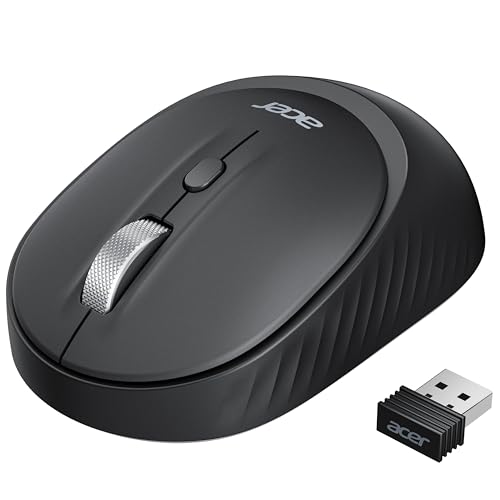
Acer Bluetooth Wireless Mouse for Laptop

Acer Wireless Mouse for Laptop 4000 DPI

Logitech M185 Compact Ambidextrous Wireless Mouse Swift Grey

Logitech M185 Compact Ambidextrous Wireless Mouse with Rubber Grips Blue

Afaartcci Rechargeable Wireless Mouse Silent Bluetooth Black

TECKNET Wireless Mouse 2.4G Ergonomic Computer Mouse 2600 DPI Purple

Logitech M240 Compact Silent Bluetooth Wireless Mouse Graphite

HP X3000 G3 Wireless Mouse Black
More Details On Our Top Picks
Small-handed shoppers get the most out of this Acer, because its shape is built to feel manageable instead of oversized. The dual wireless setup, with Bluetooth 5.2 and 2.4GHz, suits a laptop that moves between a desk, a meeting room, and a bag without much fuss.
The trade-off is simple, Bluetooth and 2.4GHz do not run at the same time, so switching modes matters. Four buttons and three DPI settings, 800, 1200, and 1600, make it flexible enough for work and casual browsing, though power users may want more customization.
What We Like
- Dual-mode support helps you pair with more than one setup.
- Small-hand sizing keeps the grip comfortable on shorter work sessions.
- Left- and right-hand use broadens the fit for different desk habits.
- The 800 to 1600 DPI range covers basic cursor speed needs.
- Four buttons keep the layout simple, which is handy for quick everyday use.
Things To Consider
- Bluetooth and 2.4GHz need separate switching, so it takes a moment to change modes.
- Four buttons leave less room for shortcuts than more feature-heavy office models.
- Very large hands may find the compact shape a touch small.
Feature Rundown
Who It Suits Best
Office workers, students, and laptop commuters who want a compact mouse with flexible connectivity will get the best fit here.
A Better Fit Elsewhere
Logitech M240 Compact Silent Bluetooth Wireless Mouse Graphite suits you better when you want Bluetooth only and a cleaner, dongle-free bag.
Compared with the first Acer, this one leans harder into cursor control. The 4000 DPI ceiling and six-button layout make more sense for a desk setup where you want quicker response and a few extra controls close at hand.
Medium and large hands are the clear fit, especially for long stretches at a laptop dock or desktop. In most home offices, the plain 2.4GHz USB receiver setup is the easier path, though it does mean keeping track of the dongle.
Highlights
- Five adjustable sensitivity steps give you more room to match the cursor to the task.
- 4000 DPI is useful for bigger monitors and faster pointer movement.
- Six buttons add convenience for routine office work and browser use.
- The shape suits medium to larger hands better than the smaller Acer in this list.
Room For Improvement
- The USB receiver setup works well, but the dongle needs a storage habit so it does not wander off.
- This shape is less appealing for very compact travel kits.
- More buttons also mean a little more learning than a basic three-button mouse.
Technical Sheet
Made For
Desk-based laptop users, home-office setups, and anyone who wants more pointer range than a basic travel mouse usually provides will appreciate this one.
Look Elsewhere When
Logitech M185 Compact Ambidextrous Wireless Mouse Swift Grey suits you better for lighter travel carry and a more pocket-friendly shape.
This M185 keeps things plain in a good way, with a compact shape and a right-or-left-hand layout that works without drama. The USB-A nano receiver is the kind of tiny plug-in piece that disappears into a laptop bag, which suits commuters and students especially well.
It also leans on optical tracking, a simple sensor type that reads surface movement and turns it into pointer motion. That keeps the experience easy for office documents, web work, and travel, though the small body may feel too short for larger hands during longer sessions.
Positives
- Compact sizing makes it easy to carry with a laptop sleeve or small bag.
- Ambidextrous shape keeps the mouse easy to use with either hand.
- The nano receiver stays out of the way once plugged in.
- Optical tracking handles common office tasks without extra setup.
- Long battery life helps reduce how often you think about replacements.
Minor Gripes
- The small shell can feel snug for larger palms.
- There are no added controls for shortcut-heavy workflows.
- The tiny receiver is easy to misplace during frequent device changes.
Core Details
Who Should Grab It
Laptop commuters, casual office users, and anyone who wants a simple compact mouse with a familiar USB receiver setup will feel at home here.
Where A Sibling Pick Shines
Logitech M240 Compact Silent Bluetooth Wireless Mouse Graphite fits you better for a cleaner Bluetooth-only setup without a receiver.
This version of the M185 keeps the same compact, ambidextrous shape as the grey model, but the rubber grips add a more secure feel in hand. That extra texture matters most during longer spreadsheet sessions or quick laptop work at a café table, where slick plastic can feel less planted.
The trade-off is a little obvious, since the shape still stays small and simple. You get the same easy USB-A nano receiver approach and familiar wireless convenience, which is great for routine use but not aimed at people who want a pile of programmable controls.
Upsides
- Rubber grips add a steadier hold during longer sessions.
- The compact body still packs easily for travel.
- Ambidextrous design keeps it friendly for either hand.
- The USB-A nano receiver makes setup quick on many laptops.
Softer Spots
- Small dimensions can feel tight for large hands.
- There are no advanced controls for power users.
- The textured sides may need occasional wipe-downs to stay clean.
At A Glance
The Right Fit
Commuters and office users who want the M185 shape but prefer a bit more grip will appreciate this version most.
Swap It Out When
Acer Wireless Mouse for Laptop 4000 DPI suits you better for a larger hand fit and extra button controls.
The Afaartcci stands out because it mixes rechargeability with a quiet-click profile, which matters a lot on trains, in shared offices, or late-night home setups. Bluetooth 5.2 and 2.4GHz support give you two ways to connect, while the USB receiver tucks into the mouse itself for easier packing.
That neat storage idea is handy, though the dual-mode setup still follows the usual rule that only one mode runs at a time. You may find the ergonomic shape easier on your hand than flatter travel mice, but the real value here is convenience, not a long list of controls.
Reasons To Buy
- Rechargeable power reduces the hassle of replacing batteries.
- Quiet clicks are a smart fit for shared spaces.
- Bluetooth 5.2 and 2.4GHz broaden compatibility across devices.
- The built-in receiver storage helps keep the mouse bag-friendly.
- Ergonomic shaping gives the hand a more natural rest than flat travel models.
Worth Noting
- Bluetooth and 2.4GHz still need separate switching.
- Portable designs can feel a bit narrow for larger hands.
- The quiet-button feel is subtle, which some people prefer and some do not.
Details At A Glance
Perfect Match For
Frequent travelers, hybrid workers, and MacBook or iPad users who want a neat wireless setup will get the most from this model.
Another Choice May Suit
Logitech M240 Compact Silent Bluetooth Wireless Mouse Graphite fits you better when you want Bluetooth-only simplicity and no receiver at all.
TECKNET goes in a more traditional direction than the Acer dual-mode picks, and that can be a good thing for a basic office desk. The side grips and ergonomic shell aim to reduce hand strain during regular laptop work, while the 2600 DPI ceiling gives you enough range for everyday navigation.
Its compact size keeps it travel friendly, though the shape is still more about comfort than flashy extras. A stated two-year battery span is appealing on paper, especially for desk users who do not want to think about power very often.
Best Bits
- Side grips help the mouse feel steadier in hand.
- 2600 DPI gives you a useful middle ground for office work.
- USB-A plug-and-play setup keeps installation simple.
- The compact body packs well for laptop travel.
- Two-year battery life is a strong convenience point for routine users.
Areas To Watch
- The 2.4GHz receiver means you still need to keep track of a dongle.
- Purplish styling may not suit every desk setup.
- Power users may want more buttons than this shape offers.
Spec Overview
Best Suited To
Budget-conscious office users, students, and laptop owners who want a straightforward ergonomic shape will appreciate this pick.
Reach For A Different Pick When
Afaartcci Rechargeable Wireless Mouse Silent Bluetooth Black suits you better if you want Bluetooth support and a quieter click feel.
The M240 is the cleanest option in this lineup for people who want Bluetooth and no receiver to keep track of. Quiet clicks make it a solid match for libraries, shared desks, and video calls, where a softer button sound just feels considerate.
It also keeps the layout restrained with three non-customizable buttons, so you know exactly what you’re getting. That simplicity is part of the charm, although it does mean less flexibility than the Acer 6-button mouse or the dual-mode Afaartcci.
What We Like
- Bluetooth-only use keeps your USB ports open.
- Quiet clicks are well suited to shared work areas.
- Compact sizing makes it easy to slip into a laptop bag.
- Three-button simplicity keeps the learning curve low.
- Long battery life adds convenience for everyday laptop use.
Points To Note
- No USB receiver means Bluetooth has to fit your setup.
- The button layout stays basic, with no custom control options.
- Small travel-friendly shells may feel less secure for larger hands.
Feature Snapshot
Who Will Love This
People who want a neat Bluetooth mouse for office work, travel bags, or shared environments will find this a very sensible fit.
Where Another Pick Suits Better
Logitech M185 Compact Ambidextrous Wireless Mouse Swift Grey is the better call when you prefer a USB receiver instead of Bluetooth pairing.
The HP X3000 G3 lands in a useful middle zone, with side grips, a 1600 DPI optical sensor, and a shape that feels easy to carry between places. For laptop owners who move from home desk to office desk or classroom table, that balance is often more useful than extra buttons.
The blue LED sensor and 15-month battery life round out the package in a way that feels straightforward rather than fussy. It’s a sensible travel companion, though heavy pointer users may still prefer the Acer 4000 DPI option for more speed on large displays.
Bright Spots
- Side grips help keep the mouse steady during longer sessions.
- 1600 DPI is a comfortable middle setting for everyday work.
- Travel-friendly sizing makes it easy to carry with a laptop.
- Blue LED tracking supports routine pointer movement on common surfaces.
- Broad platform support suits Windows PCs, Mac systems, and Chromebooks.
Small Caveats
- 1600 DPI may feel modest on very large displays.
- The design stays simple, so shortcut fans may want more control.
- The compact body still needs a little cleaning around the side grips over time.
Core Details
Whose Shelf It Belongs On
Laptop users who want a simple, portable mouse with comfortable grip details and broad compatibility will get a lot of value here.
Skip It When
Acer Wireless Mouse for Laptop 4000 DPI fits you better for a faster pointer range and more button controls.
How To Choose The Right Laptop Wireless Mouses
Connection Style Matters More Than It Looks
Bluetooth keeps USB ports open, which helps on slim laptops that already live on a charger, hub, or external drive. A 2.4GHz USB receiver usually gives you the easier plug-and-go path, especially for older systems or shared work laptops.
Dual-mode mice make sense for people who move between devices, though the handoff only helps when you actually need both connection types. The trade-off is small but real, because the receiver has to be stored or managed and Bluetooth pairing can take an extra step.
Shape Should Match Your Hand, Not Just Your Bag
Compact travel mice fit well in a sleeve, yet they can feel cramped during long editing sessions or repeated spreadsheet work. Larger or ergonomic shells, like the TECKNET and the broader Acer model, usually suit desk use better because your hand has more surface to settle on.
Ambidextrous designs matter too. They work for left-handed and right-handed use, which is helpful in shared offices or for anyone who changes hand position often.
DPI, Buttons, And Everyday Control
DPI, or dots per inch, is a pointer sensitivity setting, so higher numbers move the cursor farther with less hand motion. Lower or mid-range settings often feel calmer for document work, while higher ranges help on large screens or fast navigation.
Button count changes how much the mouse can do without reaching for the keyboard. Three-button models stay simple, while five- and six-button options add convenience for browsing, app switching, and office routines.
Battery Routine And Carry Comfort
Rechargeable models cut down on spare battery storage, which matters for travel and hybrid work. Replaceable-battery models often stay easy to live with too, especially when the stated runtime is long enough that you only think about power a few times a year.
Quiet clicks, rubber grips, and tiny nano receivers sound minor on paper, but they shape daily use. Together they decide whether the mouse feels neat, steady, and easy to pack, or just another thing floating around in your laptop bag.
Things Worth Knowing First
Common Shopping Slip Ups
Plenty of people focus on looks and forget the connection type. That usually leads to a mismatch, such as choosing Bluetooth for a laptop that still works better with a USB receiver.
Another common miss is size. A compact mouse feels great on the move, but a larger hand may want a fuller body, side grips, or a more arched shape.
What The Higher Tier Buys
Spending more in this category usually pays for comfort details, extra buttons, or a more flexible wireless setup. You also tend to get better fit options, such as side grips, dual-mode connectivity, or a sensor range that feels smoother on larger screens.
That extra money makes the most sense for daily desk use, hybrid work, or shared-device setups. For a basic laptop that only needs light navigation, a simpler mouse often covers the job just fine.
Final Thoughts
The right mouse depends on how your laptop actually lives with you, not on a long feature list. A Bluetooth model like the Logitech M240 keeps the desk cleaner, while a dual-mode option like the Acer Bluetooth mouse gives you more connection flexibility. For larger hands or heavier office use, the Acer 4000 DPI and TECKNET picks make a stronger case. Choose the shape and connection that match your routine, and the rest gets much easier.
