
PC case screens can do more than look sharp, they can show temps, system info, or a custom image without crowding your desk. That matters most for you if you like a tidy build, check hardware at a glance, or want a display that fits a gaming tower, a compact rig, or a Raspberry Pi setup. The picks below focus on screen size, mounting style, input options, and how easy each one looks to live with. You’ll also see where a simple sub-display makes sense and where a broader mini monitor gives you more room to work with.
The Shortlist At A Glance

Lian Li 8.8″ Universal Screen Black SM088X

Lian Li 8.8″ Universal Screen White SM088W

waveshare 7inch Capacitive Touch Screen LCD (H) with Case

Thermalright Trofeo Vision LCD White Edition 6.86″
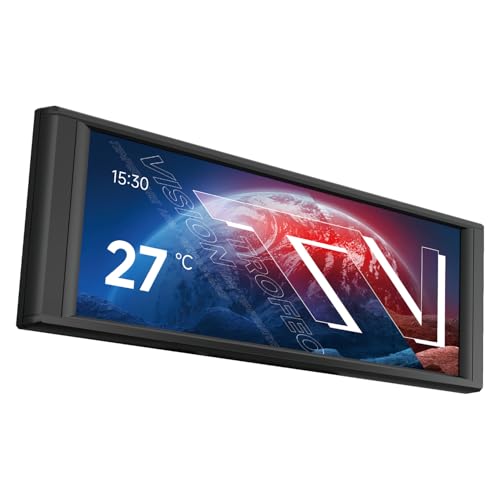
Thermalright Trofeo Vision LCD Black Edition 6.86″
AISHICHEN 11.26″ Mini Monitor FHD 1920×440
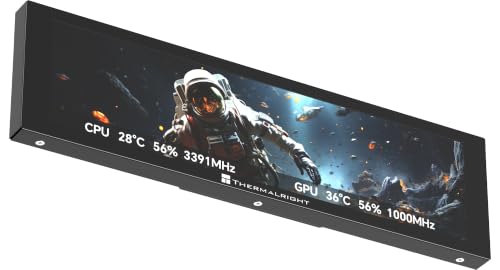
Thermalright Trofeo Vision LCD AIO Display 9.16″

WOWNOVA 8 Inch LCD Screen Inside PC Case
More Details On Our Top Picks
Lian Li’s black 8.8-inch screen fits the kind of build that wants a clean visual accent without taking over the case. The adjustable mount is the main draw here, since a flexible bracket can make placement easier in a tight tower or a more open showcase rig.
The ARGB frame adds a little style, but the real value is how easily this kind of panel can sit alongside temperature readouts and system info. One thing worth noting, though, is the installation note about the correct H screws, so careful assembly matters more than it first appears.
Strong Points
- 8.8-inch size gives you a clear display without pushing into large-monitor territory.
- Adjustable mounting helps it fit a wider range of case layouts.
- ARGB framing adds a coordinated look for RGB-heavy builds.
- Good for showing temps, status panels, or custom visuals at a glance.
Things To Consider
- The screw guidance matters, so the install deserves a careful read.
- The styling is more about presentation than a plain utility-first look.
- Owners who dislike accessory cable clutter may want to plan the routing first.
Feature Rundown
Who It Suits Best
It suits you best if you want a flexible display for a custom PC tower and care about the overall look as much as the readout itself.
A Better Fit Elsewhere
Lian Li 8.8″ Universal Screen White SM088W fits better for a white-themed build where the panel should blend into a lighter interior.
The white version keeps the same 8.8-inch format, but it makes more sense in light-colored interiors where a darker insert would feel heavy. The dynamic screen control wording points to a more active display setup, so this one suits you best when the panel is part of the build’s personality, not just a utility strip.
Compared with the black SM088X, this model is the easier visual match for white cases, white fans, and pale cable routing. The trade-off is simple, that brighter shell will show grime faster than a dark finish, so cleaner builds need a bit more attention.
What We Like
- White finish blends neatly into light PC themes.
- 8.8-inch display size keeps the interface easy to read.
- Adjustable mounting broadens fit across common case layouts.
- Dynamic screen control supports a more animated visual setup.
Areas To Watch
- The lighter finish can need more frequent wipe-downs.
- Careful cable planning helps preserve the clean look it’s built for.
- The screw warning still matters during installation.
Details At A Glance
Built With In Mind
It belongs on a white or two-tone PC build where the screen should look integrated rather than bolted on.
Swap It Out When
Lian Li 8.8″ Universal Screen Black SM088X suits darker cases better, especially when you want the display to disappear into the hardware.
This waveshare panel moves beyond a simple case display and into touch-screen territory, which changes how you may use it in a Raspberry Pi setup. Capacitive touch means the surface responds to finger input rather than a resistive layer, so menu work and interactive projects feel much closer to a small desktop monitor.
The 7-inch size is a sensible middle ground for desk projects, kiosks, or a compact Pi build where space still matters. Compared with the Lian Li picks, this one is less about a flashy PC accent and more about control, which makes it a stronger match for makers.
Upsides
- Capacitive touch gives you direct on-screen interaction.
- Case included, so the setup feels more complete.
- Works across a wide list of Raspberry Pi models.
- HDMI input and IPS panel support a familiar, desktop-like experience.
Softer Spots
- It makes more sense for projects than for pure case decoration.
- Touch support can add setup steps compared with a plain display panel.
- The 7-inch format may feel small for heavy dashboard use.
Feature Snapshot
Whose Shelf It Belongs On
It suits you best if your PC case display also needs to act as a hands-on screen for Raspberry Pi projects or small desktop tasks.
Where A Sibling Pick Shines
AISHICHEN 11.26″ Mini Monitor FHD 1920×440 fits better for a wider dashboard view when you want more room for stats and sensor panels.
This Thermalright sub-display keeps the footprint modest, which helps in cases where a larger screen would dominate the interior. A 1280 by 480 panel is a stretched wide format, so it works well for slim system readouts, animation strips, and compact visual dashboards.
The magnetic panel design should appeal to you if you prefer a cleaner mounting approach and less fuss during placement. White is the obvious fit for pale-themed builds, though the narrow height means long lists or dense stat layouts are not its strong suit.
Reasons To Buy
- Magnetic panel design can simplify placement in the case.
- Wide but slim format suits hardware stats and simple visuals.
- White finish blends naturally with light builds.
- Full-color LCD helps custom images feel more alive.
Points To Note
- The narrow 6.86-inch shape is less flexible for crowded layouts.
- Static or simple visuals make the most sense on this format.
- Dust and fingerprints show more on light-colored surfaces.
Core Details
Who Should Grab It
It fits you well if you want a compact, tidy sub-display for a white PC build and do not need a large information-heavy screen.
Another Choice May Suit
Thermalright Trofeo Vision LCD AIO Display 9.16″ is the better call for a larger cooling-focused monitor with more room for live hardware data.
The black version keeps the same compact shape as the white model, but it slips into darker builds more naturally. That makes it a steadier visual match for stealthier towers, where you want the screen to look like part of the case instead of a bright insert.
Because the display is still 6.86 inches, the same trade-off applies, meaning you get a neat sub-panel rather than a large dashboard. For most gaming rigs, that balance is enough, and the darker shell tends to be a little easier to keep looking tidy.
Best Bits
- Black finish matches dark case interiors cleanly.
- Magnetic panel style supports easier placement.
- 6.86-inch format stays compact inside the chassis.
- Full-color LCD works well for small visual accents.
Small Caveats
- Limited display area means you’ll want concise content.
- The look is strongest in darker systems, not bright themes.
- Like most sub-displays, it rewards careful cable routing.
Quick Facts
The Right Fit
It suits you best if your case is dark, your cable work is neat, and you want a small internal screen that fades into the build.
Reach For A Different Pick When
Thermalright Trofeo Vision LCD White Edition 6.86″ is better for light-colored systems where the panel should follow the rest of the hardware styling.
This AISHICHEN monitor goes wider than the smaller case panels above, and that extra width makes a real difference for dashboards. A stretched-bar layout like 1920 by 440 gives you more horizontal space for sensors, CPU and GPU figures, or a tidy AIDA64-style monitoring strip.
HDMI and Type-C give you straightforward connection options, which is handy in a mixed setup with a laptop or a small desktop controller. The honest read is that this format is less about decorative flair and more about information density, so it suits desk-focused builds best.
Highlights
- Wide 11.26-inch layout gives you room for more data.
- FHD 1920 by 440 resolution supports a sharp dashboard style.
- HDMI and Type-C broaden compatibility with common gear.
- IPS panel helps the screen stay usable from different angles.
- Good fit for CPU, GPU, and temperature monitoring layouts.
Worth Noting
- The wide shape needs enough internal or desk space.
- It makes less sense as a simple decorative accent.
- Cable planning matters more because the display is larger.
Technical Sheet
Perfect Match For
It suits you best if you want a long, information-heavy monitor for a PC case or a desk setup that tracks hardware at a glance.
Consider Something Else When
WOWNOVA 8 Inch LCD Screen Inside PC Case Screen works better for a quicker internal install and a simpler case-first layout.
This 9.16-inch Thermalright display leans into hardware monitoring, and that makes it a stronger match for systems where the screen has a job to do beyond looking neat. USB Type-C gives the connection path a more modern feel, while the preset themes can save you some setup time in a gaming rig or AIO cooler build.
Compared with the smaller Thermalright 6.86-inch panels, this one gives you more breathing room for real-time readings. The trade-off is plain enough, since a larger monitor asks for more space and looks less discreet inside a compact case.
Bright Spots
- 9.16-inch screen gives you more room for monitoring data.
- USB Type-C keeps the connection path straightforward.
- Preset themes help the display feel less blank out of the box.
- Well suited to CPU cooler or AIO-focused case builds.
Trade Offs
- The larger size needs more internal space.
- It’s a stronger utility screen than a subtle accent piece.
- Preset themes may not match every aesthetic right away.
Feature Card
Who Will Love This
It suits you best if you want a larger in-case monitor for a gaming build or a cooler-focused setup and care more about live data than decoration.
Look Elsewhere When
Thermalright Trofeo Vision LCD White Edition 6.86″ is the tidier choice for smaller cases where a compact sub-display is the better visual fit.
WOWNOVA takes a very direct route with the promise of a one-click, one-cable setup, and that will appeal to you if you want a simpler installation path. The added desktop mode makes it feel more flexible than a pure dashboard panel, so it can live in a case today and still have a broader role later.
Against the more involved options in this list, that straightforward setup is the selling point, not flashy styling. The trade-off is that the design language feels more functional than premium, but for many PC cases, that’s the right call.
Positives
- One-click, one-cable concept keeps setup simple.
- 8-inch size fits neatly in many case interiors.
- Desktop mode adds a little more flexibility.
- Good choice when you want a no-fuss internal screen.
Areas To Watch
- The design focus is practical rather than showy.
- More advanced users may want a larger monitoring canvas.
- Like any case screen, cable routing still deserves care.
Core Details
Who Should Grab It
It fits you best if you want a compact internal screen and prefer a setup that doesn’t feel overly technical.
Where A Sibling Pick Shines
Thermalright Trofeo Vision LCD AIO Display 9.16″ suits you better when your build needs a larger monitoring screen with more room for live data.
How To Choose The Right Lcd Displays For Pc Case
Start With Screen Size And Shape
Size sets the whole tone. An 8.8-inch panel like the Lian Li units feels balanced for most towers, while a 6.86-inch sub-display is better when you want the screen to stay discreet.
Wide monitors such as the AISHICHEN 11.26-inch model suit dashboard layouts, but they ask for more room. The 7-inch waveshare works differently, because touch support matters more than sheer display width.
Match The Screen To The Build Style
Finish matters more than many people expect. A black screen usually blends into stealth builds, while white models disappear more naturally inside pale or all-white cases.
That’s where the Thermalright White and Black Edition pair makes sense as a split choice. One looks calmer in a bright interior, the other reads cleaner in a darker rig.
Check Inputs, Mounting, And Ease Of Setup
Connection type decides how painless the install feels. USB Type-C is tidy for modern gear, HDMI is familiar for small monitors, and one-cable concepts can save time in a crowded case.
Mounting style matters just as much. Adjustable brackets help the Lian Li screens fit more layouts, while magnetic panels are simpler to place but usually suit a narrower set of use cases.
Think About What You’ll Show On It
A case display used for temperatures needs less room than one meant for sensor dashboards or custom art. Preset themes, like the ones on the Thermalright 9.16-inch screen, can make setup feel easier, but they also steer the screen toward a certain look.
For practical monitoring, a stretched format works well because it keeps numbers readable without wasting space. For a more interactive setup, the waveshare touch panel makes more sense than a static sub-display.
A Quick Reality Check
Wrong Turns To Avoid
Many shoppers focus on screen size alone and forget about mounting depth, cable routing, or the finish that needs to live beside the rest of the hardware. That mistake shows up fast in compact cases, where a good-looking panel can become awkward very quickly.
Another common slip-up is picking a display that looks good in a photo but doesn’t fit the job. A decorative panel and a monitoring panel solve different problems, so the screen should match your actual use.
The Upgrade Payoff
More expensive models tend to buy you better layout flexibility, more polished materials, or a display format that feels more intentional inside the case. The AISHICHEN wide monitor and the Thermalright 9.16-inch screen are good examples of paying for more usable information space.
That extra spend makes sense for system builders who check hardware often or want a cleaner, more integrated presentation. For simpler case accents, the smaller Lian Li or WOWNOVA options often give you enough without overcomplicating the build.
Frequently Asked Questions
What Makes A Good PC Case LCD Screen?
A good one fits the case size, matches your build style, and shows the information you actually want to see. It should also be easy to mount without turning cable management into a hassle.
Do You Need Touch Support?
Touch support helps when you want the display to act like a small control panel, especially in a Raspberry Pi setup. For simple temperature readouts, touch usually adds more capability than you need.
Is A Wide Screen Better Than A Square One?
A wide screen suits dashboards, sensor strips, and hardware telemetry. A smaller square or near-square panel often works better when you want a compact visual accent.
Which Connection Type Is Easier To Live With?
USB Type-C tends to feel cleaner on modern setups, while HDMI is familiar and widely used. The easier choice is the one that matches the rest of your hardware and cable routing.
Should You Choose White Or Black?
Pick the color that matches the case interior, not just the rest of the room. White feels lighter and more open, while black blends into darker systems with less visual noise.
Final Thoughts
The right LCD display for your PC case depends on how much space you have, how polished you want the build to look, and whether the screen is there for style, monitoring, or both. The Lian Li options suit cleaner showcase builds, the waveshare makes sense for Pi projects, and the Thermalright and AISHICHEN picks serve more focused monitoring jobs. WOWNOVA keeps things simple for quick installs. Choose the screen that matches your case, your cabling comfort, and the kind of information you actually want in front of you.
