
Left-handed gaming can feel awkward fast when a mouse fights your grip, your side buttons sit in the wrong place, or the shell crowds your palm during long sessions. The picks below focus on shapes, button layouts, and sensor specs that make sense for left-hand use, whether you split time between shooters, MMO hotbars, or all-day desktop work. You’ll also see a few ambidextrous options, since some of the strongest gaming mice for left-handed use are built that way. The goal is simple: help you match the mouse to the way you actually play.
The Shortlist At A Glance

Razer DeathAdder Essential Left-Handed Esports Ergonomic Gaming Mouse 3,500 DPI

Logitech G PRO 2 Lightspeed Ambidextrous Wireless Gaming Mouse Black

Logitech G PRO 2 Lightspeed Ambidextrous Wireless Gaming Mouse White
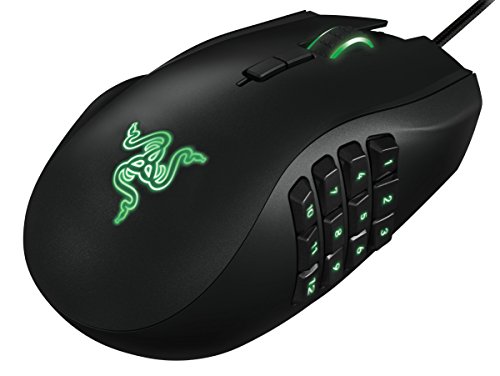
Razer RZ01-01050100-R3M1 Naga Left-Handed Ergonomic MMO Gaming Mouse 12 Thumb Buttons

Acer Dual-Mode 2.4GHz Wireless Wired Gaming Mouse 24,000 DPI 8 Buttons
Logitech G PRO X2 SUPERSTRIKE Wireless Gaming Mouse Black White

Corsair M75 Wired RGB Lightweight FPS Gaming Mouse 26,000 DPI Black

ELECOM Left Hand Wired USB Ergonomic Shape Mouse Silent Click 2000DPI
More Details On Our Top Picks
Left-handed shaping is the whole story here, and that matters more than flashy extras for a lot of setups. The 3,500 adjustable DPI ceiling keeps it in the practical range for everyday aiming, desktop control, and slower-paced games.
Compared with the ambidextrous Logitech picks, this one leans harder into a true left-hand feel, which helps when you want the shell to disappear under your palm. It suits desk setups where comfort matters more than a long feature list, though the modest DPI range is a fair trade-off for players who expect higher-sensitivity tuning.
Strong Points
- Purpose-built left-hand shape supports natural placement.
- Adjustable DPI gives you basic sensitivity control.
- Simple layout keeps setup and habits straightforward.
- Comfort-first profile works well for long sessions at a desk.
Things To Consider
- The sensor ceiling is modest beside newer high-DPI options.
- Players who swap between genres may want more customization.
- One thing to note, the design is more about comfort than extra controls.
Feature Snapshot
Who It Suits Best
Dedicated left-handed gamers who want a straightforward ergonomic shape will get the most from it.
A Better Fit Elsewhere
Logitech G PRO 2 Lightspeed Ambidextrous Wireless Gaming Mouse Black suits competitive players who want wireless flexibility and a more modular control layout.
This one leans into a symmetrical shell, so left-handed players get a clean starting point instead of a forced compromise. The wireless setup, USB-C charging, and support for PowerPlay charging make it feel built for a tidy desk and frequent gaming sessions.
The HERO 2 sensor is the headline here, with up to 44K DPI and tracking figures that suit high-speed flicks and low-sensitivity control alike. Compared with the Razer DeathAdder Essential, this is the more advanced choice for players who care about sensor headroom and wireless convenience, though the premium feature set will feel like too much for simple office use.
What We Like
- Symmetrical design works for either hand.
- Wireless play keeps desk clutter down.
- USB-C charging is easier to live with than older ports.
- HERO 2 sensor gives you broad sensitivity range.
- Magnetic side buttons let you tailor the control layout.
Areas To Watch
- The shape is ambidextrous, not a true left-hand contour.
- Wireless features add cost and complexity.
- Side-button count is limited, so MMO fans may want more inputs.
Core Details
Who Will Love This
Competitive PC gamers who want wireless performance and a symmetrical body will be most comfortable here.
Swap It Out When
Razer RZ01-01050100-R3M1 Naga Left-Handed Ergonomic MMO Gaming Mouse fits better for players who need a real left-side thumb-button cluster.
The white finish gives this model a cleaner desk presence than the black version, and the rest of the hardware story stays familiar. You still get the same ambidextrous shell, removable magnetic side buttons, USB-C charging, and PowerPlay support, so the appeal is partly practical and partly visual.
That makes it a neat fit for lighter setups, especially for left-handed players who want a pro-grade wireless mouse without the visual weight of a dark shell. Compared with the black PRO 2, the trade-off is only in finish preference, so the choice comes down to your desk style and how much you value a brighter look.
Upsides
- White finish pairs well with light peripherals.
- Ambidextrous body stays friendly to left-handed use.
- Magnetic side buttons support flexible layouts.
- USB-C charging keeps daily upkeep simple.
Softer Spots
- The shape still aims for symmetry, not a left-only contour.
- Bright finishes can show grime faster than darker shells.
- Most of the core hardware mirrors the black version, so the difference is mostly visual.
Details At A Glance
Made For
Left-handed gamers who want a bright, clean-looking wireless setup will appreciate this version most.
Look Elsewhere When
Razer DeathAdder Essential Left-Handed Esports Ergonomic Gaming Mouse fits better for anyone who wants a shape built specifically around the left hand.
MMO players usually care less about vanity and more about button access, and this design leans hard into that need. The 12 programmable thumb buttons are the real draw, especially during raids, hotbar-heavy RPG play, or any game where you keep reaching for keyboard shortcuts.
The left-handed ergonomics give it a clear edge over the ambidextrous Logitech options for players who want controls where the thumb naturally rests. The honest trade-off is size and complexity, because a mouse with this many inputs needs a little setup time and some desk space to feel natural.
Best Bits
- Built specifically for left-hand control.
- 12 thumb buttons support dense in-game commands.
- 8,200 adjustable DPI gives stronger sensitivity headroom than the DeathAdder Essential.
- Well suited to MMO, RPG, and macro-heavy play.
- Thumb-focused layout can reduce keyboard stretching in long sessions.
Points To Note
- Button-heavy layouts take time to memorize.
- Cleaning around the thumb grid can take a little patience.
- The shape is specialized, so casual use may feel excessive.
Spec Overview
Right Fit For
Left-handed MMO and RPG players who depend on many hotkeys will get the most value from it.
Another Choice May Suit
Corsair M75 Wired RGB Lightweight FPS Gaming Mouse works better for players who want a lighter shell and fewer thumb distractions.
The Acer stands out because it tries to cover both play styles, with wireless and wired modes in one shell. For a desk that shifts between work, casual gaming, and longer sessions, that flexibility can be genuinely useful.
It also brings 24,000 DPI, eight programmable buttons, and RGB lighting with nine modes, so the feature list feels broad without becoming as specialized as the Razer Naga. The trade-off is that this is a generalist mouse first, so left-hand comfort depends more on the symmetrical fit than on a purpose-built contour.
Bright Spots
- Dual-mode design suits both cordless and cabled use.
- 24,000 DPI leaves plenty of sensitivity room.
- Eight programmable buttons help with game shortcuts and desktop commands.
- RGB customization adds personal style without changing the core shape.
- Works well for mixed work and play desks.
Small Caveats
- The shape is more neutral than left-specific.
- RGB and driver features add a little setup time.
- The return-style instructions in the listing suggest a less polished ownership experience than the premium Logitech picks.
Feature Rundown
The Right Fit
Gamers who want one mouse for both desk work and play sessions will find the Acer especially practical.
Where A Sibling Pick Shines
Logitech G PRO 2 Lightspeed Ambidextrous Wireless Gaming Mouse Black suits players who want a more polished wireless shape and a higher-end sensor path.
This mouse is for the shopper who already knows the feel of a lighter pro-style shell and wants more control over how clicks respond. The adjustable click haptics and customizable rapid-trigger magnetic analog switches point toward a more tuned-in experience, while the 61 g weight keeps it aimed at fast hand movement.
It sits above the simpler gaming mice here because the focus is not just shape, but click behavior and input feel. That makes it a stronger match for serious enthusiasts than for casual play, though the more advanced control style may feel like overkill in slower genres or desk-only use.
Reasons To Buy
- 61 g weight keeps movement quick.
- Rapid-trigger switches aim for responsive input feel.
- Adjustable haptics let you tune click feedback.
- USB-C makes charging straightforward.
- Pro-focused design suits players who care about fine control.
Worth Noting
- The advanced switch system is more niche than many players need.
- It prioritizes performance tuning over broad left-hand ergonomics.
- Specialized parts can make setup feel more involved than on simpler mice.
Technical Sheet
Best Suited To
Performance-minded gamers who enjoy tuning click feel and input response will get the most from it.
Reach For A Different Pick When
ELECOM Left Hand Wired USB Ergonomic Shape Mouse fits better for left-hand comfort during everyday office use.
At 74 g, this Corsair keeps the focus on quick movement rather than heavy-handed comfort. The ambidextrous body and swappable side buttons matter here, because left-handed FPS players can keep the shell neutral and still set up a workable button arrangement.
Compared with the Naga, this is far less specialized and much easier to live with in fast shooters or general play. The catch is that it makes a stronger case for speed than for long ergonomic sessions, so players who want a softer palm shape may prefer the Razer DeathAdder Essential instead.
Highlights
- 74 g weight helps fast pointer movement.
- Ambidextrous shape supports either hand.
- Swappable side buttons make the layout more flexible.
- Wired connection avoids charging upkeep.
- 26,000 DPI gives a wide sensitivity ceiling.
Room For Improvement
- The shape is not a dedicated left-hand mold.
- Wired use keeps cable management in the picture.
- Lightweight shells can feel less cushioned over very long sessions.
Core Details
Built With In Mind
FPS players who want a light wired mouse and a neutral shape will appreciate this Corsair most.
Skip It When
Razer RZ01-01050100-R3M1 Naga Left-Handed Ergonomic MMO Gaming Mouse is the better call for thumb-heavy MMO control.
This ELECOM is more about calm, everyday comfort than gaming flash. The left-hand ergonomic shape, silent click design, and 2,000 DPI ceiling make it a sensible fit for office work, late-night use, and light gaming on a laptop or home PC.
Compared with the heavier gaming-first models in this list, it asks less of your hand and less of your setup. That makes it a good choice for left-handed users who value quiet operation and a relaxed wrist angle, though it won’t feel as tuned for fast competitive play as the Corsair or Logitech options.
Positives
- Left-hand ergonomic shape supports a natural grip.
- Silent click design suits shared rooms and office use.
- Wired USB connection keeps things simple.
- Five buttons cover basic gaming and productivity needs.
- Works across PC, Mac, and laptop setups.
Softer Spots
- The 2,000 DPI ceiling is modest for fast shooters.
- It focuses on comfort more than deep gaming customization.
- Quiet buttons are nice, though dust and grime can still collect around the shell like any daily-use mouse.
At A Glance
Whose Shelf It Belongs On
Left-handed office users and casual gamers who want a quiet, ergonomic wired mouse will get the cleanest fit here.
Where Another Pick Suits Better
Logitech G PRO 2 Lightspeed Ambidextrous Wireless Gaming Mouse Black suits players who want more speed, wireless freedom, and a more competitive control set.
How To Choose The Right Left Handed Gaming Mouses
Shape Comes First
A true left-hand shell matters more than a long list of extras for many shoppers. The Razer DeathAdder Essential and Razer Naga Left-Handed are purpose-built, while the Logitech, Acer, and Corsair picks use ambidextrous bodies that work for either side. That difference changes wrist angle, thumb reach, and how quickly the mouse disappears under your hand during long sessions.
Players who grind for hours usually feel the shape choice before anything else. A contoured left-hand mouse can reduce awkward thumb placement, while a symmetrical body gives you flexibility if you swap hands or share a desk. Neither route is wrong, but the comfort trade-off is real.
Buttons Should Match The Game
MMO and RPG players benefit from more programmable controls because those games live on hotkeys and ability chains. The Razer Naga’s 12 thumb buttons are built for that style, while the Corsair M75 and Elecom keep things simpler for FPS play or general use. More buttons help only when you plan to learn them, since clutter slows you down.
For shooters, fewer buttons and easier thumb access usually feel better. A clean layout can stay out of the way during fast aim corrections, and that matters in tight matches. You should think about your main game first, then decide how much onboard control actually earns its place.
Connection And Weight Shape Daily Use
Wireless mice suit tidy desks and flexible movement, but they also add charging and battery habits. Logitech’s PRO 2 Lightspeed models and the Acer dual-mode option make sense for desks that switch between gaming and work, while wired models remove battery concern entirely. In most setups, that choice comes down to how much cable management you’re willing to live with.
Weight also changes the feel more than many specs on a page. A 61 g mouse like the Logitech PRO X2 SUPERSTRIKE moves with very little effort, while 74 g from the Corsair M75 still feels light but a touch steadier in the hand. Lighter is not always better, it just suits faster flicks and lower fatigue for some players.
Sensor Range And Grip Feel Finish The Job
DPI, or dots per inch, describes how far the pointer moves for each inch of hand movement. Higher numbers help you tune sensitivity, but a big DPI ceiling does not automatically mean a better fit. The smarter question is whether you want a broad adjustment range or just a stable setting that you can leave alone.
Grip feel matters just as much as the sensor. Rubberized contours, side-button placement, and shell height decide whether your hand rests naturally or starts working overtime. Once the mouse feels right in your palm, the rest of the spec sheet starts to matter less.
What To Weigh Before You Click
Where Shoppers Go Wrong
Many people focus on DPI alone and ignore shape, which is how a mouse ends up feeling awkward even with a strong sensor. Another common miss is choosing a left-right symmetric shell and expecting it to behave like a true left-hand ergonomic model. That gap shows up fast during long sessions.
Button count causes similar confusion. A dense MMO layout looks useful, but it can slow you down in games that reward simple aim and fast movement. Keep the game genre in view, and the rest becomes easier to judge.
The Case For Spending Up
Higher-tier models usually pay for better sensors, lighter shells, stronger wireless systems, and more careful button mechanics. That’s why the Logitech PRO 2 Lightspeed and PRO X2 SUPERSTRIKE sit above basic wired options in both feel and flexibility. You’re paying for smoother control, cleaner materials, and more tuning room.
The upgrade makes sense for fast competitive play or for setups you use every day. A casual office mouse can do the job, but a better-built gaming mouse usually feels steadier after hours at the desk. That extra comfort often matters more than the headline features.
Final Thoughts
Your best match depends on what your hand needs, not just the gaming label on the box. The Razer DeathAdder Essential and ELECOM favor comfort and left-hand fit, the Logitech PRO 2 pair bring flexible wireless performance, and the Naga goes hard on MMO control. For fast shooters, the Corsair M75 and Logitech PRO X2 feel more focused, while the Acer sits in the middle with broad usefulness. Choose the shape that feels easiest to trust, and the rest of the spec sheet will fall into place.
