
Limited edition computer cases are for you when the tower should do more than hide hardware. Maybe your setup sits in a living room, maybe your desk gets pulled into daily work, or maybe you just want a case that feels less generic without sacrificing airflow or fit.
That’s the balance this roundup focuses on, style, cooling support, panel access, and the little choices that shape build day. You’ll see roomy mid-towers, compact Micro ATX picks, and a few cases that lean hard into visual character.
The Shortlist At A Glance

H2 (2026) HYXN ATX PC Case

Geometric Future M5 Tempered Glass Mid Tower

SilverStone Technology FLP02 Retro-Inspired Tower Chassis

ASUS ProArt PA401 Wood Edition ATX PC Case

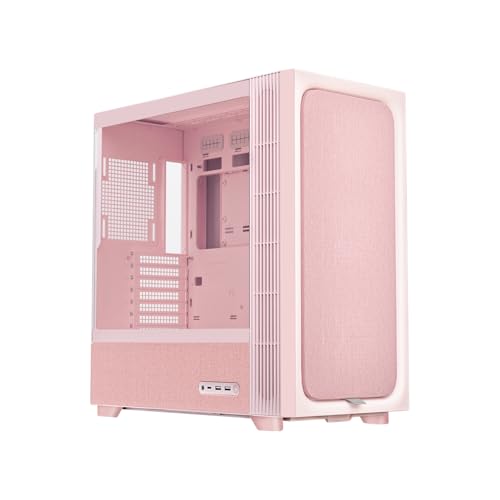
TRYX FLOVA Pink ATX Mid-Tower PC Case

Okinos Aqua UNO Micro ATX Case

Geometric Future M8 Cowboy Mid Tower
More Details On Our Top Picks
The HYXN leans hard into cooling headroom, and that matters for a gaming tower that may sit under a desk for long sessions. Eight pre-installed ARGB fans, split across 140 mm and 120 mm sizes, give the case a busy but practical starting point, so you’re not building around a near-empty shell.
The dual-chamber layout separates the main hardware zone from cable and PSU space, which usually makes routing cleaner and helps the front chamber breathe. The trade-off is size, because this is a large mid-tower that suits spacious desks more than tight corners, but it’s a strong match for builders who want easy airflow planning from day one.
Strong Points
- Eight included fans mean your base cooling setup starts strong.
- Dual-chamber construction helps keep cables and heat sources more organized.
- 420 mm radiator support gives you room for larger liquid-cooling hardware.
- Type-C 3.2 on the front I/O fits modern peripherals and fast storage enclosures.
- The black finish keeps the look simple, so the lighting stays in charge.
Things To Consider
- The large footprint can feel bulky beside a shallow desk.
- With so many fans, dusting the intakes is part of regular upkeep.
- The visual style leans gaming-first, which may not suit a subdued workspace.
Feature Snapshot
Who It Suits Best
You’ll get the most from this case as a gaming builder or upgrade-minded hobbyist who wants airflow first and does not mind a larger chassis.
A Better Fit Elsewhere
Geometric Future M5 Tempered Glass Mid Tower suits you better when you want a more premium-feeling frame and a cleaner, less fan-heavy starting point.
After the fan-heavy HYXN, this Geometric Future case feels more deliberate and material-forward. The 1.2 mm steel frame gives it a sturdier feel on paper, and the tempered glass side panel suits anyone who wants to show off a cleaner build without losing the practical ATX and E-ATX support.
Toolless panels matter more than they sound like they do, especially for builders who tinker often or move parts around between upgrades. The black and yellow finish is bolder than the ASUS ProArt PA401 Wood Edition, so this one fits a more expressive desk setup, though the colorway is the sort of choice you either love or keep at arm’s length.
What We Like
- 1.2 mm steel gives the chassis a substantial, confidence-inspiring feel.
- Toolless panels make routine access easier during upgrades or cleaning.
- 420 mm and 360 mm radiator support gives you broad cooling flexibility.
- Five pre-installed 140 mm ARGB PWM fans help with airflow and lighting right away.
- Type-C support keeps the front I/O current for modern gear.
Small Caveats
- The black and yellow finish is distinctive, so it won’t blend into every room.
- Glass panels look sharp but reward careful handling during cleaning and reassembly.
- The larger support range can make the case more than you need for modest hardware.
Core Details
Who Will Love This
You’re in a good spot with this one if you build high-performance systems and want a case that feels sturdier than a basic starter tower.
Another Choice May Suit
ASUS ProArt PA401 Wood Edition fits you better when your desk leans toward a calmer, more studio-like look with a warmer front panel.
The FLP02 goes in a different direction from the glass-heavy cases above, and that’s the point. Its retro chassis style makes sense for a workstation, media corner, or office desk where you want personality without chasing RGB everywhere.
The turbo button is the odd little feature that gives this case real character, because it offers an instant full-speed cooling mode for moments when heat builds quickly. Pair that with three front 5.25-inch bays and 360 mm radiator support, and you get a chassis that feels built for flexibility more than minimalism.
Upsides
- The retro design stands out in a room full of plain black towers.
- The turbo button gives you quick manual control over cooling behavior.
- Three front 5.25-inch bays support legacy drives and hot-swap cage ideas.
- 360 mm radiator support keeps it relevant for liquid-cooling builds.
Areas To Watch
- The style is specific, so it won’t suit every gaming setup.
- The 5.25-inch bay layout makes the front less streamlined than newer minimalist cases.
- Dusting around the front openings is part of ordinary upkeep in a lived-in room.
Technical Sheet
Built With In Mind
This fits you best as a retro fan, workstation builder, or someone who still uses front-bay expansion gear.
Where A Sibling Pick Shines
Geometric Future M8 Cowboy Mid Tower makes more sense for you if you want a more premium materials mix and a vertical GPU layout.
The ProArt PA401 lands in a quieter part of the category, and that’s exactly why it works. A wooden front panel paired with tempered glass gives it a warmer, more finished look than the metal-heavy cases nearby, which suits editing desks and home offices well.
The dual 160 mm fans are a practical touch because larger fans can move a lot of air without needing a wall of smaller ones, and the power button lock is a thoughtful detail for desks that get bumped often. The detachable PSU bracket should also make installation less awkward, though the overall appeal is strongest for you when appearance and order matter as much as raw airflow.
Bright Spots
- The wooden front panel gives the case a calmer, more furniture-like look.
- Dual 160 mm fans offer a strong cooling base with fewer visible components.
- Power button lock helps reduce accidental presses in busy work areas.
- USB-C 20Gbps suits faster external drives and newer accessories.
- The detachable PSU bracket can make the build process easier to manage.
Room For Improvement
- The style is tasteful but less flashy than the Geometric Future M5.
- Wood and glass surfaces ask for regular wiping to stay clean.
- It feels best suited to a deliberate setup, not a highly modded show build.
Feature Card
Whose Shelf It Belongs On
You’ll appreciate this most as a creator, designer, or home-office builder who wants a polished tower that still feels practical.
Skip It When
TRYX FLOVA Pink ATX Mid-Tower PC Case makes more sense for you if you want a brighter style statement and a more experimental fabric-forward design.
The Aqua UNO is for smaller desks that still deserve a polished, display-ready tower. Its panoramic tempered glass and two-tone black and yellow finish make it feel more like a styled object than a plain box, which is a big part of the appeal.
Just as important, the case stays realistic about size limits, with support for graphics cards up to 309 mm and no radiator support at all. That last point is the main trade-off, so this case works best for compact air-cooled builds where clean presentation matters more than liquid-cooling plans.
Positives
- The panoramic glass gives your components a broad visual frame.
- Three included 120 mm ARGB fans help the case start with useful airflow.
- Type-C 5 Gbps is a sensible front connection for a compact tower.
- The 309 mm graphics card limit still covers many mainstream cards.
Points To Note
- No radiator support makes it a poor match for liquid-cooling plans.
- The compact shell can feel tight during cable routing.
- Glass panels need careful handling during cleaning and part changes.
Details At A Glance
Perfect Match For
You’ll like this most as a Micro ATX builder with a compact desk and a preference for visual flair over expandability.
Look Elsewhere When
Okinos Aqua UNO in White&Yellow suits you better than this black-and-yellow version if you want a brighter tone without changing the same compact layout.
TRYX makes a very specific point here: your PC case can feel like part of the room, not just hardware storage. The fabric-inspired look is unusual in this group, and the pink finish gives it an easy personality for creative spaces or a setup that doubles as decor.
The practical side is still present, though, with tempered glass, three-speed cross-flow cooling, 360 mm radiator support, and USB-C 3.2 Gen 2×2 I/O. That mix suits you well if you want a case with visual texture and serious connection options, even though the styling may feel too distinctive for conservative office builds.
Best Bits
- The fabric-inspired exterior gives the case a rare, soft-edged look.
- Three-speed cross-flow cooling adds flexibility for different load levels.
- 360 mm radiator support keeps high-end cooling options on the table.
- USB-C 3.2 Gen 2×2 suits fast, modern peripherals.
Worth Noting
- The design is bold, so it won’t disappear into the background.
- Fabric-style surfaces may need more thoughtful dust care than plain metal panels.
- The pink finish narrows the appeal for some room setups.
Quick Facts
The Right Fit
This suits you best if your desk setup treats the PC as part of the visual layout and you still want strong cooling options.
Swap It Out When
ASUS ProArt PA401 Wood Edition is the calmer choice for you when you want a less playful finish and a more studio-like presence.
This white-and-yellow version follows the same compact formula as the black-and-yellow Aqua UNO, but the lighter finish changes the mood completely. It feels brighter on a shelf or under a monitor, which helps a small gaming setup read more playful without adding bulk.
The core trade-off stays the same, because you still get panoramic tempered glass, three 120 mm ARGB fans, Type-C 5 Gbps, and no radiator support. That makes it a neat fit for air-cooled builds that value presentation, though the 309 mm GPU limit means oversized cards need a second look.
Reasons To Buy
- The white-and-yellow palette looks lighter and more open than the darker version.
- Panoramic glass makes the internal layout easy to show off.
- Three 120 mm ARGB fans provide a useful cooling base.
- Type-C 5 Gbps keeps the front panel practical for everyday accessories.
Softer Spots
- No radiator support keeps it out of liquid-cooling territory.
- The smaller shell asks for a little patience during cable work.
- Bright finishes can show smudges sooner, so wiping the panels matters.
Feature Rundown
Whose Shelf It Belongs On
You’re the right match for this version if you want the same compact format as the darker model but prefer a lighter, friendlier color story.
Where Another Pick Suits Better
Geometric Future M5 Tempered Glass Mid Tower is the stronger choice for you if expansion room and sturdier steel matter more than a compact footprint.
The M8 Cowboy is the most character-heavy case in this list, and it earns that status through materials as much as shape. Aluminum, cowhide, glass, and 1.0 mm steel create a layered look that feels closer to a design object than a standard gaming tower.
The vertical air tunnel layout and vertical GPU mount make the internal presentation as unusual as the exterior, so this is the pick for a desk that should turn heads without shouting. Because it supports Type-C and large 420 mm or 360 mm radiators, the style is backed by real build flexibility, though the material mix makes this a less casual choice than the simpler HYXN or Okinos cases.
Highlights
- The aluminum and cowhide mix gives the case a rare, layered look.
- Vertical air tunnel design supports a distinct internal layout.
- Vertical GPU mounting helps the graphics card stand out visually.
- 420 mm and 360 mm radiator support keeps cooling options broad.
- Type-C support keeps the front panel current for modern devices.
Honest Caveats
- The material mix is striking, but it also narrows the audience.
- Vertical GPU layouts can need a little more planning around cable routing.
- Specialty finishes often ask for gentler cleaning than plain painted steel.
Core Details
Made For
You’re the right match for this case if you want your PC to feel like a centerpiece and you don’t mind a more design-led build process.
Reach For A Different Pick When
SilverStone Technology FLP02 Retro-Inspired Tower Chassis fits you better if you want a more nostalgic look with practical front-bay flexibility.
How To Choose The Right Limited Edition Computer Cases
Size, Layout, And What Your Desk Can Handle
Case size shapes almost everything else, from motherboard support to cable routing. A large dual-chamber ATX tower like the HYXN gives you breathing room, while a Micro ATX case such as the Okinos Aqua UNO keeps the footprint much smaller.
Desk depth, under-desk clearance, and side-panel access matter more than many shoppers expect. A tall glass tower can look great, but it becomes annoying fast when you need to reach rear ports or swap a drive under a low shelf.
Cooling Support Should Match Your Hardware, Not Your Mood
Radiator support tells you how far the case can go with liquid cooling, and fan count hints at the airflow baseline. The HYXN and Geometric Future M5 are built for heavier cooling plans, while the SilverStone FLP02 focuses on a different kind of control with its turbo button.
The trade-off is straightforward, more cooling support usually means more size, more dusting, and more parts to manage. Air-cooled systems can stay simpler, but they still need a sensible path for intake and exhaust.
Materials Change The Feel More Than The Spec Sheet Suggests
Steel, tempered glass, wood, aluminum, and even cowhide create very different ownership experiences. The ASUS ProArt PA401 Wood Edition reads calm and polished, while the Geometric Future M8 Cowboy turns the case into a visible design piece.
Heavier or mixed-material builds often feel more premium, but they can also be less forgiving during cleaning and assembly. That matters most for people who move hardware often or keep the system in a shared room.
A Quick Reality Check Before You Choose
Mistakes Worth Dodging
A common slip-up is choosing a case for looks alone and then finding out the GPU length, radiator size, or tower height does not suit the hardware. The Okinos Aqua UNO makes that lesson obvious, because its 309 mm card limit and no-radiator layout are clear guardrails.
Another easy miss is overlooking access. Toolless panels, detachable brackets, and front USB-C sound small, but they save time every time you open the case or connect a drive.
When Paying More Pays Off
Higher-tier cases usually cost more because of thicker steel, unusual materials, more pre-installed fans, or more involved panel systems. That’s why the Geometric Future M5 and M8 Cowboy feel so different from simpler compact towers.
The upgrade makes sense when the case is part of a long-term build, a visible workspace, or a system that gets regular hardware changes. For a basic office PC, the extra spend may not change daily use enough to matter.
Frequently Asked Questions
Do Limited Edition Computer Cases Matter For Cooling?
They can, but only when the design includes real airflow support such as fan mounts, radiator room, or a sensible internal layout. A striking panel alone does not keep hardware cool.
Should You Choose Glass Or A More Solid Front Panel?
Glass works well for display-heavy builds and RGB setups, while solid or mixed front panels often feel calmer and more durable in daily handling. The better choice depends on whether the case is meant to show hardware or blend into the room.
Is A Larger Mid-Tower Always Better?
No, larger cases help with compatibility and cooling, but they take up more space and can feel awkward on a small desk. Compact towers make more sense for tighter setups and simpler builds.
Do Toolless Panels Really Help?
Yes, especially for builders who upgrade parts or clean dust filters often. They reduce the small frustrations that turn routine maintenance into a chore.
What Should You Check Before You Order?
Check motherboard size, GPU length, radiator support, and front I/O such as Type-C. Those four details prevent most fit problems before the case arrives.
Closing Thoughts
Limited edition computer cases make the most sense when you want your PC to feel intentional, not generic. The best match for you depends on whether you care more about airflow, compact size, studio styling, or a showpiece look. HYXN and Geometric Future lean toward performance-friendly builds, while ASUS ProArt and TRYX bring stronger visual identity. Pick the one that fits your room, your parts, and the way you actually use the machine.
