
Liquid cooling asks a lot from a case, so you want space for radiators, sensible fan mounting, and room to route cables without turning the build into a knot. The picks below focus on real tower layouts, front-panel connectivity, and the kind of airflow-friendly designs that suit gaming rigs, upgrade-heavy desktops, and showpiece builds alike.
Some choices lean hard into glass and presentation, while others are better for builders who care more about support for larger radiators or easier access during assembly. That split matters, because the wrong case can make an otherwise good cooling plan feel cramped from day one.
Quick Look At Our Top Picks

HYXN H2 (2026) ATX PC Case, Pre-installed 8 PWM ARGB Fans

HYXN H2 (2026) ATX PC Case, Pre-Installed 8 No ARGB Fans
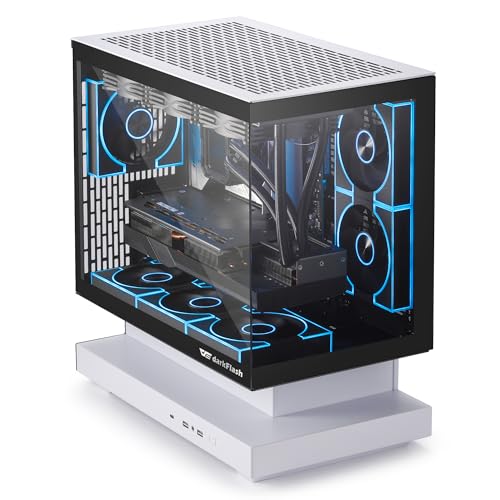
darkFlash FLOATRON F1(2025) Micro-ATX PC Case

FOIFKIN F1 PC Case, Pre-Installed 6 PWM ARGB Fan

CORSAIR 3500X RS ARGB Panoramic Mid-Tower PC Case

KEDIERS PC CASE ATX 5 Fans Pre-Installed, K4(MAX)

Geometric Future M5 Tempered Glass Mid Tower, GEO-M5F-BNY

Geometric Future M5 Tempered Glass Mid Tower, GEO-M5F-BY
More Details On Our Top Picks
Eight pre-installed fans give this HYXN case an obvious cooling bias, and the dual-chamber layout helps keep power cables and storage gear away from the main show area. For a heavy gaming build or a liquid loop with a large radiator, that extra internal breathing room matters more than glossy trim.
The trade-off is plain, this kind of chassis is built for size and airflow first, so smaller desks and minimal setups may find it more than they need. Still, the 140 mm fan mix and 420 mm radiator support make it a serious starting point for builders who want headroom without adding a lot of parts later.
What We Like
- Six 140 mm fans and two 120 mm fans come pre-mounted, which saves setup time and gives the case a strong baseline for heat handling.
- Dual-chamber layout keeps the main side cleaner, so cable routing feels less cramped during a full gaming build.
- 420 mm radiator support leaves room for larger liquid-cooling hardware, useful for high-output CPUs or future upgrades.
- Type-C 3.2 on the front panel suits newer peripherals and makes the top I/O feel current instead of bare-bones.
Things To Consider
- The size leans toward spacious desks and full-size layouts, so compact work areas may feel crowded.
- ARGB lighting adds visual impact, but it also means more cable management than a plain fan setup.
- The large fan count can make cleaning more involved, especially in homes with dust buildup.
Feature Snapshot
Who It Suits Best
You get the most from this case when you want a roomy ATX build with strong cooling from the start and a bright, layered look.
Where A Sibling Pick Shines
HYXN H2 (2026) ATX PC Case, Pre-Installed 8 No ARGB Fans suits you better if you want the same airflow-heavy shell without the lighting focus.
This version keeps the same large-frame H2 layout, but it drops the ARGB emphasis and leans into plain airflow instead. That makes it a cleaner fit for a workhorse tower, especially for home offices or gaming systems where lighting would just be extra clutter.
The honest read is that you’re trading visual flair for a more understated look, which is exactly what many quiet desks want. Like the lit model above, it still brings the 420 mm radiator ceiling and the dual-chamber structure, so you’re not giving up the practical stuff that matters most.
Positives
- Eight pre-installed fans help you start with a complete cooling layout.
- The dual-chamber design keeps the main compartment easier to organize.
- 420 mm radiator support gives liquid-cooling builds plenty of room to scale.
- No-ARGB styling suits understated setups and keeps the front of the system visually quiet.
Points To Note
- You give up the lighting effects that some showcase builds rely on.
- The size still favors roomy surfaces and a bit of build experience.
Core Details
Who Should Grab It
You’re the best match for this one if you want a full-size ATX case with strong cooling support and no lighting distraction.
Another Choice May Suit
HYXN H2 (2026) ATX PC Case, Pre-installed 8 PWM ARGB Fans fits you better if your build needs the same chassis but you want the illuminated look.
Panoramic glass changes the mood of a build right away, and this darkFlash case is clearly aiming at people who want their micro-ATX system to be seen. The 270-degree viewing angle gives it a display-case feel, while back-connect support keeps the rear-side cabling from taking over the clean side.
Three ARGB PWM fans, plus support for a 360 mm AIO, make the layout more than just pretty glass. The trade-off is the micro-ATX size, which suits compact desktops better than oversized parts lists, so your component choices need to stay disciplined.
Highlights
- 270-degree panoramic glass creates a strong visual display for a compact gaming setup.
- Back-connect support can help keep front-facing cable clutter under control.
- Three ARGB PWM fans provide a ready cooling base for a smaller system.
- 360 mm AIO support gives you room to plan a liquid-cooled micro-ATX build.
Room For Improvement
- Micro-ATX sizing leaves less room for oversized expansion plans.
- The glass-heavy style can demand more careful cleaning to keep fingerprints down.
- W/o RGB fans in the source title suggests the fan package may not match the most decorative expectations.
Quick Facts
Made For
You’ll like this most for a compact show build where interior looks matter as much as airflow.
Skip It When
Geometric Future M5 Tempered Glass Mid Tower suits you better if you want more room for E-ATX or a larger upgrade path.
Six PWM ARGB fans put this FOIFKIN case in a friendly middle ground, not as loaded as the HYXN twin but still ready for a warm gaming tower. Type-C on the front panel helps it feel current, and the ATX mid-tower shape should suit most standard desktop builds without asking for a giant footprint.
You may find the 360 mm radiator support especially useful for a mainstream liquid-cooled setup, because it leaves enough room for serious cooling without jumping to a larger chassis. The honest read is that it’s a straightforward choice, which is often exactly what a first custom build needs.
Upsides
- Six pre-installed fans reduce the need to fill the case out later.
- ARGB lighting gives the system some visual energy without going overboard.
- ATX mid-tower sizing keeps the footprint familiar for most desks.
- 360 mm radiator support fits many common liquid-cooling plans.
Small Caveats
- It does not bring the same fan count as the bigger HYXN options.
- The glass-and-light style asks for a bit more upkeep than a plain steel tower.
Feature Rundown
The Right Fit
You’re a good match for this case if you want a practical ATX build with lighting and liquid-cooling room, but not a huge chassis.
Look Elsewhere When
CORSAIR 3500X RS ARGB Panoramic Mid-Tower PC Case fits you better if you want a more premium-feeling interior layout and anti-sag support for a heavy graphics card.
The CORSAIR case has a more polished feel than the budget-leaning towers above, and the panoramic front gives a build a cleaner stage for the hardware inside. Three pre-installed fans, a spacious interior, and GPU anti-sag support point toward a case that cares about both presentation and long-term stability.
Reverse connection motherboard compatibility matters too, because cable routing can look far less awkward in a windowed case. For builders who care about a tidy finish and a stronger overall frame around a heavier graphics card, this is a very sensible step up.
Standout Traits
- Panoramic layout creates a clean showcase feel for glass-panel builds.
- GPU anti-sag support helps a large graphics card sit more securely.
- Reverse connection motherboard compatibility can simplify the visual side of cable routing.
- Three pre-installed fans give the case a ready airflow base.
Trade Offs
- The feature set is more about polish than raw fan count.
- Clear-panel designs usually ask for a little more dust care over time.
Details At A Glance
Built With In Mind
You’ll appreciate this most for a polished gaming tower with a large graphics card and a neat, modern interior layout.
Another Choice May Suit
Geometric Future M5 Tempered Glass Mid Tower suits you better if you want a thicker 1.2 mm steel frame and toolless access for more frequent hardware changes.
Full-view glass gives this KEDIERS tower a display-first personality, and the five pre-installed fans make it easier to get a cooling layout moving without extra add-ons. Type-C on the front panel keeps it modern enough for everyday desktop use, especially in a setup that doubles as a gaming station.
The trade-off shows up in maintenance, because dual tempered glass tends to put fingerprints and dust on display pretty quickly. Still, for a builder who wants a visually open case and a 420 mm radiator ceiling, it covers a lot of common needs in one shell.
Best Bits
- Five pre-installed fans give you a strong starting point for cooling.
- Full-view dual tempered glass creates a clean showcase look.
- 420 mm radiator support leaves room for larger liquid-cooling hardware.
- Type-C adds a useful modern front-panel connection.
Areas To Watch
- Glass panels make regular wiping part of ownership.
- The visual focus can leave less room for a plain, understated setup.
Core Details
Whose Shelf It Belongs On
This fits you well when you want a glass-heavy ATX tower that still leaves room for serious cooling hardware.
Swap It Out When
HYXN H2 (2026) ATX PC Case, Pre-installed 8 PWM ARGB Fans suits you better if you want more built-in fan coverage from the start.
Geometric Future takes a more engineering-minded route here, with 1.2 mm steel, toolless panels, and support for E-ATX or ATX builds. That thicker steel count matters in a case this size, because it usually means a steadier frame for a build you plan to keep and update over time.
Five pre-installed 140 mm ARGB PWM fans and support for 420 or 360 mm radiators make it a strong platform for liquid cooling, especially in larger gaming systems. For builders who like frequent part swaps, the easier panel access is a small but welcome quality-of-life touch.
Reasons To Buy
- 1.2 mm steel suggests a more substantial shell than thinner lightweight cases.
- Toolless panels make access simpler for upgrades and routine cleaning.
- E-ATX and ATX support opens the door to broader motherboard choices.
- Five pre-installed 140 mm ARGB PWM fans give it a strong airflow base.
- 420 mm and 360 mm radiator support suits ambitious cooling layouts.
Honest Caveats
- The larger frame is more demanding on desk space.
- RGB fans and glass panels still add some upkeep compared with a plain steel box.
Feature Card
Who Will Love This
You’re the right match for this one if you want a premium-feeling liquid-cooled tower with room for bigger parts and easier access.
Where Another Pick Suits Better
CORSAIR 3500X RS ARGB Panoramic Mid-Tower PC Case is a better fit if you want a more mainstream mid-tower shape with a polished interior layout.
This yellow-accent version keeps the same core M5 structure, so the difference is mostly styling rather than function. That makes it a good fit for builders who like the Geometric Future layout but want a brighter finish to match a custom desk setup or themed room.
You still get the E-ATX and ATX support, the toolless panels, and the five 140 mm ARGB PWM fans, so the useful parts stay intact. Compared with the black-and-green model above, this one is about color preference, which is sometimes the real deciding factor in a visible build.
Bright Spots
- Same 1.2 mm steel frame as the other M5 version.
- Toolless panels make maintenance and upgrades less fiddly.
- E-ATX and ATX support keeps motherboard choices broad.
- Five pre-installed 140 mm ARGB PWM fans support a strong cooling base.
- The black and yellow finish gives a more distinctive look.
Softer Spots
- The colorway is the main difference, so the choice is largely aesthetic.
- The larger frame still needs a decent amount of desk depth.
Technical Sheet
Who It Suits Best
You’ll like this version most if you want the M5 platform in a brighter finish that still works for a serious liquid-cooled build.
A Better Fit Elsewhere
Geometric Future M5 Tempered Glass Mid Tower, GEO-M5F-BNY is the better pick if you prefer the black-and-green styling and the same hardware platform.
How To Choose The Right Liquid Cooled Pc Cases
Start With Radiator Room And Fan Layout
Radiator support is the first number to check because liquid cooling lives or dies on fit. A 360 mm radiator works for many mainstream loops, while 420 mm support gives you more breathing room for larger hardware and slower fan speeds.
Fan layout matters just as much, since a case can support liquid cooling and still feel awkward if intake and exhaust paths are poorly thought out. Cases like the HYXN H2 models show how pre-installed 140 mm fans can give you a stronger starting point, while smaller cases often ask you to plan more carefully around motherboard and cable space.
Match The Case Size To Your Desk And Parts
ATX mid-towers suit most gaming desks, but dual-chamber shells and panoramic glass designs take up more visual and physical space than you might expect. Micro-ATX cases, like the darkFlash FLOATRON F1, work better for tighter setups or simpler component lists.
Think about the graphics card too, not just the cooler. A larger card paired with a tall radiator can make a roomy case feel suddenly ordinary, which is why spacious interiors and support features such as anti-sag hardware become worth the attention.
Look At Build Access, Not Just Looks
Toolless panels, reverse-connection motherboard support, and side access can save a lot of frustration during a future upgrade. These details do not sound glamorous, but they shape how easy it is to swap drives, clean dust, or reroute cables after the first build.
For a case that stays in service for years, that ease matters almost as much as the front-panel design. Geometric Future’s M5 cases stand out here, since they combine sturdier steel, broader motherboard support, and panel access that feels more builder-friendly than a purely display-focused shell.
Choose Lighting With Maintenance In Mind
ARGB fans add visual punch, yet they also mean more cabling, more surfaces to dust, and more parts that draw the eye. Plain fan setups can look calmer and are often easier to live with in a work-heavy room.
That’s why the no-ARGB HYXN H2 and the brighter versions sit on different sides of the same practical question. You’re not just choosing a look, you’re choosing how much upkeep and visual attention the system will ask for every week.
Things Worth Knowing First
Where Shoppers Go Wrong
The most common slip-up is treating radiator size as the only deciding factor. A case can clear a 420 mm unit and still frustrate you with awkward cable routing, cramped drive placement, or a front panel that feels busy.
Another misstep is ignoring the actual room around the desk. Large glass cases look great in photos, but a bulky mid-tower can crowd a small workspace fast.
When Paying More Pays Off
Higher-tier cases usually cost more because of the material choices and convenience features. Thicker steel, toolless panels, stronger interior support, and more refined layouts all raise the quality of day-to-day use.
You feel that difference most during the second and third upgrade, not on day one. A sturdier frame and better access can save time, reduce annoyance, and make a serious build feel less temporary.
Frequently Asked Questions
Do You Need A Large Case For Liquid Cooling?
Not always, because many 360 mm radiator builds fit comfortably in a mid-tower. Larger cases simply give you more room for cable routing, thicker radiators, and easier part swaps.
Is ARGB Necessary For Good Cooling?
No, lighting does not cool the system by itself. ARGB mainly changes the look, while fan count, fan size, and radiator space do the actual thermal work.
What’s The Difference Between ATX And Micro-ATX?
ATX cases are generally roomier and suit bigger builds with more room to work. Micro-ATX cases are smaller and better for compact desktops or simpler hardware plans.
Why Does Dual-Chamber Design Matter?
It separates cables and auxiliary components from the main display side. That usually makes the build look cleaner and can make assembly feel less cramped.
What Should You Check Before Buying?
Check radiator clearance, motherboard size support, and the number of pre-installed fans. Then make sure the case’s footprint fits your desk and the way you actually use your PC.
Closing Thoughts
For a liquid-cooled build, the case is more than a shell, it sets the tone for airflow, cable routing, and how painless future upgrades feel. The HYXN options are easy to recommend for builders who want lots of cooling support right away, while the Geometric Future M5 cases suit you better when sturdier construction and easier access matter more. The darkFlash and KEDIERS picks serve smaller or more style-focused setups well, and the CORSAIR model lands in a polished middle ground. Choose the layout that fits your desk, your parts, and how often you like to tinker.
