
Shopping for a low-cost mouse gets easier once you know what matters most: grip, button feel, connection type, and how much desk fuss you can live with. Some people want a simple wired model that just works, while others need a silent wireless pick for shared spaces or travel. The eight options below split cleanly across those needs, so you can match the mouse to your laptop bag, home office, or everyday setup without paying for extras you won’t use.
Quick Look At The Shortlist

wegear USB Wireless Mouse 2.4GHz Black

Rii Wireless Noiseless Mouse 2.4G Silent Black
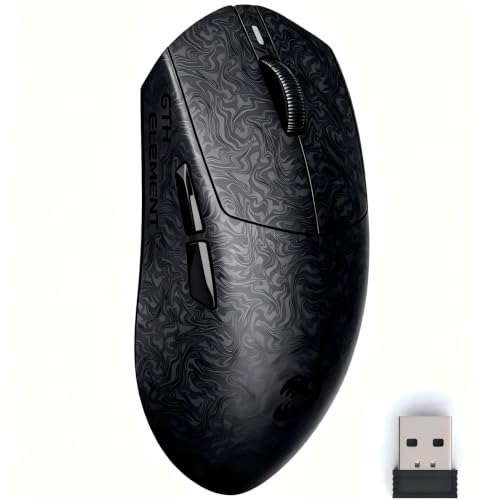
ZORNHER X Mloong MX301 PRO Lightweight Gaming Mouse

Afaartcci Rechargeable Wireless Mouse Silent Bluetooth Black

HOTWEEMS Wireless Mouse D-09 Black

Amazon Basics 3-Button USB Wired Mouse Black

Lenovo 300 USB Wired Computer Mouse Black

VssoPlor Wireless Mouse Slim Black and Gold
More Details On Our Top Picks
wegear keeps the setup straightforward, which matters when your desk already has a charger, a laptop stand, and too many cables. The 2.4GHz wireless connection cuts the cord clutter, while the five DPI steps give you room to slow the pointer for careful work or speed it up for casual browsing.
The six-button layout adds a little more control than the bare-bones mice in this list, and the claimed long battery life makes it easier to leave in a backpack or desk drawer. In a busy home office, that kind of low-maintenance behavior tends to matter more than flashy extras.
Strengths
- Five DPI levels let you tune pointer speed for spreadsheets, web work, or general navigation.
- The wireless setup keeps your laptop bag lighter than a corded model like the Amazon Basics option.
- Six buttons give you extra control for common shortcuts without moving into gaming-only territory.
- The stated battery life supports long stretches between charge changes or battery swaps.
Things To Consider
- The six-button layout can feel busier than a simple three-button mouse for basic users.
- 2.4GHz wireless still needs a USB port, so slimmer laptops may need a hub.
- Portable mice like this often benefit from regular dust wiping around the buttons and scroll area.
Feature Snapshot
Who It Suits Best
Daily laptop users who want extra buttons without stepping into bulky gear will get the most out of this one.
Where A Sibling Pick Shines
Lenovo 300 USB Wired Computer Mouse Black is the cleaner fit for desk setups that already have a spare USB port and no interest in wireless upkeep.
This Rii mouse makes sense for shared spaces, study corners, and late-night work sessions where noisy clicks get old fast. Its wireless design reaches up to 10 meters, so you can keep a little distance from the device and still stay comfortable.
Compared with the wegear pick, it stays simpler and more focused on quiet operation than on extra buttons or sensitivity range. That trade-off is useful for someone who wants a calm, portable mouse more than a feature-heavy one.
Positives
- Quiet clicking helps keep a low-profile desk setup.
- The 10-meter wireless range gives you room to move around a room or meeting space.
- The USB dongle setup keeps pairing simple for laptops and desktops.
Softer Spots
- Noise reduction usually comes with a softer click feel, so button feedback may seem muted.
- The single-mode wireless approach is less flexible than dual-mode options like the Afaartcci model.
- A tiny dongle is easy to misplace, so storing it with the mouse matters.
Core Details
Built With In Mind
Office users, students, and anyone who shares a quiet room will get the most from this mouse.
Look Elsewhere When
Afaartcci Rechargeable Wireless Mouse Silent Bluetooth Black fits better for people who need Bluetooth plus USB receiver support across more than one device.
The MX301 PRO leans into speed and control in a way the office-first picks above do not. At about 60g, it sits in a lightweight range without feeling overly floaty, and that balance can help during fast cursor work or long gaming sessions.
The carbon-fiber-inspired finish gives it a more textured feel in hand, which matters more than it sounds when your grip gets sweaty or your desk space is tight. Compared with the Rii and wegear options, this one is built for precision and responsiveness rather than pure simplicity.
Highlights
- The PAW3315 sensor supports accurate tracking for games and everyday use.
- 60g weight gives quick movement without feeling too insubstantial.
- Triple connectivity, wired, Bluetooth, and 2.4GHz, adds flexibility for different setups.
- TTC switches provide crisp click feedback for faster actions.
- The web-based driver keeps configuration lighter than bulky desktop software.
Room For Improvement
- Gaming-focused tuning can feel more specialized than casual office users need.
- The smaller body may not suit larger hands as well as a full-size mouse like Lenovo 300.
- Special finishes can show fingerprints more readily, so a quick wipe helps keep it tidy.
Technical Sheet
Right Fit For
PC users who game often, especially in FPS titles, will appreciate the lighter frame and faster response feel.
Another Choice May Suit
wegear USB Wireless Mouse 2.4GHz Black is a calmer match for everyday laptop work where extra gaming tuning would go unused.
Afaartcci is the kind of mouse that works well for a laptop bag because it covers more than one connection style without turning into a cluttered device. Bluetooth 5.2, Bluetooth 3.0, and a 2.4G receiver give you broad compatibility, which helps when you move between a MacBook, iPad, or office notebook.
The catch is simple, you can use only one mode at a time, so this is about flexibility rather than simultaneous device hopping. Still, for travel or hybrid work, that’s often enough, and the stored receiver keeps the loose pieces from wandering off.
What We Like
- Dual-mode support gives you a useful bridge between Bluetooth and USB receiver use.
- The rechargeable setup reduces the need to keep spare batteries in your bag.
- Silent clicking suits libraries, airports, and shared tables.
- The ergonomic shape helps it feel more natural during longer laptop sessions.
Points To Note
- You cannot run both connection modes at once.
- The USB receiver lives inside the mouse, so it helps to return it there after travel.
- Silence-focused mice often trade some click crispness for quieter operation.
Details At A Glance
Made For
Commuters and multi-device laptop users will get the most value here, especially in spaces where quieter clicks matter.
Swap It Out When
HOTWEEMS Wireless Mouse D-09 Black is the simpler option for someone who wants one straightforward wireless mouse and less connection switching.
HOTWEEMS keeps the pitch simple, and that’s part of the appeal for a spare mouse or a light everyday setup. The D-09 shape, ergonomic grip areas, and five DPI steps make it flexible enough for basic work without asking you to learn any odd controls.
The stated 16-month battery life stands out in a category where many compact wireless mice need more frequent attention. Compared with the Afaartcci model, this one is less about device switching and more about a straightforward, low-fuss desktop companion.
Upsides
- Five DPI levels help you match pointer speed to browsing or office tasks.
- The ergonomic grip areas make it friendlier for longer desk sessions.
- The long battery claim supports a low-maintenance routine.
- Its compact shape works well beside a laptop in a small workspace.
Areas To Watch
- The simpler layout means fewer extra controls than some higher-feature picks.
- Portable wireless mice often need occasional underside cleaning to keep tracking smooth on dusty desks.
- The black finish can hide wear at first, but it still benefits from regular care.
Quick Facts
The Right Fit
Students, casual home users, and anyone wanting a spare wireless mouse for light work will find this an easy match.
A Better Fit Elsewhere
Rii Wireless Noiseless Mouse 2.4G Silent Black suits shared spaces better when quieter button feel matters more than simple ergonomics.
This is the kind of mouse that disappears into the background, and that can be a good thing on a desk where plain utility matters more than features. The three-button layout keeps the learning curve almost flat, while the plug-and-play USB connection makes it easy to move between Windows and Mac systems.
Compared with the wireless picks above, you give up cable freedom, but you also skip battery checks and dongle handling. For office tasks, that trade often feels fair, especially in a setup that stays in one place.
Best Bits
- The wired USB connection removes pairing steps and battery concerns.
- Three-button control stays easy for basic navigation.
- Windows and Mac compatibility broadens its everyday usefulness.
- The compact, plain design fits almost any desk without drawing attention.
Small Caveats
- The cord keeps it tied to the computer, so it’s less handy for travel.
- Simple mice can feel limiting for people who want extra shortcut buttons.
- The shell is easy to wipe down, but cable strain should still be avoided at the desk edge.
Core Details
Whose Shelf It Belongs On
Home office users who want a plain, dependable mouse for a fixed workstation will appreciate this most.
Reach For A Different Pick When
wegear USB Wireless Mouse 2.4GHz Black is a better fit for anyone who wants a cord-free desk and more click customization.
Lenovo takes the safe route here, and that works well for desks where durability and hand comfort matter more than flashy extras. The full-size body and ambidextrous shape make it easier to settle into during long stretches of work, especially for shared office stations or a home setup that stays in one place.
The 1600 DPI rating gives you a predictable pointer speed that feels steady rather than twitchy. Relative to the Amazon Basics mouse, this one offers a more substantial hand feel, which can be a better match for people who use a mouse for most of the workday.
Reasons To Buy
- The full-size shell gives your hand more room than compact travel mice.
- Ambidextrous shaping suits left-handed and right-handed use.
- 1600 DPI offers a practical middle ground for office navigation.
- USB-A connection keeps setup direct on standard laptops and desktops.
Honest Caveats
- The wired layout keeps it desk-bound.
- The three-button structure is basic compared with the wegear and HOTWEEMS picks.
- A full-size body takes more room in a travel pouch, so it’s less suited to minimal packing.
Feature Rundown
Best Suited To
Desk-first users who want a larger mouse with steady cursor response will feel at home with this one.
Swap It Out When
VssoPlor Wireless Mouse Slim Black and Gold is the better fit for travelers or students packing light between classes and cafés.
VssoPlor is shaped for the kind of person who wants a mouse that slips into a laptop sleeve without taking over the pocket. The slim body, black-and-gold finish, and USB nano receiver give it a tidy profile that feels more travel-friendly than the larger Lenovo or wegear options.
Quiet optical clicking keeps the experience calmer in dorms, libraries, or shared tables. The trade-off is straightforward, a slimmer mouse can feel less filling in the palm, so it suits lighter use and compact packing better than marathon desktop sessions.
Standout Traits
- The thin profile takes very little room in a bag.
- USB nano receiver storage and plug-and-play setup keep travel simple.
- Quiet click behavior is helpful in shared or quiet spaces.
- The black-and-gold finish gives it a little more visual polish than plain all-black models.
Areas To Watch
- Small mice can feel less supportive during long desk sessions.
- The travel-first size may not suit larger hands.
- Wireless pocket mice benefit from careful receiver storage so the tiny dongle does not vanish in a bag.
Feature Card
Perfect Match For
Travelers, students, and anyone with limited bag space will get the most from this compact shape.
Where A Sibling Pick Shines
Lenovo 300 USB Wired Computer Mouse Black is the steadier choice for full-day desk work where size and hand support matter more than portability.
How To Choose The Right Low Cost Mouses
Connection Style Shapes The Experience
Wired mice suit desks that stay put, especially in offices where USB-A ports are easy to reach. Wireless mice feel cleaner and more portable, but they add receiver handling or charging needs. Dual-mode models such as the Afaartcci mouse matter most for people moving between a laptop, tablet, and desktop setup.
Shape Beats Raw Feature Count
Hand size and grip style affect comfort more than many people expect. A full-size body like Lenovo 300 feels more settled for long sessions, while slim travel mice such as VssoPlor pack easily but can feel lighter in the hand. Small hands, larger hands, and left-handed use all change the fit story.
Button Feel And Pointer Speed Matter
Basic three-button mice work well for email, schoolwork, and routine browsing. Extra buttons and adjustable DPI, which means pointer sensitivity, help when you switch between spreadsheets, design work, or gaming. The trade-off is a busier shell, so you want only the controls you’ll actually use.
Quietness And Maintenance Are Easy To Miss
Silent clicks help in shared spaces, late-night study rooms, and calls where noise feels distracting. Battery claims also matter, because low-cost wireless mice can become annoying fast when upkeep is frequent. A quick wipe around the sensor area and buttons keeps most inexpensive mice feeling smoother for longer.
Things Worth Knowing Before You Choose
Wrong Turns To Avoid
Many shoppers focus on price first and forget to check connection type, hand size, or port needs. A tiny wireless mouse can look convenient until you use it for several hours and realize your palm wants more support. Matching the mouse to the way you work keeps the purchase useful instead of merely cheap.
Another common miss is overlooking the little practical parts, such as where the USB receiver lives or whether the model is silent enough for shared spaces. Those details sound small, but they shape daily use more than the headline specs.
The Upgrade Payoff
Higher-tier mice usually spend more on sensor quality, switch feel, better shape tuning, or broader connectivity. That matters most for gaming, all-day office use, or a laptop that moves between workspaces often. In that zone, the extra cost tends to buy comfort and flexibility, not just styling.
For simple browsing or occasional documents, a plain wired model often makes more sense. Once your mouse becomes part of a long workday, the smoother click feel and better ergonomics start earning their keep.
Closing Thoughts
For low-cost mice, the right choice usually comes down to comfort, connection, and how much fuss you want in daily use. The Amazon Basics and Lenovo picks keep things plain, while wegear, Afaartcci, and VssoPlor add portability and flexibility. Rii is the quiet choice, and the ZORNHER X Mloong MX301 PRO stands apart for gaming-focused control. Match the mouse to your desk habits, and the right one will feel natural fast.
