
Your desktop upgrade path gets a lot easier once you match the adapter to the slot, lane count, and drive format you already have. Some of these picks are simple M.2-to-PCIe cards for a single SSD, while others stretch into riser-style layouts or dual-drive support for more specific builds. The right one saves you from cramped installs, loose fitment, and the usual guesswork around M-Key, B-Key, and NGFF labels.
Quick Look At The Shortlist

StarTech M.2 PCIe SSD Adapter (PEX4M2E1)

SABRENT M.2 NVMe SSD to PCIe x16 Adapter Card

ELUTENG Dual M.2 PCIE Adapter NVME/NGFF to PCIE X4

2 Pack M.2 Key M Transfer PCI-E 1X 4X Card
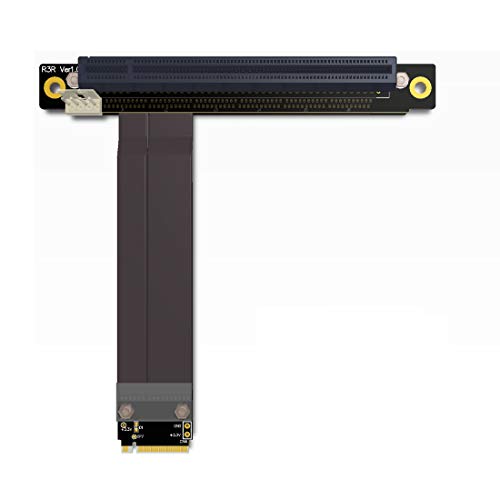
M.2 NGFF NVMe Key M Extender Cable to PCIE x16 Graphics Card Riser Adapter

PCIe Adapter for M.2 NVMe Mkey, PCI-e 4.0 X4 Card

NGFF M.2 M-Key to PCIe x4 Expansion Card Adapter
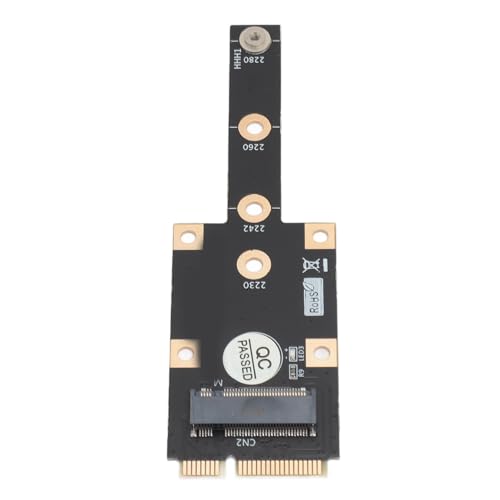
Generic Mini PCIE to M.2 M Key Adapter
More Details On Our Top Picks
StarTech keeps the layout plain and useful, which helps in a desktop tower where you want a single M.2 drive mounted cleanly in a PCIe slot. The broad fit for 2242 through 22110 lengths gives you room to match common SSD sizes without hunting for a specialty board.
The trade-off is that this is a straightforward adapter, not a flashy feature piece, so your value comes from compatibility and tidy installation more than extras. For someone replacing an older add-in card or building a simple storage upgrade, that clarity is often enough.
Strong Points
- Supports a wide spread of M.2 lengths, so shorter and longer drives both have a place here.
- Works with PCIe 3.0 and also steps back to older PCIe generations, which helps older systems stay useful.
- Ships with full-height and low-profile brackets, so case fit is easier to match.
- Single-drive format keeps cable and layout clutter down inside the case.
Things To Consider
- It is built around one SSD, so it does not suit multi-drive ambitions.
- Users chasing newer lane speeds may prefer a more current board, especially in a modern workstation.
- Bracket swaps add a small installation step, which matters in a cramped chassis.
Feature Snapshot
Whose Shelf It Belongs On
You get the most from this in a standard desktop where you want one M.2 SSD mounted with minimal fuss and solid compatibility.
Another Choice May Suit
SABRENT M.2 NVMe SSD to PCIe x16 Adapter Card fits people who want a more speed-focused board with thermal hardware already built in.
This one leans harder into thermal control than the StarTech card, and that matters in a hotter gaming rig or a fast workstation with long write sessions. The aluminum heatsink gives the drive a sturdier home, while the tool-free add-in design trims a little of the usual fiddling.
Gen 5 compatibility makes it the more forward-looking choice in this lineup, though your setup still has to support that tier for the benefit to matter. In most towers, it feels like the better match for a performance-first build than a simple storage-only install.
What We Like
- Aluminum heatsink adds a practical layer of thermal support.
- Tool-free add-in layout keeps installation simpler than many bracket-heavy cards.
- Gen 5 compatibility gives you headroom for newer systems.
- Backwards compatibility keeps it usable in older PCIe environments.
- The x16 format often suits spacious desktop layouts better than narrow add-ons.
Minor Gripes
- The extra thermal hardware adds bulk, so tight cases may feel crowded.
- Its higher-end focus can be more than you need for a basic storage upgrade.
Core Details
Built With In Mind
You suit this best when your desktop already has room for a larger card and you want the thermal overhead that goes with a faster SSD path.
Where A Sibling Pick Shines
StarTech M.2 PCIe SSD Adapter (PEX4M2E1) is the easier fit for a simpler storage-only build that values broad size support over thermal hardware.
ELUTENG stands out because it serves more than one M.2 lane of thinking, which is handy in a workstation or lab machine where flexibility matters. Support for B-Key, M-Key, and B&M Key drives gives it a wider acceptance range than the single-purpose boards above.
The 32Gbps rating makes sense for setups that want a stronger transfer path, though the real benefit still depends on the drive and slot arrangement in your tower. For anyone juggling mixed SSD types, this is the most adaptable choice in the group, even if the extra flexibility adds a bit of setup reading.
Reasons To Buy
- Dual M.2 design gives you more mounting flexibility than single-drive adapters.
- Support for several key types broadens the list of compatible SSDs.
- 32Gbps throughput is a useful fit for stronger desktop transfer paths.
- Works with a wide range of lengths, from 2230 through 22110.
Points To Note
- More flexibility usually means a longer setup check, especially with mixed drive types.
- Two-drive potential can be unnecessary for a simple home PC upgrade.
- Managing a dual-layout card in a crowded case takes a little more care during installation.
Technical Sheet
Who Should Grab It
You fit this best when you manage mixed M.2 drives and want a card that keeps options open inside a desktop chassis.
Skip It When
StarTech M.2 PCIe SSD Adapter (PEX4M2E1) makes more sense for a basic single-SSD install with simpler mounting needs.
MZHOU takes a very practical route here, because the real headline is the two-pack format. That suits tinkering desks, repair shelves, or anyone who wants a spare adapter ready instead of stopping a project for a missing part.
The PCI-E 1X to 4X transfer angle makes it more specific than the broad boards above, so you want to match it to the right slot plan. The honest read is that this is less about polish and more about keeping useful parts on hand without overcomplicating the job.
Upsides
- Two adapters in one pack give you backup coverage for projects and repairs.
- The compact transfer-card format can suit modest desktop builds.
- Useful for anyone who likes keeping a spare board in the parts drawer.
- Simple layout keeps the installation logic fairly direct.
Room For Improvement
- It is narrower in scope than the more feature-heavy boards in this list.
- The 1X to 4X transfer approach asks for a careful slot match.
- Two-pack value matters most to people who will actually use both cards.
Feature Card
Right Fit For
You benefit most from this in a tool drawer or project bench where an extra adapter can save time later.
Another Choice May Suit
ELUTENG Dual M.2 PCIE Adapter NVME/NGFF to PCIE X4 is the better match for mixed-drive flexibility and a wider compatibility spread.
ADT-LINK takes a different route from the rigid cards above by using an extender cable, which can help in open-frame builds or awkward chassis layouts. The 25cm length gives you breathing room when the SSD needs to sit away from the slot instead of directly on top of it.
That extra distance is useful, but it also introduces more cable management and a little more care during installation. For modded rigs, test benches, or cases where space is shaped like a puzzle piece, this type of adapter can feel far more practical than a fixed board.
Highlights
- 25cm cable length offers real placement freedom inside a case.
- The riser-style layout works well in open or awkward builds.
- Good fit for setups where a direct-mounted card would crowd other parts.
- The M-Key support keeps the focus on compatible NVMe modules.
Softer Spots
- Cable routing adds another step during installation.
- Open layouts usually ask for more careful cable support and strain relief.
- It is less tidy than a compact direct-fit adapter in a standard tower.
Details At A Glance
Who Will Love This
You fit this best in an open bench, custom build, or compact chassis where cable freedom matters more than a tidy all-in-one card.
Where A Sibling Pick Shines
StarTech M.2 PCIe SSD Adapter (PEX4M2E1) is the cleaner option for a standard tower that needs a direct mount rather than a cable run.
Valuegist speaks to newer desktops by listing PCIe 4.0 x4 support, which is the kind of detail that matters once your system and SSD are ready for more bandwidth. The fit for 2230 through 2280 drives also keeps it grounded in the common sizes you’re likely to use.
Compared with the older-style StarTech card, this one leans more into a modern lane setup, so it suits a recent gaming PC or a refreshed workstation better. The trade-off is simple, it makes more sense when your motherboard and drive can actually take advantage of that newer path.
Best Bits
- PCIe 4.0 x4 support suits newer desktop hardware.
- Covers four common M.2 lengths, which helps with drive swapping.
- Single-card format keeps the install straightforward.
- Good match for users who want a current-generation pathway without extra frills.
Areas To Watch
- Its modern lane support matters most in a system that can use it.
- It still stays in the single-drive lane, so no multi-SSD ambitions here.
Core Details
The Right Fit
You suit this best when your desktop is recent enough to make PCIe 4.0 worth caring about.
Look Elsewhere When
StarTech M.2 PCIe SSD Adapter (PEX4M2E1) is the calmer fit for an older machine where broad backwards compatibility matters more than newer lane support.
YiKaiEn keeps the goal focused, turning a compatible M-Key M.2 interface into a PCIe x4 slot for desktop use. That makes it a practical bridge piece for expansion cards, not just a storage accessory, which is where its usefulness starts to separate from the simpler boards.
For a tower that needs to repurpose the M.2 slot for another add-in card, this is the kind of adapter that earns its keep by staying out of the way. The honest read is that it’s most helpful in a desktop you’re already customizing, not a casual plug-and-forget build.
Bright Spots
- Converts a supported M-Key M.2 interface into PCIe x4.
- Useful for desktop expansion cards, not only SSD use.
- Simple function makes the install logic fairly direct.
- Good fit for custom desktop projects that need slot repurposing.
Small Caveats
- Its focus on expansion-card conversion makes it less flexible than dual-purpose options.
- It makes the most sense in a planned desktop build, not a casual upgrade.
Quick Facts
Perfect Match For
You fit this best in a desktop build where the goal is to turn one M-Key M.2 slot into a PCIe x4 path for another card.
A Better Fit Elsewhere
SABRENT M.2 NVMe SSD to PCIe x16 Adapter Card works better for people who want a more thermal-aware SSD mounting option instead of slot conversion.
PUSOKEI is the smallest-minded pick in the group, in a good way, because its Mini PCIe angle points straight at older compact systems. The PCB construction and included screw-and-screwdriver set make it feel more self-contained than many bare-bones adapters.
You also get support for 2230 through 2280 drives, which keeps it useful for a range of small modules in mini PCs or older laptops with the right interface. One thing worth considering is that this card is most comfortable in a narrow compatibility lane, so it suits a defined upgrade more than a broad experiment.
Standout Traits
- PCB construction gives the board a stable, practical feel.
- Included screws and screwdriver make installation more convenient.
- Covers several common M.2 lengths in one compact adapter.
- Good fit for older small-form-factor machines that need a tidy add-in.
Worth Noting
- Its niche is narrower than the desktop expansion cards above.
- Mini PCIe compatibility can limit where it makes sense to use.
- The generic branding may matter less to some shoppers than a clearer model family.
Feature Rundown
Whose Shelf It Belongs On
You fit this best when you’re upgrading a compact system that specifically needs a Mini PCIe-to-M.2 M Key path.
Reach For A Different Pick When
StarTech M.2 PCIe SSD Adapter (PEX4M2E1) is the better all-round choice for a standard desktop that wants broader slot compatibility and simpler case fit.
How To Choose The Right M 2 Ngff Pcie Adapters
Match The Adapter To The Slot You Already Have
A PCIe adapter works only as well as the slot behind it, so the first job is checking what your board can actually provide. x1, x4, x8, and x16 refer to lane width, which is the amount of PCIe traffic path available, and that matters more than marketing language. A card like the StarTech PEX4M2E1 is aimed at a straight SSD mount, while YiKaiEn’s card is built to convert an M-Key slot into PCIe x4 for a different expansion role.
Pay Attention To M-Key, B-Key, And Drive Length
M-Key is the common notch pattern for NVMe drives, while B-Key and B&M Key support can broaden compatibility with some older or mixed drives. Drive length matters just as much, because 2230, 2242, 2260, 2280, and 22110 are physical sizes, not performance grades. In a cramped mini tower, shorter support can matter more than headline speed, while a full ATX case may make a longer board like the StarTech style feel easier to live with.
Think About Heat, Cable Routing, And Case Space
A heatsink helps spread heat away from the SSD controller and memory chips, which is useful during long file transfers or heavy game installs. By contrast, an extender cable opens up placement freedom, but it also adds routing work and another part that needs to sit neatly in the case. SABRENT fits the first camp, ADT-LINK fits the second, and the better choice comes down to whether your chassis favors airflow or clean routing.
Choose For The Build You’re Planning, Not The One You Wish You Had
A basic storage upgrade calls for a simple adapter with the right bracket and slot match, nothing more. A workstation or modded desktop can justify dual-drive support, Gen 4 or Gen 5 readiness, or a layout that accepts extra hardware without crowding nearby cards. The smartest pick is the one that matches your motherboard, your case, and the kind of project you’re actually building.
What To Weigh Before You Click Amazon
Common Shopping Slip Ups
A lot of mismatches happen because the shopper focuses on M.2 size and skips the slot type. A Mini PCIe card, an M-Key adapter, and a PCIe x16 board solve different problems, so the label matters as much as the shape. Another easy miss is bracket fit, which turns into a headache later if your case only has room for low-profile hardware.
What The Higher Tier Buys
Higher-priced cards tend to spend that extra money on thermal hardware, broader compatibility, and more flexible layouts. A heatsink, a cable extender, or dual-drive support can make a real difference in a busier desktop, especially during long file moves or repeated upgrades. For a basic home PC, the extra spend only makes sense when those features solve a real space or heat problem.
Frequently Asked Questions
Do M.2 and NGFF mean the same thing?
They are often used for the same SSD family in product listings. The important part is still the keying and interface type, not the label alone.
Can you use these adapters in a laptop?
Most of these picks are built with desktop use in mind. Compact systems need very specific internal space and interface support, so the fit has to be checked carefully.
Why does PCIe lane width matter so much?
Lane width affects how much data the adapter can move at once. A card built for x4 behaves very differently from one meant for x16, especially in larger desktop builds.
Do you need a heatsink for every M.2 adapter?
No, but it helps in warmer cases or with heavier sustained workloads. A simple storage PC may do fine with a plain board instead.
Which pick makes sense for beginners?
StarTech M.2 PCIe SSD Adapter (PEX4M2E1) is the calmest place to start. It keeps the layout simple and covers a wide range of common SSD lengths.
Closing Thoughts
The best M 2 Ngff Pcie Adapters are the ones that match your slot, your drive size, and the space inside your case. StarTech is the easiest all-around storage mount, SABRENT leans into thermal support, and ELUTENG gives you the broadest flexibility for mixed drives. For smaller systems, PUSOKEI and the Mini PCIe path make more sense than a larger desktop board. Match the adapter to the machine in front of you, and the upgrade feels straightforward instead of fiddly.
