
Choosing a mouse for a Mac Air sounds simple until you need something that feels right in a coffee shop, on a flight tray, or beside a slim laptop at a desk. The eight picks below cover quiet clicking, Bluetooth convenience, dual-mode flexibility, rechargeable use, and a few more design-forward options for people who want their setup to stay clean and easy. Some are better for travel, some suit long desk sessions, and one leans hard into Apple’s gesture style.
The Shortlist At A Glance

FYBC Wireless Mouse for MacBook Air iPad Pro Mac PC Grey
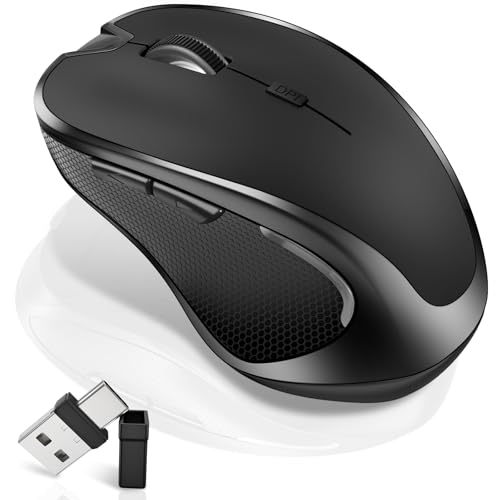
Logitech M185 Compact Ambidextrous 2.4 GHz Wireless Mouse Swift Grey

WL300 Bluetooth Mouse Silent Wireless Mice Cordless Computer Mouse Grey

SABLUTE Wireless Mouse for Laptop Quiet Compact Portable USB-C Adapter M41

Apple Magic Mouse White Multi-Touch Surface

PEIBO Bluetooth Wireless Mouse for Laptop MacBook Silver

Logitech M240 Compact Silent Bluetooth Wireless Mouse Off White

Logitech M240 Compact Silent Bluetooth Wireless Mouse Rose
More Details On Our Top Picks
FYBC goes after flexibility first, which makes sense for you if a MacBook Air sits beside an iPad Pro or a second computer. The dual-mode setup, Bluetooth 5.2 and 3.0 plus a 2.4G USB Type-C receiver, gives you options in a mixed workspace without forcing a single connection style. The rechargeable battery claim is also practical, since a mouse that lasts for long stretches between charges is easier to live with than a drawer full of cells.
The trade-off is that feature-heavy mice often ask a little more attention during setup, especially when you keep switching between devices. Still, this one fits commuters, hybrid workers, and students who want a slim shape and a cleaner desk than a bulkier office mouse usually gives. The honest read is that its appeal comes from adaptability, not flash.
What We Like
- Bluetooth and 2.4G support cover more setups than a single-link mouse.
- USB-C charging suits you well if you already keep one cable in your bag.
- The slim body should slide easily into a laptop sleeve or backpack pocket.
- Rechargeable use reduces the need to keep spare batteries around.
- The awake-keeping function can help during long desk sessions, depending on your routine.
Things To Consider
- Dual-mode controls can feel busier than a plain plug-and-go mouse.
- The jiggler-style function may not suit every workplace or classroom policy.
- Lightweight mice usually show wear faster on glossy surfaces, so storage matters.
Feature Snapshot
Who It Suits Best
You’ll get the most from this pick if you switch between a Mac, iPad, and a second computer during the week.
A Better Fit Elsewhere
Logitech M240 Compact Silent Bluetooth Wireless Mouse Off White suits you better if you want a simpler Bluetooth-only mouse with less setup fuss.
The M185 keeps things plain in a good way, especially for you if a Mac Air mouse needs to work without much thought. Its ambidextrous shape helps both left- and right-handed use, and the 2.4 GHz connection with a USB-A nano receiver keeps the setup straightforward on laptops and desktops. That kind of simplicity matters in office bags, shared workstations, and homes where the mouse gets moved around a lot.
Compared with FYBC’s dual-mode design, this Logitech is far less ambitious, but that’s part of the charm. You give up extra wireless flexibility and charging convenience, then gain a very familiar style of everyday control. For most people who just want a stable travel mouse for basic work, that trade feels fair.
Highlights
- Ambidextrous shaping keeps the grip neutral for either hand.
- USB-A nano receiver suits older laptops and desktops well.
- The compact body slips into a pouch without much bulk.
- Optical tracking gives you straightforward pointing for office tasks and browsing.
- The 12-month battery claim means less routine battery swapping than many basic mice.
Small Caveats
- The USB-A receiver can be inconvenient on newer, port-light laptops.
- No Bluetooth support means you need the tiny dongle with you.
- The shape is practical, though not especially sculpted for long gaming-like sessions.
Core Details
Who It Suits Best
You’ll like this most if you want a basic wireless mouse for school, work, or a spare bag.
Skip It When
FYBC Wireless Mouse for MacBook Air iPad Pro Mac PC Grey makes more sense when you want Bluetooth along with USB-C charging.
WL300 feels aimed at people who spend real time at a desk but still move between rooms, cafés, and meeting spaces. Silent clicks, six buttons, a sculpted grip, and adjustable DPI, which is the sensitivity setting that changes how far the pointer moves, make it more purposeful than the plain M185. For a Mac Air setup, that extra control can be handy during spreadsheets, editing, or long browsing sessions.
The 18-month battery claim also makes it less fussy to keep around than a mouse that needs charging every few weeks. The trade-off is that a more button-heavy shell can take a day or two to feel natural, especially for light users. Still, for work travel, it has a calm, usable feel that lands well.
Reasons To Buy
- Quiet clicks suit shared spaces and late-night work.
- Six buttons give you more control for shortcuts and navigation.
- The sculpted grip should feel steadier during longer sessions.
- Adjustable DPI lets you tune pointer speed to your screen and habits.
- The long battery claim lowers the upkeep burden for travelers.
Areas To Watch
- Six-button layouts can feel busy until your muscle memory settles in.
- Silent clicks soften feedback, which some people miss.
- The shape may need a little break-in time for smaller hands.
Technical Sheet
Whose Shelf It Belongs On
You’ll get the most from it in a mobile work bag where quiet clicking and extra buttons both matter.
A Better Fit Elsewhere
Logitech M240 Compact Silent Bluetooth Wireless Mouse Rose suits you better if you want fewer controls and a simpler Bluetooth-only setup.
SABLUTE is the kind of mouse that makes sense in a backpack first, desk second. The slim body, quiet click design, USB-C adapter, 3-level DPI, and sleep mode point toward easy carry and light maintenance, which suits students and commuters well. On a Mac Air, it feels like a tidy companion rather than the main event.
Compared with the WL300, you lose some button count and that more shaped grip, but the payoff is a simpler form that disappears into a laptop sleeve more easily. One thing worth considering is the adapter-based connection, since keeping track of tiny parts can be annoying in a moving bag. For study spaces and hotel desks, though, that compact profile is hard to ignore.
Plus Points
- The slim build packs neatly beside a laptop and charger.
- Quiet operation works well in libraries and shared rooms.
- USB-C adapter support fits newer accessory habits.
- Three DPI levels give you a little pointer control without complexity.
- Sleep mode helps reduce routine power use between sessions.
Points To Note
- The compact shell may feel too small for larger hands.
- Adapters are easy to misplace, so storage habits matter.
- Quiet buttons give less tactile feedback than louder switches.
Details At A Glance
Built With In Mind
You’ll appreciate this most if your days move between classes, cafés, and short desk sessions.
Another Choice May Suit
FYBC Wireless Mouse for MacBook Air iPad Pro Mac PC Grey fits better for you if you want Bluetooth options alongside its receiver setup.
The Magic Mouse is the most distinct shape in this group, and that matters because it asks you to work in a different way. The multi-touch surface supports swiping and gesture-style control, so you may find it especially natural beside a Mac Air if you already like trackpad habits. It looks clean on a desk, and the low-profile body keeps the profile minimal rather than bulky.
The catch is that the flat shape is not everyone’s favorite for long sessions, and the control style takes some adjustment. Compared with the more conventional WL300 or M185, this one is less about straightforward grip and more about Apple-fluent navigation. For Mac-first setups, that trade is often worthwhile, though not for every hand shape.
Best Bits
- The multi-touch surface supports familiar swipe-style control.
- The low-profile form keeps a Mac desk looking clean.
- It pairs naturally with users who already like gesture navigation.
- The shape is easy to pack beside a laptop.
Softer Spots
- The flat body can feel less natural than a sculpted mouse.
- Gesture-heavy control takes a little acclimation.
- Long sessions may suit some hands better than others.
Core Details
Who Should Grab It
You’ll like this most if your Mac Air already feels like part of a very streamlined Apple setup.
Look Elsewhere When
Logitech M240 Compact Silent Bluetooth Wireless Mouse Off White fits better if you want a more traditional shape with less learning curve.
PEIBO takes a plain route, and that can be exactly what you want for a budget-friendly Mac Air companion. The auto switch-off behavior and eight-minute sleep mode help the Li-polymer battery last longer between charges, which is useful for casual office use and light travel. You may find that quiet, low-maintenance behavior matters more than extra buttons in a secondary mouse.
Compared with the more feature-rich FYBC and WL300 picks, this one gives up a lot of bells and whistles. The upside is a calmer, simpler ownership experience that asks less from you day to day. That said, a mouse like this suits light work better than heavy multitasking.
Positives
- Automatic power saving helps stretch battery life in routine use.
- Sleep mode adds a sensible layer of power management.
- The Bluetooth-only style keeps the desk free of receivers.
- Its simple design should feel easy to learn right away.
Room For Improvement
- The slim feature set limits shortcut control.
- Light-duty styling may not satisfy heavier daily workloads.
- As with many compact mice, storage in a bag can lead to scuffs over time.
Feature Rundown
The Right Fit
You’ll be happiest with this if you want a secondary mouse for email, browsing, and light office work.
Where A Sibling Pick Shines
FYBC Wireless Mouse for MacBook Air iPad Pro Mac PC Grey fits better if you want broader device compatibility and a rechargeable workflow.
The M240 is a clean answer for you if the goal is a Bluetooth mouse that stays out of the way. It has no USB receiver, quiet clicks, and three non-customizable buttons, which keeps the feel simple for Mac Air use at home, in class, or in a shared office. The 18-month battery claim also makes it a strong fit for people who dislike routine upkeep.
Compared with the M185, it removes the dongle and leans harder into wireless simplicity. That makes it more suitable for newer laptops and for anyone who wants fewer loose parts to keep track of. The honest read is that it’s not fancy, but it is easy to live with.
Strong Points
- No receiver means one less accessory to lose.
- Quiet clicks help keep the workspace calm.
- The Bluetooth connection suits modern Mac Air setups nicely.
- Three-button simplicity keeps learning time near zero.
- Long battery claims reduce routine maintenance.
Worth Noting
- Three non-customizable buttons limit shortcut flexibility.
- The plain layout may feel too basic for power users.
- As with many compact mice, the small frame can feel light during long sessions.
Quick Facts
Who Will Love This
You’ll appreciate it most if you want a simple Bluetooth mouse for everyday Mac Air chores.
Reach For A Different Pick When
WL300 Bluetooth Mouse Silent Wireless Mice Grey suits you better if extra buttons and a sculpted grip matter more.
This rose version keeps the same core M240 formula, so your choice here is really about finish and desk feel. You still get Bluetooth, quiet clicks, and the three-button layout, which makes it a neat option for Mac Air users who want a little color without giving up the plain setup. It works nicely in a home office where appearance matters almost as much as function.
Compared with the off-white M240, this one is mostly about personal style. The trade-off is the same one as before, very little customization, very little fuss. For people who want their accessories to look more personal while staying restrained, that balance lands well.
Best Bits
- The rose finish adds a softer visual touch to a desk setup.
- Bluetooth connectivity keeps the workflow tidy.
- Quiet clicks help in shared or late-evening spaces.
- The compact body fits neatly beside a Mac Air.
Minor Gripes
- The three-button layout is intentionally simple, not flexible.
- Color preference is a personal call, so it won’t matter to everyone.
- Storage in a crowded bag can still leave compact mice looking worn over time.
Feature Card
Perfect Match For
You’ll get the most out of it if you want a simple mouse that looks a little softer than the usual office gray.
A Better Fit Elsewhere
Logitech M240 Compact Silent Bluetooth Wireless Mouse Off White suits you better if you want the same feature set in a cleaner neutral finish.
How To Choose The Right Mac Air Mouses
Connection Style Matters First
Bluetooth keeps your Mac Air setup clean, especially on newer laptops where every port feels precious. A 2.4 GHz receiver still has a place for desks that stay put, since it can feel straightforward once the dongle is plugged in. Dual-mode mice make the most sense for people who move between laptops, tablets, and desktop machines during the week.
Receiver-based mice are simple, but tiny dongles can disappear into bags and desk drawers. Bluetooth-only models remove that loose part, though they ask a little more from pairing and device management. For most Mac Air setups, the right answer comes down to whether you value convenience at the desk or simplicity in the bag.
Shape, Size, And Click Feel
A compact mouse suits travel bags and small tables, but it can feel cramped during long sessions. Sculpted grips, like the WL300’s, spread your hand more naturally, while flatter designs such as the Magic Mouse aim for a cleaner profile. Quiet-click switches help in libraries, coworking spaces, and shared homes, though some people miss the sharper feel of louder buttons.
Ambidextrous shapes work well for mixed households and left-handed use. More button-heavy mice can be useful for shortcuts, but they also take longer to learn. The best fit is the one that matches how long you stay at the computer and how much control you want under your fingertips.
Battery Strategy And Maintenance
Rechargeable mice reduce the hassle of stocking spare cells, and USB-C charging is especially handy if your bag already runs on that cable. Battery-life claims matter most for commuters and anyone who forgets to top up accessories often. Sleep modes and auto power-off features are worth attention because they cut down on needless drain during idle stretches.
Long battery claims are useful, but they do not change the need to store the mouse carefully. Compact models can pick up scuffs in crowded backpacks, and receivers are easy to misplace. For a Mac Air, the smoothest ownership experience usually comes from a mouse that matches your charging habits as closely as it matches your hand.
Things Worth Knowing Before You Choose
Wrong Turns To Avoid
Shoppers often focus on size alone and forget about connection type. A mouse that feels tiny in the hand can still be awkward if it needs a receiver you don’t want to manage. Another common miss is ignoring button layout, since a simple three-button mouse behaves very differently from a six-button one.
It also helps to think about where the mouse will live. A travel bag, dorm desk, or shared office has different needs, and that changes how much weight you should give to quiet clicks, sleep mode, and charging style.
The Upgrade Payoff
Higher-tier mice usually cost more because they add better materials, more refined shaping, and extra connection flexibility. A rechargeable body, multi-device pairing, or a gesture surface takes more design work than a basic plastic shell with one receiver. That extra money often goes toward daily convenience, not just a fancier look.
The upgrade makes sense when you use your Mac Air for long workdays, frequent travel, or device switching. A simpler mouse still does the job for email and browsing, but a more polished model can save little annoyances that add up. That’s where the premium feel shows up, in fewer small frustrations rather than dramatic features.
Final Thoughts
Your best Mac Air mouse depends on how much you value simplicity, quiet clicks, and a clean desk. FYBC and the two Logitech M240 versions stand out for different reasons, while the Magic Mouse makes sense for people who already like Apple-style gestures. If you want a practical everyday choice, the M185 and WL300 stay easy to recommend. Match the mouse to your work rhythm, not just your laptop color, and the right pick tends to feel obvious fairly quickly.
