
You want a Mac keyboard that fits your setup without fuss, especially when USB-C laptops, older USB-A accessories, and desktop docks all crowd the same desk. The right pick keeps typing comfortable, saves ports, and avoids the awkward adapter pile that turns a clean workspace into a mess.
This roundup focuses on wired Mac-friendly options for home offices, school desks, travel bags, and busier workstations. You’ll see compact boards, models with number pads, and a few picks that add hub-style convenience for people who plug in more than just a keyboard.
Quick Look At Our Shortlist
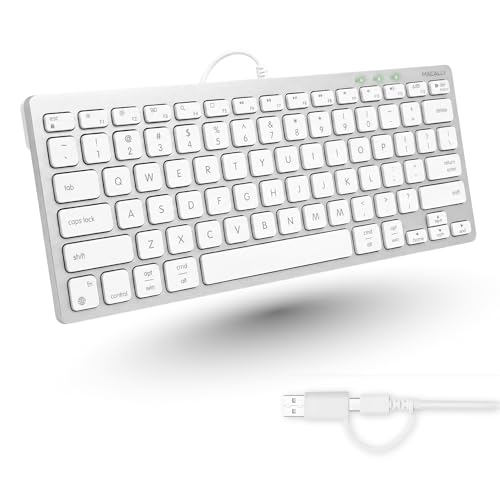
Macally USB C Wired Keyboard for Mac Compact Mac Keyboard
OMOTON Wired Keyboard for Mac Compact 78-Key White

Macally USB Wired Keyboard and Mouse Combo for Mac and PC

OMOTON USB-A & Type-C Dual Interface Wired Keyboard for Mac Numeric Keypad

Macally Wired Keyboard for Mac with USB Hub Dual Interface Silver

Macally Wired Keyboard for Mac with USB Hub Dual Interface
TECKNET Wired Keyboard for MacOS Devices Slim Mac Keyboard

Macally Large Print Keyboard for Mac Dual USB-C & USB-A Backlit
More Details On Our Top Picks
Mac desks that bounce between newer USB-C laptops and older ports get a tidy answer here. The dual-connector setup keeps the keyboard useful across more machines, so you spend less time hunting for the right cable and more time typing.
The compact size matters in tighter spaces, especially beside a laptop stand or a small iMac setup. You give up a number pad, though, so spreadsheet work feels less roomy than with the OMOTON full-size option later in this list.
Strong Points
- USB-C and USB-A support broadens compatibility across newer and older Mac setups.
- Compact footprint leaves more room for a trackpad, notebook, or external drive.
- Simple wired connection avoids battery charging and pairing steps.
- Works well for desk setups that change devices during the week.
Things To Consider
- No number pad, so data entry feels tighter.
- Compact boards can take a short adjustment period for touch typists.
- Wired placement rewards a neat cable route, so desk clutter still matters.
Feature Snapshot
Who It Suits Best
People who move between a MacBook, iMac, or mini desktop and want one simple wired board will get the most value here.
A Better Fit Elsewhere
OMOTON Wired Keyboard for Mac Compact 78-Key White suits someone who wants a slightly more traditional layout and a simple white desk look.
That 78-key layout keeps the footprint small without feeling stripped down. For dorm rooms, shared desks, or a travel bag that doubles as an office kit, the smaller body is easy to place and easy to carry.
Compared with Macally’s first pick, this one leans a little more traditional in shape and may suit you better if you prefer a cleaner white desktop look. The trade-off is the same compact compromise, so number-heavy work still feels more comfortable on the OMOTON model with a keypad lower in the list.
Highlights
- 78-key layout keeps the keyboard trim.
- USB-C and USB-A support helps with mixed Mac port setups.
- Plug-and-play use suits desks that need quick setup.
- White finish blends neatly with bright workspaces.
Points To Note
- No number pad for spreadsheets or repeated data entry.
- Smaller keys and tighter spacing can feel different at first.
- White finishes usually show desk dust sooner, so light upkeep helps.
Technical Sheet
Built With In Mind
Students, apartment dwellers, and commuters with a carry case will appreciate the small footprint most.
Swap It Out When
OMOTON USB-A & Type-C Dual Interface Wired Keyboard for Mac Numeric Keypad suits you better when spreadsheets or repeated number entry matter more than saving space.
This combo makes sense for a fresh desk setup because the keyboard and mouse arrive as one matching pair. You avoid the odd mismatch that happens when you piece together accessories one at a time, which is handy for a spare room, student desk, or family computer corner.
It sits differently from the first two picks, since you’re getting a whole input set instead of just a keyboard. The honest trade-off is that combo kits usually ask you to accept both parts as a bundle, so it’s less flexible than buying a keyboard alone.
Best Bits
- Keyboard and mouse together simplify a new setup.
- Compact form keeps the desk feeling orderly.
- Works for Mac and PC, which helps mixed-device homes.
- One purchase covers two core input tools.
Room For Improvement
- The bundle format gives less freedom to mix and match parts.
- Compact sizing may feel tight for users who prefer a larger typing area.
- Keeping two corded accessories tidy takes a little extra cable planning.
Core Details
Right Fit For
New desk setups and multi-user homes benefit from the simplicity of a matched keyboard and mouse pair.
Where Another Pick Suits Better
Macally USB C Wired Keyboard for Mac Compact Mac Keyboard is the cleaner choice for someone who already has a mouse and only wants a keyboard.
The numeric keypad changes the feel right away, especially in spreadsheets, accounting tasks, or any desk routine that leans on repeated number entry. The 8-degree tilt also gives your wrists a more relaxed angle, which many people notice during long typing stretches at a home office or business desk.
Compared with the slim 78-key OMOTON above, this one gives you a fuller layout, so the desk footprint grows a little. That’s the trade-off, and it’s a fair one for anyone who wants efficiency over minimum size.
Upsides
- Numeric keypad speeds up number-heavy work.
- USB-A and Type-C support makes setup easier across ports.
- 8-degree tilt adds a more natural typing angle.
- Good fit for office desks where a larger layout feels welcome.
Softer Spots
- The larger frame takes more desk real estate.
- Number pad layouts can be bulkier in small carry cases.
- Angle preference is personal, so the tilt may suit some hands more than others.
Details At A Glance
Who Should Grab It
Office staff, freelancers, and anyone living in spreadsheets will get the most from the keypad and angled deck.
Where A Sibling Pick Shines
OMOTON Wired Keyboard for Mac Compact 78-Key White fits smaller desks better when you can live without the number pad.
This one stands out because the keyboard doubles as a small USB hub, with two USB-A ports and one USB-C port built in. That matters on a desk with an external drive, receiver, or charging cable, since you can keep more gear close at hand without reaching behind the computer.
It’s a stronger fit than the first Macally board for people who treat the keyboard as part of a small workstation hub. The trade-off is simple enough: more functionality usually means more desk attention, so neat cable routing starts to matter even more.
Bright Spots
- Built-in hub gives you extra connection points.
- Dual interface support broadens where it can sit in your setup.
- Backlit design helps in dim rooms or evening work.
- Silver finish keeps the look close to classic Apple-style desks.
- Useful for people who keep several small accessories plugged in.
Areas To Watch
- Hub features can add cable complexity.
- Backlit boards often ask more of your desk organization and lighting preferences.
- The richer feature set may be more than a simple typing station needs.
Feature Rundown
Who Will Love This
You’ll like this most in a desk setup that needs both typing and extra ports in one compact footprint.
Look Elsewhere When
TECKNET Wired Keyboard for MacOS Devices Slim Mac Keyboard is the cleaner choice for a simpler, lower-cost setup.
This version follows the same hub-first idea as the Silver model above, but it leans harder into broad compatibility across Mac, PC, Android, iPad, and iOS. That wider device list helps in homes where the keyboard may move from a MacBook to a tablet stand or a desktop tower without much ceremony.
That flexibility matters more than it first sounds, especially in mixed-device households or small offices with shared gear. The only catch is the same one you get with any feature-dense board, because more ways to use it can mean more choices to manage on the desk.
Reasons To Buy
- Broad platform support makes it useful across several devices.
- Built-in hub reduces the need for a separate USB splitter.
- Backlighting helps in low-light work corners.
- Good match for households that swap hardware often.
Small Caveats
- Broad compatibility can feel like overkill for a simple single-Mac desk.
- Extra hub features mean more ports to keep track of.
- Backlit keys usually add to the visual busyness of the workspace.
Spec Overview
Best Suited To
People who switch between Apple gear and other devices will get the most out of this broader compatibility.
Another Choice May Suit
Macally USB C Wired Keyboard for Mac Compact Mac Keyboard makes more sense for a lighter, more straightforward typing station.
This is the leanest-feeling option in the group, and that makes it appealing for simple desks that just need dependable typing without extra bulk. The angled shape should feel comfortable for everyday office work, though personal wrist preference still matters, especially during longer writing sessions.
Compared with the Macally hub models, TECKNET keeps the concept narrower and easier to place. You lose the added port expansion, but you gain a cleaner footprint that suits study tables, shared workbenches, and smaller home offices.
Best Bits
- Slim body suits narrow desks.
- Stable wired connection fits straightforward daily typing.
- Dual interface support helps with Mac compatibility.
- Lower feature load keeps the setup uncluttered.
Worth Noting
- No hub or number pad, so it stays focused on basics.
- Slim layouts can feel spare to people used to fuller boards.
- Lightweight accessories often benefit from a tidy desk surface so they stay put.
Quick Facts
Whose Shelf It Belongs On
People who want a no-frills wired keyboard for a compact office or study nook will feel right at home with this one.
Reach For A Different Pick When
Macally Wired Keyboard for Mac with USB Hub Dual Interface Silver suits you better when extra ports and backlighting matter more than a slim body.
The large-print legends make this the easiest keyboard in the group to read at a glance, especially in dim rooms or for anyone who dislikes squinting at small markings. Quiet scissor-switch keys round out the feel, so the typing action should stay restrained and comfortable for late-night work or shared spaces.
Compared with the other Macally boards, this one is the clearest visual aid choice and the most obvious fit for visibility-first use. The trade-off is that a specialty layout can feel less universal, so some people will still prefer the more standard look of the earlier compact options.
Plus Points
- Large-print characters improve at-a-glance readability.
- Backlighting helps in low-light rooms.
- Quiet scissor switches keep the feel controlled.
- Dual USB-C and USB-A support covers more Mac setups.
- Compact body still avoids a full-size desktop footprint.
Areas To Watch
- Specialty key labeling may not suit everyone’s preferred look.
- Compact size still leaves out a number pad.
- Backlit models often need a bit more attention to cable placement and desk lighting.
Core Details
Made For
Seniors, low-vision users, and anyone working under softer lighting will get the clearest benefit here.
Skip It When
OMOTON USB-A & Type-C Dual Interface Wired Keyboard for Mac Numeric Keypad is a better fit for number-heavy office work.
How To Choose The Right Mac Keyboard Usbs
Port Match Beats Guesswork
USB-C and USB-A support matters more than it first looks, because desk gear changes faster than old habits. A keyboard that fits both port types saves you from adapter juggling on a MacBook Air today and an iMac or mini desktop tomorrow. That kind of flexibility suits people who split time between home, office, and a second workstation.
Wired keyboards also remove charging from the equation, which is useful for shared desks and side tables where one more cable is better than one more battery to babysit. The trade-off is obvious: you stay tethered, so cable length and desk layout deserve attention. A clean route under the monitor stand can make the whole setup feel calmer.
Layout Size Changes Daily Comfort
Compact boards help in small spaces, but they also shift your muscle memory. A 78-key design trims the footprint, while a full layout with a number pad supports faster numeric entry and less hand movement during spreadsheets. That difference is minor during light email work and much bigger during long accounting sessions.
You’ll also notice spacing and key placement more after a few hours than after a few minutes. A compact board feels airy on a crowded desk, yet a larger board can feel easier for touch typing and repeated shortcuts. The right choice comes down to whether saving space or keeping every key close matters more.
Extra Features Should Match Real Use
Backlighting helps in dim rooms, and a USB hub can reduce the clutter of extra dongles. Those features sound small on paper, but they matter a lot in a late-night study corner or a workstation that also powers an external drive and a receiver. The catch is that extra functions usually mean more to think about during setup and cable management.
A quieter key feel or a slight typing tilt can also change your day in subtle ways. None of those features fixes a bad desk, but they can make a busy desk feel more settled. For most people, the best value comes from picking the feature you’ll notice every day rather than the spec that looks clever once.
What To Weigh Before You Spend
Common Shopping Slip Ups
Many people focus on connector type and forget the layout. A keyboard that looks right online can feel cramped in person, especially without a number pad or with keys packed tightly together.
Another easy miss is extra desk gear. A hub model adds convenience, but it also asks for a cleaner cable plan, and that matters more than most people expect.
The Upgrade Payoff
Higher-tier models usually charge more because they add backlighting, hub ports, or broader device support. Those extras cost something in parts and design space, so the price usually tracks the added convenience rather than a mysterious premium.
Spending up makes sense in a shared office, a dark room, or a mixed-device home. A simpler board still does the typing job well, yet a feature-rich option earns its keep when you use those extras every day.
Frequently Asked Questions
Do Mac Keyboard Usbs need to be Apple-branded?
No, a good wired keyboard only needs compatible connectors and a layout that feels comfortable. The Mac-friendly options in this roundup are built for that kind of everyday use.
Is a compact keyboard harder to type on?
Compact layouts can feel tighter at first because the keys sit closer together. Many people adjust quickly, though heavy spreadsheet work still feels easier on a full board with a number pad.
Why choose a wired keyboard over wireless?
Wired models skip battery charging and pairing steps, which keeps the setup simple. They also make sense for desks where the keyboard stays in one place most of the time.
What does a USB hub in a keyboard add?
A built-in hub gives you extra ports right on the keyboard. That helps when you want to keep a drive, receiver, or cable within easy reach.
Who should choose large-print keys?
Large-print keys help in dim rooms and for anyone who wants the legends easier to read at a glance. They’re also useful on a shared desk where visibility matters more than a standard look.
Closing Thoughts
The right Mac Keyboard Usbs choice depends on how much desk space you have, how often you switch between USB-C and USB-A, and whether extras like a hub or number pad matter in daily use. A simple compact board suits light typing and small spaces, while a fuller model pays off for office work and heavier number entry. Pick the version that matches your routine, not the one with the longest feature list. That keeps the desk tidy and the typing part easy.
