
Big hands need more than a roomy shell. You want a mouse that lets your palm settle naturally, keeps your thumb from cramping, and matches the way you work, game, or scroll all day.
That usually means paying attention to shape first, then connection style, button layout, and how tall the body feels in your grip. The eight picks below focus on that practical fit, with options for office use, gaming, vertical ergonomics, and travel-friendly desk setups.
The Shortlist At A Glance

Acer Wireless Mouse for Laptop 4000 DPI

Logitech Signature Plus M750 L Wireless Mouse Graphite

Redragon Large Wireless Gaming Mouse for Big Hands

Wireless Ergonomic Vertical Mouse for Large Hands 3600DPI
Redragon Big Wireless Mouse for Medium to Large Hands 4000 DPI

Logitech Signature M650 L Full Size Wireless Mouse Black
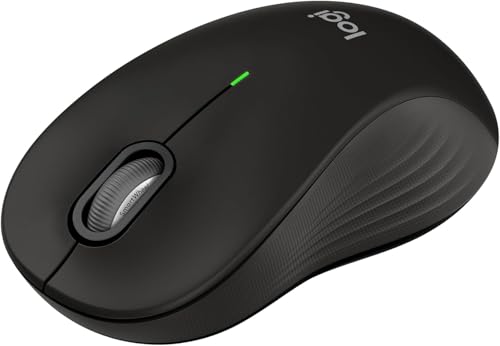
Logitech Signature M550 L Full Size Wireless Mouse Black
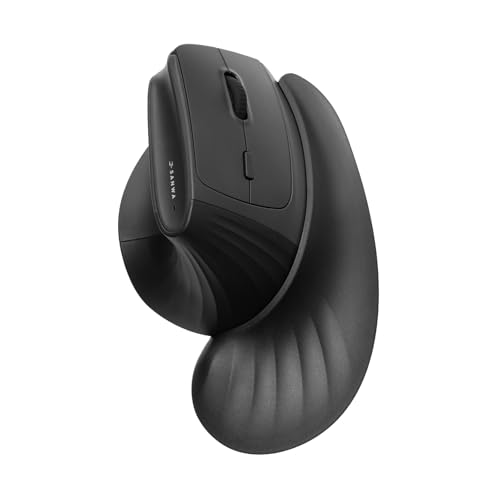
SANWA Wireless Ergonomic Mouse for Large Hands with Wrist Rest
Acer keeps things straightforward, which helps on a crowded desk where you just want a full-size mouse that settles into a medium or large hand without fuss. The 4000 DPI ceiling gives you room to tune pointer speed, and the six-button layout gives you a little more control than a basic office shell.
The trade-off is that this feels more utilitarian than plush, so comfort-seekers may want a more contoured shape. For daily laptop work, though, the 2.4GHz wireless setup and USBA receiver make it a sensible fit for straightforward use.
What We Like
- Five DPI steps let you tailor pointer speed to spreadsheets, browsing, or casual design work.
- Six buttons add useful shortcuts for everyday navigation without making the body feel crowded.
- The medium-to-large hand fit should suit work desks where a compact mouse feels cramped.
- 2.4GHz wireless keeps the desk clear, which matters on shared office setups and student tables.
Things To Consider
- The shape looks more practical than sculpted, so all-day comfort depends on your grip style.
- USBA receiver use adds one more small piece to keep track of during travel or storage.
- Heavy palm-grip users may still prefer a fuller contour with deeper thumb support.
Feature Snapshot
Who It Suits Best
Office users and students with medium to large hands will get the most from this straightforward wireless shape.
A Better Fit Elsewhere
Logitech Signature Plus M750 L Wireless Mouse suits you better for quieter desk work and a more polished contoured feel.
For a large-hand office mouse, this one leans into quiet confidence instead of flashy extras. The contoured body, silent clicks, and SmartWheel scrolling make long document sessions feel calmer, especially on a desk where sound carries.
Bluetooth and multi-device support matter most for people who move between a laptop, a desktop, and a tablet-style workflow. The 24-month battery claim points to low upkeep, though the trade-off with this sort of mouse is that it stays focused on work rather than gaming flair.
Highlights
- The large-hand shape gives your palm more room than smaller ambidextrous mice.
- SmartWheel scrolling helps with long pages and dense documents, so you spend less time flicking endlessly.
- Silent clicks suit shared offices, late-night work, or any desk where noise gets old fast.
- Bluetooth plus multi-device support makes switching between setups feel much less awkward.
- The long battery claim is appealing for anyone who dislikes frequent charging or battery swaps.
Minor Gripes
- The focus here is office comfort, so fast-paced gaming use is not the main story.
- Large-hand fit helps, but very deep palm grips may still want a taller body.
- Bluetooth convenience can depend on the quality of the host device’s wireless stack.
Core Details
Made For In Mind
You’ll appreciate this most in office-heavy routines, especially alongside a laptop and a second screen.
Reach For A Different Pick When
Redragon Large Wireless Gaming Mouse for Big Hands fits better for gaming-heavy desk time and macro-minded control.
The Redragon stands out because it looks built for long sessions where grip, reach, and button access all matter. Finger rests on both sides and rubber side grips give your hand more contact points, which helps when you keep the mouse in play for hours at a time.
Tri-mode connection is the real flexibility piece here, since you can move between 2.4G, Bluetooth, and wired use. That mix suits a gaming desk that sometimes doubles as a work station, though the RGB lighting and macro focus make it feel more specialized than the Logitech office models.
Reasons To Buy
- Full-size shape gives medium and large hands a roomier landing spot.
- Side finger rests help stabilize the grip during longer sessions.
- Rubber side panels add traction, which matters during fast cursor moves.
- Tri-mode connectivity gives you more setup freedom than a basic wireless-only mouse.
- Wired fallback can be useful during charging or on a crowded desk.
- RGB modes and programmable macros suit users who like custom control and visual flair.
Room For Improvement
- The gaming styling may feel busy for a plain office setup.
- Macro and lighting features can add learning time you may not want for simple work.
- Extra modes usually mean more maintenance around software and profile setup.
Technical Sheet
Who Should Grab It
Gamers with bigger hands and mixed-connection setups will get the most from this flexible shape.
Swap It Out When
Logitech Signature M550 L Full Size Wireless Mouse suits you better for a quieter office-first setup with simpler software needs.
A vertical mouse changes the hand angle, and that matters most in long desk stretches where a flatter shell starts to feel tiring. This SHARE SUNSHINE model adds a blue LED accent and a rechargeable design, but the bigger story is its upright posture and large-hand sizing.
You may find the shape a little different during the first hour or two, because vertical mice ask your wrist and forearm to work in a new position. Still, that same setup can feel better for people who want a more open grip, and the quieter click behavior helps in shared rooms.
Bright Spots
- The vertical angle supports a more natural hand position than a standard flat mouse.
- The large-hand design gives taller palms more room to settle in.
- Rechargeable use cuts down on routine battery changes.
- Silent clicks keep the mouse from dominating the sound of a quiet office.
- 3600 DPI gives you a usable spread for everyday pointer work.
Points To Note
- Vertical mice usually take a short adjustment period, especially for first-time users.
- The upright grip can feel unusual for gaming or rapid side-to-side flicking.
- Blue LED styling is more decorative than essential, so it’s a taste call.
Details At A Glance
The Right Fit
You’ll likely value this most on a work desk where wrist posture matters more than gaming speed.
Another Choice May Suit
SANWA Wireless Ergonomic Mouse for Large Hands with Wrist Rest is the better match for people who want a vertical shape plus added palm support.
Redragon’s other big-hand option leans more toward everyday comfort than gaming personality. The curved body, anti-slip surface, and rubber side grips are the kinds of details that matter most after a long afternoon of email, browsing, and drag-and-drop work.
In most home offices, that shape will feel easier to live with than a harder-edged shell, especially because it’s sized for medium to large hands. The six-button layout and 4000 DPI ceiling add utility, though it does stay closer to a general-use mouse than a feature-heavy specialty model.
Upsides
- Curved full-size design gives your palm more contact and a less pinched feel.
- Anti-slip, anti-sweat material helps the grip stay steady during longer sessions.
- Finger rests and side grips support a more planted hand position.
- Six buttons add convenience for everyday shortcuts and app control.
- 4000 DPI gives enough headroom for standard productivity work and lighter creative tasks.
Areas To Watch
- It is still a general-purpose mouse, so specialized gaming extras are limited.
- Full-size bodies can feel bulky in a small laptop bag or tight desk tray.
- Grip materials are helpful, but they still need regular wiping in heavy daily use.
Quick Facts
Best Suited To
You’ll get the most out of this in a steady office routine where comfort and grip matter more than flashy extras.
Look Elsewhere When
Redragon Large Wireless Gaming Mouse for Big Hands is the stronger match for users who want tri-mode connection and more gaming personality.
The renewed M650 L keeps the Logitech shape people tend to like for long office days, and the SmartWheel is the part that makes it feel more polished than basic. Line-by-line precision for documents and quicker scrolling for long pages is handy on busy workdays, especially when your screen is packed with tabs.
Because this is a renewed listing, the value story depends on the condition you’re comfortable with. That trade-off can make sense for a desk mouse, though the honest read is that the appeal sits in the familiar shape, quiet clicks, and multi-device convenience rather than in any flashy extras.
Best Bits
- The full-size shell works well for larger hands that need a less cramped grip.
- SmartWheel scrolling makes long documents easier to handle.
- Silent clicks suit office work, shared spaces, and late-night sessions.
- Customizable side buttons add practical shortcuts for everyday desk use.
- Bluetooth and multi-device support help when you move between setups.
Softer Spots
- Renewed condition can vary in presentation, so expectations should stay realistic.
- The body is designed for comfort first, not for gaming features or dramatic styling.
- Some hands may still want a taller contour for a deeper palm hold.
Spec Overview
Whose Shelf It Belongs On
Desk-focused professionals who want a familiar large-hand shape and low-noise clicks will get strong value from this one.
Where A Sibling Pick Shines
Logitech Signature M550 L Full Size Wireless Mouse makes more sense for people who want the same broad Logitech comfort with a newer multi-device angle.
Compared with the M650 L, this renewed M550 L leans into the same large-hand comfort but shifts the emphasis toward simple Bluetooth convenience. The contoured shape, soft thumb area, and rubber side grips are the pieces that help it feel settled in hand rather than skittish.
For mixed-device desks, that easy pairing behavior matters more than flashy features. You may find it a cleaner fit than the Redragon gaming models, especially in offices where quiet clicks and a calm silhouette matter more than extras.
Positives
- The full-size body gives larger hands more room than smaller travel mice.
- SmartWheel scrolling helps with both long pages and detailed documents.
- Silent clicks fit shared workspaces and low-noise home offices.
- Bluetooth Low Energy and Logi Bolt receiver support give you connection flexibility.
- Soft thumb support and rubber grips help the mouse feel secure during long sessions.
Small Caveats
- Renewed condition may be a better fit for value-minded setups than for perfectionists.
- The work-first design leaves gaming extras to the side.
- Large-hand comfort is strong, but users with very broad palms may still want a taller shell.
Core Details
Built With In Mind
You’ll like this most if you want a dependable office mouse that feels calm, quiet, and easy to move between devices.
Not Your Match When
Redragon Large Wireless Gaming Mouse for Big Hands is the better fit for people who want gaming features and tri-mode connection.
SANWA goes a step further than the other ergonomic picks by pairing a 46° vertical angle with a magnetic wrist rest. That combination gives your hand and forearm a more supported posture, which can feel especially welcome during long work sessions at a laptop dock or desktop tower.
The 3-device switching and dual Bluetooth plus 2.4G connection options add practical flexibility, so it is not just a comfort piece. The honest trade-off is that vertical mice rarely feel instant, and this one asks for a bit of adjustment before the shape starts to feel normal.
Standout Traits
- The 46° vertical angle creates a more relaxed wrist position than a flat mouse.
- The detachable magnetic wrist rest adds support without making the setup permanent.
- Three-device switching helps you move across a laptop, desktop, and second device.
- Silent clicks suit shared work rooms and quiet home offices.
- 1000 to 4000 DPI gives you a wide enough range for standard pointer work.
Honest Caveats
- Vertical mice usually take a little time to feel natural in the hand.
- The wrist rest adds support, but it also adds another part to store or detach.
- People who prefer a low-profile grip may not enjoy the upright stance.
Core Details
The Right Fit
You’ll benefit most from this if you want an ergonomic mouse with extra support for long desk sessions and larger hands.
Consider Something Else When
Wireless Ergonomic Vertical Mouse for Large Hands 3600DPI is the simpler choice if you want a vertical design without the added wrist rest.
How To Choose The Right Mices For Big Hands
Shape, Height, And Palm Support
Big hands usually need more than extra length, they need height and contour too. A low shell can force your palm to curl, which gets tiring during long office blocks or gaming sessions.
Look closely at the body profile and the thumb rest area. A fuller curve suits palm grippers, while a slimmer, flatter frame often works better for fingertip users who still want large-hand coverage.
Connection Style And Daily Flow
Wireless 2.4GHz models stay simple and reliable for desks with one main computer. Bluetooth becomes more useful when you jump between a laptop, a tablet-style device, and a second machine without wanting another receiver in the way.
Tri-mode mice cost more because they give you more ways to work, but not everyone needs that much flexibility. For a fixed home setup, a straightforward wireless model can feel cleaner and easier to live with.
Buttons, Scroll Wheels, And Control
Extra buttons matter most when they map to real habits, like browser back, document navigation, or game commands. The SmartWheel-style scroll systems on the Logitech picks are a good example of how a wheel can save time without changing your grip.
For heavy spreadsheet use, quieter clicks and a sensible side-button layout often matter more than flashy lighting. That balance tends to matter most in shared spaces where sound and clutter add up quickly.
What To Weigh Before You Click
Mistakes Worth Dodging
One common slip is treating hand size as the only factor. Grip style matters just as much, because a mouse that looks large on paper can still feel short in the palm or awkward at the thumb.
Another easy miss is buying for features you won’t use. A macro-heavy gaming mouse can be fun, but office users often get more value from quiet clicks, a comfortable curve, and a scroll wheel that behaves well on long pages.
What The Higher Tier Buys
More expensive mice usually spend the extra money on shape refinement, multi-device convenience, quieter switches, and more polished scroll systems. You’re paying for smoother daily use, not just for a longer feature list.
That upgrade makes the most sense for people who sit at the desk all day, switch between devices, or care about a more natural grip over time. Casual use does not always need that level of refinement, and that’s fine.
Closing Thoughts
For big hands, the safest choice is usually the mouse that matches your grip and your work pattern first, then everything else second. The Logitech models stand out for office comfort, the Redragon picks bring more control and gaming energy, and the SANWA option leans hardest into posture support. For a simple desk upgrade, that gives you a clear path without overcomplicating the decision.
