
FPS gaming puts a lot of pressure on your mouse, from snap aim to long practice sessions and quick side-step fights. The right shape, sensor, and click feel can make your setup feel settled instead of fussy. This roundup focuses on eight distinct picks, from lightweight competitive models to pistol-grip designs for players who want something different at the desk. You’ll also see where each one makes sense in real use, not just on a spec sheet.
Quick Look At The Shortlist

Corsair M65 RGB Ultra Tunable FPS Gaming Mouse

Logitech G PRO X2 SUPERSTRIKE Wireless Gaming Mouse

SteelSeries Esports FPS Gaming Mouse Prime Edition

Corsair IRONCLAW Wireless SE Gaming Mouse

ErgoStrike7 Next-Gen FPS Gaming Mouse with Recoil

NSYCA G11 Lightweight Wireless Gaming Mouse
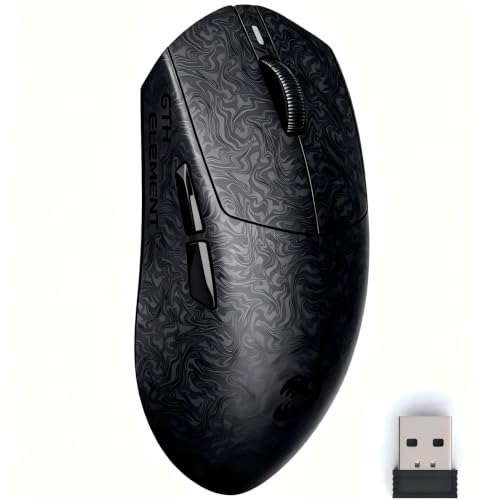
ZORNHER X Mloong MX301 PRO Lightweight Gaming Mouse

FireGrip Gun Mouse for Shooter Games
More Details On Our Top Picks
The M65 line makes sense for you when aim tuning matters as much as comfort. Its tunable weight system lets you change how planted the mouse feels, while the 26,000 DPI optical sensor gives you a very wide sensitivity range for fast flicks or slower tracking.
Optical switches and AXON Hyper-Processing point toward quick, crisp response, and that matters in hectic matches where every click counts. The trade-off is simple, a feature-rich shell can feel busier than a bare-bones esports shape, so you get more control with a little less simplicity.
Strong Points
- The tunable weight system lets you tailor balance for wrist aim or arm aim.
- 26,000 DPI gives you a wide adjustment range for different in-game sensitivities.
- Optical switches should suit players who want a sharper click feel.
- The sensor fusion control approach helps the mouse feel more locked in on the desk.
Things To Consider
- The added tuning pieces may be more than you need for a simple travel bag setup.
- Players who prefer an ultra-light shell may find the adjustable design less minimal.
- Black finishes usually show grime sooner than textured coatings, so cleanup can become a routine.
Feature Snapshot
Who It Suits Best
Competitive FPS players who like to tune weight and sensitivity by hand will get the most from this one.
Where A Sibling Pick Shines
SteelSeries Esports FPS Gaming Mouse Prime Edition suits you better when you want a lighter, simpler shell without the extra tuning parts.
This one leans hard into speed and control, which is exactly why it stands out next to the Corsair M65 RGB Ultra Tunable FPS Gaming Mouse. The 61g body keeps the feel light in hand, and the magnetic analog switches with rapid-trigger behavior point toward very quick activation.
Adjustable click haptics matter more than they sound, because you can shape feedback to taste instead of living with a fixed click response. The honest read is that this suits serious PC and Mac players who want a tuned, modern feel, while the highly specialized click system may be more than casual campaign play really needs.
What We Like
- The 61g weight helps the mouse move with very little drag.
- Rapid-trigger style switches should appeal to fast-click FPS habits.
- Adjustable haptics let you choose a firmer or softer click feel.
- USB-C charging keeps the cable side of setup familiar and tidy.
- PC and Mac support broadens the fit for mixed-device desks.
Minor Gripes
- The advanced switch system may feel like overkill for slower genres.
- Light mice can feel skittish until you settle into the shape.
- Wireless gear adds charging and storage habits you need to remember.
Core Details
Who Will Love This
Fast-twitch players who want light handling and a highly responsive click system should get the most from it.
A Better Fit Elsewhere
NSYCA G11 Lightweight Wireless Gaming Mouse makes more sense for mixed work-and-play desks that need Bluetooth, 2.4GHz, and wired flexibility.
The SteelSeries Prime Edition strips away a lot of visual noise and keeps the focus on movement. At 69g, it lands in that sweet spot where the mouse still feels quick, but not so feather-light that every correction feels twitchy.
TrueMove Pro sensor specs, 18K CPI, 450 IPS, and 50G point to a mouse built for clean tracking during hard flicks and fast swipes. Compared with the Logitech G PRO X2 SUPERSTRIKE Wireless Gaming Mouse, this one feels more straightforward, which should appeal to players who want fewer layers between hand and crosshair.
Positives
- 69g weight keeps motion quick without going overly bare.
- The sensor is tuned for tight lift and tilt tracking.
- Five programmable buttons cover common FPS binds cleanly.
- Magnetic optical switches should deliver crisp activation.
- PC and Mac support makes setup simple across platforms.
- The shape suits sustained practice sessions better than flashy showpieces.
Room For Improvement
- Five buttons may feel sparse outside pure FPS play.
- The lightweight shell may feel less substantial in very large hands.
- RGB lighting is present, but it won’t matter to everyone.
Details At A Glance
Built With In Mind
Players who want a light, focused FPS mouse without a lot of extra button clutter will feel at home here.
Swap It Out When
Corsair IRONCLAW Wireless SE Gaming Mouse suits larger-handed players better, especially when comfort matters more than minimal weight.
The IRONCLAW takes a different route from the lighter SteelSeries Prime Edition by leaning into comfort and a fuller hand shape. Its ergonomic frame is aimed at larger hands, and the 10 programmable buttons give you room for FPS, MMO, or hybrid desktop use.
That makes it a sensible choice for long desk sessions, especially when you want the mouse to feel supportive instead of stripped down. The trade-off is that its larger body may not suit claw-grip players who want the shortest possible reach, so shape matters as much as the sensor here.
Highlights
- The ergonomic build gives larger hands more room to settle in.
- Ten programmable buttons help with game binds and desktop shortcuts.
- 26,000 DPI supplies plenty of pointer range.
- Wireless use keeps the desk cleaner, which helps in tight setups.
Small Caveats
- The larger body may feel bulky on very compact mousepads.
- More buttons can take time to map comfortably.
- Black shell care is part of ownership, especially with frequent hand contact.
Quick Facts
Right Fit For
Large-hand FPS and MMO players who value comfort over a stripped-down shell should look here first.
Another Choice May Suit
SteelSeries Esports FPS Gaming Mouse Prime Edition makes more sense for smaller hands that want a lighter, simpler shape.
The ErgoStrike7 goes in a very different direction, because its vertical gun-grip shape changes how your hand rests on the desk. That can feel more natural for players who dislike low, flat mice, and the recoil feedback adds a more tactile game-feel layer.
Wireless and wired USB support gives you flexibility, but the real story is the grip itself. You may find the learning curve unusual at first, especially coming from a standard shell like the Corsair IRONCLAW Wireless SE Gaming Mouse, yet the payoff is a distinctive hold that some players will prefer almost immediately.
Reasons To Buy
- The vertical gun-grip layout changes wrist posture in a clear way.
- Recoil feedback adds a more immersive control feel.
- Wireless and wired support gives you setup flexibility.
- The shape helps this mouse stand apart from standard FPS shells.
Worth Noting
- The unusual grip can take time before it feels natural.
- Specialized shapes are harder to share across different hand styles.
- The design is more niche than a conventional competitive mouse.
Technical Sheet
Whose Shelf It Belongs On
Players curious about a gun-grip layout and tactile feedback are the natural fit here.
Look Elsewhere When
Logitech G PRO X2 SUPERSTRIKE Wireless Gaming Mouse suits you better for a more familiar, lightweight competitive shape.
The G11 is the flexible desk companion in this group, because it covers Bluetooth 5.1, 2.4GHz wireless, and USB-C wired use in one shell. That makes it easier to move between a gaming PC, laptop, or Mac without rearranging your whole desk setup.
Its PAW3311 sensor reaches 22,000 DPI, and the 1000Hz polling rate points toward responsive movement for both work and gaming. The trade-off is that a mouse with this many modes and settings can feel more configuration-heavy than a simpler FPS pick like the SteelSeries Prime Edition.
Best Bits
- Three connection modes make cross-device use far less annoying.
- 22,000 DPI offers plenty of sensitivity range for aim tuning.
- The dedicated fast-trigger button targets quick clicking in shooters.
- Programmable controls and macros help with binds and multitasking.
- RGB tuning gives you extra personalization without changing the grip.
Areas To Watch
- Driver-based customization adds setup time.
- So many features can feel busy for a pure plug-and-play desk.
- The model has more of a feature-first feel than a minimalist one.
Core Details
The Right Fit
Multi-device shoppers who want one mouse for play, study, and desktop work should find this one especially useful.
Reach For A Different Pick When
Corsair M65 RGB Ultra Tunable FPS Gaming Mouse suits you better when weight tuning matters more than connection variety.
The MX301 PRO feels aimed at people who want a lightweight mouse without the hollow, floaty character some ultra-light models can have. At around 60g, it stays nimble, and the carbon-fiber-inspired texture gives the shell a grippier, less plasticky feel.
That same balance makes it a nice middle ground for smaller hands or players who move the mouse a lot during a match. Compared with the NSYCA G11, this one looks simpler and more stripped down, which is useful when you want fast aiming without extra mode juggling.
Upsides
- The 60g weight helps quick movement feel natural.
- The textured finish adds grip without needing sticky coatings.
- The PAW3315 sensor covers aiming and everyday desktop work cleanly.
- Web-based customization avoids bulky desktop software.
- TTC switches provide a crisp click feel for rapid inputs.
Points To Note
- The small-size focus may not suit very large hands.
- Web-based setup is handy, though some desk setups still prefer a local app.
- The stripped-back approach means fewer extras than the G11.
Feature Rundown
Best Suited To
Smaller-hand FPS players who like a light shell and a grippier surface should feel comfortable here.
Skip It When
Corsair IRONCLAW Wireless SE Gaming Mouse is the better fit for larger hands and a more cushioned hold.
The FireGrip keeps the pistol-grip theme going, but it adds vibration feedback in a way that makes the shape feel more deliberate. You get both 2.4G wireless and wired use, so the desk setup stays flexible while the hand position stays very different from a normal gaming mouse.
That difference can be a plus for you or a reason to pass, depending on how much change your grip can handle. Compared with the ErgoStrike7, this one keeps the same niche spirit but reads as a simpler choice for players who want the vertical concept without overthinking the rest of the setup.
Highlights
- The vertical pistol grip changes wrist angle in a very direct way.
- Vibration feedback adds a physical layer to shooter play.
- Wireless and wired support keeps placement flexible.
- Programmable buttons help with remapping common game actions.
Trade Offs
- The grip style is specialized and won’t suit everyone.
- Vertical mice take a learning period before they feel normal.
- Feedback features add personality, but they also add another thing to get used to.
Feature Card
Perfect Match For
Players curious about a vertical shooter mouse and comfortable with a less conventional hand position will get the most from it.
Where A Sibling Pick Shines
ErgoStrike7 Next-Gen FPS Gaming Mouse with Recoil is the better fit for you if recoil feedback and a more dramatic gun-grip feel are higher priorities.
How To Choose The Right Mices For Fps
Shape Comes First
Grip style decides a lot before sensor numbers even enter the picture. Palm grip usually favors fuller shells like the Corsair IRONCLAW Wireless SE Gaming Mouse, while claw and fingertip play often pair better with lighter, more compact mice such as the SteelSeries Esports FPS Gaming Mouse Prime Edition or ZORNHER X Mloong MX301 PRO Lightweight Gaming Mouse.
Hand size matters just as much. Larger hands often feel cramped on short bodies, and a mouse that seems fine for a desk demo can feel awkward after an hour of aim training.
Sensor And Click Feel
Sensor quality shapes how cleanly the cursor follows your hand. High CPI or DPI numbers help with sensitivity range, but the real value is steady tracking and consistent response during fast stops, which is why the TrueMove Pro and PAW3315-style sensors matter for FPS use.
Click behavior matters too. Optical or magnetic switch systems can feel snappier than older mechanical setups, and that can help in fast shooters where your fingers repeat the same action thousands of times.
Weight And Cable Choice
Light mice usually feel easier to flick, especially in low-sensitivity setups. Heavier or tunable designs, like the Corsair M65 RGB Ultra Tunable FPS Gaming Mouse, give you more control over balance, which helps some players keep their aim steady rather than skittery.
Wireless models remove drag from the desk, but they add charging habits and another thing to keep track of. Wired mice stay simple, and that simplicity still appeals to many competitive setups.
Extra Controls And Special Shapes
Programmable buttons help in games that mix movement, utilities, and quick inventory changes, though more buttons can slow down the learning curve. Special shapes, like the ErgoStrike7 Next-Gen FPS Gaming Mouse with Recoil or FireGrip Gun Mouse for Shooter Games, are more about comfort and feel than raw familiarity.
That makes them worth a look for niche preferences, but less appealing for someone who wants a standard competitive layout. The safest path is still to choose the shape that fits your hand before chasing the longest feature list.
What To Weigh Before You Click
Wrong Turns To Avoid
Don’t chase DPI alone. A huge sensitivity number means little if the shell feels wrong in your hand or the click response doesn’t suit your play style.
Also avoid treating every FPS mouse like a universal tool. A vertical gun-grip design or extra-heavy shell can be great for one setup and awkward for another.
The Upgrade Payoff
Higher-tier mice usually cost more because of better switches, lighter shells, tighter sensor tuning, and more refined materials or finishes. That extra spend makes sense for you when you play often, use a low-sensitivity setup, or want a shape that stays comfortable through long sessions.
It’s less useful for casual play on a weekend TV setup. In that case, a simpler mouse with the right fit can be the smarter move, because comfort and consistency matter more than a long feature list.
Final Thoughts
Your best FPS mouse is the one that matches your grip, your hand size, and how much control you want over feel and response. The Corsair M65 RGB Ultra Tunable FPS Gaming Mouse and SteelSeries Esports FPS Gaming Mouse Prime Edition make strong starting points for classic competitive use, while the Logitech G PRO X2 SUPERSTRIKE Wireless Gaming Mouse and NSYCA G11 bring more modern speed and flexibility. Niche shapes like the ErgoStrike7 and FireGrip can be satisfying too, as long as you want their unusual hand position. Pick the shape that feels natural, and the rest tends to fall into place.
