
Mac setups ask a lot from a mouse, especially during long workdays, shared desks, and travel-heavy routines. You want clean pairing, a shape that doesn’t fight your hand, and controls that make sense without a long learning curve. This roundup keeps the focus on practical fit, so you can match the mouse to your desk, bag, and daily habits.
Quick Look At Our Shortlist
PHILIPS Ergonomic Wireless Mouse, Multi-Device Bluetooth

RaceGT USB C Wireless Mouse, Type C Mac Mouse

Wireless Bluetooth Mouse for Mac Air MacBook Pro with Jiggler

Logitech Slim Wireless Bluetooth Mouse for Mac

Wireless Mouse for MacBook Air iPad Pro Mac PC
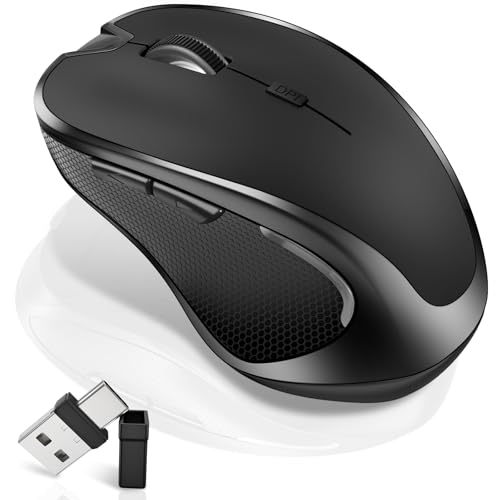
Logitech M185 Compact Ambidextrous 2.4 GHz Wireless Mouse

WL300 Bluetooth Mouse Silent Wireless Mice

SABLUTE Mouse for MacBook Wireless Bluetooth Mice
More Details On Our Top Picks
Right-handed users who spend hours between mail, spreadsheets, and browser tabs will notice the shape first. The side scroll is handy for wide timelines, and the silent click profile keeps a shared desk calmer than a louder office mouse. Because it works across Bluetooth and USB-A or USB-C, it fits newer MacBooks and older ports without much fuss.
The trade-off is that the ergonomic shape is tuned for one hand, so left-handed use is not the point here. You may also find the multi-device setup more useful on a desk than in a backpack, since this pick leans more productivity than travel. Still, for daily work on a Mac, it feels like a steady, practical setup rather than a flashy one.
Strong Points
- Side scrolling helps with wide documents and timelines.
- Silent clicks suit open offices and late-night work.
- Bluetooth plus USB-A and USB-C support broadens compatibility.
- Rechargeable design cuts down on disposable battery swaps.
- Right-handed shaping supports long desktop sessions.
Things To Consider
- The right-hand contour limits comfort for left-handed use.
- It feels more desk-focused than ultracompact for travel.
- Side-scroll controls add usefulness, but also a little learning.
Feature Card
Who It Suits Best
You want a quiet, ergonomic mouse for a Mac desk setup and you prefer a right-handed shape with flexible connection options.
A Better Fit Elsewhere
Logitech Slim Wireless Bluetooth Mouse for Mac suits travel-first users more, especially anyone who wants a slimmer body for a bag or pocket.
RaceGT keeps the setup simple, which helps on a MacBook desk or a spare workstation that still needs a reliable pointer. The USB-C receiver tucked into the battery compartment is the kind of small detail that matters once you stop carrying extra dongles around. Six buttons and three DPI levels also make it more flexible than a bare-bones office mouse.
The honest read is that the extra controls help more on a laptop or desktop than on a packed travel tray. You also need to remember where that receiver lives, because battery-compartment storage is easy to overlook during a rushed move between rooms. For a straightforward wireless setup, though, it covers the basics without feeling stripped down.
What We Like
- USB-C receiver support suits newer Mac hardware.
- Six buttons give you more control than a plain two-button mouse.
- Three DPI steps make pointer speed easier to tune.
- Wireless design keeps your desk clear of cables.
Room For Improvement
- The receiver storage spot can be easy to misplace in a hurry.
- Extra buttons add utility, but also a bit more setup habit.
- It feels more functional than polished for premium desk spaces.
Core Details
Built With In Mind
You want a simple, USB-C friendly mouse for a MacBook, desktop, or laptop and you like having a few extra buttons available.
Swap It Out When
Logitech Slim Wireless Bluetooth Mouse for Mac suits you better when a thinner body and a more polished travel profile matter more than extra controls.
This one is built for people who move between MacBook, tablet, and PC gear without wanting to rethink the mouse each time. Dual-mode switching, Bluetooth 5.2 and 3.0, plus 2.4G support make it the most mode-heavy option in the group so far. The jiggler feature is the unusual part, and that makes it more specialized than the PHILIPS or RaceGT picks.
That extra flexibility comes with a little more setup attention, especially around which connection method you prefer on a given day. The rose-gold finish adds some personality, though style is naturally a personal call rather than a performance edge. For mixed-device households or desk-sharing situations, it has a lot going on in a small shell.
Highlights
- Bluetooth 5.2 and 3.0 support broadens pairing options.
- 2.4G mode gives you another connection path.
- The jiggler function adds a very specific workflow benefit.
- Rechargeable design avoids constant battery replacement.
- Silent clicking helps in shared spaces.
Small Caveats
- The added modes can feel busy at first.
- The jiggler feature is useful for some routines, less so for others.
- Rose gold styling won’t suit every desk setup.
Details At A Glance
Whose Shelf It Belongs On
You switch between Mac, Windows, and tablet gear often and want one mouse that handles several connection styles without much drama.
Consider Something Else When
Logitech M185 Compact Ambidextrous 2.4 GHz Wireless Mouse fits better for a simpler day-to-day setup with fewer modes to think about.
Logitech takes the travel-friendly route here, and the slim body makes sense beside an iPad or tucked into a work bag. The shape is light, clean, and easy to carry, which helps on commutes, café tables, and plane trays where space disappears fast. It also tracks across multiple surfaces, so the desk surface matters a little less than with more basic office mice.
Compared with the PHILIPS model, this one trades ergonomic depth for portability and a cleaner profile. The slim shell feels elegant, though that also means less hand fill for longer desktop sessions. For mobile work, the balance is smart; for all-day palm support, you may want something roomier.
Positives
- Thin body slips easily into a bag or pocket.
- Light feel suits travel and daily carry.
- Surface tracking flexibility helps on less ideal desks.
- Rounded shape gives it a polished look next to Mac gear.
Areas To Watch
- The slim frame offers less hand support than fuller mice.
- Mobile comfort matters more here than long-session cushioning.
- The aesthetic focus may matter more than extra controls.
Quick Facts
Who Will Love This
You want a lightweight Mac mouse that slides into a mobile routine and looks tidy next to an iPad or laptop.
Look Elsewhere When
PHILIPS Ergonomic Wireless Mouse works better for you when wrist support and side scrolling matter more than portability.
FYBC aims at the desk jockey who wants rechargeability without giving up a slim profile. The USB-C fast charging and stated battery span make it easy to picture in a home office where the mouse spends more time in use than on charge. Its two-mode wireless setup keeps it from feeling locked into a single device type.
The keep-awake jiggler feature gives it a narrower personality than the Logitech Slim or M185, which both stay more straightforward. That special-purpose angle can be useful in long work sessions, though it also means the mouse is less focused on classic simplicity. For anyone who wants a slim rechargeable option with a little extra function, it sits in a useful middle ground.
Upsides
- USB-C charging fits modern desk routines well.
- Rechargeable design reduces routine battery swaps.
- Two wireless modes support more than one device style.
- Slim build stores easily beside a laptop.
Softer Spots
- The jiggler angle is more niche than universal.
- Very slim mice can feel lighter in the hand than full-size models.
- Feature density may be more than you need for basic browsing.
Spec Overview
Made For
You want a slim rechargeable mouse for a MacBook, iPad, or mixed desk setup and you value USB-C charging.
Where A Sibling Pick Shines
Logitech Slim Wireless Bluetooth Mouse for Mac is the cleaner travel choice when you care more about shape and portability than extra function.
The M185 keeps things simple in a way that still makes sense for Mac use, especially on a basic laptop setup or a shared family desk. Its ambidextrous shape helps left- and right-handed use alike, and the compact size makes it easy to slip into a sleeve or drawer. The USB-A nano receiver keeps the setup old-school and dependable, which suits a lot of office machines.
Compared with the more feature-heavy RaceGT and SABLUTE picks, this one is clearly more about straightforward utility. The trade-off is fewer controls and less modern connection flexibility, so it feels less suited to a fancy Mac-only desk. Still, for uncomplicated pointing and clicking, that simplicity has real appeal.
Best Bits
- Ambidextrous shape works for either hand.
- Compact size stores easily and travels well.
- USB-A nano receiver keeps the setup straightforward.
- Optical tracking suits routine office navigation.
Worth Noting
- USB-A only can feel dated on newer MacBooks without adapters.
- It focuses on simple navigation more than extra control.
- Small mice can feel less filling in larger hands.
Technical Sheet
The Right Fit
You want a very simple wireless mouse for everyday Mac use and you do not need a long list of extras.
A Better Fit Elsewhere
SABLUTE Mouse for MacBook Wireless Bluetooth Mice suits you better when you want tri-mode pairing and charging through USB-C.
Wegear leans into comfort and quiet use, which makes this a sensible choice for work sessions that stretch from morning into the afternoon. The sculpted grip gives your hand a more guided place to rest, and the six-button layout adds room for shortcuts without going overboard. The 18-month battery figure also stands out because it points to fewer interruptions in a normal office routine.
Compared with the M185, this pick gives you a more shaped feel and more controls, while staying easy to live with. The honest trade-off is that a sculpted shell can feel a little more committed than a flat travel mouse. For commuters, home offices, and people who want quieter clicks, the balance looks strong.
Reasons To Buy
- Quiet clicking works well in shared spaces.
- Sculpted grip adds a more guided hand feel.
- Six buttons support shortcuts and extra control.
- Long battery span reduces routine upkeep.
- Adjustable DPI helps match speed to the task.
Minor Gripes
- The shaped body may feel less flat in a pocket.
- Extra controls are useful, but also slightly more to learn.
- Grey styling is restrained rather than eye-catching.
Feature Rundown
Best Suited To
You want a quiet wireless mouse for everyday Mac work and you like a grip that feels more shaped in the hand.
Another Choice May Suit
Logitech Slim Wireless Bluetooth Mouse for Mac fits you better when extreme portability matters more than a sculpted grip.
SABLUTE is the most multi-device minded option in this lineup, and that shows up in the tri-mode design. Bluetooth 5.2, Bluetooth 3.0, and 2.4GHz support make it easy to move between a MacBook, iPad, and a desk PC without changing your basic workflow. Silent click, USB-C charging, and three DPI levels round it out as a very desk-friendly package.
The catch is that this many features make the mouse feel a bit more involved than the plain M185 or even the simpler RaceGT. That said, for people who juggle devices all day, the extra flexibility earns its place. It feels like a tidy upgrade for a busy setup rather than a casual spare mouse.
Plus Points
- Tri-mode support makes device switching easier.
- USB-C charging fits modern cable habits.
- Silent clicks suit open offices and shared spaces.
- Three DPI levels add basic cursor tuning.
- Compact wireless design keeps the desk uncluttered.
Honest Caveats
- More modes mean a little more to remember.
- Feature depth may be more than a simple backup mouse needs.
Core Details
Right Fit For
You manage several devices in one workspace and want a mouse that keeps switching simple while staying compact and quiet.
Reach For A Different Pick When
Logitech M185 Compact Ambidextrous 2.4 GHz Wireless Mouse works better for you when plain, low-fuss operation matters more than multi-device flexibility.
How To Choose The Right Mices For Mac
Connection Style And Desk Flow
Start with how your Mac connects in daily use. Bluetooth keeps the desk clean, while a USB receiver can feel simpler on older laptops, shared workstations, or machines that already have the right port shape. Dual-mode and tri-mode mice add flexibility, but they also add one more thing to remember.
That matters more than it sounds. A mouse that pairs easily with your MacBook Air and still handles a Windows laptop or iPad can save time during a busy week, yet a single-mode option may feel calmer for a one-device setup.
Shape, Grip, And Hand Fatigue
Ergonomic mice support the hand in a more natural angle, while slim mice save space and pack better. Right-handed shells can feel more stable for long workdays, but ambidextrous models stay simpler for shared desks or mixed-handed households.
Hand feel is personal, so match the shape to the way you actually work. A sculpted grip helps during long spreadsheet sessions, while a flat, compact body makes more sense for travel and café work.
Buttons, DPI, And Everyday Control
DPI, or dots per inch, describes pointer sensitivity. Higher flexibility helps you move between detailed edits and faster navigation, and extra buttons can speed up common tasks without turning the mouse into a gadget. Side scroll wheels matter most for wide timelines, large sheets, and creative work with broad canvases.
More controls are useful only when you will use them. A simpler mouse often feels better for basic browsing, while a feature-heavy model earns its keep in a busy office or mixed-device workflow.
What To Weigh Before You Choose
Wrong Turns To Avoid
Many shoppers focus on shape alone and forget the port situation on the Mac itself. Others grab a tiny travel mouse and then wonder why long desk sessions feel cramped after lunch. Another common miss is paying for extra buttons you never touch.
It helps to think through your actual week, not a perfect desk setup. Commuters, students, and people who split time between sofa and office usually need different things from full-time workstation users.
Where The Extra Money Goes
Higher-tier models often bring more connection modes, better button layouts, rechargeable batteries, or a shape that sits more naturally in the hand. Sometimes that also means a cleaner finish or a design that looks more at home next to a MacBook and iPad.
That upgrade makes sense when your mouse is part of every workday, not just an occasional accessory. For light browsing or a spare laptop, a simpler option often covers the job without asking much back.
Final Thoughts
The right mouse for your Mac depends on how much you move, how long you sit, and how much control you want under your fingers. PHILIPS and Logitech Slim stand out for comfort and portability, while SABLUTE and the Kovess model lean harder into device switching. For plain, low-fuss use, M185 stays easy to recommend. Match the mouse to your routine, and your desk setup starts feeling a lot less fussy.
