
Thumb-button mice earn their keep in busy hands. They help you move faster through games, long workdays, and cluttered multitasking without forcing your wrist into awkward motions. The spread here covers wired MMO mice, wireless everyday picks, a trackball, and a few more balanced shapes, so you can match the mouse to your desk instead of adapting your desk to the mouse.
Quick Look at the Shortlist

Redragon M811 Wired RGB MMO Gaming Mouse 10000 DPI Remapping Keys

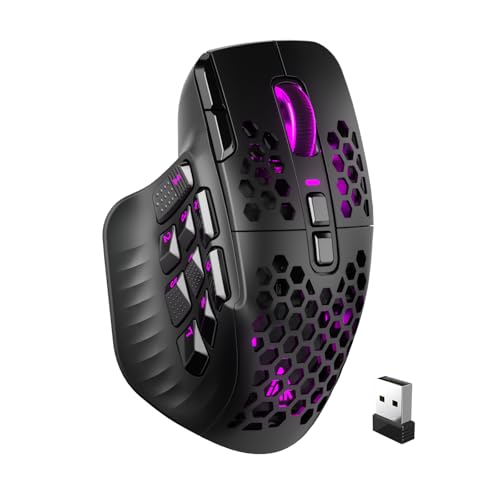
AFUNTA C12 Gaming Mouse 12 Programmable Buttons
Logitech G305 Lightspeed Wireless Gaming Mouse Black

ProtoArc EM02 Wireless Trackball Mouse Gray

Redragon M908 Wired MMO RGB Gaming Mouse 12400 DPI Remapping Keys

Razer Basilisk V3 X HyperSpeed Customizable Wireless Gaming Mouse Black

Logitech G502 Hero Wired Gaming Mouse Black

TECKNET Wireless Bluetooth Mouse Rechargeable Black
More Details On Our Top Picks
The M811 leans hard into command density, with 15 programmable buttons and a thumb-heavy layout that suits MMO hotbars, macros, and work shortcuts. The 5 DPI steps start at 500 and reach 6200 by default, and software support stretches the range higher for people who like finer control. Wired use keeps the connection simple, which helps on a desk where you want predictable response more than extra features.
Compared with the lighter TECKNET pick later in the list, this one is much more specialized and much less minimal. The grip follows a natural hand shape, so longer sessions tend to feel easier on the palm, though the larger control count can take a little memorizing. For desk-bound play or repetitive office work, that trade-off makes sense.
Strong Points
- 15 programmable controls suit dense key mapping.
- The five default DPI steps make switching feel orderly.
- Software tuning gives you room to tailor sensitivity.
- The shaped body should suit longer sessions better than a flat shell.
- Wired operation avoids battery management.
Things To Consider
- The control count takes some setup time.
- Wired use keeps movement tied to the cable.
- The MMO layout is great for mapping, less handy for very simple browsing.
Core Details
Who It Suits Best
Guild players, macro-heavy MMO fans, and office users who live in spreadsheets will get the most out of it.
A Better Fit Elsewhere
Logitech G502 Hero Wired Gaming Mouse Black suits you better when you want a more familiar all-purpose shape with strong button flexibility but fewer MMO-specific inputs.
This AFUNTA model pushes hard into thumb control, with six numbered keys on the left side and a total of 12 programmable buttons. The contoured body and TEFLON feet pads should suit long sessions at a desk where glide and grip both matter. The pulsing light and six color modes add a bit of personality, though they stay more decorative than essential.
Compared with the Redragon M811, this one gives you a simpler DPI ladder and a built-in triple-click button that can help with repetitive tasks. The included weights are a useful touch for people who like the mouse to feel a little heavier in hand. The honest read is that it asks for some adjustment time, but the control layout gives you plenty to work with once it feels familiar.
What We Like
- Six side keys make thumb access immediate.
- 12 programmable buttons help with macros and shortcuts.
- TEFLON feet support smoother desk movement.
- The built-in weights let you tune the hand feel.
Minor Gripes
- The button-rich layout needs a learning period.
- Lighting is more cosmetic than functional.
- People who prefer a plain mouse may find the design busier than needed.
Feature Rundown
Made For
Thumb-heavy MMO play, hotkey-heavy office work, and anyone who likes a mouse with more physical control than a plain office model.
Another Choice May Suit
TECKNET Wireless Bluetooth Mouse Rechargeable Black suits you better when portability, quiet daily use, and a lighter control set matter more than macro density.
The G305 sits in the useful middle ground, wireless enough for a clean desk and restrained enough for people who don’t want an oversized MMO shell. The HERO sensor and 12,000 DPI ceiling point to accurate pointer movement, while six programmable buttons keep the setup practical rather than crowded. On a laptop bag or a home desk, that balance feels easy to live with.
Unlike the Redragon and AFUNTA picks, this one gives you fewer thumb-centric inputs but a much simpler daily rhythm. On-board memory helps the mouse remember settings, which is handy when you move between systems. The trade-off is plain enough, you give up the sprawling control grid and get a cleaner, lighter-feeling setup in return.
Highlights
- Wireless use keeps desks uncluttered.
- Six programmable buttons cover the basics well.
- On-board memory helps settings travel with the mouse.
- The listed battery life supports long stretches between charges or swaps.
Areas To Watch
- Button count stays modest beside the MMO-focused picks.
- The shape is more general-purpose than specialized.
- Wireless gear still asks you to keep track of power.
At A Glance
Right Fit For
Frequent travelers, hybrid workers, and gamers who want wireless convenience without giving up reliable pointer control.
Where A Sibling Pick Shines
Redragon M908 Wired MMO RGB Gaming Mouse 12400 DPI Remapping Keys fits you better for a heavier macro workload and a more command-dense thumb zone.
The EM02 changes the conversation a bit, because the thumb ball stays in place while your hand does the navigating. That design helps on cramped desks and with long editing sessions, especially when you want to move the pointer without sweeping the whole mouse around. The 0 to 15 degree adjustable angle is a small but meaningful comfort touch for different wrist positions.
Compared with the G305, this is less about travel-ready simplicity and more about staying planted in one spot. Connection support for Bluetooth and 2.4G USB-A, plus the ability to pair three devices, makes it useful across a desktop, laptop, and tablet setup. The catch is that trackball control feels different at first, so the payoff is best for people who are ready for a short adjustment period.
Positives
- The thumb ball keeps desk movement to a minimum.
- Adjustable angle adds a useful comfort option.
- Three-device support suits mixed-device workspaces.
- Rechargeable power cuts down on battery swaps.
Small Caveats
- Trackball control feels unfamiliar at first.
- The shape favors stationary use more than travel use.
- Ball and housing can need regular cleaning, like most trackball setups.
Feature Card
The Right Fit
You get the most from this mouse in a compact office, on a crowded desk, or in a setup where wrist comfort matters more than rapid whole-hand movement.
Swap It Out When
Logitech G502 Hero Wired Gaming Mouse Black suits you better when you want a more familiar gaming shape and more direct pointer movement for fast-paced play.
The M908 goes even further into MMO territory than the M811, with a dense button layout and a 12400 DPI ceiling for users who want a lot of adjustment room. That makes it a strong desk mouse for players who keep many skills, macros, or commands close at hand. The RGB lighting adds visual flair, though the real story is the control load.
Compared with Logitech G502 Hero Wired Gaming Mouse Black, this one feels less like a general gaming all-rounder and more like a command station. The ergonomic grip body helps longer sessions feel less tiring, which matters when your hand stays on the mouse for hours. For people who live in hotkeys and remapping, the layout has real purpose, not just extra buttons for show.
Reasons To Buy
- The high DPI ceiling leaves plenty of tuning range.
- Macro-friendly controls suit complex games and shortcuts.
- The grip shape supports extended desk use.
- Wired operation keeps the connection straightforward.
- RGB lighting adds a bit of desk personality.
Room For Improvement
- The control layout asks for muscle-memory time.
- Wired use keeps the cable in play.
- The design feels more specialized than casual.
Core Details
Built With In Mind
Serious MMO players, macro users, and desk-based gamers who want a wired mouse with a heavier control set.
A Better Fit Elsewhere
Razer Basilisk V3 X HyperSpeed Customizable Wireless Gaming Mouse Black suits you better if you want fewer MMO-style controls and a more flexible wireless setup.
The Basilisk V3 X HyperSpeed lands in a more polished middle zone, with nine programmable controls and dual wireless options for 2.4 GHz or Bluetooth use. That makes it a good fit for someone who wants a gaming-ready mouse that still behaves well on a normal work desk. The listed battery figure suggests long stretches between charges, which is handy in mixed-use setups.
Relative to the G305, this one offers more controls and a more adjustable feel, while still staying wireless. Mechanical switches Gen-2 and the 5G Advanced 18K optical sensor point toward crisp input and careful pointer handling, though the mouse still asks you to live with battery management. The honest read is that it suits people who want one mouse to handle work and play without leaning too hard in either direction.
Upsides
- Nine programmable controls give you useful flexibility.
- Bluetooth and 2.4 GHz support make switching easier.
- The sensor and switches suit accurate, responsive use.
- The long battery figure helps in mixed work and play setups.
Points To Note
- Wireless power still needs attention.
- The control count is lower than the MMO-heavy picks.
- Users chasing a very light, simple mouse may find it more feature-packed than needed.
Details At A Glance
Whose Shelf It Belongs On
You get the best fit here if you split time between gaming, office work, and a laptop setup that benefits from wireless flexibility.
Look Elsewhere When
Redragon M811 Wired RGB MMO Gaming Mouse 10000 DPI Remapping Keys suits you better when your main priority is a much deeper MMO-style button layout.
The G502 Hero is the most adjustable wired shape in this group, with 11 programmable buttons, adjustable weights, and on-board memory for saved settings. That combination works well for people who want a mouse that can be tuned to match the way your hand rests and the way your games or apps are mapped. The 25,600 DPI figure also leaves plenty of room for sensitivity changes.
Compared with the Redragon MMO models, the G502 feels less specialized and more broadly useful across gaming genres and PC or Mac setups. The scroll wheel, button layout, and weight tuning make it feel like a tool you can shape around your habits, though the cable still keeps it firmly desk-oriented. You may find it especially useful when one mouse needs to cover both serious play and day-to-day computer work.
Best Bits
- 11 programmable buttons give you broad shortcut coverage.
- Adjustable weights help fine-tune the feel in hand.
- On-board memory makes saved settings easier to keep.
- The high DPI ceiling supports fast or careful cursor work.
- PC and Mac support broadens setup flexibility.
Honest Caveats
- The wired layout keeps movement tethered.
- The feature set can feel like more mouse than a casual office user needs.
- Adjustable parts may call for a bit of tinkering before the fit feels right.
Spec Overview
Best Suited To
Competitive-style gamers, customization fans, and anyone who likes a wired mouse with a lot of physical tuning built in.
Consider Something Else When
TECKNET Wireless Bluetooth Mouse Rechargeable Black suits you better for a quieter, simpler desk setup with less emphasis on gaming controls.
TECKNET closes the list with a more general-purpose shape, which makes sense for workstations that need a dependable mouse more than a specialist gaming shell. Bluetooth 5.3, Bluetooth 5.0, and 2.4G support give you connection flexibility, while seven buttons and side scroll keep the control set practical. The quieter click feel should suit shared offices or late-night desk work better than louder gaming mice.
Compared with the G305, this one shifts toward everyday comfort and broader compatibility rather than gaming-first focus. Six adjustable DPI settings help you change pointer speed without getting buried in configuration, and the rechargeable design reduces battery swaps. The trade-off is straightforward, you get a calmer daily mouse instead of a high-button-count thumb machine.
What We Like
- Bluetooth and 2.4G support make it versatile.
- Seven buttons give you useful daily controls.
- Side scroll helps in spreadsheets and wide documents.
- Quiet clicks suit shared spaces.
- Rechargeable power keeps maintenance light.
Worth Noting
- The control layout stays simpler than the gaming mice above.
- People chasing deep MMO remapping will want more buttons.
- The ergonomic shape is friendly, though it still feels like a standard all-purpose mouse rather than a specialized thumb unit.
Feature Snapshot
Who Should Grab It
Office multitaskers, laptop users, and anyone who wants a quiet everyday mouse with enough extra controls to feel useful.
Where A Sibling Pick Shines
Razer Basilisk V3 X HyperSpeed Customizable Wireless Gaming Mouse Black suits you better if you want a more gaming-focused sensor and a more polished control set.
How To Choose The Right Mices With Thumb Buttons
Button Count Should Match Your Habits
Thumb buttons sound great in theory, but the real question is how many commands you actually want under your hand. MMO players, spreadsheet heavy workers, and power users often benefit from nine or more programmable controls, while casual desktop use usually feels smoother with a smaller set. The more buttons you add, the more setup time and memory work you take on, so the best fit is the one you can use without hunting for the right key during a busy moment.
Wired Or Wireless Changes The Whole Feel
A wired mouse usually feels straightforward and predictable, especially on a dedicated gaming desk. Wireless models help a clean setup stay clean, and they make more sense for laptop life, conference rooms, and desks that get moved around often. The trade-off is simple, wired models remove charging from the equation, while wireless models ask you to keep an eye on power and connection mode.
Shape Matters More Than Spec Sheets
Thumb-button mice can feel very different in hand, even when the specs look similar. A tall MMO shell, a balanced right-handed frame, and a trackball all solve different problems, and your wrist comfort depends on which motion you prefer, whole-hand movement or thumb-led control. For long sessions, the grip shape and button placement often matter more than raw DPI.
DPI Is A Tool, Not A Trophy
DPI means dots per inch, in plain terms how far the pointer moves for a given hand movement. Higher numbers can help with rapid cursor travel on large or multi-monitor desks, but too much sensitivity can make precise work feel jumpy. The sweet spot comes from matching the DPI range to your games, your screen size, and how steady your hand feels during everyday use.
Things Worth Knowing First
Hidden Buying Traps
A common mistake is chasing button count without checking whether the layout actually suits your thumb. Another is treating RGB lighting, weights, or extra modes as core value when your real need is comfort and dependable control. The smarter move is to match the shape and button placement to your usual day, not to the flashiest feature on the page.
The Upgrade Payoff
Higher-tier mice usually cost more because you get better sensors, more programmable inputs, stronger onboard memory, richer wireless options, or physical tuning like adjustable weights. That extra spend makes sense for people who game often, work across multiple devices, or want a mouse that can adapt to different tasks instead of only one. For light browsing and email, a simpler mouse often covers the job just fine.
Final Thoughts
You can narrow this category fast once you decide whether thumb buttons are for gaming, productivity, or both. The Redragon and AFUNTA picks make the most sense for button-hungry control, the G305 and TECKNET stay friendlier for day-to-day use, and the G502 and Basilisk sit nicely in the middle with more tuning. Choose the shape that matches your hand first, then let the button count do the rest.
