
Mini-led displays can make a desk feel less flat, especially when you split time between gaming, editing, and everyday work. You get deeper contrast than a standard edge-lit panel, but the real question is how much motion speed, color tuning, and stand adjustability you actually need. This roundup helps you sort that out without getting buried in spec sheets. The right pick often comes down to your room, your graphics setup, and how much of your day lives in front of the screen.
Quick Look At Our Top Picks

INNOCN 32″ Mini LED 4K 160Hz Monitor, Black

ASUS ProArt PA278CV 27 Inch 1440p QHD USB-C Professional Monitor

AOC 27 Inch Gaming Monitor QHD 180Hz Mini-LED HDR1000, Q27G3XMN
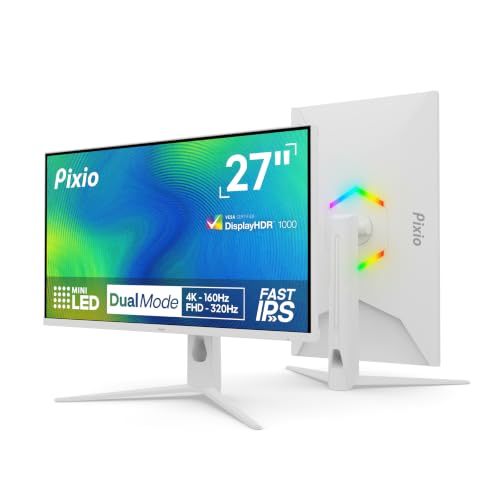
Pixio PX27UM Mini LED White 27 inch Dual Mode UHD 4K 160Hz/FHD 1920×1080 320Hz Fast IPS Panel
INNOCN 27″ 2K 1440P 320Hz Mini LED Gaming Monitor, GA27T1M

KTC 27 Inch Mini LED Gaming Monitor 1440P 180Hz, M27T6
AOC 27 Inch Gaming Monitor QHD 240Hz Mini-LED HDR1000, Q27G4ZMN
More Details On Our Top Picks
That 32-inch frame gives you room to keep a game, a timeline, and a browser open without feeling cramped. The 4K resolution and 160Hz refresh rate make it an easy match for people who split their day between work and play, while HDMI 2.1 and USB Type-C add flexibility for newer laptops and consoles.
The trade-off is simple, a screen this large asks for desk depth and a graphics setup that can keep pace. You also get a height-adjustable stand, which helps in a shared office or a gaming nook where posture matters more than flair.
Strong Points
- 4K detail works well for text, timelines, and large game worlds.
- 160Hz gives motion a much smoother feel than standard office panels.
- USB Type-C keeps laptop setups cleaner with fewer cables.
- Height adjustment helps you line up the panel at eye level.
- Wide color support suits photo-heavy work and vivid media.
Things To Consider
- A 32-inch panel takes serious desk space, especially in shallow setups.
- To get the most from 4K at high refresh, your hardware needs to be up to the task.
- The black finish is practical, though it can still show dust in bright rooms.
Feature Snapshot
Who It Suits Best
People who want one screen for work, streaming, and console or PC gaming will get the most from this size and feature mix.
A Better Fit Elsewhere
The ASUS ProArt PA278CV is the better match for color-sensitive creative work at a smaller desk, especially when accuracy matters more than speed.
After the larger INNOCN panel, this one feels like the calmer, more work-focused choice. The 27-inch QHD panel keeps text sharp without demanding as much desk depth, and the USB-C, USB hub, and daisy-chain support make it a tidy hub for a laptop-based setup.
Color work is the real draw here, especially for design, editing, and product photography. Calman verification and Delta E under 2 point toward tighter color behavior, though the honest read is that you’re paying for accuracy and desk convenience rather than gaming speed.
What We Like
- QHD resolution gives you a clear middle ground between 1080p and 4K.
- USB-C helps simplify docking for laptops that support display and data over one cable.
- USB hub and daisy-chain support suit neat multi-device desks.
- 100% sRGB and 100% Rec. 709 are a strong fit for color-aware workflows.
- The ergonomic stand makes daily repositioning easier.
Softer Spots
- It makes less sense for fast-twitch gaming than the AOC and INNOCN gaming picks.
- Creative-focused tuning can feel less exciting for casual streaming or console use.
- The feature set assumes you’ll use the screen as a desk anchor, not a portable display.
Quick Facts
Who Will Love This
You’ll appreciate this most if your desk time revolves around design, editing, spreadsheets, and a clean cable setup.
Where A Sibling Pick Shines
The Pixio PX27UM Mini LED White 27 inch Dual Mode UHD 4K 160Hz/FHD 1920×1080 320Hz Fast IPS Panel fits better for you if gaming speed matters more than color workflow.
This AOC model leans hard into gaming, and that focus shows up in the 180Hz refresh rate and 0.3ms response claim. The mini-led backlight with 336 local dimming zones should appeal to anyone who likes stronger contrast in dark scenes, especially in a bedroom setup or a dim media room.
The broader trade-off is that it’s less about office polish and more about motion and image punch. You still get a height-adjustable stand, USB 3.2, HDMI 2.1, DP 1.4, audio out, and VESA mounting, so the desk setup remains flexible even though the use case is pretty specific.
Upsides
- 180Hz suits fast shooters and other twitchy games.
- Mini-led backlighting can improve contrast in dark scenes.
- Height adjustment and VESA support make placement easier.
- HDMI 2.1 and DisplayPort cover modern PC and console connections.
- Audio out adds a useful fallback for desk speakers or headphones.
Points To Note
- The gaming-forward tuning may feel like overkill for plain office work.
- Mini-led panels often reward careful setup, especially with brightness and contrast settings.
- The screen is better suited to a fixed desk than a move-and-pack routine.
Core Details
Best Suited To
You’ll get the most from this monitor if your setup is built around competitive gaming and you like vivid contrast in darker content.
Skip It When
The ASUS ProArt PA278CV is the cleaner fit for color work, long editing sessions, or a desk where low-friction productivity matters more than speed.
This Pixio stands out because it gives you two very different modes in one panel: 4K at 160Hz for sharper, slower-paced work and 1080p at 320Hz for speed-first gaming. That kind of flexibility makes sense in a room where one PC handles both weekend matches and weekday desktop duties.
The white finish also sets it apart from the darker screens in this list, which can matter on a bright or style-conscious desk. The trade-off is that dual-mode convenience can only help you when you’re willing to switch settings based on the task, so it suits a hands-on setup more than a set-and-forget routine.
Bright Spots
- Dual mode gives you a sharp 4K option and a faster 1080p option.
- Fast IPS keeps the panel feeling agile for quick motion.
- The white finish brings a cleaner look to lighter desk setups.
- Adaptive sync helps smooth out inconsistent frame output.
- Fully adjustable positioning supports a more exact fit on the desk.
Room For Improvement
- Dual-mode flexibility adds another layer of setup decisions.
- The white shell may show grime sooner in a busy room.
- People who only want one fixed mode may never use the extra range.
Feature Rundown
Right Fit For
You’ll like this most if you want a single screen that can shift between visual polish and high-speed gaming without changing monitors.
A Better Fit Elsewhere
The INNOCN 27″ 2K 1440P 320Hz Mini LED Gaming Monitor, GA27T1M is the better call for players who care more about high refresh at a steady QHD setup than about dual-mode switching.
This INNOCN is built for people who want very quick motion without stepping into a huge display. The 27-inch QHD layout is a comfortable middle ground, while the 320Hz refresh rate and claimed 0.5ms response time speak directly to fast shooters and twitch-heavy play.
Support for FreeSync and G-SYNC compatibility helps reduce tearing across a wide range of graphics setups, and that matters more than the marketing often admits. The caveat is that this kind of speed-focused monitor tends to reward a capable PC, so it makes the most sense in a gaming room where performance already matters.
Best Bits
- 320Hz is a strong match for very fast competitive play.
- QHD resolution keeps the panel sharp without the weight of 4K.
- FreeSync and G-SYNC compatibility broaden system fit.
- HDMI 2.1 and DP give you modern connectivity options.
- The adjustable stand helps you set the screen at a usable height.
Honest Caveats
- The high-refresh focus is most useful for players who can feed it enough frames.
- Speaker inclusion is convenient, though many desk setups still lean on separate audio gear.
- The overall profile suits gaming first, not mixed creative work.
Feature Card
Made For
You’ll get the most from this model if gaming is the main reason you’re shopping and you care about fast response more than anything else.
Another Choice May Suit
The ASUS ProArt PA278CV fits better for color-accurate work and office-first setups, where calibration and USB-C convenience matter more than raw refresh speed.
The KTC M27T6 sits in that useful middle space where gaming speed, brightness headroom, and desk ergonomics all matter. Its 27-inch QHD panel, 180Hz refresh rate, and 148% sRGB coverage make it feel versatile for people who want one screen for gaming, streaming, and normal daily use.
The fully adjustable stand is a practical advantage here, especially in a shared office or a room where your seating position changes through the day. The trade-off is that it’s not as extreme as the 320Hz INNOCN models, so esports-focused players may still want more speed.
Reasons To Buy
- 180Hz is smooth enough for most modern games.
- 148% sRGB suggests a lively color presentation for entertainment and everyday work.
- Tilt, swivel, pivot, and height adjustment make setup easier.
- VESA mounting gives you a path to a cleaner desk layout.
- The 27-inch size keeps it approachable for regular desks.
Areas To Watch
- High-refresh competitive play is not its most aggressive lane.
- The bright finish and display surface may need routine dusting in busy rooms.
- Its appeal drops a little for pure office work without gaming use.
Details At A Glance
The Right Fit
You’ll like this most if you want a gaming monitor that still behaves well as an all-day desk screen.
Swap It Out When
The AOC 27 Inch Gaming Monitor QHD 240Hz Mini-LED HDR1000, Q27G4ZMN suits you better if you want a more aggressive speed focus and stronger HDR-style gaming emphasis.
This AOC model pushes harder than the 180Hz version above it, and the 240Hz refresh rate gives fast-motion gaming a very responsive feel. The mini-led VA panel with 1152 dimming zones should also bring stronger contrast than a plain backlit screen, which matters in dark game scenes and HDR movies alike.
It keeps the practical touches too, including height adjustment, DP 1.4, HDMI 2.0, earphone out, and VESA mounting. The honest read is that this one suits speed-focused play best, but it still works as a general-purpose screen for anyone who wants a sharper, punchier image on the desk.
Plus Points
- 240Hz helps fast games feel more immediate.
- Mini-led backlighting supports stronger contrast in mixed light scenes.
- Height adjustment and VESA support make installation more flexible.
- Earphone out keeps audio routing simple on a desk.
- QHD resolution keeps the panel easy to drive compared with 4K.
Small Caveats
- HDMI 2.0 is less future-facing than the newer connection on some rivals.
- VA panels can feel a little different from IPS if you care a lot about viewing angle behavior.
- The gaming-first profile matters more here than pure office comfort.
Core Details
Whose Shelf It Belongs On
You’ll appreciate this most if you want a fast gaming monitor that still holds up as an everyday desk display.
Look Elsewhere When
The ASUS ProArt PA278CV is the better fit for color-sensitive work, while the Pixio PX27UM Mini LED White 27 inch Dual Mode UHD 4K 160Hz/FHD 1920×1080 320Hz Fast IPS Panel makes more sense for a lighter, style-forward setup.
How To Choose The Right Mini-Led Monitors
Match Resolution To Your Setup
A 27-inch QHD panel is the easiest place to land for most desks, because it stays sharp without asking as much from your graphics card. A 32-inch 4K screen gives you more space for timelines, spreadsheets, and large game worlds, but it also needs more desk depth and stronger hardware to feel effortless. Dual-mode screens sit in between, giving you a 4K view for detail and a 1080p speed mode for motion-heavy games. That flexibility helps a lot in shared rooms, though it only pays off when you’re willing to change modes for the task.
Read Refresh Rate In Context
Refresh rate is the number of times the image updates each second, so a higher figure can make motion feel smoother. For fast shooters, 240Hz and 320Hz stand out, especially paired with quick response times and adaptive sync. For mixed office and media use, 160Hz or 180Hz already feels lively and usually asks less from the rest of your setup. The bigger point is simple, speed matters most when your PC can feed the panel enough frames to keep up.
Don’t Ignore Color And Contrast
Mini-led backlighting uses many local dimming zones, which can improve contrast by dimming small areas of the screen more precisely. That makes dark scenes look more layered, though it can also add a little setup sensitivity depending on how the monitor handles brightness and tone mapping. For photo, video, and design work, look closely at color coverage, calibration claims, and panel tuning rather than chasing motion specs alone. For pure gaming, the contrast boost matters most when you spend time in HDR content or darker titles.
Check The Desk-Fit Details
Stand adjustment sounds boring until you use a monitor every day, then it becomes the part that saves your neck and keeps the screen usable across long sessions. Height, swivel, tilt, and pivot are especially handy in home offices and multi-user spaces. USB-C and USB hubs help you trim cable clutter, while HDMI 2.1, HDMI 2.0, and DisplayPort shape what you can connect cleanly. A screen that fits your desk and devices usually feels better than a flashy panel with mismatched ports.
A Quick Reality Check
Hidden Buying Traps
A lot of people get pulled toward the highest refresh number and forget the rest of the setup. A 320Hz panel sounds impressive, but it’s wasted money and desk space when your machine, games, or work habits never use it. Another common miss is buying a screen that looks great on paper but leaves you short on stand adjustment or useful ports. The smoother path is to match the monitor to your desk depth, device mix, and actual workload.
The Upgrade Payoff
Higher-tier mini-led monitors cost more because they usually mix faster refresh rates, more precise dimming, stronger color behavior, and better connection options. That extra money starts to make sense when you want one screen for both gaming and serious work, or when you spend long hours staring at text and motion. It also matters in rooms with changing light, since a better tuned panel handles contrast more gracefully. For a pure office desk, though, a simpler monitor can still make more sense and leave room in your setup for other gear.
Final Thoughts
Mini-led monitors are at their best when you want richer contrast without giving up speed or everyday usability. The AOC and INNOCN gaming picks suit fast play, the ASUS ProArt model suits color-sensitive work, and the Pixio dual-mode screen fills a useful middle ground. Your best choice depends less on the label and more on how you spend your hours at the desk. Pick the screen that fits your room, your gear, and your habits, and you’ll feel the difference right away.
