
Miniature mice make sense when your desk moves with you, from coffee shops to conference rooms to cramped tray tables. You want something that slips into a laptop sleeve, connects without fuss, and still feels steady enough for email, spreadsheets, or a quick edit on the road. The eight picks below focus on size, connection options, button feel, and the small trade-offs that matter once the novelty wears off.
Quick Look at the Shortlist
Logitech M187 Wireless Mini Mouse
Uiosmuph Mini Wireless Bluetooth Mouse for Travel Black
Uiosmuph Mini Wireless Bluetooth Mouse for Travel White
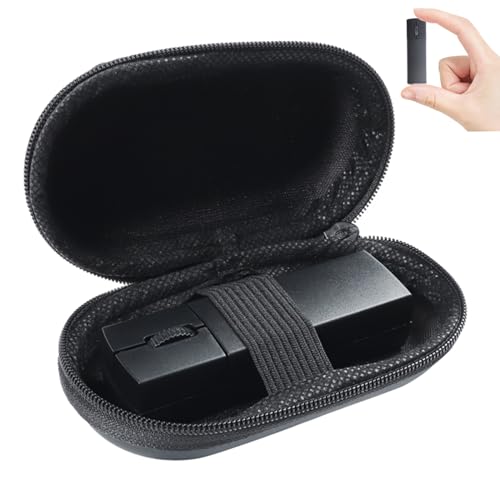
elec Space Wireless Mini Finger Mouse

Wireless Bluetooth Mouse Mini 3-Mode Black

WL300 Bluetooth Mouse Silent Wireless Mouse Grey

FMOUSE Portable 2-in-1 Wireless Bluetooth Mouse

Wireless Mouse Mini Small Finger Bluetooth Mouse
More Details On Our Top Picks
The M187 keeps things plain, and that works well for daily carry. Its mini frame suits a bag, a dorm desk, or a spare work setup where you do not want a bulky mouse taking over space.
The brand calls out a better click feel and performance, which points to a more polished button response than the cheapest travel mice. The trade-off is simple, you are choosing familiarity and portability rather than a long feature list.
What We Like
- Small enough to slip into a slim pouch without drama.
- Button response should feel more settled than very bare-bones minis.
- Good fit for commuting, hotel desks, and quick laptop sessions.
- The shape stays easy to understand, so setup feels straightforward.
Things To Consider
- You are not getting extra modes or advanced controls here.
- Very small mice can feel cramped during long editing stretches.
- Owners usually keep it in a case or side pocket, since pocket carry can invite scuffs.
Feature Snapshot
Who It Suits Best
You want a small, no-nonsense mouse for commuting, side tables, and everyday laptop tasks.
A Better Fit Elsewhere
Uiosmuph Mini Wireless Bluetooth Mouse for Travel Black suits you better when you need Bluetooth plus 2.4 GHz options for several devices.
This black Uiosmuph model leans into flexibility, not just size. BT 5.1, BT 5.0, and 2.4 GHz support give you more ways to pair it, which is handy on a laptop today and a tablet tomorrow.
The 3.07 x 1.89 x 1.06 inch footprint is genuinely pocket-friendly, so it disappears into a laptop bag without much thought. That said, tiny travel mice can feel a bit tight for larger hands, especially during long office stretches.
Highlights
- Three connection paths help you match different devices without carrying extra gear.
- USB-C charging fits a modern cable lineup more neatly than older micro-USB setups.
- The compact body suits commuters who want a mouse that travels light.
- 1600 DPI gives you enough cursor speed for ordinary work and browsing.
- The included adapter and receiver make it easier to work around mixed ports.
Room For Improvement
- The very small shell may feel short under larger palms.
- Silent clicking usually softens desk noise, but it can also feel less tactile than a louder switch.
- Keeping the receiver and adapter together matters, because tiny accessories are easy to misplace.
Core Details
Whose Shelf It Belongs On
You move between a laptop, tablet, and home desk and want one small mouse that can keep up.
Where A Sibling Pick Shines
Uiosmuph Mini Wireless Bluetooth Mouse for Travel White fits you better when you want the same feature set in a lighter-looking finish.
The white version keeps the same travel-first shape as the black Uiosmuph, but the lighter finish gives it a cleaner desktop look. That can matter more than it sounds like, especially on a bright workspace or a slim notebook setup.
You still get the same pocket-size footprint, so it slips into a sleeve, side pouch, or backpack pocket with almost no fuss. The honest trade-off is that pale finishes can show grime sooner, so a quick wipe now and then helps it stay tidy.
Positives
- The small footprint is easy to carry through airports, trains, and daily commutes.
- Bluetooth plus 2.4 GHz support keeps it useful across mixed setups.
- USB-C charging lowers cable clutter in a modern travel kit.
- 1600 DPI is a sensible middle ground for office tasks and browsing.
Softer Spots
- The compact body may feel petite for larger hands during longer sessions.
- White finishes usually ask for a bit more cleaning than darker shells.
Details At A Glance
Made For
You want a very small mouse in a lighter finish for travel, classroom carry, or a clean-looking desk.
Another Choice May Suit
Logitech M187 Wireless Mini Mouse suits you better when you prefer a simpler pick with a more traditional, no-frills feel.
The elec Space model leans into a finger-style shape, so it feels different from the more conventional minis above. That shape can make it easier to stash, and the included case helps it behave more like a carry item than a desk-only accessory.
Bluetooth and 2.4 GHz support give it two connection paths, which is useful for a MacBook, Chromebook, or travel laptop setup. The trade-off is the learning curve, since finger mice are less familiar than standard palm-style shells.
Bright Spots
- The finger-style design keeps the footprint very compact in transit.
- A case is a practical touch for bag carry and storage.
- Dual-mode connectivity helps you move between machines more easily.
- The ergonomic angle may suit people who dislike flat, tiny travel mice.
Areas To Watch
- Finger-style mice feel unfamiliar at first, especially for standard mouse users.
- The unusual shape may not suit long spreadsheet sessions.
- Case carry adds one more small part to keep track of.
Technical Sheet
Right Fit For
You travel often and want a compact mouse that also protects itself in a case.
Swap It Out When
WL300 Bluetooth Mouse Silent Wireless Mouse Grey suits you better when a more familiar grip and six-button layout matter more than the compact finger style.
This one lands in a useful middle ground. You get three connection modes, a small carrying case, and a very light build, so it works for desk hopping, hotel work, or a backpack that already feels crowded.
The 3-button layout keeps things simple, which is good news for everyday laptop tasks and bad news only for anyone who wants extra shortcut controls. You may find the minimal setup a little plain, but plenty of people will see that as a plus.
Best Bits
- Three connection modes add flexibility for mixed-device routines.
- Quiet clicks suit shared spaces and late-night work sessions.
- The included case makes it easier to toss into a bag.
- Three buttons keep the learning curve low.
Points To Note
- Three buttons are enough for basics, but not for shortcut-heavy work.
- The minimal form gives you less surface area to rest your hand.
- Cases add convenience, though they also add one more item to pack.
Core Details
The Right Fit
You want a plain, portable mouse that keeps your bag light and your setup simple.
Where A Sibling Pick Shines
WL300 Bluetooth Mouse Silent Wireless Mouse Grey suits you better when six buttons and a sculpted grip matter more than minimal simplicity.
Compared with the simpler minis above, the WL300 is built to feel more like a work mouse that still travels well. A sculpted grip and six buttons make it better suited to long document days, side-office setups, and anyone who likes a more structured hand position.
The adjustable DPI, or cursor sensitivity, gives you some control over pointer speed, while the tri-mode setup covers wired, 2.4 GHz wireless, and dual Bluetooth use. The trade-off is that more options usually mean more to think about, so it suits organized desks better than grab-and-go minimalists.
Reasons To Buy
- The sculpted grip should feel steadier in longer work sessions.
- Six buttons give you more control than the basic travel picks here.
- Wired, 2.4 GHz, and Bluetooth support broadens compatibility.
- Adjustable DPI helps you tune cursor movement to the task.
- The quieter click feel fits shared offices and late-night work.
Minor Gripes
- The more capable layout can feel like extra setup for very casual users.
- Six buttons are useful, though they also add a little learning time.
- The larger control set makes it less stripped-down than the pocket tiniest options.
Feature Rundown
Built With In Mind
You want a compact mouse that still feels ready for serious desk work and mixed-device use.
Look Elsewhere When
FMOUSE Portable 2-in-1 Wireless Bluetooth Mouse suits you better when a built-in micro SD card reader matters more than extra buttons.
FMOUSE is the odd one in the group, and that can be a strength. Alongside the mouse function, you get a micro SD card reader and an 8GB card in the box, which gives it a clear role for mobile work, quick file moves, or a small travel kit.
Its 3.07 x 1.49 x 0.87 inch size and 30g weight keep it firmly in the pocket-size camp. The catch is that combo products can feel a little specialized, so you will appreciate it most when you actually use both functions.
Upsides
- The card-reader function can reduce the number of gadgets in your bag.
- An 8GB card adds immediate usefulness for simple transfers.
- USB-C charging fits modern travel cables and laptop routines.
- The low weight makes it easy to carry all day.
Small Caveats
- Combo designs make the mouse more specialized than a plain travel pick.
- The narrow body may feel less natural for larger hands.
- Extra functions are useful only when you actually need them.
At A Glance
Perfect Match For
You work on the move and like the idea of one compact accessory doing two jobs.
Reach For A Different Pick When
Logitech M187 Wireless Mini Mouse suits you better when you want a simpler shape with fewer moving parts.
This SHARE SUNSHINE pick mixes a finger-style shape with a TF card reader, so it lands closer to a compact utility tool than a plain office mouse. That makes it handy for light travel, a classroom bag, or a gift where the extra function adds some value.
The catch is the same one that follows most tiny finger mice, they are convenient first and ergonomic second. For quick use on a laptop stand or in a small workspace, the trade-off feels reasonable, though very long work sessions may call for something more traditional.
What We Like
- The finger-style body keeps the footprint small for carry.
- A TF card reader adds utility beyond pointer control.
- The handheld shape fits casual travel and light desk use.
- It works as a thoughtful small gift for mixed-use setups.
Honest Caveats
- Finger mice usually feel less familiar than standard desktop shapes.
- The compact shell may not suit long, full-day workloads.
- Extra functions are useful, but they also make the layout less plain.
Key Specs
Best Suited To
You want a tiny, multifunction travel mouse for casual use, gifts, or a secondary kit.
Where A Sibling Pick Shines
WL300 Bluetooth Mouse Silent Wireless Mouse Grey suits you better when ergonomics and six buttons matter more than the card reader.
What To Weigh Before You Choose
Traps First Timers Fall Into
Mini mice look similar at first glance, but the details change the experience fast. A thumb-sized shell can be fine for quick email, then feel cramped during a three-hour spreadsheet block, so hand size matters more than the product photos suggest.
Connection type matters just as much. Bluetooth keeps the bag cleaner, a 2.4 GHz receiver can be handy on older laptops, and tri-mode models help only when you actually switch devices often.
When Paying More Pays Off
Higher-tier minis usually spend extra money on better grips, more buttons, and broader connection options. You also tend to get more polished charging, sturdier accessories, or a case that makes travel less messy.
That upgrade makes sense for commuting professionals, students bouncing between classes, and anyone who uses the mouse for work instead of occasional taps. For casual use, a simpler model often feels easier to live with.
A Quick Reality Check
Common Shopping Slip Ups
One easy mistake is treating every miniature mouse like a travel mouse. Some are tiny but still built for desk comfort, while others are truly pocket-first, and the difference shows up once your hand stays on it for more than a few minutes.
Another miss is ignoring small accessories. A receiver, adapter, case, or card reader can be useful, but each one adds a tiny bit of packing and a little more to keep track of.
Why Top Tier Costs More
More expensive minis usually spend money on ergonomics, extra controls, and multi-device flexibility. That is where the extra value sits, not in flash, but in how often the mouse matches your day without compromise.
For a work bag that leaves the house daily, those details can justify the step up. For a backup mouse in a drawer, plain and light is usually enough.
Final Thoughts
The right miniature mouse depends on how you travel and how long your hand stays on it. Logitech M187 keeps things simple, the Uiosmuph models are better for mixed-device use, and the WL300 leans toward people who want a more complete work tool. Tiny accessories can save space, but they should still feel easy to carry, easy to charge, and easy to trust on a normal day. Pick the one that matches your routine, and the small size will feel like an advantage rather than a compromise.
