
When your game asks for fast spell swaps, clean aim, and a lot of side-button memory, the mouse matters more than most setups admit. You want something that fits your hand, keeps pace with long sessions, and gives you enough programmable controls without feeling busy. These eight picks cover wired and wireless choices, ergonomic shapes, vertical grips, and a few cross-use options for work and play.
The Shortlist At A Glance

Redragon M811 Wired RGB MMO Gaming Mouse 10000 DPI Remapping Keys
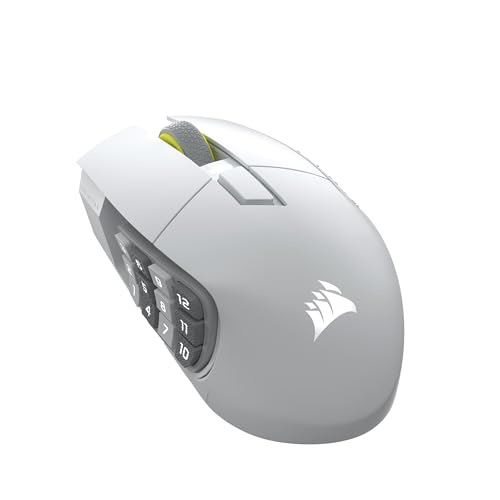
Corsair Scimitar Elite Wireless SE MMO PC Gaming Mouse 33,000 DPI

Corsair Scimitar Elite Wireless SE MMO PC Gaming Mouse 33,000 DPI

Corsair IRONCLAW Wireless SE Gaming Mouse Black 26,000 DPI

Corsair Scimitar RGB Elite Wired MOBA/MMO Gaming Mouse 18,000 DPI

WL300 Bluetooth Mouse Silent Wireless Mice Grey
SOLAKAKA E9 PRO Ergonomic Vertical MMO Mouse Black 24800 DPI

Wireless Gaming Mouse RGB Dual Mode Bluetooth Mouse 24000 DPI
More Details On Our Top Picks
For MMO sessions that depend on muscle memory, the M811 leans into control over flash. You get 15 programmable buttons, a five-step DPI setup, and a body shaped to follow the hand more naturally, which helps during long raids or a busy workday.
The wired connection also keeps the feel straightforward, with no battery to manage and no pairing to think about. The trade-off is plain enough, you’re tied to the cable, so it suits desk setups better than travel bags.
Strong Points
- 15 programmable buttons give you room for spells, macros, and utility actions.
- Five DPI steps make sensitivity changes quick during different game roles.
- The shaped body suits longer sessions better than flatter, more generic shells.
- Wired operation keeps setup simple for a fixed desk.
Things To Consider
- The cable keeps movement dependable, but it also keeps your desk less flexible.
- Macro-heavy layouts can take a little setup time before they feel natural.
- The style leans functional, so it won’t feel understated on every desktop.
Feature Rundown
Who It Suits Best
MMO players who want lots of remappable controls on a wired desk setup will get the most from it.
Where A Sibling Pick Shines
Corsair Scimitar Elite Wireless SE fits better for anyone who wants a wireless layout with a denser feature set and less cable drag.
This one leans hard into control density, which is exactly what you want when your keybinds start multiplying. The 16 programmable buttons, key slider, and up to 150-hour battery make it a strong fit for long MMO stretches, especially on a clean wireless desk.
The 33,000 DPI ceiling gives you plenty of headroom for sensitivity tuning, though most people will care more about how the layout feels than the headline number. The honest read is that this is for methodical users, not anyone who wants a minimal shell.
Highlights
- Wireless design keeps the desktop free of cable drag.
- 16 programmable buttons support dense action bars and repeated macros.
- Key slider placement helps your thumb land in a repeatable spot.
- Long battery runtime suits people who hate frequent charging routines.
- 1,000Hz polling keeps cursor updates responsive for a mouse in this class.
Softer Spots
- The button grid takes time to learn, especially on a fresh game profile.
- Wireless use means you’ll still want a charging routine in place.
- The layout can feel busy for simple desktop work.
Feature Card
Who Will Love This
Competitive MMO players who want a wireless mouse with a dense command layout will feel right at home.
Look Elsewhere When
Redragon M811 Wired RGB MMO Gaming Mouse 10000 DPI Remapping Keys makes more sense for a simpler wired setup that skips battery upkeep.
The gunmetal finish gives this version a more muted look than the white model above, which matters more than people admit once a desk setup starts living in plain sight every day. Underneath that finish, you still get the same 16-button layout, the side-slider idea, and the wireless freedom that suits long MMO evenings.
Most people choosing between the two Corsair wireless models will be deciding with aesthetics and desk style, not capability. You get the same high-control shape, so this one makes sense when you want the darker visual tone without giving up the control scheme.
Upsides
- Dark finish blends more easily into understated setups.
- Wireless operation keeps the desktop uncluttered.
- 16 programmable buttons give you plenty of bind room.
- The Key Slider keeps thumb placement consistent during repeated actions.
Areas To Watch
- The layout still asks for a learning period, even with the familiar Corsair shape.
- Wireless convenience brings the usual charging responsibility.
- Style differences are subtle, so the choice may come down to finish preference.
Details At A Glance
Built With In Mind
Desk setups that lean dark, clean, and low-gloss will get the most from this version.
Skip It When
WL300 Bluetooth Mouse Silent Wireless Mice is the easier call for travel, office switching, and lighter everyday control.
Some mice chase button count first, but this one starts with shape. The ergonomic shell is aimed at larger hands, and that makes it easier to live with during long evenings of grinding, map clearing, or even work sessions that stretch past dinner.
The 10 programmable buttons keep the layout useful without turning the thumb side into a maze. The trade-off is simple, it’s less crowded than the Scimitar models, so heavy macro users may want more buttons than this layout gives them.
Bright Spots
- The shape is built with larger hands in mind.
- Wireless operation keeps desk movement easy.
- 10 programmable buttons cover core MMO commands without excess clutter.
- The black finish looks restrained and easy to pair with other gear.
Room For Improvement
- Macro-heavy MMO play may outgrow the 10-button layout.
- The larger shell may feel oversized in smaller hands.
- Wireless use still means you need to plan for charging.
Technical Sheet
Whose Shelf It Belongs On
Gamers with larger hands who want a wireless mouse and a calmer button layout will get the most from it.
Another Choice May Suit
Corsair Scimitar Elite Wireless SE fits better for users who want more programmable controls packed into the side of the mouse.
This wired Scimitar sits in the same family as the wireless models, but the cable keeps it focused on a desk-first setup. With 17 programmable buttons and iCUE compatibility, it gives you a lot of room for game profiles, utility actions, and everyday desktop shortcuts.
The cross-platform support is the big practical angle here, since the listing calls out PC, Mac, PS5, PS4, and Xbox. That’s useful for a mixed setup, though the mouse still feels like a command hub first and a casual all-purpose pointer second.
Positives
- 17 programmable buttons create plenty of room for binds and shortcuts.
- Wired operation keeps latency concerns out of the picture.
- iCUE compatibility gives you software-based control over setup.
- Support across several platforms helps in shared or flexible setups.
Minor Gripes
- The cable limits desk freedom compared with the wireless Scimitar versions.
- The dense layout takes commitment before it feels second nature.
- It may feel busier than needed for light office use.
Core Details
Best Suited To
Mixed-platform setups and MMO players who want lots of controls in a wired shell will make good use of it.
Where A Sibling Pick Shines
Corsair IRONCLAW Wireless SE Gaming Mouse fits better for larger hands and a cleaner wireless desktop.
Not every mouse on this list is built for the same kind of desk life, and the WL300 makes that obvious right away. Quiet clicks, six buttons, a sculpted grip, and tri-mode connectivity give you a calmer tool for office work, cafe tables, and travel bags.
The three connection modes, wired, 2.4G wireless, and Bluetooth, are the real story here because they let you move between laptop, tablet, and desktop without much fuss. The trade-off is that it’s more about convenience and flexibility than hardcore MMO control.
What We Like
- Quiet clicks suit shared spaces and late-night work.
- Three connection modes make device switching more practical.
- Six buttons keep the layout simple and easy to learn.
- The sculpted grip helps it sit naturally in the hand during travel use.
Points To Note
- The button count is modest next to the MMO-focused models above.
- It suits general productivity more than dense game macros.
- Battery life is listed, but real use patterns will still shape how often you charge.
Feature Snapshot
Who Should Grab It
Frequent travelers, laptop users, and office workers who want a quiet mouse with flexible connections will appreciate it.
Swap It Out When
Redragon M811 Wired RGB MMO Gaming Mouse 10000 DPI Remapping Keys is a better fit for a desk-bound MMO setup with far more programmable controls.
The vertical grip is the main reason this mouse stands apart from the flatter shapes above. A 45-degree angle, 10 side buttons, tri-mode connectivity, and programmable macros make it a serious option for anyone who wants a more upright hand position without giving up MMO control.
Some people settle into vertical mice quickly, while others need a short adjustment period before the angle feels normal. In a long work session or a multi-hour game night, that shape can feel more natural than a standard shell, and the web driver gives you another layer of control.
Reasons To Buy
- The vertical grip changes wrist posture in a noticeable way.
- 10 side buttons support command-heavy play.
- Tri-mode connectivity gives you room to move between devices.
- RGB lighting and web-based driver control add setup flexibility.
Small Caveats
- Vertical shapes do not feel natural to everyone right away.
- The taller stance may need extra space beside a compact keyboard.
- Macro setup adds a little setup time before the mouse feels tailored.
Key Specs
The Right Fit
Users who want a vertical ergonomic shape with MMO-grade side controls will get the most from it.
Reach For A Different Pick When
Corsair IRONCLAW Wireless SE Gaming Mouse is a steadier choice for larger hands that want a more traditional horizontal grip.
This one sits in a useful middle ground, with enough gaming features to matter and enough everyday restraint to avoid feeling overbuilt. The 13 macro buttons, 24,000 DPI ceiling, RGB lighting, and PMW-3311 sensor give it a more ambitious profile than the WL300 above, but it’s still usable for general laptop and desktop work.
The 4000 Hz polling rate stands out on the page, and the 50-hour battery claim suggests it wants a real gaming schedule rather than occasional use. The honest read is that this suits a mixed desk more than a stripped-down office setup.
Best Bits
- 13 macro buttons provide a lot of room for game and desktop shortcuts.
- Dual-mode wireless connection keeps it flexible across setups.
- The PMW-3311 sensor gives the model a more serious gaming angle.
- Comfort grip language points to easier everyday handling.
Worth Noting
- The feature set is fuller than a basic office mouse, so setup may take a little more time.
- Battery use will depend heavily on lighting and how often you game.
- Its gaming-first shape may feel busier than you want for pure productivity.
Feature Rundown
Who It Suits Best
Mixed-use desktop owners who want a wireless gaming mouse with more macro control than a standard office model will get the most from it.
A Better Fit Elsewhere
WL300 Bluetooth Mouse Silent Wireless Mice suits quieter office work and travel more cleanly, especially when simple switching matters more than gaming features.
How To Choose The Right Moba Mouses
Button Count And Grip Shape Matter First
MOBA and MMO play leans on repeated actions, so button layout deserves more attention than raw sensor talk. A mouse with 10 to 17 programmable buttons can shorten travel from keyboard to pointer, while a shape that fits your palm or fingertips keeps that layout usable over long sessions.
That balance matters in practice. A dense thumb grid helps in raids and ability-heavy matches, but it can feel cluttered during everyday browsing or light office work.
Wired, Wireless, Or Tri-Mode?
Wired mice keep things simple and steady, which suits fixed desks and anyone who dislikes charging routines. Wireless models reduce drag and can make a clean setup feel less cramped, while tri-mode designs add more flexibility for laptops, tablets, and shared workspaces.
There’s a real trade-off here. The more connection options you get, the more you may manage pairing, battery use, and profile switching, though that extra effort can pay off for travel-heavy routines.
Sensor Range And DPI Are Only Part Of The Story
DPI, which stands for dots per inch, describes how far the pointer moves for a given hand movement. Higher numbers can help with fast sweeping motion, but good comfort, stable tracking, and a shape you can control matter just as much for most people.
In a game room, the useful question is not “highest DPI,” it’s whether the mouse feels predictable at the sensitivity you actually use. A sensor that stays steady during quick turns and small corrections usually matters more than a giant headline number.
Macro Software Can Help, But It Needs Patience
Programmable buttons are only helpful once your bindings feel natural. Mouse software can improve that process, especially on models with remapping, key sliders, or browser-based control panels, but the first setup pass can take a little patience.
That time pays off for players who keep the same roles for long stretches. Anyone who swaps between work and games may prefer a simpler layout, while dedicated MMO mains tend to benefit more from richer control software.
Things Worth Knowing First
Hidden Buying Traps
Shoppers often fixate on DPI and ignore hand size, grip angle, and button placement. That usually leads to a mouse that sounds powerful on paper but feels awkward once the match starts.
Another common miss is buying a heavily featured MMO mouse for light office use, where the extra buttons can get in the way more than they help.
What The Higher Tier Buys
More expensive models usually spend money on better wireless behavior, denser programmable layouts, more polished software, and shapes that suit a narrower group of hands. In this category, you often pay for control density and comfort tuning as much as for electronics.
That upgrade makes sense for long-session MMO players, streamers, and anyone who wants the mouse to replace part of the keyboard workload. For casual play or plain desktop work, a midrange shape with fewer controls may be the calmer choice.
Final Thoughts
Your best Moba mouse comes down to how much control you want under your thumb and how your hand likes to rest for hours at a time. The Redragon M811 is the sensible wired starting point, the Corsair Scimitar Elite Wireless SE models suit power users who want dense controls, and the WL300 fills the quiet travel role without pretending to be an MMO specialist. Pick the shape and button count that match your real routine, not the biggest number on the page, and the rest gets easier.
