
For anyone juggling spreadsheets, reference tabs, and video calls, a good 2 monitor adapter keeps the desk from turning into cable soup. The right one depends on your laptop’s ports, your display layout, and whether you need mirrored screens or a true extended setup. Some of these picks lean toward simple USB-C attach-and-go use, while others are better for older VGA gear or Mac setups with stricter display limits.
Quick Look At The Shortlist
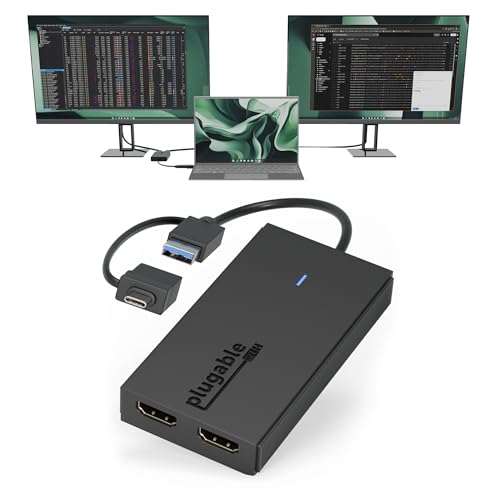
Plugable Dual HDMI Monitor Adapter for M1-M5 & Neo macOS

Anker 7-in-1 USB-C Hub, Dual Monitor USB C Docking Station
Acer 4-in-1 USB C Hub, Type C to Dual HDMI Adapter 4K@60Hz
USB C to Dual HDTV Adapter, Fophmo 4K@60Hz HDTV Splitter

USB C to Dual HDMI Adapter, Dual Monitors Adapter USB C Hub
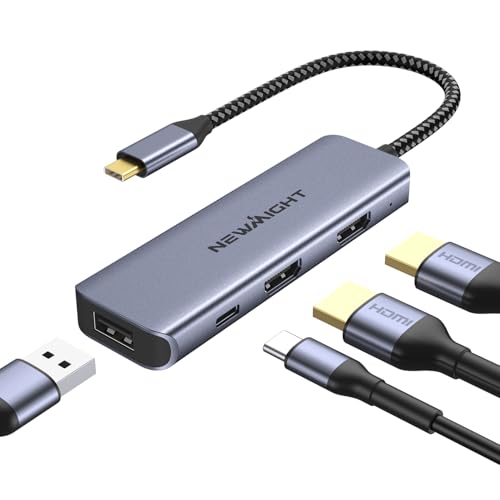
USB C Dual HDMI Adapter for 2 Monitors, Newmight 4-in-1 USB C
Dual VGA Splitter Monitor Cable 1 Male to 2 Female Adapter
More Details On Our Top Picks
Plugable’s adapter fits the kind of desk where one laptop has to feed two displays without a lot of drama. Its support for USB-C, Thunderbolt, and USB 3.0 gives it a broader reach than many single-path adapters, and the 1080p at 60Hz ceiling keeps motion smooth for documents, browser tabs, and video calls.
The trade-off is clear, though: this is not the route for people chasing high-resolution creative work across twin panels. For macOS users, the SMI driver requirement matters, so the setup feels better suited to a steady office station than a move-it-around-every-day bag.
Strong Points
- Works across several host connection types, which helps when your laptop lineup changes.
- Dual 1080p at 60Hz support is a sensible fit for everyday office multitasking.
- Plays well with Mac, Windows, and ChromeOS, so mixed environments stay simpler.
- Good match for compact desks where two external screens matter more than high-end resolution.
Things To Consider
- The 1080p ceiling leaves more demanding visual work outside its sweet spot.
- macOS use depends on the driver path, so setup takes a little more attention.
Feature Snapshot
Who It Suits Best
You benefit most here if your workday lives in spreadsheets, tickets, browser windows, and video meetings on a laptop with mixed port compatibility.
A Better Fit Elsewhere
Acer’s 4-in-1 USB C Hub suits you better if you want stronger 4K output and a lighter, travel-ready footprint for a USB-C-only routine.
This Anker dock leans into desk utility, not just display output. You get dual HDMI, an 85W max power delivery path, one USB-A port rated for 10Gbps, and three USB 2.0 ports, so a keyboard, mouse, storage drive, and charging cable can all live in the same hub.
The honest read is that it suits a permanent workstation better than a bare-minimum portable setup. For laptop owners who keep a monitor pair, peripherals, and charging in one place, the layout is cleaner than the simpler plug-and-play adapters above.
Highlights
- Dual HDMI output helps you run two external screens from one USB-C port.
- 85W max power delivery reduces the need to juggle a separate charger at the desk.
- One 10Gbps USB-A port supports faster data handoffs than plain USB 2.0 ports.
- Three USB 2.0 ports are useful for low-bandwidth accessories that stay connected all day.
- Works well for a tidy home office where cables need a single landing point.
Room For Improvement
- The larger hub format takes more desk real estate than a simple adapter cable.
- Its value drops a bit for travelers who only need a screen link and nothing else.
Details At A Glance
Who Will Love This
You fit this best if your desk setup runs on one laptop, two monitors, and several always-plugged accessories.
Look Elsewhere When
Plugable’s Dual HDMI Monitor Adapter suits you better if you want a lighter option that focuses on display support and skips the extra hub bulk.
Among the more compact options here, Acer’s hub stands out for a very clean display-first layout. Dual HDMI at 4K 60Hz is the headline, and that higher output ceiling gives you more room for detailed work than the 1080p-only Plugable adapter above.
The included 100W power delivery port also matters on a busy desk, since it helps keep the laptop powered while the hub handles the screen load. For travelers who still want serious monitor support in a small shell, this one lands in a useful middle ground.
Upsides
- Dual 4K at 60Hz support is a strong fit for sharper desktop work.
- 100W power delivery helps simplify a two-monitor setup without extra charging clutter.
- USB 3.0 support gives you a useful port for storage or a fast accessory.
- The 4-in-1 layout keeps the package small enough for a laptop bag.
Minor Gripes
- The feature set is narrower than a full docking station like the Anker hub.
- That lighter design means less room for extra peripherals at the desk.
Core Details
Made For
You suit this best if you want higher-resolution dual displays without carrying a larger dock around every day.
Where A Sibling Pick Shines
Anker’s 7-in-1 USB-C Hub makes more sense if your desk needs extra USB ports and charging headroom in one fixed location.
Fophmo earns attention for being explicit about a limitation many people discover too late, especially on MacBook desks. macOS can only mirror the two displays here, while Windows systems with DP Alt Mode support extended output, so the fit depends on your machine rather than the adapter alone.
That honesty makes it easier to match the product to the room you work in. A small office that needs mirrored teaching screens, client demos, or shared content can use it well, while a multiview Mac workflow needs a different path.
Bright Spots
- 4K at 60Hz support keeps the image side of the setup respectable.
- The OS behavior is stated plainly, which reduces setup guesswork.
- Windows extended display support makes it more versatile on the right laptop.
- The added USB-A port helps with a mouse, keyboard, or thumb drive.
Softer Spots
- macOS mirror-only behavior limits dual-screen productivity on MacBooks.
- The adapter only fits a narrower group of machines than the broader USB-C picks above.
- For mixed-use offices, that platform split can make sharing the unit awkward.
Feature Rundown
The Right Fit
You fit this best if your setup revolves around Windows and you need a clear, mirrored or extended dual-display path from USB-C.
Another Choice May Suit
Plugable’s Dual HDMI Monitor Adapter suits Mac users better if you need broader platform compatibility and a more familiar office-style setup.
HCCBM’s hub goes after the straightforward dual-monitor desk, with two HDMI ports at 4K 60Hz front and center. That makes it easy to picture on a laptop stand beside a keyboard and mouse, where you want two screens without a huge dock taking over the setup.
The minimalist listing also suggests a narrower feature story than the Anker dock or the Acer unit. That can be a plus for people who want less clutter, although you’ll want to check that the rest of your gear matches the port layout you already use.
Best Bits
- Dual 4K at 60Hz output gives the screens a clean, modern baseline.
- The hub format stays simple, which helps on smaller desks.
- Good fit for a laptop that already carries the rest of the workload through other accessories.
Areas To Watch
- The source details are sparse, so exact accessory and compatibility planning takes extra care.
- It offers less of the all-in-one convenience you get from a fuller docking station.
Spec Overview
Whose Shelf It Belongs On
You match this best if you want a no-nonsense dual HDMI hub and already have a clear idea of your laptop’s USB-C capability.
Swap It Out When
Anker’s 7-in-1 USB-C Hub suits you better if you need extra data ports and charging support beyond the display link.
Newmight builds flexibility into the output path, which is handy for laptops that move between different workspaces. You can use one HDMI at 4K 60Hz or both at 4K 30Hz, so the adapter gives you a choice between higher single-screen sharpness and broader dual-screen coverage.
That mix works well for hotel desks, shared offices, and home workstations where the same laptop needs to serve more than one purpose. The USB-A port and 100W PD charging round out the package, though the more compact design still keeps it lighter than the Anker dock.
Reasons To Buy
- Single 4K 60Hz or dual 4K 30Hz output gives you useful display flexibility.
- 100W power delivery supports a charging setup that stays tidy.
- USB-A adds a practical slot for a mouse receiver or storage stick.
- Plug-and-play behavior keeps the setup process light for routine use.
Worth Noting
- Dual 4K runs at 30Hz, so motion will feel less fluid than a 60Hz path.
- The broader feature mix still stops short of a full multiport dock.
Feature Card
Built With In Mind
You suit this best if your laptop needs a flexible adapter for mixed workspaces and you can live with dual 4K at 30Hz.
Reach For A Different Pick When
Acer’s 4-in-1 USB C Hub makes more sense if you want dual 4K at 60Hz and a tighter, more resolution-focused display setup.
SAISN’s VGA splitter lives in a different lane from the USB-C adapters above, and that matters. It is built for screen duplication through VGA, so it fits older projectors, older monitors, or a legacy classroom setup more than a modern dual-monitor workstation.
The trade-off is obvious, but not a weakness for the right space: it solves a very specific cable problem with little extra complexity. For a spare meeting room or an aging office tower, that kind of narrow tool can still feel like a sensible little bridge.
Positives
- Very simple signal path for mirrored VGA screens.
- Good match for older display hardware that still gets daily use.
- Small and easy to store in a cable drawer or tech kit.
Small Caveats
- It only suits VGA-based duplication, so it won’t help with USB-C display needs.
- The narrow use case makes it a poor fit for newer laptop desks.
Core Details
Right Fit For
You fit this best if you still work around VGA monitors or projectors and need a simple duplication cable.
Not Your Match When
Plugable’s Dual HDMI Monitor Adapter is the stronger choice for modern laptops that need dual USB-C display support.
How To Choose The Right 2 Monitor Adapters
Match The Adapter To Your Laptop Port
The first decision is the host port, because that sets the ceiling for what the adapter can do. USB-C and Thunderbolt units suit newer laptops, while USB 3.0 and VGA-based options exist for older gear and specialty setups.
That’s why the Plugable and Acer picks make sense for modern desks, while the SAISN cable only belongs in legacy environments. A mismatched port standard creates more frustration than a weaker display spec ever will.
Decide Between Mirrored And Extended Screens
Mirror mode shows the same thing on both displays, which is useful for training, demos, and shared viewing. Extended mode turns the monitors into separate work areas, which is the better fit for spreadsheets, editing timelines, and multitasking.
The Fophmo adapter makes this difference plain because macOS and Windows behave differently with it. That kind of OS-specific behavior matters more than a flashy spec sheet, especially for people moving between home and office machines.
Look Past Resolution Alone
Resolution tells only part of the story. A dual 4K adapter can still feel wrong for your desk if it lacks charging, data ports, or the right driver support for your operating system.
Anker’s hub solves more than one problem at once, while Newmight offers a more balanced blend of charging, USB-A, and display flexibility. Choose the lightest tool that covers the way you actually work, not the one with the longest feature list.
Think About Daily Convenience
The small things show up after a week of use. Cable length, extra ports, and how much desk space the unit takes all influence whether the adapter feels tidy or cluttered.
If your workstation stays fixed, a fuller hub can earn its place. For travel, a smaller adapter that disappears into a laptop bag usually feels better.
Before You Click Around
Common Shopping Slip Ups
A lot of people focus on the number of HDMI ports and miss the OS rules. That mistake shows up fast on MacBooks, where a product may mirror instead of extend, or require a driver path you don’t want to manage.
Another common miss is ignoring charging needs. A dual-monitor adapter without PD, short for power delivery, can leave you juggling a separate charger on the same crowded desk.
Where The Extra Money Goes
Higher-tier models usually add broader port mixes, stronger charging, or more predictable display behavior across different systems. The Anker dock is a good example because it folds HDMI, fast USB-A, USB 2.0, and 85W charging into one unit.
That extra spending is worth it for permanent workstations and mixed peripheral setups. For a simple laptop-to-two-monitor bridge, a lighter adapter often covers the job with less bulk.
Frequently Asked Questions
Do all 2 monitor adapters extend both screens?
No, some only mirror displays, and others only extend on certain operating systems. Fophmo’s adapter is a clear example because macOS mirror behavior differs from Windows support.
Is USB-C always better than VGA?
USB-C is the better fit for modern laptops because it handles current display and dock needs. VGA still makes sense for older monitors or projectors that already live in an established setup.
Do you need a hub or just an adapter?
A hub helps when your desk also needs charging, storage, and accessories. A plain adapter works better when your only goal is to connect two monitors and keep the setup light.
Why do some dual monitor adapters support different refresh rates?
Refresh rate is how many times per second the image updates. Higher rates feel smoother, so 60Hz is usually the cleaner desk choice than 30Hz for movement-heavy work.
Which item here suits travel best?
Acer’s 4-in-1 USB C Hub and Newmight’s 4-in-1 adapter both travel well because they keep the footprint small. Acer leans toward sharper dual-screen output, while Newmight gives you more output flexibility.
Closing Thoughts
A good 2 monitor adapter should match your laptop, your displays, and the way you sit down to work each day. Plugable and Acer fit modern dual-screen desks especially well, Anker serves a fuller workstation, and the VGA splitter only earns its place in older setups. The smartest choice is the one that makes your desk feel quieter, not busier.
