
Three-screen desks can get crowded fast, especially once cables, stands, and height differences start fighting for space. The right mount changes that, giving you a cleaner line of sight and a setup that feels less like a pile of hardware and more like a proper workstation.
This roundup focuses on desk mounts for mixed office, gaming, and home use, with options that suit compact screens, wider displays, and heavier panels. You’ll see where each one fits, where it gives ground, and which pick makes sense for your setup.
The Shortlist At A Glance

VIVO Triple Monitor Mount STAND-V003P

HUANUO Triple Monitor Mount 13-27 Inch

MOUNTUP Triple Monitor Mount 17-32 Inch

PUTORSEN Triple Monitor Mount Up To 49 Inch

ErgoFocus Triple Monitor Mount Max 32 Inch

MOUNTUP Dual Monitor Desk Mount 17-32 Inch
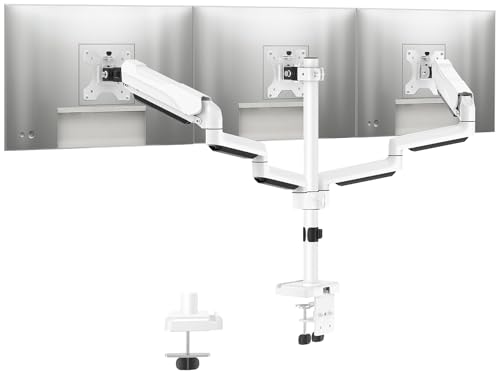
MOUNTUP Triple Monitor Stand Mount Up To 27 Inch
More Details On Our Top Picks
The VIVO STAND-V003P suits desks where a tidy three-screen stack matters more than dramatic articulation. Its free-standing layout keeps the footprint straightforward, which can be easier to place than clamp-based arms on older desks or surfaces with awkward edges.
You’ll get the most from it in a compact office or home workstation where screens stay fairly uniform in size, since the fit caps at 24-inch LCD panels. The honest read is that this style favors stability and simplicity over the kind of broad motion you’d expect from a more elaborate gas-spring arm.
Strong Points
- Free-standing design avoids desk-edge clamp concerns.
- Works well for three small LCD panels.
- Cleaner desktop layout than separate monitor feet.
- Good match for basic office or trading setups.
Things To Consider
- Screen size ceiling stays on the small side.
- Less appealing for ultrawide or heavy monitors.
- Base style uses more surface area than a clamp arm.
Feature Snapshot
Who It Suits Best
Desk users with smaller, matching displays and limited tolerance for complicated mounting gear will get the clearest fit here.
Where A Sibling Pick Shines
HUANUO Triple Monitor Mount 13-27 Inch suits you better once tilt, swivel, and rotation matter more than a simple base layout.
Compared with VIVO’s simpler stand, this HUANUO arm leans harder into adjustability. The tilt, swivel, and rotation range gives you more ways to line up three screens for coding, editing, or a mixed work-and-play desk, and the VESA 75×75 and 100×100 patterns cover the common monitor backs you’ll run into.
The 13 to 27 inch range keeps it in the sweet spot for standard desktop panels, though the 19.8-pound arm limit means you still need to check monitor weight before committing. For most home offices, that’s a fair trade, since the layout rewards people who want fine positioning without moving into heavy-duty territory.
What We Like
- Wide motion range helps with screen alignment.
- Common VESA patterns make compatibility simpler.
- Fits a useful span of mainstream monitor sizes.
- Good fit for desks shared between work and gaming.
Worth Noting
- Weight limit still matters with thicker panels.
- Three-arm setups need careful spacing on smaller desks.
- Setup takes more adjustment than a fixed stand.
Details At A Glance
Who Will Love This
Multi-taskers who want three flexible panels on a standard desk will appreciate the broad adjustment range most.
Swap It Out When
MOUNTUP Triple Monitor Mount 17-32 Inch is the better fit for larger screens and a little more breathing room around each arm.
This MOUNTUP model stretches farther on screen size than the HUANUO pick, and that matters once your desk moves into larger 27 to 32 inch panels. Clamp and grommet mounting give you two installation paths, so a fixed desk edge or a cable pass-through opening can both work.
Each arm supports 4.4 to 19.8 pounds, which keeps the setup grounded in practical desktop territory rather than oversize displays. You’ll likely value it most in a busy workstation where the goal is to reclaim desk depth without giving up three separate viewing zones.
Highlights
- Supports a wider size range than smaller-frame stands.
- Clamp and grommet options add placement flexibility.
- Full-motion design helps with height and angle changes.
- Useful for larger office or trading layouts.
Points To Note
- Larger range means more attention to desk clearance.
- Three-screen alignment still takes careful setup.
- Heavier panels should be matched thoughtfully to the arm limits.
Core Details
The Right Fit
Desk users with mid-size monitors and a real need for motion adjustment will get the most out of this one.
Look Elsewhere When
VIVO Triple Monitor Mount STAND-V003P is easier to place for smaller, lighter screens and simpler furniture.
The PUTORSEN arm steps into a different lane from the earlier picks, because its center position handles monitors up to 49 inches and the side arms go to 35 inches. That makes it the clear heavy-frame option in this group, especially for ultrawide panels or mixed-screen setups where the center display carries more visual weight.
The gas spring design helps the arms move with less strain, and the C-clamp plus grommet base gives you two common desk attachment paths. The trade-off is obvious, though, since larger arms ask more from your desk depth, your monitor weights, and your patience during setup.
Reasons To Buy
- Handles much larger center displays than most entries here.
- Gas spring arms support smoother positioning.
- Two mounting styles suit different desk layouts.
- Good choice for ultrawide or mixed-size rigs.
- Black finish keeps the hardware visually restrained.
Small Caveats
- Large format means desk fit matters a lot.
- Monitor weight checks are worth doing carefully.
- Setup can feel more involved than smaller mounts.
Technical Sheet
Built With In Mind
You’ll suit this best if your desk carries a big center display and two supporting screens for work or gaming.
Another Choice May Suit
MOUNTUP Triple Monitor Mount 17-32 Inch is easier to live with for medium panels and a more standard three-screen layout.
ErgoFocus sits in the middle ground, which is often exactly where three-monitor desks need to land. Its 32-inch ceiling and 17.6-pound per-arm limit make it more accommodating than VIVO’s smaller-frame stand, yet less imposing than the PUTORSEN heavy-duty layout.
That balance works well for people who want decent range without moving into oversized hardware. The triple-arm format can still take planning on a narrow desk, and the honest read is that careful spacing matters more here than with a dual setup like MOUNTUP’s aluminum arm.
Upsides
- Fits a useful range of mainstream screen sizes.
- Per-arm limit works for many everyday monitors.
- Three-arm format keeps all panels aligned together.
- Good middle ground between light and heavy models.
Areas To Watch
- Still demands desk space for three separate displays.
- Larger monitors need careful weight checks.
- Triple mounts usually take more setup time than dual arms.
Feature Rundown
Whose Shelf It Belongs On
General office users and home multitaskers who want a steady three-screen desk without oversized hardware will feel at home here.
Reach For A Different Pick When
PUTORSEN Triple Monitor Mount Up To 49 Inch is the better route for ultrawide-heavy setups and larger center displays.
Not every workspace needs all three arms, and that’s where this MOUNTUP dual mount earns its place in a three-monitor roundup. The die-cast aluminum build gives it a more solid feel on paper than lighter metal arms, while the 17 to 32 inch range keeps it useful for a main-and-side pair or a two-screen desk that might grow later.
Its tilt, swivel, and 360-degree rotation range makes it easy to square screens to your posture, which helps during long stretches at a desk. You may find the tension adjustment worth a little patience at first, but that trade-off is normal on articulated arms and pays back in better positioning.
Best Bits
- Die-cast aluminum frame adds a sturdier feel.
- Full adjustability helps tune screen height and angle.
- Broad size support covers common office panels.
- Works well for dual-screen setups and future expansion.
Room For Improvement
- Only holds two displays, so it’s not a full trio.
- Arm tension may need adjustment after setup.
- Rotation range is handy, but it also demands careful alignment.
At A Glance
Perfect Match For
People building a two-monitor desk, or those planning to expand later, will get the clearest use from this arm.
Skip It When
MOUNTUP Triple Monitor Stand Mount Up To 27 Inch is the better fit once you need all three screens mounted at once.
The white finish gives this MOUNTUP mount a different tone from the black hardware that dominates the rest of the list. On a light desk or in a bright room, it can read cleaner and less industrial, which is useful when you care about the look of the workstation as much as the function.
Its 27-inch ceiling and 4.4 to 19.8 pound arm range keep it in the everyday-monitor lane, so it’s a sensible fit for standard office screens rather than oversized panels. The trade-off is that it won’t chase the larger formats handled by PUTORSEN, but most people aiming for a neat three-screen layout won’t need that extra reach.
Positives
- White finish blends well with lighter desks.
- Three-arm layout keeps a clean visual line.
- Useful size range for common office screens.
- Good choice for tidy, modern workstations.
Softer Spots
- Screen size ceiling is lower than some larger-frame picks.
- White hardware may show dust more visibly.
- Not aimed at oversized or ultrawide displays.
Core Details
Made For
You’ll appreciate this most if your desk leans modern, light-colored, and built around standard-size monitors.
Where Another Pick Suits Better
HUANUO Triple Monitor Mount 13-27 Inch is the safer match if you want a darker finish plus more motion control options.
How To Choose The Right 3 Monitor Stands
Size And Weight Come First
Start with the monitors you already own, not the desk mount you wish you owned. Screen size limits and arm weight limits need to match, because a 27-inch panel with the wrong weight can still be a poor fit even when the diagonal looks acceptable.
VIVO works well for smaller LCD panels, while PUTORSEN steps into much larger screen territory. That difference matters more than the badge on the arm, since your actual panels decide whether the mount stays steady and easy to set up.
Mount Style Changes The Whole Experience
C-clamp mounts grip the desk edge, while grommet mounts use a desk hole, usually a cable pass-through opening. Free-standing bases avoid both, which helps on older furniture, glass-adjacent layouts, or desks where you don’t want pressure on the edge.
Each style has a trade-off. Clamp and grommet options often free more surface area, but a base can be simpler to place and less fussy for renters or temporary workspaces.
Motion Should Match Your Workflow
Tilt changes vertical angle, swivel turns the screen side to side, and rotation shifts between landscape and portrait. Those three motions sound similar until you use them at a desk for coding, spreadsheets, or gaming, then the differences become obvious.
For straight office work, modest adjustment can be enough. For mixed tasks or long hours, the HUANUO and MOUNTUP articulated arms make posture changes easier, though they also need more careful setup.
Desk Space And Screen Count Need Honest Math
Three-monitor hardware eats room faster than most people expect. A compact desk may physically fit the arms but still feel cramped once keyboard, mouse, speakers, and cable slack enter the picture.
That’s why the dual-arm MOUNTUP belongs in this conversation too, even though it only carries two screens. It can be the smarter move for a workstation that doesn’t truly need all three displays mounted at once.
A Quick Reality Check
Wrong Turns To Avoid
Don’t match a mount by screen size alone, because weight limits and VESA pattern support matter just as much. A monitor can fall within the inches range and still miss the fit on the backplate or push the arm harder than intended.
Another common miss is buying a large triple arm for a desk that’s too shallow. The hardware may fit on paper, but the day-to-day layout can become awkward fast.
The Upgrade Payoff
Higher-tier arms usually cost more because they support larger screens, heavier loads, and smoother adjustment hardware like gas springs or reinforced joints. Those parts take more material and more careful construction, which shows up in the price of the mount itself.
The upgrade makes sense when your monitors are large, your desk gets heavy daily use, or you want finer positioning without sagging over time. For a simple home desk with standard panels, a mid-range arm often covers the job without excess hardware.
Frequently Asked Questions
What size monitors work with these stands?
That depends on the model, with options here ranging from smaller 24-inch screens to much larger 49-inch center displays. Check the listed size range before matching your monitors.
Do you need VESA mounting holes?
Yes, these mounts rely on the VESA backplate pattern for attachment. The common 75×75 and 100×100 mm formats appear on several picks in this roundup.
Is a triple arm always better than a dual arm?
No, a triple arm only makes sense when all three screens earn their place on the desk. A dual arm can be the cleaner choice for narrower setups or lighter workstations.
Which mount style is easiest to place?
A free-standing base is usually the least fussy because it avoids clamp pressure and desk holes. Clamp and grommet styles can save more surface area, though they ask for more planning.
Which pick suits larger displays best?
PUTORSEN Triple Monitor Mount Up To 49 Inch is the clear match for larger center screens and wider side panels. The others stay closer to standard desktop sizes.
Final Thoughts
For a three-screen setup, the right stand is less about flash and more about fit, desk depth, and how much motion you actually use. VIVO keeps things simple, HUANUO and MOUNTUP add more articulation, and PUTORSEN opens the door to much larger panels. ErgoFocus sits in the middle, while the MOUNTUP dual arm and white triple mount round out the list for narrower or style-focused workspaces. Match the stand to your monitors first, and the desk will feel easier to live with.
