
You’re looking at mice that sit in the premium lane, where sensor precision, button tuning, and build feel matter more than flashy marketing. That makes sense for competitive gaming, long desk sessions, or work setups where every click feels personal. Some of these lean into ultra-light speed, others into dense customization or classic wired reliability, so the right match depends on how you actually use your desk time.
Quick Look At Our Top 8

Razer Basilisk V3 Pro 35K Wireless Gaming Mouse (Phantom Green)

Razer Basilisk Ultimate HyperSpeed Wireless Gaming Mouse with Dock

Gigabyte GM-M6900 Precision Optical Gaming Mouse

Logitech G PRO X2 SUPERSTRIKE Wireless Gaming Mouse (Black/White)

ATTACK SHARK R5Ultra 8K Carbon Fiber Wireless Gaming Mouse (White)

Corsair Raptor M45-5000 DPI Optical Sensor Gaming Mouse
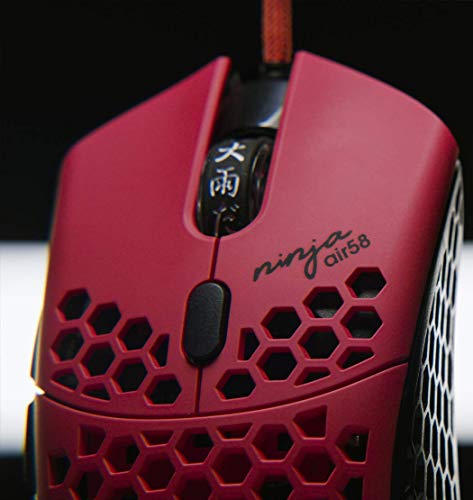
Finalmouse x Ninja Air58, Cherry Blossom Red

WL300 Bluetooth Silent Wireless Mouse, Grey
More Details On Our Top Picks
The Basilisk V3 Pro leans hard into control, with a HyperScroll tilt wheel and 13 customizable inputs that suit busy gaming desks and multitasking workspaces. The 35K DPI optical sensor gives you plenty of headroom for fine cursor movement, while the optical switches in the third generation are built for crisp, low-wobble clicks.
In most setups, that mix feels more useful than flashy, especially for MMO play, editing, or anyone who maps a lot of shortcuts. The trade-off is a more involved shape and feature set, so it’s less appealing for minimalists who want a stripped-down shell.
Strong Points
- HyperScroll tilt wheel adds useful side-to-side control for long app lists or weapon swaps.
- Thirteen programmable inputs make the mouse easier to tailor to your habits.
- The 35K sensor gives you ample sensitivity range for fast or slow cursor work.
- Optical switches help clicks feel more consistent than many mechanical setups.
- The wireless design suits desks that stay tidy without a trailing cable.
Areas To Watch
- The feature stack can feel busy until you map it to your routine.
- The sculpted gaming shape may not suit very small hands.
- RGB lighting adds visual flair, but it also asks more from battery habits.
Feature Rundown
Who It Suits Best
Dedicated PC gamers and shortcut-heavy multitaskers will get the most from this one, especially on a desk that stays put.
A Better Fit Elsewhere
ATTACK SHARK R5Ultra 8K Carbon Fiber Wireless Gaming Mouse suits you better for ultra-light FPS play, since it trims weight far more aggressively.
Compared with the Basilisk V3 Pro, this version keeps the same broad gaming shape but leans on a charging dock for a simpler daily routine. The 20K DPI optical sensor, Chroma RGB lighting, and 11 programmable buttons give you a capable setup without pushing as far into the newest generation’s control ceiling.
For a desk that gets used every day, the dock is the quiet convenience here, because it keeps charging more visible and less fussy. The renewed condition also matters in practice, since you’re stepping into a pre-owned route that can suit cautious spenders who still want a feature-rich shell.
What We Like
- The charging dock makes routine top-ups easier to keep track of.
- Eleven programmable buttons give you enough room for genre shortcuts.
- The 20K sensor still covers precise tracking for most game styles.
- Wireless use keeps the desk clear of cable drag.
- Chroma lighting adds a bit of personality without changing the core layout.
Small Caveats
- Renewed condition may matter more to you than the spec sheet does.
- It does not carry the newer 35K sensor from the Basilisk V3 Pro.
- The dock takes up extra space on crowded desks.
Core Details
Built With In Mind
Desk gamers who like a docked charging setup and plenty of button mapping will find the fit appealing.
Swap It Out When
Logitech G PRO X2 SUPERSTRIKE Wireless Gaming Mouse suits you better if your priority is faster click response and lighter weight.
This one keeps things straightforward, which is refreshing after the button-heavy Razer pair above. A four-way tilt wheel, a strengthened 1.8-meter cable, and software-based DPI tuning give you basic gaming control without forcing you into a crowded shell.
It fits best in a simple desktop setup where wired reliability still matters more than wireless extras. The honest read is that it feels older in spirit, yet that can be useful for someone who just wants direct cursor control and fewer moving parts.
Upsides
- The four-way tilt wheel adds extra scrolling paths for documents and maps.
- Software DPI adjustment lets you tailor sensitivity to your habits.
- The reinforced cable is a practical touch for everyday desk use.
- The gold-plated USB connector points to a more durable plug finish.
Points To Note
- The shape and feature set are more basic than newer premium mice.
- Customization depends on the GIGABYTE FORCE software.
- Wired use suits desks better than travel bags.
Technical Sheet
Whose Shelf It Belongs On
Desktop users who want a wired mouse with adjustable sensitivity and a no-fuss layout will feel at home here.
Reach For A Different Pick When
Corsair Raptor M45 fits you better if you want a more familiar Corsair gaming layout with seven programmable buttons.
The Logitech here shifts the conversation from broad customization to click behavior, and that matters for fast games. Its magnetic analog switches, adjustable click haptics, and under-8K wireless support aim at players who care about response feel as much as raw tracking.
At 61 grams, it stays in the lighter tier without feeling stripped bare, which makes it easier to move quickly across a pad. The trade-off is that its appeal is narrower than the Basilisk V3 Pro, because the feature story centers on precision timing rather than extra buttons.
Highlights
- Rapid-trigger style switching can help clicks feel more immediate.
- Adjustable haptics let you tune how each press feels.
- The 61g frame keeps hand movement light and quick.
- USB-C charging is simple for modern desk setups.
- PC and Mac support broadens compatibility for mixed-device homes.
Worth Noting
- The analog-switch focus may matter more to competitive players than to casual use.
- It offers less button count than the Basilisk line.
- Very light mice can feel less planted to some hands.
Details At A Glance
Best Suited To
Competitive players who want a lighter body and more exact click control will get the most from it.
Where A Sibling Pick Shines
Razer Basilisk V3 Pro 35K Wireless Gaming Mouse suits you better if you want more side buttons and a more versatile scroll wheel.
Weight is the headline here, and at 39g this mouse sits in the very light zone that many FPS players chase. The PAW3950 MAX sensor, 42,000 programmable DPI, and 750 IPS tracking speed show where the money goes, into fast motion handling and fine-grained control.
Compared with the Logitech above, this one pushes even harder toward speed, while the carbon-fiber shell and PTFE feet aim to keep movement smooth. The trade-off is that a mouse this light can feel a bit delicate to people who prefer a fuller, more anchored shape.
Positives
- The 39g frame is built for minimal drag across the pad.
- High DPI range gives you a lot of sensitivity headroom.
- PTFE feet support a smoother glide on suitable surfaces.
- Wired, Bluetooth, and 2.4GHz options make it flexible across setups.
- The carbon-fiber build points toward a more serious material story than plain plastic.
Areas To Watch
- Very light mice can feel less substantial in slower desktop work.
- Three connection modes can add setup choices you’ll need to sort out.
- High-performance specs matter most in fast game play, not everyday browsing.
Feature Snapshot
Right Fit For
FPS mains and ultra-light mouse fans will appreciate the speed-first shape and broad connection options.
Look Elsewhere When
WL300 Bluetooth Silent Wireless Mouse fits you better for office work, since quiet clicks and a sculpted grip matter more there.
The Corsair Raptor M45 keeps the formula direct: a 5000 DPI optical sensor, seven programmable buttons, and on-the-fly DPI changes for quick sensitivity shifts. Unlike the feature-dense Razer models, it focuses on clean, familiar function rather than layered extras.
That makes it a comfortable choice for someone building a straightforward PC setup or replacing an older wired mouse. The adjustable weight system is the part that gives it extra personality, since you can change both heft and balance instead of living with one fixed feel.
Bright Spots
- Seven programmable buttons cover common game and desktop shortcuts.
- On-the-fly DPI switching helps when you move between tasks.
- The weight system lets you tune the feel to your hand.
- The 5000 DPI sensor is plenty for standard gaming control.
Softer Spots
- The design is simpler than newer premium wireless mice.
- Wired use keeps it tied to the desk.
- Performance-focused shoppers may want a newer sensor ceiling.
Core Details
The Right Fit
Wired gaming setups and desk users who want adjustable balance without extra complexity will feel comfortable here.
Another Choice May Suit
Razer Basilisk Ultimate HyperSpeed Wireless Gaming Mouse with Dock is the better fit for you if wireless freedom matters more than a fixed cable.
This Finalmouse leans into the kind of stripped-back, status-forward design that stands apart from the busier Razer and Logitech options. The brand’s focus here is ultralight feel and a handcrafted, artful presentation, so it appeals most to people who care about speed and aesthetic identity together.
The catch is that this is a niche choice rather than a safe all-rounder, and that’s part of its charm. You may find it especially appealing for competitive FPS play, but it makes less sense for someone who wants lots of buttons or a heavier palm-filling body.
Reasons To Buy
- Extremely light build supports fast flicks and quick corrections.
- The minimal shape keeps the focus on movement rather than extras.
- Its visual identity stands apart from more conventional gaming mice.
- It suits players who like a very stripped-down tool.
Minor Gripes
- The wording and branding suggest a niche, style-led identity.
- It gives you fewer productivity-oriented features than the Basilisk line.
- Very light shells are not everyone’s favorite for long work sessions.
Feature Card
Made For
Speed-focused competitive players who value a very light mouse and a distinctive look will connect with this one.
Not Your Match When
Logitech G PRO X2 SUPERSTRIKE Wireless Gaming Mouse suits you better for tuned click feel and a more modern wireless feature set.
After the gamer-first picks above, the WL300 feels like the practical desk companion in the group. Tri-mode connectivity, six buttons, a sculpted grip, and adjustable DPI make it easy to move between laptop, desktop, and travel use without much fuss.
The quiet-click design is the part you notice most in shared spaces, because it keeps the mouse less distracting during calls or late work. The 18-month battery claim is also useful for routine office life, though the real comfort question is whether the sculpted shape fits your hand well over a long day.
Standout Traits
- Tri-mode connectivity supports wired, 2.4G wireless, and Bluetooth use.
- The quiet click design suits libraries, offices, and shared rooms.
- Six buttons give you enough control for daily work tasks.
- Sculpted grip shape can feel more natural in long sessions.
- Broad device compatibility helps with mixed laptop and desktop setups.
Honest Caveats
- The quiet-work focus makes it less exciting for gaming-first shoppers.
- Multi-mode use means a bit more setup choice up front.
- Grip comfort depends on hand size and holding style.
Quick Facts
Who Should Grab It
Office workers, students, and travelers who want a quiet mouse with flexible connection modes will get the most from it.
Where Shoppers Go Wrong
ATTACK SHARK R5Ultra 8K Carbon Fiber Wireless Gaming Mouse suits you better for fast competitive play, where extreme lightness matters more than silence.
How To Choose The Right Most Expensive Mouses
Match The Mouse To The Way You Work Or Play
Shape comes first. A Basilisk-style body gives you thumb buttons and a fuller palm feel, while something like the Finalmouse Air58 leans toward a stripped, speed-first grip. Your daily use matters more than the spec sheet, because a mouse that feels awkward for three hours will annoy you long before its sensor impresses you.
Weight is the next big divider. Ultra-light designs, such as the ATTACK SHARK R5Ultra, shine in fast shooters and low-friction movement, while a heavier or more feature-packed body can feel steadier for editing, browsing, or long office sessions. The right call is the one that matches your hand habits, not the one with the loudest marketing.
Look Closely At Controls And Click Behavior
Button count matters only when you’ll use it. Thirteen inputs on the Basilisk V3 Pro help MMO players, power users, and shortcut-heavy desks, but a simpler mouse can feel cleaner for general work. Extra controls are useful only when they shorten your routine rather than clutter it.
Click feel deserves equal attention. Logitech’s SUPERSTRIKE model focuses on rapid-trigger magnetic analog switches and adjustable haptics, which is a very different promise from the more conventional click action on the Corsair Raptor M45. That difference can matter a lot in competitive play, where a small change in feel can alter how confident your hand feels.
Don’t Ignore Connection Style And Maintenance
Wireless freedom is useful, yet it also changes how you think about charging and desk space. A docked mouse like the Razer Basilisk Ultimate keeps power management visible, while a tri-mode option like the WL300 gives you flexibility across laptop, desktop, and travel bags. Wired mice stay simpler, which still appeals to plenty of people who want fewer setup variables.
Maintenance is fairly practical, too. A shell with dense button clusters or textured grips can collect grime faster than a plain body, so easy-to-wipe surfaces matter more than many shoppers expect. For most setups, a mouse that is comfortable to clean and easy to store ends up feeling more premium than one that merely looks expensive.
What To Weigh Before You Click
Common Shopping Slip Ups
One common mistake is paying for features you won’t use. A crowded mouse with many buttons sounds useful until you realize your workday only needs two thumb shortcuts and a scroll wheel. Another slip-up is picking an ultralight shell for office use, then finding that the airy feel doesn’t suit slower, longer sessions.
Shape confusion causes trouble too. A mouse can have a great sensor and still feel wrong in your hand, especially when the body is tall, narrow, or heavily contoured. The safer move is to match grip style and desk use before you focus on DPI numbers.
Where The Extra Money Goes
Higher-tier mice usually spend their budget on better sensors, more refined switches, lighter materials, and richer customization. That’s why the ATTACK SHARK R5Ultra and Logitech G PRO X2 SUPERSTRIKE sit in a different lane from the Gigabyte or Corsair picks, which are more straightforward in design. You’re paying for motion precision, click tuning, and comfort details that show up over long sessions.
The upgrade makes sense when your mouse is part of daily work or regular gaming. A premium body can save you small irritations all day, from awkward thumb reaches to repeated charging stops. For casual browsing, though, a simpler mouse often covers the same ground with less fuss.
Final Thoughts
Your best match here comes down to use case, not prestige. The Razer Basilisk V3 Pro and Logitech G PRO X2 SUPERSTRIKE make sense for serious gaming control, the WL300 is the calm workhorse, and the Finalmouse Air58 speaks to the speed-obsessed crowd. A mouse this personal should feel right in the hand before it feels impressive on paper. Choose the one that fits your desk rhythm, and the rest gets much easier.
