
Long hours at a desk can turn a keyboard and mouse into the part of your setup that nags the most. The eight picks here focus on split layouts, vertical mice, cushioned wrist support, and quieter typing, which matters when you’re working from home, commuting between offices, or just trying to keep your hands in a more natural position.
You’ll see a mix of full combos and support pieces, because the right answer is not always a bigger keyboard. Some options suit a shared home office, while others fit a compact desk or a travel-heavy routine, and the trade-offs show up in size, connectivity, and how much change you want to make to your setup.
The Shortlist At A Glance

Perixx Periduo-605 Ergonomic Split Keyboard and Vertical Mouse Combo
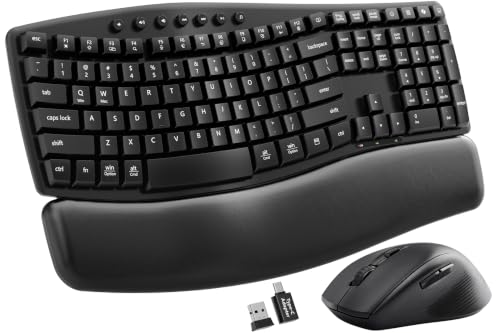
SABLUTE MA41 Ergonomic Wave Keyboard Combo

ProtoArc EKM01 Plus Wireless Ergonomic Keyboard Mouse Combo
Lomiluskr Wireless Ergonomic Keyboard and Mouse Combo Pink
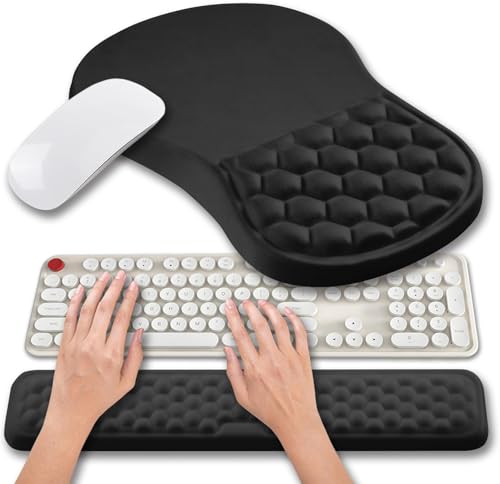
Hokafenle 2 in 1 Ergonomic Mouse Pad Wrist Rest Set

Vaydeer Keyboard Stand and Mouse Pad Set with Wrist Rest

SABLUTE Ergonomic Wireless Keyboard and Mouse Combo 4000mAh Backlit

Logitech Wave Keys and Lift Vertical Mouse Ergonomic Wireless Combo Rose
More Details On Our Top Picks
The split keyboard layout gives your hands more room to sit apart, and the vertical mouse keeps your grip closer to a handshake position. That combination suits long stretches of spreadsheet work, writing, or general office tasks where the same motion repeats all day.
The adjustable palm rest adds a little more support than a bare board, and the low-profile membrane keys should feel gentler than tall, springy keys. The trade-off is plain: membrane boards usually feel softer and quieter, but they do not have the crisp key response some heavy typists prefer.
Strong Points
- Split layout encourages a wider arm position.
- Vertical mouse shape suits relaxed gripping.
- Low-profile keys can feel less tiring over long sessions.
- Adjustable palm support helps steady your wrists at the desk.
Things To Consider
- Membrane keys feel softer, not mechanical.
- Split layouts usually take a little getting used to.
- The combo is desk-first, so it is less handy for frequent travel.
Core Details
Who It Suits Best
Desk workers who want a straightforward ergonomic combo and do not mind spending a day or two adjusting to split typing will get the most from it.
A Better Fit Elsewhere
ProtoArc EKM01 Plus Wireless Ergonomic Keyboard Mouse Combo works better for you if multi-device switching matters more than the simpler layout here.
This one leans into a wave-shaped keyboard, which usually means the key rows are gently curved to follow a more natural hand position. Add the soft leather palm rest and the quiet-key focus, and you get a setup that feels suited to a shared office or a home desk where noise matters.
The dual-system switch is a useful touch for Windows and Mac homes, and the included USB-A plus USB-C adapter setup makes the combo easier to place across different machines. The honest trade-off is that a feature-rich board like this can ask a little more attention during setup, especially in a space where you move between laptops often.
Highlights
- Wave key layout supports a more natural hand path.
- Quiet typing suits shared spaces and video calls.
- Soft leather wrist support adds a cushioned landing spot.
- System switching helps in mixed Windows and Mac setups.
- Adapter support makes cross-device use less awkward.
Worth Noting
- Feature-rich setups take a little more getting sorted.
- Leather-style padding needs routine cleaning to stay tidy.
- Those who prefer a sharp mechanical feel may want something more tactile.
Feature Card
Right Fit For
You’ll appreciate this most in a busy office or home workspace where quiet keys and platform flexibility matter more than a minimalist setup.
Skip It When
Logitech Wave Keys and Lift Vertical Mouse Ergonomic Wireless Combo works better for you if a more polished multi-device experience matters more than the all-in-one utility here.
The strongest part here is flexibility, because the keyboard is full-size and split, while the mouse stays in the ergonomic lane. That combination makes sense for people who jump between a desktop, laptop, and maybe a second machine during the day, since the combo handles up to three devices through Bluetooth or 2.4G.
USB-C rechargeability also helps keep battery swaps out of the routine, which is handy in a home office that already has enough cords. The trade-off is that a more connected setup like this can feel slightly more involved than simpler wireless pairs, especially in a small space where every extra device setting matters.
Bright Spots
- Full-size split keyboard leaves room for a familiar layout.
- Bluetooth and 2.4G support broaden placement options.
- Three-device switching works well for mixed workstations.
- USB-C rechargeability reduces battery management chores.
- Ergonomic mouse keeps the set consistent from keyboard to pointer.
Small Caveats
- More functions usually mean more setup steps.
- Full-size layouts ask for real desk space.
- Rechargeable gear still needs regular charging habits.
Quick Facts
Made For
Hybrid workers and multitaskers who move between several devices in the same day will get the most from this combo.
Look Elsewhere When
Perixx Periduo-605 Ergonomic Split Keyboard and Vertical Mouse Combo suits you better if you want a simpler desk-first setup without multi-device extras.
This combo stands out first for its look, but the split ergonomic shape is what makes it relevant here. A PU wrist rest adds a smooth landing zone, and the colorful 2.4G wireless keyboard approach fits a desk that wants a bit more personality without giving up a more natural typing angle.
For a PC or laptop desk that sits in a bedroom, studio, or shared apartment, that mix of function and color can feel refreshing. The trade-off is practical, though, because lighter finishes and textured surfaces usually ask for a bit more care to keep them looking tidy.
Upsides
- Split ergonomic form supports a more open hand position.
- PU wrist rest offers a smooth support surface.
- Colorful styling gives a desk a softer visual tone.
- Wireless setup keeps cords off a small workstation.
Areas To Watch
- Style-focused finishes may show wear sooner than plain dark gear.
- Color choices can feel more personal than neutral.
- Wireless accessories still need battery or power attention over time.
Details At A Glance
Who Should Grab It
Style-conscious desk users who still want ergonomic basics will get the most value from this one.
Where A Sibling Pick Shines
SABLUTE MA41 Ergonomic Wave Keyboard Combo makes more sense for you if quieter typing and dual-system switching matter more than color.
Not every carpal-tunnel-friendly setup needs a full keyboard swap, and this set makes that point clearly. The gel-style support and the massage bulge are aimed at giving your mouse hand and keyboard hand a softer resting surface, which can suit a work desk that already has a keyboard you like.
That makes it useful for a low-commitment upgrade in an office, studio, or home setup where you want support without replacing everything. The catch is simple: wrist rests stay cleanest when you keep dust and hand oils from building up, so regular wiping matters more than it does with hard plastic gear.
Positives
- Two-piece support helps both keyboard and mouse zones.
- Gel cushioning adds a softer resting feel.
- Massage-style contour gives your wrist a more shaped surface.
- Easy desk upgrade without replacing your whole input setup.
Softer Spots
- Support accessories depend on the keyboard and mouse you already use.
- Soft materials need more routine cleaning.
- Padding feel is personal, so firmness preferences will vary.
Technical Sheet
The Right Fit
Desk users who already have a keyboard they like but want a softer hand position will get the most from this set.
Another Choice May Suit
Vaydeer Keyboard Stand and Mouse Pad Set with Wrist Rest is the better match for you if you want a raised typing angle along with wrist support.
A keyboard stand changes the angle of your hands, and that can feel useful on a desk where your wrists tend to hover too flat. Pair that with the soft memory foam wrist support, and you get a setup that works well for office typing, home admin work, or casual gaming sessions that run longer than planned.
Compared with the Hokafenle set, this one goes a step further by changing posture rather than only adding cushioning. The trade-off is that stands occupy a bit more desk surface, so they fit best where your keyboard zone has room to breathe.
Best Bits
- Raised typing angle can feel easier on the wrists.
- Memory foam support softens contact under the hands.
- Works across office, home, and gaming use.
- Compact set keeps the upgrade focused and contained.
Room For Improvement
- Keyboard stands need a bit more desk depth.
- Foam support should be kept clean and dry.
- Posture changes can take time to feel normal.
At A Glance
Built With In Mind
You’ll get the most from this set in a home office or shared desk where a slightly raised typing angle feels better than a flat surface.
Swap It Out When
Hokafenle 2 In 1 Ergonomic Mouse Pad Wrist Rest Set is a better fit for you if you want softer support without adding a keyboard stand.
The backlit keyboard makes this combo easier to live with in dim rooms, and the rechargeable 4000mAh battery removes a lot of battery swapping from the routine. For night-owl work sessions or a laptop desk with softer lighting, that can make the whole setup feel more settled.
The faux lambskin palm rest adds a cushioned touch, while the wave keys aim to keep typing motion more natural. One thing worth considering is that backlighting and rechargeability are useful, but they also mean you’ll want to keep an eye on power habits instead of treating the set like a plug-and-forget desktop fixture.
Reasons To Buy
- Backlit keys help in dim work areas.
- Rechargeable power keeps battery swaps off your to-do list.
- Wave-shaped keys support a gentler typing path.
- Soft palm rest adds comfort during longer sessions.
- Fits Windows, Mac, and Chrome OS setups.
Minor Gripes
- Lighting and rechargeable power need occasional attention.
- Soft palm materials benefit from simple upkeep.
- Multi-OS support does not remove the learning curve of ergonomic shapes.
Core Details
Whose Shelf It Belongs On
Late-night workers and platform-hopping home office users will get the most from this combo.
Reach For A Different Pick When
ProtoArc EKM01 Plus Wireless Ergonomic Keyboard Mouse Combo makes more sense for you if multi-device switching matters more than lighting.
This combo feels aimed at people who want a more polished ergonomic setup without losing multi-device flexibility. The wave-shaped keyboard and cushioned palm rest work alongside the vertical mouse, so your keyboard and pointer share the same comfort-minded design language.
Being able to connect up to three devices is especially handy for mixed Mac and Windows desks, and that kind of flexibility matters in a home office that juggles a laptop, tablet, or work computer. The trade-off is mostly about cost and desk space, since premium comfort gear rarely stays minimal, but the hand feel can justify the footprint for heavy daily use.
Standout Traits
- Wave keyboard shape supports a relaxed typing arc.
- Vertical mouse keeps the hand in a more neutral hold.
- Cushioned palm rest softens the front edge of the board.
- Three-device pairing suits mixed-device workdays.
- Multi-OS support fits households with different systems.
Points To Note
- Higher-feature combos usually take up more desk planning.
- Premium comfort gear can feel like an investment.
- More device options mean more things to manage up front.
Feature Rundown
Perfect Match For
Heavy desk users who want a polished ergonomic combo for switching across several devices will get the most from this pick.
Another Choice May Suit
ProtoArc EKM01 Plus Wireless Ergonomic Keyboard Mouse Combo is the smarter fit for you if you want multi-device versatility with a less premium-looking setup.
How To Choose The Right Mouse And Keyboards For Carpal Tunnel
Match The Shape To Your Workday
Ergonomic keyboards help most when the layout changes your arm and wrist position, not just the label on the box. Split boards spread the hands apart, wave-shaped boards guide the fingers into a gentler curve, and vertical mice reduce the flat hand twist that comes with standard mice. For someone at a desk eight hours a day, those small changes matter more than flashy extras.
Desk depth matters too. A full-size split keyboard such as the ProtoArc EKM01 Plus needs more room than a wrist rest set like the Hokafenle 2 In 1, so your available surface should guide the choice. Narrow desks, laptop trays, and shared tables usually benefit from simpler support pieces or a compact combo.
Look At Connectivity Before Comfort Extras
Wireless is convenient, but the connection type still shapes daily use. A 2.4G receiver keeps things straightforward, while Bluetooth or multi-device pairing helps when you switch between a work laptop and a home computer. The Logitech Wave Keys and Lift combo makes that flexibility obvious, while simpler sets keep the learning curve lower.
Rechargeable power is useful for frequent users, especially on models such as the SABLUTE combo with a 4000mAh battery. The trade-off is that rechargeable gear asks for a charging habit, so it suits organized desks more than casual, leave-it-anywhere setups. Quiet keys, adapters, and multi-system support are nice additions, yet they should support the core shape, not replace it.
Decide How Much Change You Want
Some people need a full keyboard-and-mouse reset, while others just want softer support under the hands. A wrist rest set can be a sensible first step for home offices that already have a keyboard in place, and it costs you less desk disruption than a full split combo. That’s why the Hokafenle and Vaydeer options matter, even beside the more complete Perixx and Logitech sets.
Higher-end options usually spend more on layered comfort, broader compatibility, and multi-device convenience. You notice that in the Logitech combo’s polished device switching, or the ProtoArc set’s Bluetooth plus 2.4G flexibility. The upgrade makes sense when you live at the desk, but plain support can be the smarter move for occasional typing or smaller workstations.
A Quick Reality Check
Common Shopping Slip Ups
Many desk setups fail because the keyboard shape looks ergonomic but the mouse stays flat and unforgiving. Another common miss is buying a full-size combo for a cramped desk, which makes the ergonomic gain harder to enjoy. Matching the size and shape to your actual work area keeps the upgrade from feeling awkward.
Padding also matters more than people expect. Soft wrist rests feel pleasant at first, but they need routine wiping and they do wear a little more visibly than hard plastic surfaces. For a tidy home office, that trade-off is fine, though a low-maintenance setup may suit you better.
Where The Extra Money Goes
In this category, higher-tier pricing usually reflects better build refinement, broader device support, and more comfortable surface materials. A combo with wave keys, a vertical mouse, and cushioned support tends to cost more than a simple rest pad because it changes more of the typing experience. That difference shows up in daily comfort, especially during long sessions.
The upgrade pays off most for people who work from one desk for long stretches or move between several devices. A premium combo feels easier to live with when it cuts down on constant hand repositioning and lets you switch machines without fuss. For lighter use, a simpler wrist rest or a more basic ergonomic pair can be enough.
Final Thoughts
The right ergonomic setup for carpal tunnel support depends on how much of your desk routine you want to change. A split keyboard and vertical mouse make the biggest shift, while wrist rests and stand sets offer a gentler step into better hand positioning. The Perixx, ProtoArc, and Logitech options stand out for fuller daily use, while Hokafenle and Vaydeer make sense for smaller upgrades. Pick the shape that fits your desk, then let the rest of the features follow naturally.
