
Choosing a keyboard and mouse for a MacBook Pro is less about flashy extras and more about what fits your desk, your travel routine, and your hands. A compact combo can clear space for a laptop stand, while a fuller layout can make long typing sessions feel far less cramped. The picks below cover quiet office use, portable setups, and sturdier desktop-friendly options, so you can match the hardware to the way you actually work.
Quick Look At The Shortlist

Macally Premium Bluetooth Keyboard and Mouse for Mac

Macally Premium Bluetooth Keyboard and Mouse for Mac Space Gray

Logitech MK955 Signature Slim Wireless Keyboard Mouse Combo

OMOTON Ultra-Slim Bluetooth Keyboard and Mouse Combo
SABLUTE Bluetooth Keyboard and Mouse for Mac KMA1 Pro

Logitech MX Keys S Combo Mac Wireless Keyboard and Mouse
Macally Apple Wireless Keyboard and Mouse for Mac Dual Mode Silver
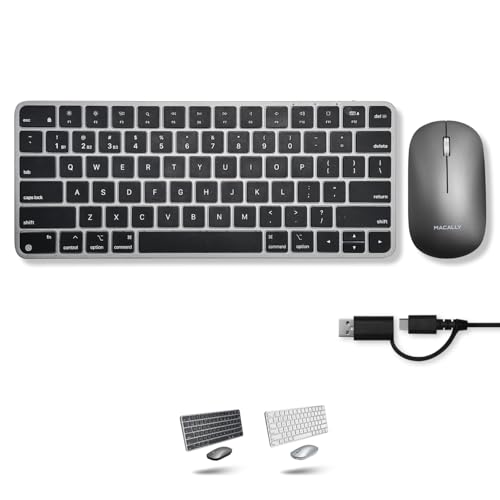
Macally Apple Wireless Keyboard and Mouse for Mac Dual Mode Space Gray
More Details On Our Top Picks
Macally keeps this combo straightforward: a 110-key keyboard, a mouse, and multi-device convenience for people who split time between a MacBook Pro and an iMac. The layout suits a desk that stays busy, and the rechargeable design means you are not constantly swapping batteries.
The honest read is that this is a practical, no-drama setup rather than a luxury showpiece. For daily office work, school projects, or a home workstation that needs one kit for more than one Mac, it makes sense without asking you to overthink it.
Strong Points
- 110 keys give you a fuller layout for spreadsheet work and long document sessions.
- Multi-device pairing helps you move between a MacBook Pro and desktop without a lot of desk clutter.
- Rechargeable power is convenient for regular use and cuts down on battery juggling.
- The Mac-focused pairing makes the desk feel less like a patchwork of mismatched gear.
Things To Consider
- A fuller keyboard takes more desk space than a mini layout.
- The combo leans practical, so style-seekers may want something with more visual polish.
- Owners who move the set often may want a sleeve or pouch for cleaner storage.
Feature Snapshot
Who It Suits Best
Desk-based Mac users who want a fuller keyboard and a simple multi-device setup will get the most from it.
A Better Fit Elsewhere
Logitech MX Keys S Combo Mac Wireless Keyboard and Mouse fits better for heavier typists who want a palm rest and backlit keys.
This space gray version keeps the same Macally formula as the first pick, but the finish gives your desk a more unified look. That matters more than people expect, especially beside a silver MacBook or an iMac on a clean work surface.
You still get the same broad, practical layout, so the trade-off is not about function. Instead, the choice is really about whether you want the combo to blend in or stand out a little less than plain silver gear.
What We Like
- The darker finish pairs neatly with many Space Gray Mac setups.
- The 110-key layout keeps the same comfortable work-friendly structure as the silver version.
- Multi-device use helps you keep one keyboard-and-mouse pair ready for several machines.
- Rechargeable power suits daily desk use and avoids constant battery replacement.
Room For Improvement
- The appeal is mostly cosmetic, so the function story stays close to the first Macally pick.
- As with most fuller combos, it is less portable than a mini travel set.
Core Details
Who Should Grab It
Mac users who care about finish matching as much as desk function will appreciate this version.
Swap It Out When
Macally Premium Bluetooth Keyboard and Mouse for Mac is the more sensible route if you want the same setup in a lighter silver look.
Logitech aims this combo at people who spend long stretches typing and hopping between devices. Quiet keys matter in shared spaces, and support for three devices is handy for a MacBook Pro, a work laptop, and a tablet on the same desk.
The larger-hand focus is worth noticing too, because not every slim set feels roomy once you settle in for a full day. Compared with the two Macally picks, this one leans more toward polished ergonomics and cross-platform flexibility than simple minimalism.
Highlights
- Quiet typing and clicking suit shared offices, libraries, and late-night setups.
- Three-device switching reduces the need to keep re-pairing accessories.
- Bluetooth and multi-OS support make it easier to move across Mac and Windows gear.
- The larger-hand orientation gives the layout a more comfortable, less cramped feel.
- Its slim shape keeps the desk looking tidy without feeling stripped down.
Softer Spots
- The slim profile may not satisfy you if you prefer a heavier, more traditional feel.
- People who want a compact travel set may find this a bit more desk-bound.
Quick Facts
Best Suited To
Frequent typists who split time among several devices will get the most from it.
Another Choice May Suit
Macally Apple Wireless Keyboard and Mouse for Mac Dual Mode Silver is the cleaner match for someone who wants a smaller Mac-first kit.
OMOTON goes straight at the small-desk crowd with an ultra-slim profile that should sit neatly beside a MacBook Pro without taking over the whole surface. The silver finish keeps it visually calm, which helps in a dorm room, a spare room office, or any setup that has to stay tidy.
Because the listing keeps the details brief, this one reads best as a space-saving basic rather than a feature-heavy desktop set. That can be exactly right for light use, although people who want richer extras will probably prefer the Logitech options higher up.
Bright Spots
- Ultra-slim design helps preserve desk space.
- Mac compatibility makes it easier to match a simple Apple-focused setup.
- The silver finish blends well with many Mac accessories.
- Its light footprint suits temporary work areas and shared tables.
Points To Note
- The listing does not spell out much detail, so the value story is mostly about simplicity.
- Ultra-slim gear can feel less substantial than thicker desktop combos.
- People who move between rooms may want to keep the set together so pieces do not wander.
At A Glance
Made For
Students, light office users, and anyone with a tighter work surface will get the most out of this slim layout.
Look Elsewhere When
Logitech MX Keys S Combo Mac Wireless Keyboard and Mouse fits better for long typing sessions and a more cushioned, desktop-first feel.
This SABLUTE combo leans into the extras that matter once your desk gets used after dark. The seven-color backlight is handy in a dim room, and the full-size layout with tilt legs gives the keyboard a more planted feel than the slimmer OMOTON option.
Quiet scissor-switch keys should suit shared spaces, though the trade-off is a setup that feels more feature-rich than minimal. For Mac users who want more visual flexibility and a more complete desktop posture, it makes a strong case.
Positives
- Seven-color backlighting helps keep key legends visible in low light.
- Full-size layout gives you more room for everyday typing and number entry.
- Tilt legs make the typing angle easier to tailor to your desk height.
- Quiet scissor-switch keys suit workspaces where loud typing would feel intrusive.
- Rechargeable design is handy for regular home office use.
Minor Gripes
- The extra features add more visual busyness than a plain black or silver set.
- Full-size hardware takes up more room than a mini travel combo.
- Users who keep a very clean desk may need a little time to settle on a backlight setting they like.
Feature Rundown
Whose Shelf It Belongs On
Night owls, home office users, and people who want a more customizable desktop combo will appreciate it most.
Reach For A Different Pick When
OMOTON Ultra-Slim Bluetooth Keyboard and Mouse Combo is the cleaner choice for a smaller desk and a simpler setup.
Logitech’s MX Keys S Combo reads like the most desk-friendly setup in this list, especially for people who live in long documents, browser tabs, and quick file jumps. The included palm rest, backlit keyboard, and fast-scroll mouse push it well beyond the simpler Macally sets.
USB-C charging and Bluetooth make daily use cleaner, and compatibility with MacBook Pro, MacBook Air, iMac, and iPad broadens its reach. The trade-off is obvious enough, you are paying for comfort and polish rather than a bare-bones accessory pair.
Upsides
- Palm rest support helps long typing sessions feel less tiring.
- Backlit keys are useful in dim rooms and evening work.
- Fast-scroll mouse action suits long pages, big spreadsheets, and media timelines.
- USB-C charging keeps cable management simpler for modern Mac setups.
- Wide Mac and iPad compatibility makes it easy to move the combo around the house or office.
Areas To Watch
- The feature set pushes it toward desk use rather than lightweight travel.
- The added comfort pieces may feel like more hardware than casual users need.
- People with very small desks may want to measure space before committing.
Details At A Glance
The Right Fit
Heavy typists, desk workers, and anyone who wants a more polished Mac workstation will get the strongest match here.
Where A Sibling Pick Shines
Logitech MK955 Signature Slim Wireless Keyboard Mouse Combo is a better call for cross-device users who want a slimmer, lighter-feeling set.
This mini Macally set brings a useful twist with dual-mode operation, so Bluetooth plus wired support gives you more flexibility than the first two Macally combos. That matters on a travel desk, a shared workspace, or a home office where you want one kit to cover more than one connection style.
The smaller footprint helps a MacBook, iPad, or Mac mini setup stay neat, and the silver finish keeps the look light. The trade-off is the usual one for mini hardware, less spread means less room to stretch out during long typing sessions.
Best Bits
- Dual-mode support gives you both wireless and wired options.
- Mini size is easier to tuck into a bag or drawer.
- Multi-device support helps one combo cover several Apple devices.
- Rechargeable design cuts down on the hassle of swapping power cells.
Small Caveats
- The mini format can feel tight during longer typing sessions.
- Smaller gear is easier to misplace, so storage matters more.
- People with larger hands may prefer the roomier Logitech MK955 layout.
Feature Card
Built With In Mind
Frequent travelers, dorm setups, and minimalist Mac users will appreciate the compact footprint.
Consider Something Else When
Macally Premium Bluetooth Keyboard and Mouse for Mac is the better call for a more expansive desktop layout.
This Space Gray version closes the list with the same compact dual-mode idea as the silver model, but the darker finish gives it a slightly more muted desk presence. For a MacBook Pro carried between home and office, that can feel neat and restrained without asking for extra space.
Because it shares the mini, rechargeable, multi-device design, the practical case is nearly the same as Item 7. The difference is mostly visual, so the better choice comes down to whether you prefer a lighter silver look or a deeper gray tone.
Reasons To Buy
- Dual-mode support adds flexibility for wireless and wired use.
- Mini size makes it easy to store, pack, or slide aside after work.
- Multi-device support helps keep one small kit useful across several Apple machines.
- Rechargeable design keeps upkeep simple for routine desk use.
Worth Noting
- The compact shape is handy, but it does not leave much spare room for larger hands.
- Since it shares the same format as Item 7, the choice is mostly about finish.
- People who spend hours typing may prefer the more spacious Logitech or full-size SABLUTE sets.
Core Details
Who Will Love This
Portable Mac users who like a compact, understated finish will feel right at home with it.
A Better Fit Elsewhere
Macally Apple Wireless Keyboard and Mouse for Mac Dual Mode Silver is the cleaner pick if you want the same kit with a brighter finish.
How To Choose The Right Mouse And Keyboards For Macbook Pro
Size, Feel, And Desk Space
Size is the first filter because it changes how your desk works, not just how the combo looks. A mini set like the Macally dual-mode options keeps a laptop stand, notebook, and coffee cup from feeling crowded, while a full-size board like the SABLUTE KMA1 Pro gives your hands more room to move. The trade-off is simple: compact gear travels better, fuller gear tends to feel calmer during long sessions.
Key travel, key shape, and mouse size matter just as much. Scissor-switch keys usually feel lighter and quicker, which helps in shared spaces or fast email work, while a larger-hand layout like the Logitech MK955 makes sense for longer typing blocks. The right feel depends on how many hours you spend at the keyboard and how much you notice wrist or finger fatigue.
Connection Style And Device Switching
Bluetooth keeps the desk cleaner, and it matters when you already have cables for power, storage, or an external display. Dual-mode models add a wired path, which is useful on trips, at a temporary workspace, or anywhere wireless pairing feels less convenient. Multi-device switching is worth paying attention to for anyone who jumps between a MacBook Pro, an iPad, and a desktop in the same day.
That flexibility can save small pockets of time that add up. A combo that remembers more than one machine helps you move from writing to browsing to presentations without rebuilding the setup each time. For many people, that matters more than a fancy finish.
Comfort Features That Earn Their Keep
Comfort extras are not fluff once you use a keyboard for real work. A palm rest can ease the angle of your wrists, backlighting helps in dim rooms, and tilt legs let you change the typing angle to suit your chair height. Those details sound minor, but they shape whether the combo disappears into the background or nags at you by midafternoon.
Mouse behavior matters too, especially for large documents and long web pages. A fast-scroll wheel, a quiet click, or a more substantial body can make daily use feel smoother. If your MacBook Pro is part of a desk setup rather than a grab-and-go routine, these comforts are often worth the extra attention.
Match The Kit To Your Work Pattern
Office-heavy users usually benefit from fuller, quieter, or backlit sets, because those features pay off over time. Travel-focused users tend to be happier with smaller combos that store easily and do not dominate a hotel desk. The sweet spot sits where convenience, comfort, and size all line up with your routine.
It also helps to think about maintenance. Rechargeable accessories reduce battery handling, but they still need charging routines and a safe place to store cables. A tidy setup lasts longer in practice when you keep the hardware matched to the way you move through the day.
What To Weigh Before You Decide
Common Shopping Slip Ups
One common miss is choosing for appearance first and desk fit second. A slim combo may look neat beside a MacBook Pro, then feel too tight once you add a monitor, a stand, and a trackpad-sized mouse pad.
Another easy mistake is overlooking connection needs. A Bluetooth-only set works well for many desks, but a wired option can feel much less fussy in shared spaces or during travel.
What The Higher Tier Buys
Higher-tier combos usually spend more money on comfort touches like palm rests, backlighting, better scroll behavior, and smoother switching between devices. Those parts do not just sound nicer, they make long typing sessions and heavier desktop use feel less tiring.
That upgrade makes the most sense for full-time desk work, shared office environments, or anyone who spends hours at the keyboard. Casual use can live quite happily with a simpler set, especially when portability matters more than extras.
Final Thoughts
Your best match depends on how you use your MacBook Pro day to day. The Logitech MX Keys S Combo Mac Wireless Keyboard and Mouse makes the strongest case for long desk sessions, while the Macally dual-mode mini sets fit better for travel or smaller setups. The Macally 110-key options sit in the middle and make sense when you want a fuller layout without moving into premium territory. Choose the one that fits your space first, and the rest tends to fall into place.
