
You want steadier control, less hand slide, and a setup that feels calmer during long sessions. Mouse grips solve that by adding texture or extra surface contact without forcing you into a new mouse shape.
The right pick depends on your mouse model, how much coverage you want, and whether you prefer a thin tape feel or a more sculpted patch. Some options suit fast-paced gaming, while others make more sense for daily work, travel, or shared desks.
Quick Look At The Shortlist

Lizard Skins DSP Computer Mouse Grip for PC Gaming 0.5mm Crimson Red

HOTLINEGAMES 2.0 Plus Anti Slip Mouse Grip Tape for Razer Viper V4 Pro V3 Pro

TALONGAMES Mouse Anti Slip Grip Tape for Logitech G PRO X2 SUPERSTRIKE PRO X Superlight

Pulsar Gaming Gears SUPERGRIP Pre-Cut Keyboard Griptape 0.5mm

JINGDU Nonslip Skin for Logitech G PRO X Superlight Wireless Mouse White

Pwnage Ultra Grip Pre-Cut Anti-Slip Grip Tape 0.5mm

Gaming Mouse Three Dimensional Grips Auxiliary Patch Black
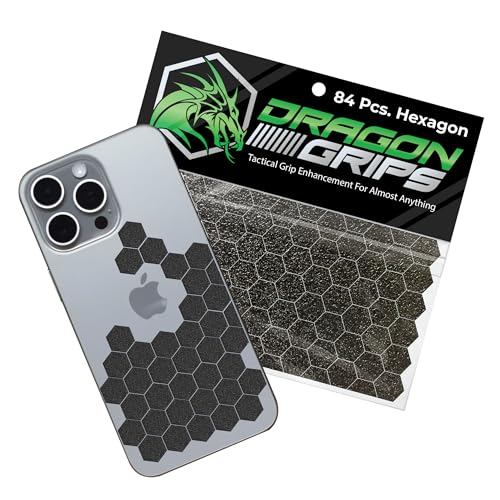
Dragon Grips Black Rubber Grip Tape 84pc Hexagon Stickers
More Details On Our Top Picks
Lizard Skins keeps the formula straightforward, a thin 0.5mm grip layer that stays out of the way while still adding traction. That makes sense for competitive play and for desk setups where you want more control without bulk.
The cut-to-fit format means you can shape it around your mouse instead of adapting your hand to the tape. Crimson Red also gives the setup a clear accent, though the custom trimming step takes a little patience.
What We Like
- 0.5mm thickness keeps the mouse feel close to stock.
- Cut-to-fit design suits odd curves and compact shells.
- Extra texture helps steady your grip during fast flicks.
- Color choice adds a clean visual accent.
Areas To Watch
- Custom trimming takes care, especially around tight edges.
- Best results depend on careful placement and clean surfaces.
Feature Snapshot
Who It Suits Best
PC gamers who want a slim grip layer and are comfortable trimming pieces for a custom fit will get the most from this one.
A Better Fit Elsewhere
JINGDU Nonslip Skin for Logitech G PRO X Superlight Wireless Mouse White suits you better when you want more mouse-specific coverage with a cleaner skin-style wrap.
This HOTLINEGAMES tape leans into texture, so it suits Razer Viper owners who want more bite on the side panels. The diamond pattern gives your fingers more purchase, which matters on long sessions or in matches where your grip starts to soften.
The material also aims to handle moisture better than smoother sheets, and that helps the mouse feel more settled during warm conditions. The trade-off is simple, stronger texture usually means a more noticeable change under your hand, so subtle feel seekers may prefer the thinner Lizard Skins option.
Highlights
- Diamond texture gives the fingers a firmer anchor.
- Designed for Razer Viper V4 Pro and V3 Pro models.
- Moisture handling helps during longer, hotter sessions.
- Cut-to-fit format keeps the shape adaptable.
Worth Noting
- Texture feels more pronounced than very plain tape.
- Careful alignment matters for a tidy finish.
- Best suited to the listed Razer shapes, not every mouse.
Core Details
Who Will Love This
Razer Viper users who want a more tactile side grip for gaming sessions and sweaty-hand management will appreciate the focus here.
Where A Sibling Pick Shines
TALONGAMES Mouse Anti Slip Grip Tape for Logitech G PRO X2 SUPERSTRIKE PRO X Superlight fits better for Logitech owners who need broad model coverage instead of Viper-specific sizing.
TALONGAMES takes the compatibility-first route, which helps you quickly match the right sheet to a Logitech shell without guessing. For people who bounce between a desktop, a lap setup, or tournament-style desk gear, that clarity saves time and frustration.
The 0.5mm profile keeps the grip feeling light, and that matters when you want traction without turning the mouse into a bulky object. The honest trade-off is that lighter tape can feel less sculpted than raised patch systems like the Hokeyio option later in this list.
Best Bits
- Thin 0.5mm build stays close to the mouse body.
- Multiple Logitech compatibility notes help with model matching.
- Palm sweat absorption support suits long sessions.
- Cut-to-fit layout keeps installation flexible.
Small Caveats
- Requires careful alignment for a neat finish.
- Thin material offers less raised structure than patch-style grips.
- Best fit depends on choosing the correct mouse model.
Details At A Glance
The Right Fit
Logitech mouse owners who want a slim, adaptable grip and already know their exact model will get the cleanest fit from this one.
Another Choice May Suit
Pulsar Gaming Gears SUPERGRIP Pre-Cut Keyboard Griptape 0.5mm suits you better when your gear list includes keyboard keycaps alongside mouse comfort tweaks.
Pulsar’s SUPERGRIP stands out because it extends the grip idea beyond just mice and into keyboards, which is handy for a desk setup that sees a lot of fast hand movement. The pre-laminated format means the pieces arrive ready for placement, so the experience feels less like a craft project and more like a tidy accessory swap.
That makes it useful for gaming stations and also for shared desks where slippery keycaps or a smooth wrist contact point become annoying over time. The compromise is focus, it’s more specialized than a plain mouse-only strip, so minimalists may find the broader coverage unnecessary.
Plus Points
- Pre-cut pieces reduce trimming work.
- Ultra-thin 0.5mm profile keeps surfaces feeling natural.
- Works beyond mice, which helps mixed setups.
- Pre-laminated layout makes placement more orderly.
Points To Note
- Keyboard-first design may be more than you need for simple mouse grip use.
- Installation still depends on clean, careful placement.
Feature Rundown
Built With In Mind
Desk setups that mix gaming mice and keyboards, especially for people who like neat, ready-made pieces, are the best match here.
Look Elsewhere When
HOTLINEGAMES 2.0 Plus Anti Slip Mouse Grip Tape for Razer Viper V4 Pro V3 Pro makes more sense for a mouse-only setup that needs a stronger textured hold.
JINGDU takes a more skin-like approach, so the mouse keeps a clean, wrapped look instead of a purely taped-on feel. That matters for Superlight owners who want their gear to look tidy on a desk as well as feel steadier in hand.
The white finish gives it a lighter visual presence, though it also asks a bit more from upkeep than darker grips in a busy workspace. For everyday use, the protective cover style makes sense, especially for people who prefer coverage over isolated grip zones.
Reasons To Buy
- Skin-style coverage gives the mouse a neat, unified look.
- Compatibility is tailored to the Logitech G PRO X Superlight Wireless Mouse.
- Works well for people who prefer more surface coverage.
- White color keeps the profile visually light on a desk.
Minor Gripes
- White surfaces may show wear or grime sooner in heavy use.
- Coverage style may feel more involved than simple strip tape.
- Best fit depends on owning the listed Logitech model.
Core Details
Whose Shelf It Belongs On
Superlight owners who want a cleaner wraparound look and do not mind a more complete coverage style will get the most value here.
Swap It Out When
Lizard Skins DSP Computer Mouse Grip for PC Gaming 0.5mm Crimson Red suits you better when you want a thinner, more adjustable grip layer instead of a skin-style wrap.
Pwnage is the flexible one in this group, because the grip tape is positioned for phones, keyboards, mice, and gamepads instead of a single mouse family. That versatility helps you keep one texture language across a mixed desk, which is handy in shared spaces or travel kits.
The pre-cut layout also means you can peel and place without tool fuss, and the 0.5mm profile keeps the added thickness restrained. The trade-off is obvious, broad compatibility usually comes with less model-specific shaping, so the fit feels less tailored than Lizard Skins or TALONGAMES.
Positives
- Pre-cut sections make setup quicker.
- Universal scope works across several gear types.
- 0.5mm thickness keeps the feel slim.
- Sweat-absorbing texture helps the grip stay steadier.
Softer Spots
- Universal fit means less model-specific shaping.
- Some setups may need more planning to place the sections neatly.
At A Glance
Made For
People with mixed gear, especially desk setups that include a mouse plus other handheld devices, will get the most out of this broad format.
Reach For A Different Pick When
JINGDU Nonslip Skin for Logitech G PRO X Superlight Wireless Mouse White fits better for anyone who wants a more mouse-specific coverage pattern.
Hokeyio goes a different direction with three-dimensional grip patches, so the hand contact feels more shaped than flat tape. That can help in esports-style use where you want the palm and fingers to feel supported rather than just lightly textured.
Because the patches are meant to be positioned where your hand needs them, you get more freedom to tailor the layout to palm size. The trade-off is that this approach needs more thought during placement, and it’s less discreet than the slim-sheet options above it.
Standout Traits
- Raised patches give a more sculpted contact feel.
- Adjustable placement supports different hand sizes.
- Self-adhesive format keeps installation simple.
- Optional side modules help build out extra support.
Room For Improvement
- More visible than flat grip tape.
- Layout planning takes extra attention.
- Extra pieces may feel unnecessary for simple use.
Feature Card
Perfect Match For
Esports-minded mouse users who want a more shaped, hands-on contact point and do not mind a bolder look will like this style.
Consider Something Else When
TALONGAMES Mouse Anti Slip Grip Tape for Logitech G PRO X2 SUPERSTRIKE PRO X Superlight suits you better when you want a slimmer, lower-profile grip approach.
Dragon Grips closes the list with a different kind of flexibility, because the 84-piece hexagon set can cover a lot of surfaces beyond a mouse. That makes it useful for people who like to keep one grip texture across controllers, cases, and desk accessories too.
The rubber feel and pre-cut shape should make installation straightforward, although the small sticker format means layout planning matters more than with a single-sheet grip. A bit like building with tiles, the result depends on how neatly you place each piece, so it rewards patient setup.
Bright Spots
- 84 pieces give you plenty of placement options.
- Hexagon shape works across many different surfaces.
- Rubber texture adds grip without a bulky feel.
- Waterproof material suits gear that sees frequent handling.
Honest Caveats
- Sticker-based layout takes patience to arrange cleanly.
- Best for multi-surface use rather than a pure mouse-only fix.
- Small pieces can make alignment a little time consuming.
Spec Overview
Who Should Grab It
People who want a large, modular grip supply for more than one device will get the most use from this set.
Where Shoppers Go Wrong
Pwnage Ultra Grip Pre-Cut Anti-Slip Grip Tape 0.5mm suits you better when you want one simpler sheet instead of many small stickers.
How To Choose The Right Mouse Grips
Match The Grip Style To Your Hand
Thin tape works best for people who want the mouse to feel almost unchanged, just steadier. Raised patches or skin-style coverage suit hands that want more contact area and a clearer boundary under the fingers. The main trade-off is feel versus support, and that choice matters most during long gaming sessions or all-day desk work.
Mouse shape matters too. A compact wireless shell often pairs well with slim, cut-to-fit strips, while broader grips can make more sense on mice that already have room for side panels. The right texture should help your hand settle, not fight the shell.
Check Compatibility Before Anything Else
Model-specific grips are easier to live with because they follow the mouse more closely. Universal pieces like Pwnage and Dragon Grips give you more freedom, but the fit may take extra thought and more careful placement.
That difference shows up fast in daily use. A precise match saves trimming time and usually looks cleaner, while a broad-format set gives you more flexibility across devices and future gear.
Think About Texture, Thickness, And Maintenance
Texture is what you feel first. Diamond patterns, rubberized stickers, and skin-like covers each create a different amount of bite, so your hand will notice the change immediately during fast swipes or long work sessions. Thin 0.5mm options stay close to stock, while sculpted patches add more presence.
Maintenance matters more than many shoppers expect. Darker grips tend to look calmer on a busy desk, while lighter finishes may need more attention over time. Clean installation surfaces help every style hold better and keep the edges tidy.
Choose By Use Pattern, Not Hype
Competitive players usually care most about consistency, especially during long sessions where dry hands or warm weather change the feel of the mouse. Office users and hybrid setups often benefit from a cleaner, lighter grip that does not call attention to itself.
The honest read is that no single grip style works for every desk. The best choice is the one that matches your mouse model, your hand size, and how much texture you actually want under pressure.
Things Worth Knowing First
Mistakes Worth Dodging
One common miss is choosing a grip by looks alone and ignoring fit. A mouse-specific sheet usually lands cleaner than a broad universal set, and that saves you from awkward trimming or edge lift.
Another slip is overestimating texture needs. Very grippy surfaces can feel great in short bursts, then start to feel busy during longer workdays, so your own hand pressure should guide the choice.
What The Higher Tier Buys
More expensive grip sets usually pay for tighter model coverage, cleaner cuts, or more specialized surface design. That extra planning shows up in the fit and often in the way the grip settles after placement.
Upgrading makes sense when your mouse is a daily tool and you want less fiddling, better texture control, or a more finished look on the desk. For occasional use, a simpler sheet often does enough.
Closing Thoughts
Your best mouse grip depends on how much texture you want and how closely the set matches your mouse. Lizard Skins and TALONGAMES make strong sense for thin, model-focused control, while HOTLINEGAMES and Hokeyio lean harder into texture and hand support. Pwnage and Dragon Grips are easier to spread across mixed gear, and JINGDU gives you a cleaner skin-style approach for the Logitech Superlight. Choose the one that fits your hand, your mouse, and the way you actually sit at your desk.
