
Mouse jigglers are a niche fix, but they solve a very real desk problem: keeping a computer active during long calls, remote shifts, or stretches of low-intensity work. The right one depends on how much control you want, whether you prefer a USB style or a trackpad-style option, and how visible you want the device to be on your desk. This roundup keeps the focus on fit, not hype, so you can sort the simple models from the more feature-rich ones.
Quick Look At Our Shortlist

EAXBUX Ultra-Slim Mouse Jiggler

Trackpad Mouse Jiggler Device, Cute Cat Figurine

Vaydeer M4 Utra Mouse Mover with APP
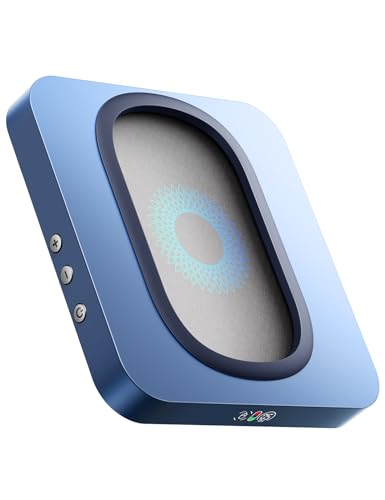
EAXBUX Undetectable Mouse Jiggler, Enlarged Turntable

Meatanty Mouse Mover Undetectable

Yonktoo Mouse Jiggler Undetectable, Ultra Slim

TECH8 USA Undetectable Mouse Mover Jiggler

AUEDROT Mouse Jiggler Undetectable, USB Mouse Mover
More Details On Our Top Picks
The slim body makes this EAXBUX model easy to tuck beside a laptop stand or external mouse pad. Adjustable spinning time gives you more control than the bare-bones options, which helps during long remote sessions or slower office days.
The honest trade-off is that any spinning-style mover needs a little desk space and a level surface. For you, that usually matters most in a shared work area where keeping things simple is better than adding extra steps.
What We Like
- Ultra-thin build keeps the footprint low.
- Adjustable timing helps match your work rhythm.
- Random movement is less repetitive than fixed motion.
- Works well for desks that stay set up all day.
Things To Consider
- Spinning-style designs need a flat, steady surface.
- Random motion may feel less predictable than simpler movers.
- More moving parts usually mean a bit more care during storage.
Feature Card
Who It Suits Best
You get the most from this pick when you want a thin, simple mover for a home office or shared desk.
A Better Fit Elsewhere
Vaydeer M4 Utra Mouse Mover with APP suits you better when remote control and timer scheduling matter more than a slim profile.
This one stands apart because it skips USB cables and leans into a touchpad-style layout with a cute cat figurine look. For a tidy desk, that matters as much as the motion itself, especially in a room where every cable seems to spread like ivy.
The cordless design keeps the setup clean, but the compatibility note deserves attention, since the listing says it doesn’t work on Dell. That makes it a strong fit for certain laptop owners, though not a safe default for every setup.
Bright Spots
- Cordless design keeps the desk uncluttered.
- Touchpad-style use avoids a USB connection.
- Cat figurine styling adds personality without taking much room.
- Quiet operation suits open offices and home workspaces.
Small Caveats
- Compatibility limits make careful matching important.
- Touchpad-style use may feel less familiar than a USB mover.
- Decorative styling won’t suit every desk.
Core Details
Built With In Mind
This fits laptop users who want a cleaner desk and don’t mind checking compatibility first.
Where A Sibling Pick Shines
AUEDROT Mouse Jiggler Undetectable Mouse Jiggers is the safer route for anyone who wants a straightforward USB plug-in with two motion modes.
The app control and remote function make this Vaydeer model feel more deliberate than the simpler movers above. For you, that means less desk fiddling and more set-it-and-get-back-to-work convenience during long computer sessions.
The dark purple finish also gives it a little more personality than plain black units, which helps in a setup where appearance matters. Still, feature-heavy gear tends to suit people who actually use the extras, not folks who just want a basic mover with no learning curve.
Upsides
- App and remote control add convenient handling.
- Timer function helps you plan longer work blocks.
- Driver-free setup reduces installation friction.
- Dark purple finish stands out from standard desk gear.
Worth Noting
- Extra controls add complexity you may not need.
- More features usually mean more app or remote dependence.
- Anyone wanting a bare-simple mover may prefer a plainer option.
Details At A Glance
Right Fit For
This suits you best when remote control and timer features matter more than a stripped-down design.
Another Choice May Suit
EAXBUX Ultra-Slim Mouse Jiggler is the cleaner match for anyone who wants a simpler, lower-profile mover on the desk.
The enlarged turntable gives this EAXBUX unit a more substantial feel than the ultra-slim model earlier in the list. That kind of design can matter on a workstation where you want stable placement and a little more visual feedback from the LED display.
Its adjustable interval approach is useful for desk routines that change through the day, from long meetings to stretches of focused work. The trade-off is that a larger surface footprint can be less comfortable on compact desks, so it suits roomier setups better.
Reasons To Buy
- Enlarged turntable offers a more substantial desktop presence.
- Adjustable interval supports different work rhythms.
- LED display makes the status easier to check at a glance.
- Random movement keeps the action from feeling repetitive.
Areas To Watch
- Larger footprint may crowd small desks.
- More visual hardware may not suit a minimal setup.
- Turntable designs usually need a stable surface and a bit of cleaning around the edges.
Feature Rundown
The Right Fit
You should look here when your desk has room for a larger mover and you want more control over timing.
Swap It Out When
Yonktoo Mouse Jiggler Undetectable, Ultra Slim is the better match for tighter desks where a lower-profile body matters more.
Meatanty keeps the pitch straightforward, with super-silent operation and random movement aimed at everyday desk use. That makes it a sensible middle ground for home offices, especially when you want something that fades into the background.
The adjustable interval timer gives it a little more reach than the most basic plug-in models, but it still stays easy to understand. The honest read is that this is the kind of pick that earns its keep by not asking much from you.
Positives
- Super-silent operation suits quiet work areas.
- Random movement adds variety to the motion pattern.
- Adjustable interval helps match different desk routines.
- Works well for office, home, and remote setups.
- Simple enough for low-maintenance daily use.
Room For Improvement
- Plain styling may feel a little utilitarian.
- Fewer extras than the app-controlled Vaydeer model.
- Random motion may be more than some people need.
Spec Overview
Whose Shelf It Belongs On
This is a good match for remote workers and home office setups that need a simple, quiet mover.
Look Elsewhere When
Vaydeer M4 Utra Mouse Mover with APP is a better fit for you if app control and a remote matter more than a plain setup.
Yonktoo goes after the low-profile crowd, and that matters in a setup where space is tight or the desktop already feels busy. No software needed keeps the setup light, which is a plus for anyone who just wants a simple plug-in mover.
The realistic movement is the part that separates it from the most stripped-down units, though the ultra-slim shape is the bigger everyday benefit. For a small home office or a shared table, it slips into the background more easily than chunkier designs.
Highlights
- Ultra-slim body fits crowded desks.
- No software needed keeps setup simple.
- Realistic movement gives it a more natural feel.
- Black finish blends into most workspaces.
Things To Consider
- Plain feature set may feel basic beside app-controlled models.
- Compact size can make it easier to misplace during storage.
- Best for straightforward use, not feature-heavy control.
At A Glance
Made For
You get the best fit here when your desk space is tight and you want a clean, easy mover.
Where Shoppers Go Wrong
EAXBUX Undetectable Mouse Jiggler, Enlarged Turntable is the smarter choice for anyone who wants a bigger surface and more visible controls.
TECH8 USA leans hard into visual flair, with an ambient glow ring and a hologram disc that make it look less like a desk tool and more like a conversation piece. In a personal office, that can be a nice fit, though it’s obviously less subtle than the plain black movers elsewhere in this list.
The no-software setup keeps the experience simple, which helps balance the bolder styling. One thing worth considering is the shipping note in the source data, since the listing may not suit every delivery location, so it’s a pick that asks for a closer look before you settle on it.
Best Bits
- Glow ring and hologram disc create a distinctive look.
- No software keeps the setup straightforward.
- Random movement supports everyday desk use.
- Stands out more than the plainer USB options.
Softer Spots
- Bold styling won’t suit every workspace.
- Shipping limitations can affect match and convenience.
- Looks matter here more than on the more utilitarian picks.
Quick Facts
Who Will Love This
This is the pick for you when style matters almost as much as the function on a personal desk.
Consider Something Else When
Meatanty Mouse Mover Undetectable makes more sense for anyone who wants a quieter, less eye-catching option for daily work.
AUEDROT keeps things very direct, with a USB plug-in layout, a switch button, and two jiggle modes. That mix makes it easy to understand for anyone who wants a practical desk tool without extra app steps or decorative flourishes.
The slight 1 to 2 pixel movement mode is especially useful when you want the pointer to stay subtle, while the random mode adds more motion variety. For a standard office laptop or home setup, that flexibility is the main reason this one earns attention.
Positives
- Two motion modes give you more control over pointer behavior.
- Slight movement stays subtle during normal mouse use.
- USB plug-in design keeps the setup familiar.
- Switch button makes day-to-day handling straightforward.
Minor Gripes
- Plain styling may feel less polished than premium-looking options.
- USB-only design adds a cable to the desk.
- Mode switching is useful, but not as flexible as app control.
Feature Snapshot
The Right Fit
This suits you best when you want a straightforward USB mover with easy mode switching.
Where A Sibling Pick Shines
Trackpad Mouse Jiggler Device, Cute Cat Figurine is the better fit for a tidy laptop setup that avoids a USB cable altogether.
How To Choose The Right Mouse Jigglers
Match The Motion To Your Routine
Motion style is the first thing to sort out, because not every desk day looks the same. Random movement suits people who want less repetitive pointer activity, while slight back-and-forth motion works better on a laptop you still use alongside the jiggler. In a busy home office, the simpler pattern usually asks for less attention.
Timing control matters almost as much. Adjustable intervals and timer functions help when your work stretches across meetings, calls, and quiet stretches at the keyboard. You get more useful control from models like the Vaydeer M4 Utra Mouse Mover with APP than from basic plug-in units.
Think About Setup Style And Desk Space
USB plug-in models are the easiest fit for most standard workstations. They keep setup simple, but the cable can be a small nuisance on a cramped desk. Ultra-slim bodies, like the EAXBUX Ultra-Slim Mouse Jiggler and Yonktoo Mouse Jiggler Undetectable, help a lot in tight spaces.
Trackpad-style units make more sense for a cleaner-looking laptop area, though compatibility deserves close attention. Decorative picks, such as TECH8 USA Undetectable Mouse Mover Jiggler, add personality, but they work best when you want the tool to feel less anonymous on the desk.
Choose The Right Level Of Control
Basic movers fit you best when all you want is a simple keep-awake tool. Once you add an app, remote, or timer, the product shifts toward users who like more control and are fine with a little extra setup. That’s where the upgrade usually earns its keep.
For remote work, a silent unit with a clear switch or timer can be worth more than a flashy body. In most home offices, ease of use beats novelty after the first week.
Check Compatibility Before You Commit
Compatibility is easy to overlook, and that’s where trouble starts. The trackpad-style Work-Life Balance Corporation model specifically notes a Dell limitation, so a quick match against your laptop or desktop matters. A small pause here saves a lot of annoyance later.
Also look at how you work alongside the device. Some people need the pointer to stay nearly still so they can keep using a real mouse, while others only need background motion during calls or idle time. The right choice matches your habits instead of forcing you to change them.
Things Worth Knowing First
Common Shopping Slip Ups
A lot of mistakes start with ignoring the motion style and the desk layout. A large turntable can be awkward on a narrow surface, and a cable-free model may still have compatibility limits that make it a poor match for your machine.
Another common miss is buying too much control for a simple need. A remote and app sound useful, but they can feel like extra steps when you only want a quiet mover that disappears into the workday.
What The Higher Tier Buys
More expensive models usually spend the extra cost on control, finish, and convenience. App support, remote handling, timer functions, and more distinctive design elements all raise the feature count, which is why the Vaydeer M4 Utra Mouse Mover with APP sits above the more basic choices.
That upgrade makes sense when your desk time is long and your routine changes a lot. For simple day-to-day keeping-awake duty, a plain USB mover often covers the need without extra complexity.
Closing Thoughts
You’ve got several workable ways to keep a computer active, and the right choice depends on how much control, style, and desk space matter to you. For a simple all-around pick, EAXBUX Ultra-Slim Mouse Jiggler is easy to live with, while Vaydeer M4 Utra Mouse Mover with APP fits a more hands-off routine. If you want something cleaner or more decorative, the trackpad-style and hologram options bring a different feel. Match the device to your desk habits, and the rest gets much easier.
