
Cad work asks a lot from your mouse, especially during long modeling sessions, tight viewport control, and repetitive clicks that can wear on your hand. You need comfort, accurate tracking, and a layout that fits the way you work, not just a generic shape that looks fine on a product page.
The picks below cover vertical ergonomics, multi-device convenience, CAD-specific designs, a trackball option, and a gaming mouse that can still serve well for fast cursor work. You’ll also see where each one fits best, so you can choose based on your desk, your software, and how many hours your hand spends on the mouse each day.
Quick Look At Our Top 8

Uineer Vertical Ergonomic Mouse 3-Device

Logitech MX Master 3S Bluetooth Wireless Mouse – Graphite

3Dconnexion CadMouse Compact Wireless
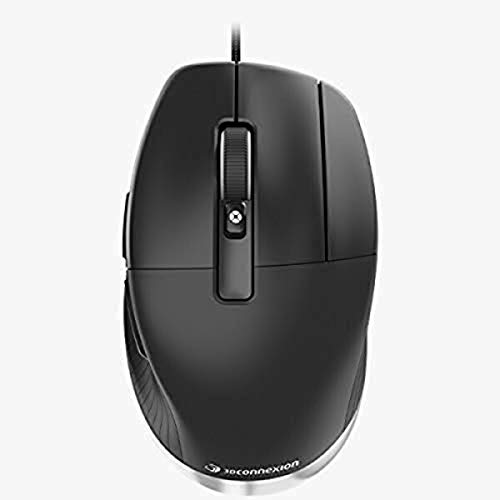
3DConnexion CadMouse Pro Mouse

3Dconnexion SpaceMouse Pro Wireless BT

Logitech M720 Triathalon Full Size Multi-Device Wireless Mouse – Black

Logitech G305 Lightspeed Wireless Gaming Mouse – Black
ProtoArc EM01 NL Wireless Trackball Mouse, Rechargeable Thumb Control, Gray
A vertical shape changes the feel right away, especially during long CAD sessions or routine office work. The Uineer gives you Bluetooth plus 2.4G connectivity, so you can move between a laptop, workstation, and tablet-style setup without rethinking your desk.
The rechargeable design and 7-color ambient lighting keep it from feeling bare-bones, though the lighting is more about style than serious function. For you, the real appeal is the upright grip, which may feel easier on a crowded workday than a flat mouse that keeps your wrist twisted inward.
Strong Points
- Vertical grip supports a more natural hand angle during long sessions.
- Three-device switching suits a desk with more than one machine.
- Bluetooth and 2.4G flexibility helps when ports are scarce.
- Rechargeable setup avoids constant battery swaps.
- Ambient lighting adds a little visual character on a plain desk.
Things To Consider
- The upright shape takes a short adjustment period.
- Lighting is a nice extra, but not a work feature.
- Some CAD users prefer a lower profile for rapid side-to-side sweeps.
Feature Snapshot
Who It Suits Best
You’ll get the most from this one if you want a softer wrist angle and switch between several devices in a normal workday.
A Better Fit Elsewhere
The Logitech M720 Triathalon Full Size Multi-Device Wireless Mouse is a better fit for you if you want a more traditional shape with multi-device use and Logitech Flow support.
This one leans hard into desk-work efficiency, and you can feel that in the quiet clicks and high-precision tracking. Since it uses Bluetooth only, it suits a clean setup well, though you won’t get a receiver in the box.
MagSpeed scrolling is the standout for long documents, timelines, and model-heavy workflows, where a smoother wheel can save a lot of little motions. Compared with the Uineer, it feels more premium and more office-focused, but the trade-off is a higher-complexity layout that may be more than you need for light use.
What We Like
- Quiet clicks suit shared offices and late-night sessions.
- 8K DPI tracking supports fine cursor placement on detailed work.
- MagSpeed scrolling helps move through long files quickly.
- Programmable buttons can trim repetitive steps in daily software use.
- Bluetooth-only design keeps the desk free of an extra receiver.
Worth Noting
- No USB receiver is included, so Bluetooth setup matters.
- No charging cable comes in the box.
- The feature set may feel heavy for casual browsing.
Details At A Glance
Who Will Love This
You’ll appreciate this most if your day includes detailed office work, long spreadsheets, or CAD tasks that reward precise pointer control.
Skip It When
The Logitech M720 Triathalon Full Size Multi-Device Wireless Mouse makes more sense if you want a simpler multi-device mouse with a receiver in the box.
Compact CAD mice are a little like a tailored jacket, they make sense when the fit matters more than flash. This one stands out because it keeps the footprint small while still aiming at design work, so a cramped desk or mobile station won’t feel crowded.
You’ll probably like it most if your hand prefers a smaller shell and your workflow involves frequent cursor nudges rather than broad sweeping motions. Compared with the MX Master 3S, it sounds less about general office luxury and more about keeping CAD use compact and focused.
Bright Spots
- Small size fits tight desk layouts and travel bags more easily.
- Wireless setup cuts down on cable clutter.
- CAD-focused design makes it more purposeful than a plain everyday mouse.
- Good match for portable workstations and secondary desks.
Minor Gripes
- A smaller shell can feel limiting for larger hands.
- Compact mice often ask for a more precise grip.
- Some users prefer a fuller body for marathon sessions.
Core Details
Made For
You’ll get the best fit here if your desk space is tight, your hand prefers a smaller mouse, and you use CAD tools in a focused way.
Another Choice May Suit
The Logitech MX Master 3S Bluetooth Wireless Mouse is a smarter move if you want more office-wide versatility and a fuller set of productivity features.
A wired CAD mouse like this tends to appeal to people who want one less battery-related task in the week. The seven-button layout gives you room for shortcuts, which can matter a lot once your software habits get repetitive.
Compared with the Compact Wireless model above, this one gives up portability for a more desk-locked setup that may feel steadier in a fixed workstation. The honest read is that the cable is either a plus or a nuisance, depending on how tidy you keep your desk.
Upsides
- Seven buttons give you room for more direct shortcuts.
- Wired connection removes battery management from the routine.
- Optical tracking suits precise pointer work on a desk.
- Good match for a dedicated CAD station.
Areas To Watch
- The cable adds desk clutter compared with wireless options.
- Best suited to a fixed workstation rather than mobile use.
- Seven-button layouts can take time to memorize.
Technical Sheet
Right Fit For
You’ll like this most if your CAD desk stays in one place and you want a cable-connected mouse with plenty of shortcut potential.
Where A Sibling Pick Shines
The Uineer Vertical Ergonomic Mouse 3-Device is easier to recommend if wrist comfort and multi-device switching matter more than wired simplicity.
This is the odd one out in the list, and that’s the point. A SpaceMouse is built around 3D navigation rather than plain cursor driving, so it makes sense for CAD work where rotating and moving models is a daily habit.
You may find it especially useful beside a standard mouse instead of as a full replacement. Compared with the CadMouse Pro, it serves a different role entirely, more like a second control surface than a direct everyday pointer.
Highlights
- 3D navigation focus fits model-heavy work.
- Wireless design keeps the desk less crowded.
- Bluetooth support simplifies connection on modern setups.
- Works well as a companion device.
Small Caveats
- Not a plain mouse replacement for every task.
- Learning the control style can take patience.
- Best value shows up in specific CAD workflows.
Key Specs
Best Suited To
You’ll get the most value from this if your CAD work involves frequent model rotation, zooming, and spatial control.
Look Elsewhere When
The Logitech MX Master 3S Bluetooth Wireless Mouse makes more sense if you want a conventional productivity mouse for general office work too.
The M720 feels aimed at the person who wants one mouse for more than one machine without moving into a specialized CAD shape. You can connect through Bluetooth or the included USB-A receiver, then pair up to three devices, which makes it useful for a laptop, desktop, and side machine.
Logitech Flow support gives it a smoother place in a mixed workstation, especially when files and pointers need to move across screens. Compared with the Uineer, it keeps the form more familiar, which may suit you better if you want less adjustment time.
Best Bits
- Pairs with up to three devices.
- Bluetooth or USB-A receiver gives you connection flexibility.
- Six customizable buttons support shortcut use.
- Flow support suits multi-computer desk setups.
- Full-size body feels familiar for long daily use.
Points To Note
- It is not shaped specifically for CAD comfort.
- Six-button layouts can still need some setup time.
- Full-size mice take more desk room than compact choices.
Feature Rundown
Whose Shelf It Belongs On
You’ll like this most if you want a roomy, familiar mouse that can juggle several devices without forcing a specialized shape.
Reach For A Different Pick When
The 3Dconnexion CadMouse Compact Wireless is the better fit for a tighter desk and more CAD-centered use.
The G305 brings gaming-grade speed into a CAD shortlist, and that can make sense for fast, precise pointer movement. Its HERO sensor, 12,000 DPI rating, six programmable buttons, and onboard memory make it feel tuned for quick response and repeatable settings.
That said, the shape is still a gaming mouse shape, not a dedicated CAD shape, so hand comfort will depend on your grip style. Compared with the MX Master 3S, this one is lighter on productivity extras and stronger on speed and responsiveness.
Reasons To Buy
- HERO sensor supports accurate cursor movement.
- 12,000 DPI gives you plenty of sensitivity headroom.
- Six programmable buttons help with custom shortcuts.
- Onboard memory keeps settings stored on the mouse.
- Long battery spec suits less frequent charging routines.
Trade Offs
- The gaming shape may not feel as relaxed as an ergonomic office mouse.
- Less focused on CAD-specific controls than 3Dconnexion options.
- The lighter body can feel different from a fuller productivity mouse.
Feature Card
The Right Fit
You’ll get the most from this if you want fast tracking, a light feel, and a mouse that can handle both work and occasional gaming.
A Better Fit Elsewhere
The 3Dconnexion CadMouse Pro Mouse is better for a fixed CAD workstation where shortcut control matters more than gaming-style speed.
A thumb trackball changes the whole workflow, because the cursor moves while your hand mostly stays put. ProtoArc adds a 0 to 20 degree adjustable angle, triple-device support through Bluetooth and 2.4G USB-A, and silent clicks, so it aims at comfort during long desk sessions.
You may find it especially useful in a cramped office or a home setup where wrist movement feels tiring by the end of the day. Compared with the M720, it asks you to adapt to trackball control, but that trade-off can pay off when your desk space is tight and motion control matters more than broad arm movement.
Standout Traits
- Thumb trackball keeps the hand more stationary.
- Adjustable angle offers a more tailored hand position.
- Triple-device support fits multi-system workflows.
- Silent clicks suit shared rooms and quiet spaces.
- Easy-clean design is handy for regular desk upkeep.
Room For Improvement
- Trackball control takes some getting used to.
- Not everyone will want a stationary mouse style.
- Cleaning still matters, especially around the ball area.
Core Details
Built With In Mind
You’ll like this most if you want to keep your hand still, work across several devices, and make room a little easier on a crowded desk.
Swap It Out When
The Logitech G305 Lightspeed Wireless Gaming Mouse is a better fit if you want a more conventional shape with faster, more familiar motion.
How To Choose The Right Mouses For Cad
Shape Comes First
CAD sessions reward a mouse that fits your hand before it impresses your eye. Vertical mice like the Uineer can ease wrist twist, while a trackball like the ProtoArc keeps your hand planted and shifts the motion into the thumb.
Desktop comfort matters more than most people expect during long drawings, edits, and viewport checks. A flat mouse may feel fine for short tasks, yet a more supportive profile can matter a lot once your workday stretches.
Buttons And Shortcuts
More buttons are useful only when they map to actions you actually repeat, such as pan, zoom, or switching tools. The 3DConnexion CadMouse Pro gives you seven buttons, while the Logitech M720 offers six customizable ones, so you can match your shortcut habits to the model.
Don’t chase button count alone. A cleaner layout with two or three reliable shortcuts often works better than a crowded shell you never fully learn.
Connection Style And Desk Setup
Bluetooth is handy for tidy desks and modern laptops, while a USB-A receiver still helps on machines that feel limited on ports. The Logitech MX Master 3S stays Bluetooth-only, the M720 includes a receiver, and the CadMouse Pro sticks with a cable for a fixed station.
That choice changes daily ownership more than the spec sheet suggests. Wireless gives you flexibility, wired gives you one less thing to charge, and multi-device support matters most when you jump between a design tower and a notebook.
Specialized Tools Versus General Use
Some mice serve CAD directly, while others simply handle long workdays very well. The 3Dconnexion SpaceMouse Pro Wireless BT is for 3D navigation, not everyday pointing, so it belongs beside a standard mouse rather than replacing it.
The MX Master 3S and M720 lean broader, which suits mixed office work better. That balance can be the smarter call for you if CAD is only part of the day and spreadsheets, email, and web tabs fill the rest.
Things Worth Knowing First
Wrong Turns To Avoid
Don’t choose only by brand familiarity. A gaming mouse like the G305 can feel quick and accurate, but its shape is still tuned for gaming use, so it won’t please every CAD hand the same way a dedicated design mouse might.
Another common miss is buying a feature-heavy model without checking your desk habits. A Bluetooth-only mouse sounds neat until you need a receiver, and a trackball sounds efficient until you realize you want broader arm motion.
The Upgrade Payoff
Higher-tier mice usually cost more because they add better sensors, more thoughtful buttons, quieter switches, stronger materials, or niche control systems like the SpaceMouse and trackball layouts. Those extras don’t matter equally to everyone, but they do add up during a long workweek.
Spending up makes sense when your mouse is part of your daily income or your daily comfort. For lighter use, a simpler model such as the Uineer or M720 can cover the basics without asking you to learn a whole new hand posture.
Closing Thoughts
Your best choice depends less on the word CAD and more on the way you work. A straight office mouse, a vertical grip, a trackball, or a 3D navigation tool can all make sense, depending on how much time you spend designing versus managing general tasks. The strongest fit is the one that keeps your hand steady and your workflow calm. Pick the shape that matches your day, and the rest usually falls into place.
