
Claw grip puts your hand in a tighter, more active position, so mouse shape matters more than flashy extras. A shell that fits your fingertips, a stable hump, and buttons placed where your thumb can reach them make long sessions feel far less tiring, whether you game after work or spend hours in a crowded desk setup.
That’s why this list leans on shape, weight, button layout, and connection style instead of generic hype. You’ll see a mix of claw-first gaming mice, larger ergonomic options, and a couple of lighter picks that suit faster flicks without feeling cramped.
Quick Look At The Shortlist

POJTK Ergonomic Wireless Rechargeable Mouse

ENDGAME GEAR XM2we Lightweight Wireless Gaming Mouse

Corsair IRONCLAW Wireless SE Gaming Mouse Black

Redragon Large Wireless Gaming Mouse for Big Hands

Bloody V7 Ergonomic Claw Grip Gaming Mouse
MCHOSE L7 Ultra+ Wireless Gaming Mouse
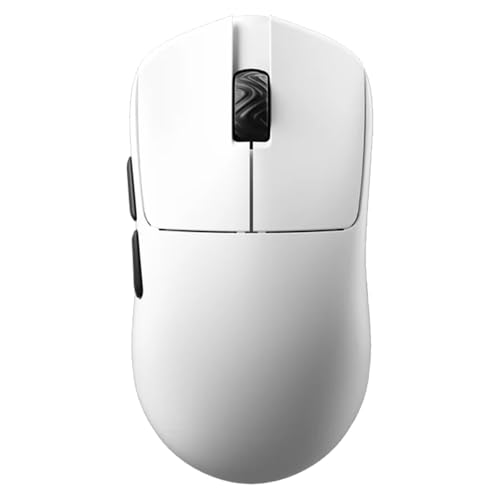
SCYROX V6 Gaming Mouse Ultra-Lightweight 40g
SCYROX V8 Gaming Mouse Ultra-Lightweight 36g±3g
More Details On Our Top Picks
POJTK leans more toward comfort and desk flexibility than pure claw-grip speed, which makes it a sensible starting point for mixed work and casual use. The vertical shape can ease hand angle strain during long laptop days, and the silent buttons suit shared offices or late-night browsing without much noise.
The three connection modes, Bluetooth, USB A, and Type C, make it easier to move between a laptop, desktop, and MacBook without juggling adapters. The trade-off is that this shape is less traditional for tight claw control, so fast FPS work will usually feel better on one of the lighter gaming picks below.
Strong Points
- Three connection options suit mixed-device desks.
- Silent clicks keep shared spaces calmer.
- Five DPI stages help you tune pointer speed.
- The vertical form can feel easier on the hand during long document sessions.
Things To Consider
- The upright shape is less natural for a tight claw hold.
- Six buttons can feel modest beside macro-heavy gaming models.
- Wireless mice still need charging planning, especially for daily commuters.
Feature Rundown
Who It Suits Best
Desk workers, students, and home users who split time across several devices will get the most out of this shape and connection mix.
Where A Sibling Pick Shines
ENDGAME GEAR XM2we Lightweight Wireless Gaming Mouse fits claw-grip players much better, especially for fast-paced FPS sessions where a lower, more agile body matters.
XM2we is the sort of mouse that makes sense the moment you care more about claw control than extra features. The low button count, light body, and right-handed esports shape point you toward fast, precise movement, especially in FPS play where a clean grip matters.
Compared with the POJTK, this one gives up comfort-first versatility in exchange for a far more focused hand position. The honest read is that it suits gaming more than general office use, though the white finish and simple layout keep the look calm on a desk.
What We Like
- The shape suits claw grip without feeling oversized.
- Lightweight build helps quicker hand corrections.
- 19,000 DPI sensing gives you plenty of pointer range.
- Five buttons keep the layout simple and uncluttered.
Room For Improvement
- Five buttons may feel spare for MMO or macro-heavy work.
- The focused shape is less relaxed for palm grip users.
- White shells can show grime faster than darker finishes, so cleaning matters.
Core Details
Built With In Mind
Claw-grip FPS players who want a light, purpose-built shell will get the clearest benefit here.
Swap It Out When
POJTK Ergonomic Wireless Rechargeable Mouse makes more sense for people who split time between work tasks and multiple devices, especially on laptop-heavy setups.
IRONCLAW is built around a roomier right-handed feel, so it makes more sense for larger hands than the smaller, tighter shapes above. The 26,000 DPI sensor and ten programmable buttons also give it enough range for people who want game control without squeezing the shell too hard.
That extra size is the trade-off, though, because claw grip players with medium hands may find it a bit much. For long sessions in MOBA, FPS, or MMO games, the broader body can feel steady rather than cramped, which matters more than looking sleek on a spec card.
Highlights
- Roomier shape helps larger hands settle in.
- Ten programmable buttons support layered game commands.
- 26,000 DPI gives you wide sensitivity control.
- Wireless design keeps the desk less cluttered.
Softer Spots
- The size can feel wide for strict claw grip users with medium hands.
- More buttons mean more setup time before everything feels natural.
- Wireless use still asks for regular charging habits.
Technical Sheet
Who Should Grab It
You’ll get the best fit here if your hands run large and you like a fuller grip during longer gaming sessions.
A Better Fit Elsewhere
ENDGAME GEAR XM2we Lightweight Wireless Gaming Mouse is the sharper claw-grip choice for smaller hands and faster FPS movement.
Redragon takes a different path from the tighter claw-first mice, putting comfort for medium to larger hands at the center. The contoured shell, finger rests on both sides, and rubber side grips help the hand stay planted, which can matter a lot in long office sessions or late-night gaming.
Tri-mode connectivity is the practical bonus here, since you can move between 2.4G wireless, Bluetooth, and wired use without changing mice. The caveat is that a larger ergonomic shape usually gives up some of the quick, lifted feel that very dedicated claw users prefer.
Positives
- The fuller body suits medium to larger hands.
- Side rests and rubber grips help steady the hold.
- Three connection modes fit mixed-device desks.
- Rechargeable use cuts down on battery swaps.
Points To Note
- The size can feel broad for very tight claw grip habits.
- RGB lighting adds visual flair, but it also adds another setting to manage.
- Drivers are part of the experience here, so setup takes a little attention.
Details At A Glance
The Right Fit
You should look here when your hand runs larger and you want a mouse that feels supportive before it feels nimble.
Reach For A Different Pick When
SCYROX V6 Gaming Mouse Ultra-Lightweight 40g suits claw users who want a lighter shell and a more symmetrical feel for faster aiming.
Bloody V7 speaks directly to claw grip users who also want a lot of control from their mouse software. The rubberized black coating adds grip security, and the eight programmable buttons, plus macros, scripting, and automation support, give it a very command-heavy feel.
The 3200 DPI sensor keeps it in a more modest sensitivity range than the newer high-DPI models in this roundup, but that may suit steady desktop work or players who prefer consistent control over huge numbers. The honest read is that this one feels more specialized than modern and ultralight, which is fine for the right setup.
Best Bits
- The claw-friendly body suits a more angled hold.
- Rubberized coating helps the mouse stay secure in hand.
- Eight programmable buttons support shortcuts and game actions.
- Browser navigation buttons add everyday convenience beyond gaming.
Minor Gripes
- 3200 DPI is modest beside newer high-sensitivity picks.
- Software features can take time to set up the way you want.
- The extra surface grip can show wear through heavy daily use.
Feature Snapshot
Whose Shelf It Belongs On
Claw-grip gamers who like software control and a grippier shell will get the most out of this one.
Look Elsewhere When
MCHOSE L7 Ultra+ Wireless Gaming Mouse makes more sense for someone chasing a much lighter body and faster competitive motion.
L7 Ultra+ sits in the more serious end of the lineup, especially beside the simpler Bloody V7 and the comfort-first Redragon. At 48 g, it stays very light, and the combination of PAW3950 sensor hardware, optical switches, 20,000 FPS, dual 8K polling, and three connection modes points toward speed-focused play.
That hardware mix is great for competitive sessions, though it also means you’re paying for capability that casual desktop use will barely notice. The shape is still ergonomic rather than strictly minimalist, so you get a bit more hand support than a barebones shell while keeping the overall weight very low.
Reasons To Buy
- 48 g weight keeps the mouse easy to move.
- Dual 8K polling supports very responsive cursor updates.
- Optical switches are built for crisp button feel.
- Three connection modes suit different setups.
- Seven programmable buttons give you useful control without crowding the shell.
Areas To Watch
- The feature set is richer than many daily-use desks need.
- High-end settings may take time to tune properly.
- Fast wireless gear still benefits from regular charging habits.
Core Details
Perfect Match For
Competitive players who want a very light wireless mouse with a more advanced sensor stack should look here first.
Another Choice May Suit
POJTK Ergonomic Wireless Rechargeable Mouse is the more relaxed route for laptop work, office use, and multi-device switching.
SCYROX V6 lands in a sweet middle ground for claw users who want speed without going fully stripped-down. The 40 g weight, symmetrical shell, and no-hole design make it feel clean in the hand, while the Pixart PAW3950 sensor and 8K dongle keep the spec side serious enough for modern gaming.
Compared with MCHOSE L7 Ultra+, this one looks a touch simpler on paper, but the lighter body and symmetrical shape may feel easier for some claw and palm hybrids. One thing worth considering is that the web-based driver keeps setup browser-friendly, which helps if you dislike bulky software installs.
Bright Spots
- 40 g weight keeps movement very easy to start.
- No-hole shell feels cleaner to hold.
- Symmetrical shape suits more than one grip style.
- Web-based driver keeps setup straightforward.
Small Caveats
- Symmetry can feel less sculpted than a purely right-hand shell.
- The lighter build may feel too airy for users who prefer more hand mass.
- Software-driven setup still asks for a little attention up front.
Quick Facts
Who Will Love This
Claw and hybrid grip gamers who want a very light shell without giving up a full-bodied shape should feel at home here.
Where A Sibling Pick Shines
Bloody V7 Ergonomic Claw Grip Gaming Mouse fits better for shortcut-heavy desktops, especially where macros and scripting matter more than raw weight.
V8 pushes the lightweight idea even further than the V6, dropping to 36 g plus or minus 3 g while keeping a symmetrical shell. That makes it a very nimble choice for claw and fingertip users who want rapid repositioning, especially in games where short, repeated hand lifts are common.
The Kailh optical switch, Nordic 52840 MCU, and PAW3950 sensor give it a clearly modern hardware profile, though the tiny weight won’t suit everyone. Some people love the feather-light feel, while others prefer a mouse with a little more substance to anchor the hand.
What We Like
- 36 g class weight keeps motion extremely easy.
- Symmetrical shape supports claw and fingertip grips.
- Kailh optical switching adds a crisp button feel.
- Nordic 52840 MCU and PAW3950 sensor point to current-generation internals.
Honest Caveats
- Very low weight can feel too insubstantial for some hands.
- Symmetrical styling offers less contour than a dedicated ergonomic shell.
- Fast, light mice usually reward a careful desk setup and cable or dongle placement.
Core Details
Built For In Mind
Claw and fingertip players who want the lightest possible feel in this group will find the most natural fit here.
Where Shoppers Go Wrong
SCYROX V6 Gaming Mouse Ultra-Lightweight 40g is usually the safer choice for anyone who wants a lighter mouse but still wants a touch more substance in the hand.
How To Choose The Right Mouses For Claw Grip
Shape Comes Before Sensor Numbers
Claw grip depends on a raised palm, bent fingers, and a mouse that doesn’t force the hand flat. A narrower waist, a hump that lands under the knuckles, and buttons you can tap without stretching matter more than a huge DPI figure for most desk setups.
That’s why the ENDGAME GEAR XM2we and SCYROX V6 make so much sense for claw-first use. Their lighter bodies and symmetrical profiles support quick fingertip corrections, while fuller shapes like the Corsair IRONCLAW lean toward bigger hands and less aggressive posture.
Weight Changes How Long You Stay Comfortable
Ultra-light mice reduce the effort needed for repeated lifts, small resets, and quick flicks. In long gaming sessions, that can feel like less drag on your wrist and fingers, though the trade-off is that some people miss the planted feel of a heavier shell.
The SCYROX V8 goes furthest in that direction, while the POJTK and Redragon choices stay more comfort-led and desk-friendly. For mixed work and play, a moderate body often feels easier to live with, even if it gives up some raw agility.
Buttons, Software, And Use Case Matter Too
Programmable buttons help when your games or apps rely on shortcuts, but they also add setup time. A simpler five-button layout feels cleaner for pure aiming, while a mouse with eight or ten programmable controls makes more sense for MMOs, macro-heavy work, or workflow shortcuts.
Bloody V7 leans hard into control customization, and the Corsair IRONCLAW gives you broad button access without going overboard. The right choice depends on whether your mouse hand spends more time firing commands or just steering the cursor.
Things Worth Knowing First
Mistakes Worth Dodging
Many shoppers chase DPI numbers first and shape second, then end up with a mouse that feels awkward in actual use. Claw grip is picky about shell height, side slope, and button reach, so a spec sheet alone rarely tells the whole story.
Another common miss is treating a large ergonomic mouse like a claw specialist. The Corsair IRONCLAW and Redragon are comfortable in the hand, but strict claw users usually do better with the more compact XM2we, V6, or V8.
Where The Extra Money Goes
Higher-tier models usually spend more on lighter shells, better sensor hardware, optical switches, and higher polling support. Those parts can improve how quickly the mouse responds and how controlled it feels during fast movement.
That upgrade makes the most sense for competitive gaming, especially on a good desk mat and a stable setup. For everyday browsing or office tasks, the more modest POJTK or Redragon can already cover the job without asking you to pay for advanced gaming gear you won’t use much.
Final Thoughts
The right claw-grip mouse feels like it disappears under your hand, which is really the point. For fast gaming, the ENDGAME GEAR XM2we, SCYROX V6, and SCYROX V8 make the strongest case, while the Corsair IRONCLAW and Redragon suit larger hands better. For everyday use, the POJTK keeps life simpler across multiple devices. Choose the shape that matches your grip first, then worry about the rest.
