
Finger-grip mice and handheld-style options solve a very specific problem, they keep your hand from feeling pinned to a bulky shell. That matters for commuters, office users, and gamers who want cleaner pointer control without giving up comfort. The eight picks below cover tiny travel designs, vertical shapes, fingertip gaming shells, and one add-on grip piece for flat-sided mice. You’ll also see where each option trades size, support, and precision, so you can match the mouse to your own desk time.
A Fast Look At The Shortlist

YUMQUA Finger Handheld Mouse Trackball Wireless

Uineer Vertical Ergonomic Mouse 3-Device

elasto Ergonomic Bluetooth Wireless Mouse M4 Set
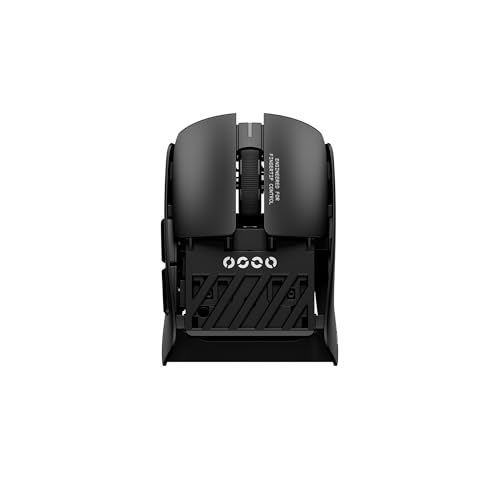
Pulsar Gaming Gears Pulsar Lab X2F Wireless Gaming Mouse Mini Black
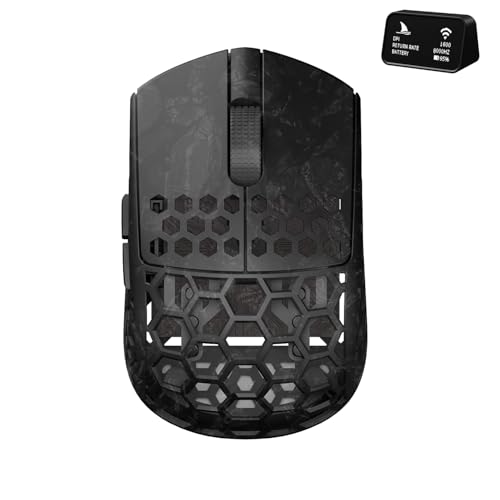
Darmoshark M5Air Mini Fingertip Grasp Gaming Mouse Carbon Fiber

Universal Pinky Finger Rest for Flat-Sided Gaming Mice

Mini 2.4G Wireless Finger Ring Mouse Ergonomic Handheld Optical Travel Mice Black

MOJO Master Grip Rechargeable Silent Vertical Mouse
More Details On Our Top Picks
The YUMQUA goes a different direction from the vertical and fingertip gaming shapes above, because it puts the pointer under a ring-like handheld layout with a trackball. That style makes sense on cramped desks, in a couch setup, or for quick laptop work where a full palm mouse just feels bulky.
The 2.4GHz USB connection keeps the setup straightforward, which matters for travel bags and shared workstations. The trade-off is obvious, trackball control asks for a short adjustment period, so it suits patients, not people who want a familiar desktop mouse feel.
Strong Points
- Trackball control keeps motion contained, which helps on tight work surfaces.
- Its handheld shape can feel less awkward than a standard mouse during short sessions.
- 2.4GHz wireless support is a simple fit for laptop and desktop use.
- Small form factor packs neatly into a bag or drawer.
Things To Consider
- The control style is different enough that your hand may need time to adapt.
- Trackballs can collect dust, so occasional cleaning matters.
- It is less natural for long, sweeping movements than a regular mouse shape.
Feature Rundown
Who It Suits Best
Desk workers and travelers who want a compact pointing tool with minimal hand movement will get the most from this shape.
Where A Sibling Pick Shines
Uineer Vertical Ergonomic Mouse 3-Device suits you better for a more familiar desk mouse feel and easier switching between several machines.
This Uineer leans into a vertical stance, so your hand stays in a more handshake-like position instead of flattening across the desk. That shape often feels friendlier for long office sessions, and the 3-device switching makes sense for a laptop, tablet, and desktop setup.
Dual Bluetooth plus 2.4G gives you flexible pairing choices, which is handy in a home office with mixed hardware. The trade-off is that vertical mice are a little taller in the hand, so very small hands may need a day or two to settle in comfortably.
What We Like
- Vertical angle can reduce wrist twisting during routine work.
- Three-device switching helps you move between machines without juggling accessories.
- Bluetooth and 2.4G options cover a wide range of setups.
- Rechargeable design cuts down on disposable battery changes.
Minor Gripes
- The taller shape takes some getting used to.
- Lighted extras may matter less if you prefer a plain desk look.
- Multi-device pairing is useful, but the setup steps can feel more involved than a single-link mouse.
Core Details
Who Will Love This
Multi-device desk users who want a more relaxed wrist angle should find this a sensible daily companion.
A Better Fit Elsewhere
MOJO Master Grip Rechargeable Silent Vertical Mouse suits you better if quiet buttons and software control matter more than multi-device switching.
Compared with the more compact travel-style options, the elasto M4 Set aims for a softer everyday posture. Bluetooth support keeps the desk cleaner, and the lighter click feel should suit people who spend long stretches on mail, spreadsheets, or browsing.
The adjustable DPI, or dots per inch, lets you tune pointer speed to the screen and your habits, which is useful on larger monitors. The honest read is that ergonomic mice can feel noticeably different from standard shells, so a little adjustment time is part of the package.
Highlights
- Bluetooth connectivity keeps the setup neat and cable-light.
- Adjustable pointer speed helps match larger screens or tighter workspaces.
- Light click action is easier on hands during repetitive office tasks.
- Ergonomic profile suits long sessions at a desk.
Room For Improvement
- The shape may feel unfamiliar at first.
- Ergonomic designs usually take more desk space than tiny travel mice.
- Soft-touch surfaces and crevices need regular wiping to stay tidy.
Details At A Glance
Built With In Mind
Desk users who want a gentler click feel and a more relaxed hand position will likely appreciate this model most.
Swap It Out When
Pulsar Gaming Gears Pulsar Lab X2F Wireless Gaming Mouse Mini Black makes more sense for fingertip gamers who care more about ultra-light movement than all-day office comfort.
The Pulsar X2F is built for fingertip control first, and the 38g weight is the detail that changes the feel most. In fast games, a shell this light can feel almost featherlike in the hand, which helps explain why competitive fingertip users pay attention to it.
The symmetrical mini shape, flat sides, and center hump give it a very deliberate profile, not a casual all-purpose one. That’s the trade-off, because the same form that helps precision can feel too sparse for people who want palm support or a fuller grip.
Upsides
- Very low weight helps quick cursor movements feel effortless.
- Mini footprint leaves plenty of room for mousepad motion.
- Fingertip-oriented shape suits fast, controlled play.
- HUANO switches and high DPI support point toward responsive gaming use.
- Symmetrical shell works for a range of hand orientations.
Softer Spots
- Its stripped-down shape gives less support for palm-heavy grip styles.
- Very light mice can feel a bit twitchy until your aim adjusts.
- Gaming-first tuning matters less for office work or casual browsing.
Feature Card
Perfect Match For
Fingertip gamers and low-slung grip users who want a tiny, agile shell will get the most from this design.
Look Elsewhere When
MOJO Master Grip Rechargeable Silent Vertical Mouse suits you better for quieter office use and a more upright hand position.
The M5Air is the sort of fingertip mouse that makes sense once you care about sensor feel, button count, and shell weight all at the same time. Carbon fiber in the name signals a more premium materials story, and the 31g body keeps the focus on very fast hand movement rather than support.
Tri-mode connectivity means you get several connection paths, including Bluetooth, and the PAW3950 sensor paired with up to 30000 DPI points squarely at serious aim work. The catch is that this kind of spec-heavy mouse usually asks for a user who already knows they prefer a low-mass fingertip shape.
Reasons To Buy
- 31g weight makes tiny corrections feel almost effortless.
- Tri-mode support gives you more connection flexibility than basic single-mode mice.
- High DPI range suits precise gaming control.
- Five programmable buttons add useful customization for games and shortcuts.
- Carbon fiber construction points to a more premium-feeling build.
Areas To Watch
- Performance tuning matters more here than casual everyday comfort.
- Advanced options can be overkill for simple office tasks.
- Very light mice need a steady grip, especially on smooth pads.
Technical Sheet
Whose Shelf It Belongs On
High-skill fingertip gamers and hardware tinkerers who like compact shells with strong performance specs will appreciate this one most.
Another Choice May Suit
elasto Ergonomic Bluetooth Wireless Mouse M4 Set fits you better for longer office sessions where comfort matters more than ultra-light gaming tuning.
This is not a mouse by itself, it’s a grip add-on for flat-sided gaming mice, and that distinction matters a lot. The universal fit makes sense for people who like their current mouse but want more pinky support without replacing the whole setup.
The adhesive-free 3M mounting style is the useful part, because it aims to hold firmly during long sessions while still coming away cleanly. ABS polymer keeps the piece simple and durable-looking, though you’ll still want to match it carefully to your mouse shape for the best result.
Best Bits
- Adds side support without forcing you to replace your mouse.
- Can help reduce pinky strain during long gaming sessions.
- Clean-removal mounting is practical for users who like to change gear often.
- Works with many flat-sided mouse shapes.
Small Caveats
- Fit depends on the exact side profile of your mouse.
- It changes the feel of the shell, so some adjustment is normal.
- It helps with support, but it doesn’t turn a basic mouse into a fully ergonomic one.
Core Details
The Right Fit
Gamers who already like their mouse shape but want a better place for the pinky will get the clearest benefit here.
Reach For A Different Pick When
Pulsar Gaming Gears Pulsar Lab X2F Wireless Gaming Mouse Mini Black is the better move when you want a full mouse built around fingertip play from the start.
The ring-mouse format is the most unusual shape in the list, and that novelty serves a real purpose for business travel. Because it sits on your finger, it can keep your hand free for typing, which is handy during presentations or on the move.
The source notes a real trade-off here, users who are used to two-handed typing may find it less convenient. That honesty matters, because this kind of mouse is best treated as a travel tool first and a full-time desk replacement second.
Bright Spots
- Finger-worn design is highly portable.
- Lets you keep one hand near the keyboard while still controlling the cursor.
- Works with a broad set of devices, including Android phones and tablets listed in the source data.
- Small size makes it easy to stash with a laptop kit.
Worth Noting
- It asks for a different hand habit than a standard desktop mouse.
- Typing comfort may vary depending on how you work at the keyboard.
- Specialty shapes like this can feel less natural during long desk sessions.
Feature Snapshot
Made For
Frequent travelers and business users who want a tiny cursor tool for laptop bags and presentations should take a close look.
Where Shoppers Go Wrong
Uineer Vertical Ergonomic Mouse 3-Device is the better fit for everyday desk users who want a more familiar grip and multi-device switching.
The MOJO Master Grip closes the list with a shape that speaks to daily desk work more than flashy specs. Its vertical layout, quiet buttons, and rechargeable design make it a very sensible fit for a home office, shared room, or late-night setup.
Custom software and adjustable sensitivity add another layer of control, which helps you dial in cursor speed without digging through constant menu changes. Compared with the Pulsar and Darmoshark picks, this one is calmer and less performance-driven, but that calm is exactly what many office setups need.
Positives
- Vertical grip supports a more natural hand angle for desk work.
- Quiet buttons suit shared spaces and late sessions.
- Rechargeable power keeps the desk less cluttered.
- Adjustable sensitivity helps you match the pointer to your screen.
- Custom software opens the door to more personal control.
Points To Note
- Vertical mice feel different from standard shells, so there’s an adjustment period.
- Software features matter most once you’re ready to tune the mouse.
- Quiet buttons are helpful, but they won’t replace a lighter fingertip shell for gaming speed.
At A Glance
Built With In Mind
People who want an everyday ergonomic mouse for work, study, and quiet shared spaces should feel right at home here.
Where Another Pick Suits Better
For fingertip gamers who want a far lighter shell, Pulsar Gaming Gears Pulsar Lab X2F Wireless Gaming Mouse Mini Black is the stronger match.
How To Choose The Right Mouses For Finger Grip
Shape Comes First
Finger grip mice live or die on shell shape. A tiny fingertip shell like the Pulsar X2F gives you fast pointer changes, while a vertical mouse such as the MOJO Master Grip spreads the hand into a more relaxed position. The wrong shape feels awkward fast, even when the specs look impressive on paper.
Travel users and shared-desk workers usually do best with compact bodies or handheld styles. Office users who spend hours at spreadsheets often prefer a taller shape or a mouse with gentler click feel. Match the shell to the way your hand actually rests, not to the loudest feature list.
Connection And Device Switching
Wireless options matter because finger-grip mice are often used with laptops and portable setups. 2.4G wireless stays simple with a dongle, while Bluetooth makes more sense for modern notebooks and tablets with fewer ports. The Uineer vertical mouse adds multi-device switching, which is useful when you bounce between work and personal gear.
Connection flexibility sounds small until you start moving between rooms or machines. A mouse that pairs cleanly with more than one device saves time and keeps your desk less crowded. For mixed setups, that convenience can matter more than an extra button or a brighter shell.
Support, Weight, And Control
Lightweight mice help fast movements feel easier, especially in fingertip gaming. The Pulsar X2F and Darmoshark M5Air show how weight changes the whole experience, with one leaning toward ultra-light speed and the other adding tri-mode versatility plus programmable buttons. That kind of spec difference matters because a heavier shell can feel steadier for office work, while a lighter one often suits quick corrections.
Support matters just as much as speed. A vertical mouse, a trackball handheld, or even a pinky rest can make long sessions easier to live with, depending on your grip. The trade-off is always there, more support usually means less freedom to toss the mouse around.
What To Weigh Before You Click
Common Shopping Slip Ups
A lot of people focus on sensor numbers and forget the hand shape. That leads to a mouse that looks impressive but feels wrong after twenty minutes. You’ll get a better result by checking grip style, connection type, and whether the mouse needs more desk room than your setup allows.
Another common miss is buying a gaming-first mouse for daily office use. Ultra-light shells can feel twitchy outside fast-paced play, and specialty add-ons like the pinky rest only make sense on a mouse that already fits your hand well. Start with the use case, then layer in the extras.
Where The Extra Money Goes
Higher-tier mouse designs usually pay for lighter shells, stronger sensor tuning, better click hardware, and more flexible connectivity. That’s why the Pulsar and Darmoshark models sit in a different lane from simpler travel picks like the YUMQUA or the ring mouse. You’re paying for precision, customization, and a more deliberate fit, not just a fancy shell.
That upgrade makes sense for competitive play, shared-device setups, or long daily sessions where small comfort gains add up. For casual browsing or short laptop use, the extra tuning may not matter much. Spend up when the mouse is part of your daily routine, not just an occasional accessory.
Final Thoughts
The best finger-grip mouse for you comes down to how you use your hand, not just how the product looks. Travel users may prefer the YUMQUA or the ring mouse, office setups often fit the Uineer or MOJO models, and fingertip gamers will probably look hardest at the Pulsar or Darmoshark. The pinky rest is the smart wildcard, especially for a mouse you already like. Pick the shape that matches your day, and the rest tends to fall into place.
